Time to replace GPU?

boreboor

Senior Member
Joined
Sep 9, 2003
Messages
2,471
Reaction score
42
Hi everyone. Think my GPU is acting up. It's about 5 years old already, see specs below (was an Aftershock built):
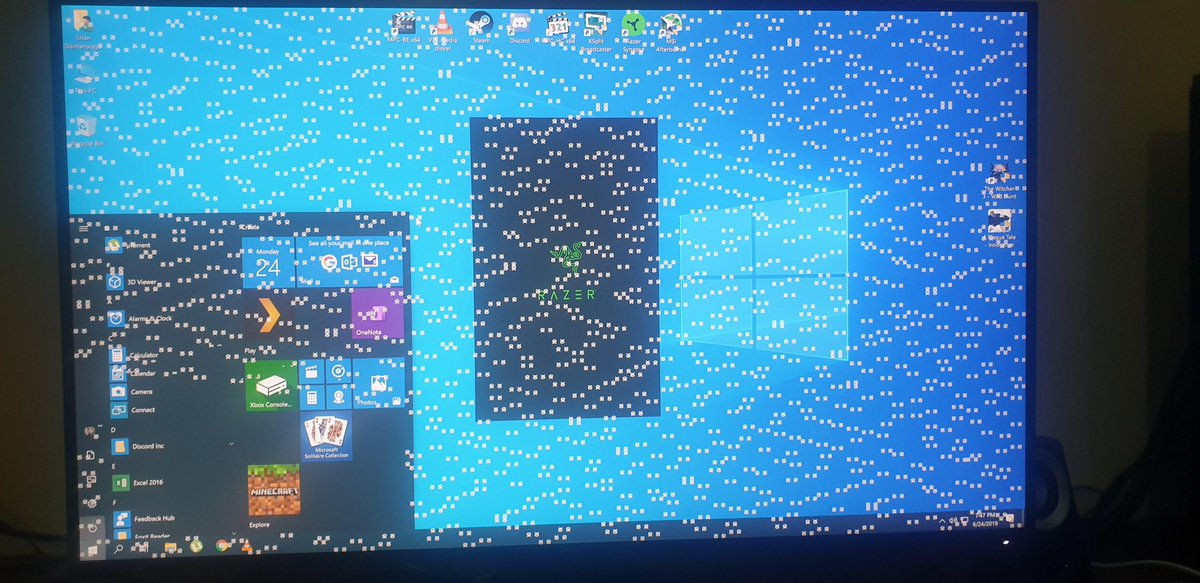
Quite frequent crashes when I play games (currently playing Yakuza 6), sometimes when that happens the fan noise becomes very loud. Sometimes the screen goes blank or weird artifacts and I can still hear the sound.
(Actually it crashed again as I was typing this).

SKYLAKE Desktop Motherboard : ASUS H170M PLUS (No SLi Support)
SKYLAKE DESKTOP CPU : Intel Core i5-6500 3.20GHz Processor
Thermal Compound : IC Diamond Thermal Compound CPU (Free Lifetime
Thermal Compound Re-pasting)
CPU Cooling System (Desktop) : Standard Stock Fan Cooling (CPU)
GRAPHICS CARD (DESKTOP) : ZOTAC NVIDIA GEFORCE GTX1070 8GB
GDDR5
Random Access Memory (RAM) (Desktop) : 8GB DDR4 2133Mhz (8GB x 1)

Looking on Lazada, the GTX1650 around $400 seems to be the cheapest I can find. Is this going to be comparable to what I have been using?

Thanks!
 

NightRaven49

Master Member
Joined
May 17, 2019
Messages
3,741
Reaction score
1,579
Looking on Lazada, the GTX1650 around $400 seems to be the cheapest I can find. Is this going to be comparable to what I have been using?
1650 is a lot weaker than the 1070, slower than even the cut down 1060 3gb. i would suggest getting used gpus on carou for example, a 980 which is more comparable to ur 1070 can be had for around 300.
 

-Sora-

Senior Member
Joined
Dec 27, 2009
Messages
1,313
Reaction score
60
GTX1650 is like 60% the performance of the 1070. I think mayb u should install msi afterburner and underclock the GPU and see if that can fix it. Or install HWinfo / HWMonitor to check if your cpu/gpu is overheating when u run games
 

jasperchc

Member
Joined
Apr 19, 2009
Messages
250
Reaction score
17
High chance your GPU is overheating. If you underclock and it no longer crash, then you found the culprit.
 

86technie

High Supremacy Member
Joined
Jun 8, 2006
Messages
40,356
Reaction score
5,943
D95vS0mX4AIq1Xk.jpg


If it is something like this than the GPU is dying.
Given the scenario if you are playing games than black out that means the graphic card is spoilt.
GTX1650 is weaker than GTX1070 but take note of the PSU used.

https://gpu.userbenchmark.com/Compare/Nvidia-GTX-1650-vs-Nvidia-GTX-1070/4039vs3609
Option 1:
Build a new PC so you can get better graphic card since these days higher end GPU.
Shops will need you to buy a new PC as they don't sell GPU individually except the GTX1650.

Option 2:
Get a second hand GTX 1070 which is around $500 but recommend change the power supply
of the PC as well. Example Seasonic S12III 650 watt at $99.
After shock uses FSP PSU, however given the age it may be wearing out soon.
Especially if your PC sometimes need to on than off than that means the PSU have issue.
 

Koenig168

Arch-Supremacy Member
Joined
Nov 4, 2007
Messages
10,035
Reaction score
1,745
1650 is a lot weaker than the 1070, slower than even the cut down 1060 3gb. i would suggest getting used gpus on carou for example, a 980 which is more comparable to ur 1070 can be had for around 300.

That much? The guy who bought my Asus GTX 970 Strix recently for $188 still asked for a discount. Should have charged him more. :)
 

boreboor

Senior Member
Joined
Sep 9, 2003
Messages
2,471
Reaction score
42
Shucks. I’m a tech noob; why so complicated now hahaha. Ok will try the underclocking first to see if I can extend its life further. By how much should I underclock?
 

Irenicus

Master Member
Joined
Feb 11, 2001
Messages
2,670
Reaction score
32
Hi boreboor, you can also try installing the latest video card drivers from Nvidia. And checking whether the video card fan is running when gaming.

After installing MSI Afterburner, monitor the temperature of the video card while gaming. Let it run for around 30mins.
 

boreboor

Senior Member
Joined
Sep 9, 2003
Messages
2,471
Reaction score
42
Hi boreboor, you can also try installing the latest video card drivers from Nvidia. And checking whether the video card fan is running when gaming.

After installing MSI Afterburner, monitor the temperature of the video card while gaming. Let it run for around 30mins.
Yup my drivers are updated. Just tried to play for a short while, then I tabbed out to see the temp - 70 degrees. Then the system hung. Gave me a white screen.
 

NightRaven49

Master Member
Joined
May 17, 2019
Messages
3,741
Reaction score
1,579
That much? The guy who bought my Asus GTX 970 Strix recently for $188 still asked for a discount. Should have charged him more. :)
i mean i just look see look see on carou for like 1 minute, most listings for 980 around the 300-350 range. now 970 going for above 200, getting a strix model for under 200 i think quite good deal for him ba. crazy to think i sold 2 water cooled furys for 300 each start of the year.
 

Irenicus

Master Member
Joined
Feb 11, 2001
Messages
2,670
Reaction score
32
Temperature of 70 degrees is ok for S'pore weather.

Can you try removing the video card and connecting your monitor directly to the iGPU of your i5-6500? Please power down and turn off the PSU before doing this.

This is to check whether the crashes are caused by the video card or the rest of the system.
 

boreboor

Senior Member
Joined
Sep 9, 2003
Messages
2,471
Reaction score
42
Temperature of 70 degrees is ok for S'pore weather.

Can you try removing the video card and connecting your monitor directly to the iGPU of your i5-6500? Please power down and turn off the PSU before doing this.

This is to check whether the crashes are caused by the video card or the rest of the system.
Hi, ok I'm doing this now.

So far seems ok. How long do I need to test it?
 

86technie

High Supremacy Member
Joined
Jun 8, 2006
Messages
40,356
Reaction score
5,943
Hi, ok I'm doing this now.

So far seems ok. How long do I need to test it?

If you have remove the graphic card and use the onboard graphics.
If it is stable that means the graphic card have issue thus need to replace.
 

boreboor

Senior Member
Joined
Sep 9, 2003
Messages
2,471
Reaction score
42
If you have remove the graphic card and use the onboard graphics.
If it is stable that means the graphic card have issue thus need to replace.
Yup I think definitely is the graphics card issue.
using onboard i could play yakuza 6 on 800x600 low settings pretty smoothly (interestingly it still looks pretty ok like a PS3 era game).

Then when I switched back, launched and played at medium setting, it crashed again within 10 mins
 

86technie

High Supremacy Member
Joined
Jun 8, 2006
Messages
40,356
Reaction score
5,943
Yup I think definitely is the graphics card issue.
using onboard i could play yakuza 6 on 800x600 low settings pretty smoothly (interestingly it still looks pretty ok like a PS3 era game).

Then when I switched back, launched and played at medium setting, it crashed again within 10 mins

The Intel UHD 530 isn't a gaming card so gaming on it, it's terrible.
Anyway that is to test the stability of the system.
To get a gaming card whether old or new can cost from $200 onwards.
Alternative is get a PS4 and play on it would be more ideal than getting a second hand
GTX 1070.
 

Yongkit

Supremacy Member
Joined
Oct 9, 2015
Messages
5,904
Reaction score
2,493
Maybe can check if you have registered for 5 years warranty then still can RMA?
 

Irenicus

Master Member
Joined
Feb 11, 2001
Messages
2,670
Reaction score
32
You can try to underclock your GTX 1070 (as one of the members suggested), to see whether it stops the crashes.
 

boreboor

Senior Member
Joined
Sep 9, 2003
Messages
2,471
Reaction score
42
The Intel UHD 530 isn't a gaming card so gaming on it, it's terrible.
Anyway that is to test the stability of the system.
To get a gaming card whether old or new can cost from $200 onwards.
Alternative is get a PS4 and play on it would be more ideal than getting a second hand
GTX 1070.
Yeah not intending to really game on it. Was just curious to see what it could do.

don’t think I’m going for PS4. Many of my games on Steam. I might end up getting a 1650 if desperate enough. Not really intending to max out graphics anyway.
 

boreboor

Senior Member
Joined
Sep 9, 2003
Messages
2,471
Reaction score
42
You can try to underclock your GTX 1070 (as one of the members suggested), to see whether it stops the crashes.
Yeah I tried with the MSI afterburner. Not sure whether I am doing it right though. How much should i underclock? -50? -100?
 

86technie

High Supremacy Member
Joined
Jun 8, 2006
Messages
40,356
Reaction score
5,943
Yeah not intending to really game on it. Was just curious to see what it could do.

don’t think I’m going for PS4. Many of my games on Steam. I might end up getting a 1650 if desperate enough. Not really intending to max out graphics anyway.

GTX1650 isn't strong, if you want can consider second hand GTX1060 around $300.
 
Important Forum Advisory Note
This forum is moderated by volunteer moderators who will react only to members' feedback on posts. Moderators are not employees or representatives of HWZ Forums. Forum members and moderators are responsible for their own posts. Please refer to our Community Guidelines and Standards and Terms and Conditions for more information.
Top