Tools to troubleshoot mobile network performance

xiaofan

High Supremacy Member
Joined
Sep 16, 2018
Messages
32,545
Reaction score
10,049
I have collected tools to troubleshoot home network performance here.
https://forums.hardwarezone.com.sg/...ubleshooting-the-network-performance.6641164/

Just wondering whiich tools are the experts here use to troubleshoot mobile network performance -- signal, speed, latency, etc.

I can think of a few tools. Not an expert, just start to explore.

1) Signal analyzer -- coverage, frequency band used, cell tower location, etc

NetMonitor
Network Cell Info Lite
Network Signal Guru
OpenSignal
analiti (more for WiFi but it does work for mobile network signal)
WiFiMan (more of WiFi but also provide a little bit of detail for signal strength)
...

2) SpeedTest including speed and latency -- probably overlaping with the tools for home network
OOkla SpeedTest,
nPerf,
iperf3,
...

3) Built-in tools of the Mobile Phone -- using the mobile phone’s dialer and enter some special codes

Field Test Mode (iOS and Android)
Engineering Mode (Android)

Reference:
https://www.mobilesignalguru.com/how-to-check-frequency-bands-on-your-mobile-phone/

4) Network status

Downdetector
https://downdetector.sg/

5) Websites with good overall info about Singapore mobile networks

OpenSignal topics for Singapore
https://www.imda.gov.sg/regulations...ration-framework/compliance-to-imda-standards

IMDA QoS Reports
https://www.imda.gov.sg/regulations...ration-framework/compliance-to-imda-standards

6) Other troubleshooting tools
 
Last edited:

xiaofan

High Supremacy Member
Joined
Sep 16, 2018
Messages
32,545
Reaction score
10,049
Other good tools.

this app looks good! Much better than that FB guy's Network Cell Info Lite:LOL:

For me if I'm on Android, and for many people internationally,NSG (Network Signal Guru) is the most popular. Can show a lot of detailed info if phone is rooted. For example in my below screenshot, can see LTE CA, and even how much downlink speed each carrier provides.
https://imgur.com/gallery/nsg-mXlNe8j
even without root, it still show you much interesting info. Not only your connected cells, it also shows neighbor cells.

Another good app is Cellular-Pro
 

firesong

Supremacy Member
Deluxe Member
Joined
Jan 17, 2001
Messages
8,638
Reaction score
4,642
You could also use Fing instead of Wifiman if one doesn't want to use a Unifi app.

Fing was better before OS rules gimped the amount of info. It used to be so much better even on Android.
 

xiaofan

High Supremacy Member
Joined
Sep 16, 2018
Messages
32,545
Reaction score
10,049
Unfortunately there seems to be no way to check if an iPhone is connected to 5G SA or 5G NSA.

that app is not available on iPhone, guess there is no way to tell definitively if its connected to SA on iPhones then

For iPhone --> I checked the following and it works.
  1. Open the Phone app.
  2. Dial *3001#12345#* and press the call button.
  3. The Field Test dashboard will appear.
  4. Navigate to Serving Cell Info or Capabilities.
  5. Look for "SA" next to connection_type or Capabilities to confirm you are on 5G SA.

Reference:
https://9to5mac.com/2024/06/28/5g-standalone-turned-on-iphone/

Nope, tested, it will show SA even if only 5G NSA is available.
 

xiaofan

High Supremacy Member
Joined
Sep 16, 2018
Messages
32,545
Reaction score
10,049
It is good to understand the basic of 2G GSM, 3G UMTS, 4G and 5G NR network architecture to understand and better use these tools.
 

xiaofan

High Supremacy Member
Joined
Sep 16, 2018
Messages
32,545
Reaction score
10,049
The above videos skip the transport network to make it simpler for the viewers.

From Huawei
https://info.support.huawei.com/info-finder/encyclopedia/en/5G+Transport+Network.html

A 5G transport network connects a 5G RAN and core network.

To provide the ultra-high bandwidth, ultra-low latency, and flexible and intelligent connection services necessary in 5G application scenarios, the 5G transport network uses a new network architecture and key technologies.
 

xiaofan

High Supremacy Member
Joined
Sep 16, 2018
Messages
32,545
Reaction score
10,049
Why is it useful to know a bit of mobile networks architecture? You actually do not need to know all the terminologies in the above mentioned videos, rather you need to know that there are Radio Access Network and Core Networks.

Many users find out during peak hours, even though there are still signals, even with full bar signals sometimes, they cannot access the internet.

In this case, it may well be the capacity limitations of the backend networks (eg: the core networks).
 

xiaofan

High Supremacy Member
Joined
Sep 16, 2018
Messages
32,545
Reaction score
10,049
Some questions I have.

1) Which app can check how the carrier aggregation (CC) works? For example, NetMonitor can show 100MHz+20MHz for my SIngtel 5G SA connection and 100MHz+25MHz for my M1 Maxx 5G SA connection. But I only know the main band used is n78. Then what is the other band used for the CC? Is it n78+n28? I do not know from the app.

2) Which telco supports 3CC-CA for 5G SA? Or even 3CC-CA with 4G LTE-A?

3) Which phone works with 3CC-CA on the above mobile networks? Any test results?
 

xiaofan

High Supremacy Member
Joined
Sep 16, 2018
Messages
32,545
Reaction score
10,049
Yet the other question is how to correlate with the real world speed achieved with the information from apps like NetMonitor.

For WiFi, it is rather easy to correlate close range wireless speed with the capability of the wireless client and the wireless router. I can look up the MAX PHY speed and then roughly estimate the speed achievable is about 60% to 80% of the MAX PHY speed
https://forums.hardwarezone.com.sg/threads/wifi-7-device-speedtest-and-wifi-7-adapters.7048233/

For mobile networks, I am not so sure to calculate the theoretical Max speed when NetMonitor tells me the bandwidth is 100+25 MHz or 100+20 MHz.
 

xiaofan

High Supremacy Member
Joined
Sep 16, 2018
Messages
32,545
Reaction score
10,049
Interesting article

GSMA's view for 6G Spectrum needs
https://www.theregister.com/2025/11/24/gsma_6g_spectrum/

6G isn't even here yet but mobile industry wants triple the spectrum​


The GSMA says 6G networks will need up to three times the spectrum currently allocated to mobile operators to meet anticipated demands for data.

In a newly published report, Vision 2040: Spectrum for the Future of Mobile Connectivity [PDF], the organization claims that cell networks in densely populated urban areas will be capacity-constrained by 2030, if the mid-band allocations for cellular services remain unchanged.
...
Frequencies the GSMA has its eye on are in the 3.8-4.2 GHz range, which it says could provide an extra 200-400 MHz of capacity; the 4.4-4.99 GHz area, where an additional 400-600 MHz can be found; a further 700 MHz from the upper 6 GHz band (6.425-7.125 GHz); and beyond that the 7.125-8.4 GHz range could deliver 600-1275 MHz of bandwidth.
....
 

xiaofan

High Supremacy Member
Joined
Sep 16, 2018
Messages
32,545
Reaction score
10,049

xiaofan

High Supremacy Member
Joined
Sep 16, 2018
Messages
32,545
Reaction score
10,049
Discussion in Zym thread.

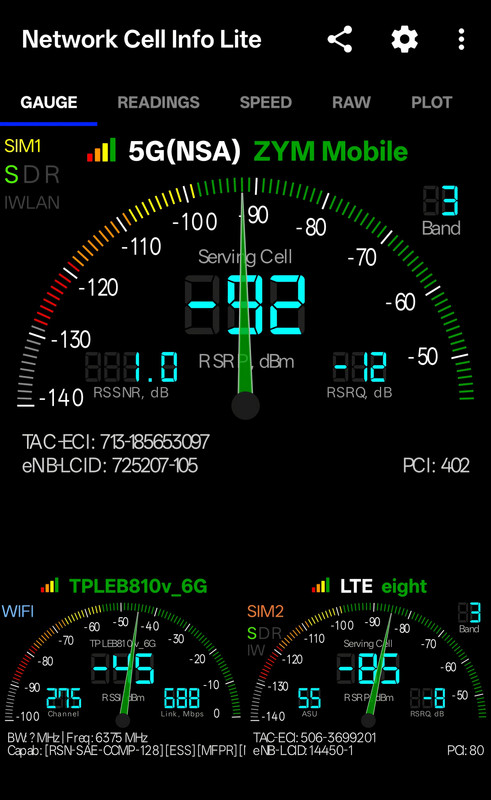
Network Cell Info Lite is popular among the users here.

Wanna see LTE, SA or NSA, use this app 👇 ... Network Cell Info Lite

IMG-20260105-153008.jpg

also suggest NetworkSignalGuru (NSG) app which gives more info. The one you show only shows main band connected and sometimes one secondary. NSG shows all connected bands, and nearby neighbor bands.

For samsung phones, no need app. Just dial *#0011#

Don't think *#0011# works on recent Samsung phones.
Around 2-3 years ago, Samsung removed that functionality from a certain release/patch onwards.

Just tested, doesn't work even with auto blocker off, at least in my case.
 
Important Forum Advisory Note
This forum is moderated by volunteer moderators who will react only to members' feedback on posts. Moderators are not employees or representatives of HWZ. Forum members and moderators are responsible for their own posts.

Please refer to our Community Guidelines and Standards, Terms of Service and Member T&Cs for more information.
Top