
You are using an out of date browser. It may not display this or other websites correctly.
You should upgrade or use an alternative browser.
You should upgrade or use an alternative browser.
Touro Mobile no eject/remove hardware option ?
- Thread starter Kennedy
- Start date
More options
Who Replied?

Mine have. Maybe your computer did not detact the hard disk properly the very 1st time you plugged it in?

I think he meant in "my computer" then right click
My Toshiba also can't safely remove that way,only your way works

ferocity
Supremacy Member
- Joined
- Dec 4, 2005
- Messages
- 5,869
- Reaction score
- 590
I think he meant in "my computer" then right click
My Toshiba also can't safely remove that way,only your way works
Hmm...i tried 4 different external hdd i own n all dont have my computer> right click> eject option on my windows 7. Anyway i always just unplug the hdd directly from the port once i finish using and my 3-4 years old hdd still works fine.

GPGT.org
Master Member
- Joined
- Jan 1, 2013
- Messages
- 2,867
- Reaction score
- 0
I think he meant in "my computer" then right click
My Toshiba also can't safely remove that way,only your way works
no idea about that option in "my computer", I always eject from the taskbar... better, faster and cheaper.

My SD card media do have that eject option in "my computer" though.

GPGT.org
Master Member
- Joined
- Jan 1, 2013
- Messages
- 2,867
- Reaction score
- 0
there is no eject hardware option from my computer, mouse right click, but I can see the eject Touro Mobile option from the taskbar.
thank you all for the information.
then use that one lah... I also eject from there, easier.

MoneyFace =p
High Supremacy Member
- Joined
- Dec 17, 2010
- Messages
- 35,380
- Reaction score
- 402
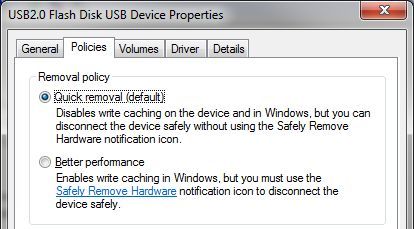
Check your external HDD hardware policies
Important Forum Advisory Note
This forum is moderated by volunteer moderators who will react only to members' feedback on posts. Moderators are not employees or representatives of HWZ Forums. Forum members and moderators are responsible for their own posts.
Please refer to our Community Guidelines and Standards and Terms and Conditions for more information.

