Trying to OC GPU and CPU

CrispyPeddler

Senior Member
Joined
Jul 26, 2016
Messages
1,829
Reaction score
7
Again u should try the following:
-LLC 3 (Entry board entry vrm), LLC1 might overwhelm it
-Slight positive offset (dont used fixed if you want dynamic frequency volts scaling), maybe +20mV
-See where it takes u to when ur 4.8GHz on load.
-Cache ratio max at core -5 for plug and play without testing. Best chipss are around all core ratio -2 or 3
-After all core clock stabilises, you may want to run per core ratios so they clock asynchronously based on load.
-Depending on headroom of your chip, you can do per core prolly at
1 core ratio: 49
2 core ratio: 49
3 core ratio: 49
4 core ratio: 48
5 ... : 48
6 ... : 48
Also your VccSA VccIO is abit high. XMP 3200 should be pass without testing even at 1.15v which is quite overkill, 1.2+ are typically for 3866 or 4000+MHz memory

Reason for improving thermal headroom via power management on entry board, minimise chances of VRM throttling iirc that board is good for up to 130W or so sustained...

Balanced plan gives u cache/voltage/clock adjustments via offset mode
High perf/Ult perf gives u clock/voltage adjustments via offset mode

And what hlots sifu said avx offset 4 is too much. Iirc platform ideal is 0-2 if not you're offsetting too much that it hurts perf

sorry i have yet try this or your previous suggestion. keep reading and there is so many setting that is so alien to me. im still digesting....:(
 

Mark73

Junior Member
Joined
Feb 4, 2018
Messages
84
Reaction score
0
Some settings must be wrong there. If u are using overclock 4.8hz profile , and your minimum cpu power adjust back to 100% u should not get only 4.3ghz in game which is the 9600k turbo boost frequency...
 

CrispyPeddler

Senior Member
Joined
Jul 26, 2016
Messages
1,829
Reaction score
7
i think i need to take a step back...ok, basically for CPU i only change the following in bios

- set the profile to turbo 4.7ghz (4.8ghz is mark in red). this caused me my first OC to be 4.7ghz with Core Voltage 1.35v

- set the profile of dram to XMP profile 1 (not sure why its called profile 1)

- set DRAM frequency to DDR4-3200

thats all i touch in bios. save and exit

with the above setting, i monitor with cpu-z that while on window its 4.7ghz and in-game rtss hows 4.3ghz cpu clock. this is with 100% performance and power management set to "full performance"

Now, yesterday i downloaded Asrock Tuner Utility and further oc the following

- CPU clock increase to 4.8ghz and lower the Core Voltage to 1.25v and click apply.

- Increase CPU cache ratio from 3.7ghz to 4.3ghz

thats all i adjust in Atuner. cpu-z shows 4.8ghz on window and in-game shows 4.4ghz cpu clock

only then i change the power management to "balanced" and set the minimum processor power to 5%. by doing this, i found out that even when idling on windows, the cpu clock move erratically (from 0.7ghz to 4.8ghz) while the Core Voltage remain 1.25v.

So, what i plan to do tonight......

- Set the power management to full performance...5% set to 100% (will be constant 4.8ghz @ 1.25v)
- Set AVX ratio to 0
- Set VccSA & VccIO to 1.15v

if in game still cant fully utilise 4.8ghz.......i'll need to do more reading and try more detail setting tips from bro encrypted and bro elmariachi... (i said detail cause i dont see all this wording in bios, need to dig deeper, click around bios and find it :))
 
Last edited:

Mark73

Junior Member
Joined
Feb 4, 2018
Messages
84
Reaction score
0
Oh u haven't set avx to 0 /auto? Then should be the problem. Good luck
 
Last edited:

CrispyPeddler

Senior Member
Joined
Jul 26, 2016
Messages
1,829
Reaction score
7
Updates:

yey, finally in-game cpu runs at 4.795ghz once i change the avx to 0(auto). did some setting based on recommendation from bro encrypted on the dram voltage and all seems good =)

thank you all of you guys so much :s12::s12:. this latest setting seems to eliminate my ac odyssey fps sharp drop too:o

updated bios setting as follows:

CPU CONFIGURATION
mpHphML.jpg


DRAM CONFIGURATION
hatVu4Q.jpg


VOLTAGE CONFIGURATION
66WzxNC.jpg

-the VVCIO is red..is it ok?
- also the offset voltage set to 20 makes it run at 1.3v..so i just set it fixed at 1.25v...shud be ok right?

ADVANCE CPU CONFIGURATION
AZFMcuw.jpg
 

Encrypted11

Supremacy Member
Joined
Jun 9, 2012
Messages
5,937
Reaction score
271
llc1 is around 16mv overshoot from the cpu VID similar to asus llc6

L3 is around 48mV vdroop on higher load. So if L1 + 20mV offset gives 1.312v under load L1, u need prolly L3 and 0 (auto)-10mV within that range.

io 1.15v ok, hlots123 sifu 1.2v+ :s34:
 

CrispyPeddler

Senior Member
Joined
Jul 26, 2016
Messages
1,829
Reaction score
7
llc1 is around 16mv overshoot from the cpu VID similar to asus llc6

L3 is around 48mV vdroop on higher load. So if L1 + 20mV offset gives 1.312v under load L1, u need prolly L3 and 0 (auto)-10mV within that range.

io 1.15v ok, hlots123 sifu 1.2v+ :s34:

:(:(:(..sorry, this is too chim. i dono how to read this..i cant find anything in the bios wording have llc1 vid l3 l1 :(
 

Mark73

Junior Member
Joined
Feb 4, 2018
Messages
84
Reaction score
0
If u use offset voltages, u have to change the minimum processor power back to 5% instead of 100%. Or else it stay at 1.25v forever
 

Encrypted11

Supremacy Member
Joined
Jun 9, 2012
Messages
5,937
Reaction score
271
if ur trying to target offset mode 1.248-1.264v

cpu load line calibration level 3
offset between auto (0mv) to 10mv

Can also experiment with level 2 and 0mv offset

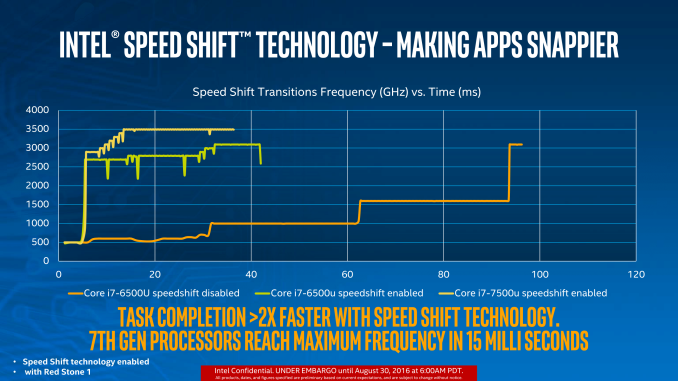
Fluctuations r normal. They don't really affect perf or frame times esp when your cache ratio doesn't drop close to the base 800mhz. Perf reductions aren't there unlike speedstep (newer cpus use speedshift).

So imo the sweetspot is ultimate perf plan + offset with edited minimum processor state to 5%.
(cache pegged at 100%, cores move from 800mhz to 4.8GHz depending on load.

And based on the datasheet dynamic/adaptive voltages/c states r beneficial for cpu longevity not that 1.25v is a lot to matter. It also reduces idle and load temps slightly because it isn't static 1.25v.
1-7.png

3tfh0QK.png
 
Last edited:

CrispyPeddler

Senior Member
Joined
Jul 26, 2016
Messages
1,829
Reaction score
7
If u use offset voltages, u have to change the minimum processor power back to 5% instead of 100%. Or else it stay at 1.25v forever

i think i'll just keep constant 4.8ghz @ 1.25v for cpu. the 5% minimum power management + balance power plan cause the clocks to fluctuates erratically and the core voltage still remain the same
 

CrispyPeddler

Senior Member
Joined
Jul 26, 2016
Messages
1,829
Reaction score
7
if ur trying to target offset mode 1.248-1.264v

cpu load line calibration level 3
offset between auto (0mv) to 10mv

Can also experiment with level 2 and 0mv offset

is there any benefit / difference using offset compare to fixed? u mention something about

"Balanced plan gives u cache/voltage/clock adjustments via offset mode
High perf/Ult perf gives u clock/voltage adjustments via offset mode"

does it mean the cpu will adjust the voltage based on load if using offset mode with different power plan
 

Encrypted11

Supremacy Member
Joined
Jun 9, 2012
Messages
5,937
Reaction score
271
is there any benefit / difference using offset compare to fixed? u mention something about

"Balanced plan gives u cache/voltage/clock adjustments via offset mode
High perf/Ult perf gives u clock/voltage adjustments via offset mode"

does it mean the cpu will adjust the voltage based on load if using offset mode with different power plan

Yes to all power plans including ult and high perf

post #69
 
Last edited:

CrispyPeddler

Senior Member
Joined
Jul 26, 2016
Messages
1,829
Reaction score
7
if ur trying to target offset mode 1.248-1.264v

cpu load line calibration level 3
offset between auto (0mv) to 10mv

Can also experiment with level 2 and 0mv offset

Fluctuations r normal. They don't really affect perf or frame times esp when your cache ratio doesn't drop close to the base 800mhz. Perf reductions aren't there unlike speedstep (newer cpus use speedshift).

So imo the sweetspot is ultimate perf plan + offset with edited minimum processor state to 5%.
(cache pegged at 100%, cores move from 800mhz to 4.8GHz depending on load.

And based on the datasheet dynamic/adaptive voltages/c states r beneficial for cpu longevity not that 1.25v is a lot to matter. It also reduces idle and load temps slightly because it isn't static 1.25v.
1-7.png

3tfh0QK.png

ok..if i read you correctly..this is steps to have the cpu clocks and voltage to adjust themselves based on load e.g. idling / surfing and gaming.

so in order to do this i need to

1. set the cpu load line calibration to level 3 / experiment it with level 2
2. set the offset voltage at around 0mv ~ 10mv (higher more stabilise?)
3. change the power plan to performance based (is there a ultimate performance plan? i only have "balanced", "high performance" and "power saver"
4. if im using offset, i need to change the minimum processor state to 5%
5. cached pegged at 100%, u mean adjust minimum cpu cache ratio to 100?
 

CrispyPeddler

Senior Member
Joined
Jul 26, 2016
Messages
1,829
Reaction score
7
Haha. Be careful u are stepping into twilight zone overclocking

yea haha. all the language and shortform is very alien to me:s22::(.

btw, i notice...not sure if i notice it correctly...with oc profile, i notice youtube video....seems to be stuttering? is it because unstable overclock? cause i didnt do any stress test...jsut play game with the oc profile
 

Encrypted11

Supremacy Member
Joined
Jun 9, 2012
Messages
5,937
Reaction score
271
ok..if i read you correctly..this is steps to have the cpu clocks and voltage to adjust themselves based on load e.g. idling / surfing and gaming.

so in order to do this i need to

1. set the cpu load line calibration to level 3 / experiment it with level 2
2. set the offset voltage at around 0mv ~ 10mv (higher more stabilise?)
3. change the power plan to performance based (is there a ultimate performance plan? i only have "balanced", "high performance" and "power saver"
4. if im using offset, i need to change the minimum processor state to 5%
5. cached pegged at 100%, u mean adjust minimum cpu cache ratio to 100?


https://www.thewindowsclub.com/ultimate-performance-power-plan

On 1-3 yes, basically you +- the mV to hit your targeted 1.25v on load if its enough to stabilise ur 4.8ghz

The cache also can adjust from 800mhz to 4.3ghz depending on load. ult perf will peg it at 4.3GHz.

5. Optional, it will still drop vcore on low load but not as much. I think you're mostly concerned with performance. In that case you can test it against a benchmark to check for score differences before and after setting min state to 5% but it is likely close to no difference or margin of error.
 
Important Forum Advisory Note
This forum is moderated by volunteer moderators who will react only to members' feedback on posts. Moderators are not employees or representatives of HWZ Forums. Forum members and moderators are responsible for their own posts. Please refer to our Community Guidelines and Standards and Terms and Conditions for more information.
Top