
UEFI boot help

yiptw89

Master Member
Joined
Sep 9, 2006
Messages
2,744
Reaction score
33
I've encountered some problems to run UEFI boot from USB to install Windows 8.

I'm using the following setup:
Intel Core i5-3570K + Asrock Z77 Extreme6
BIOS Version 2.60
Genuine Windows 8 files copied into ADATA S102 Pro 16GB USB Flash Drive using Windows 7 USB/DVD Download Tool

Below as you can see, the boot options does not have UEFI boot from my flash drive.
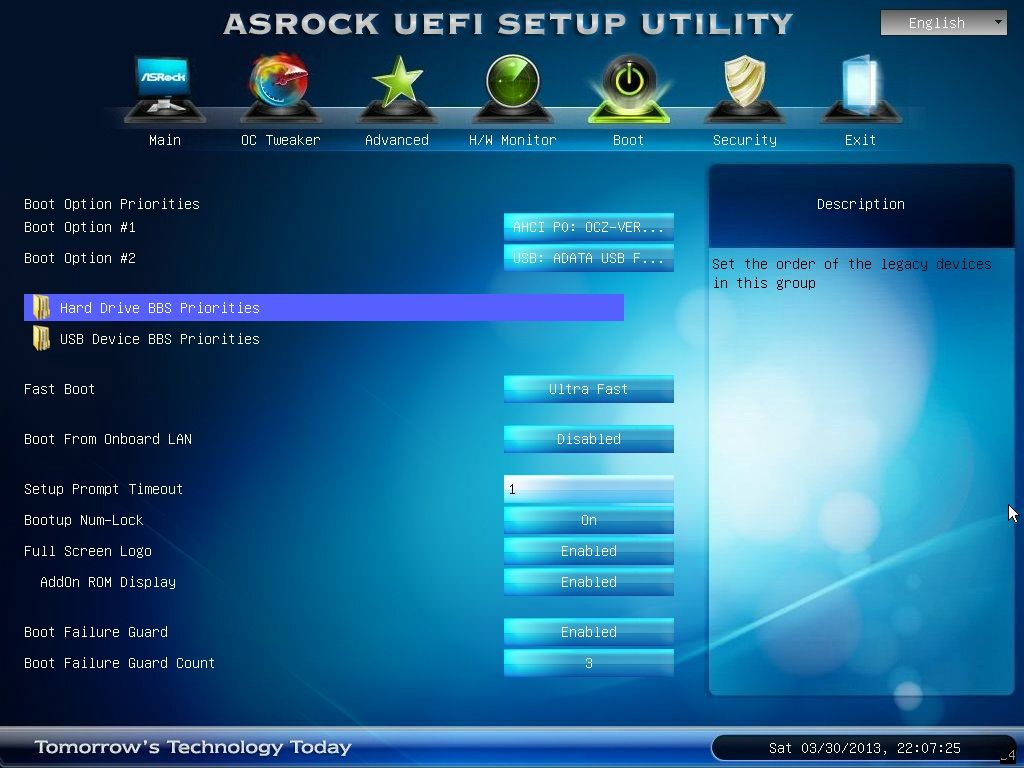
130330220726_zps19d6d927.jpg


However, I've tried it on another setup:
Intel Celeron G1610 + MSI Z77A-G45
BIOS Version 2.A
Genuine Windows 8 files copied into ADATA S102 Pro 16GB USB Flash Drive using Windows 7 USB/DVD Download Tool (same flash drive used)

In this setup with the same flash drive used, the boot options allows me to choose UEFI boot from my flash drive.
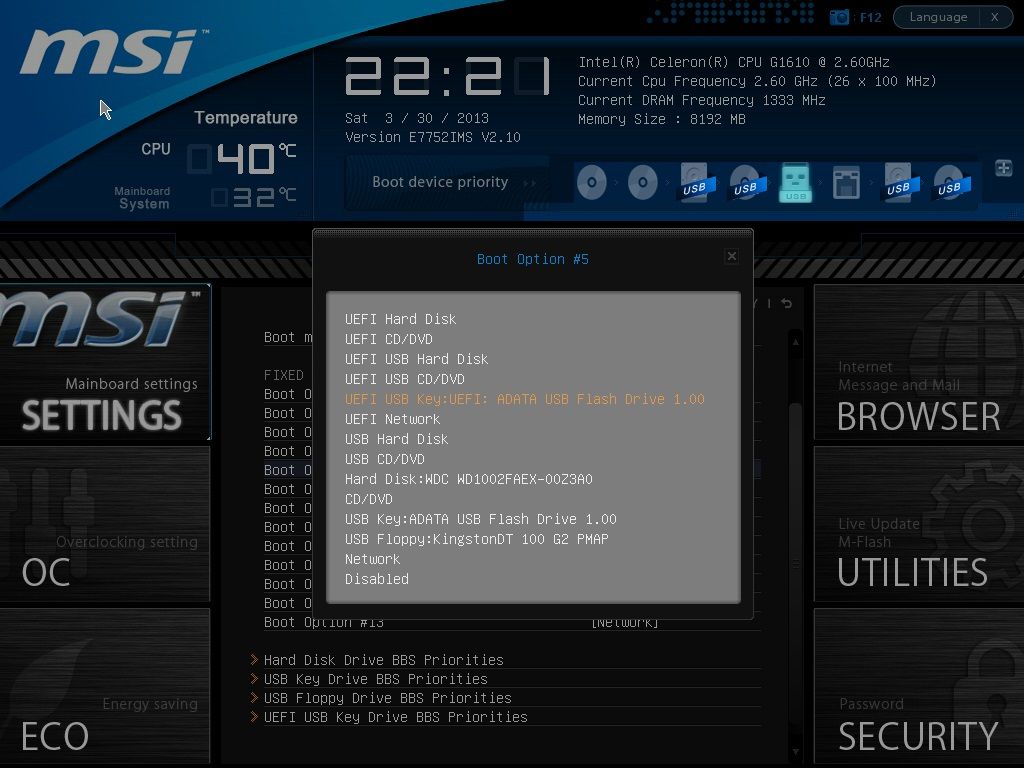
MSI_SnapShot1_01_zps088edb2b.jpg


Any kind souls can help what should I do to enable UEFI boot for the first setup?
 
Last edited:

MoneyFace =p

High Supremacy Member
Joined
Dec 17, 2010
Messages
35,374
Reaction score
401
Did you see any bootsect error occurring at the end of Windows 8 files transfer on the Windows 7 DVD USB Tool into the thumbdrive?

And did that flash drive actually boots successfully on your Celeron machine?
 
Last edited:

yiptw89

Master Member
Joined
Sep 9, 2006
Messages
2,744
Reaction score
33
Did you see any bootsect error occurring at the end of Windows 8 files transfer on the Windows 7 DVD USB Tool into the thumbdrive?

I've not encountered any errors during the transfer of files. I've used this flash drive to install Windows 8 successfully on the 2nd setup without any problems.
 

eminus

Supremacy Member
Joined
Jul 8, 2011
Messages
6,688
Reaction score
0
try disabling fast boot and also put the usb in a non usb3 slot and lastly put the boot priority to usb...then cross your finger and see if it works out :D
 

wideCDMA

Senior Member
Joined
Dec 28, 2002
Messages
1,460
Reaction score
0
I am the same MB... go to exit menu... Load UEFI default.... save and exit then boot the USB UEFI..:s12:
 

yiptw89

Master Member
Joined
Sep 9, 2006
Messages
2,744
Reaction score
33
try disabling fast boot and also put the usb in a non usb3 slot and lastly put the boot priority to usb...then cross your finger and see if it works out :D

Try disabling ASRock Fast Boot?

Disabling Fast Boot allows me to boot from USB in non-UEFI mode. UEFI boot is still not visible. Tried on USB 2.0 ports, same result also.

I am the same MB... go to exit menu... Load UEFI default.... save and exit then boot the USB UEFI..

Ya me did that on a Asrock z77 pro 3 too :)

I did that also, but still not visible.
 

yiptw89

Master Member
Joined
Sep 9, 2006
Messages
2,744
Reaction score
33
Tried using another USB flash drive, Kingston DataTraveler 100 G2.
Still don't see the UEFI USB boot option.

130330221438_zps9e1de0bc.jpg


On the 2nd setup, it still works.
MSI_SnapShot1_00_zps263b7d7a.jpg


Are there any other settings I have to change in the Asrock BIOS?
 

wideCDMA

Senior Member
Joined
Dec 28, 2002
Messages
1,460
Reaction score
0
Disabling Fast Boot allows me to boot from USB in non-UEFI mode. UEFI boot is still not visible. Tried on USB 2.0 ports, same result also.


I did that also, but still not visible.
Try using different port of usb ?
 

sbladerz

Senior Member
Joined
Aug 10, 2008
Messages
553
Reaction score
0
hi, i had the same problem as u.
what i did was to attached the thumbdrive first before booting up the system.
then my system would autorun from the thumbdrive.
hope it helps.
 

tuckloong

High Supremacy Member
Joined
Jan 6, 2007
Messages
33,009
Reaction score
9,121
Disabling Fast Boot allows me to boot from USB in non-UEFI mode. UEFI boot is still not visible. Tried on USB 2.0 ports, same result also.


I did that also, but still not visible.

wa sian half half...u need a dvd of win 8 ISO? can burn for ya :)
 

MacClipper

High Supremacy Member
Joined
Jan 1, 2000
Messages
33,617
Reaction score
4
Just dug out my Win8 Install USB flashstick to try out on my present 990FX Extreme9 test mobo, seems OK.


130331143706Copy_zps736ce467.jpg


Maybe email the TW HQ and ask them for support...
 

yiptw89

Master Member
Joined
Sep 9, 2006
Messages
2,744
Reaction score
33
Just dug out my Win8 Install USB flashstick to try out on my present 990FX Extreme9 test mobo, seems OK.

Maybe email the TW HQ and ask them for support...

May I know is your USB flash drive formatted to FAT32 or NTFS?
 
Important Forum Advisory Note
This forum is moderated by volunteer moderators who will react only to members' feedback on posts. Moderators are not employees or representatives of HWZ Forums. Forum members and moderators are responsible for their own posts. Please refer to our Community Guidelines and Standards and Terms and Conditions for more information.
Top