Unable to update Win 11

peterchan75

Supremacy Member
Joined
Apr 26, 2003
Messages
6,751
Reaction score
533
Sorry for thread jacking. It's difficult to fight against the myriads of Windows 11 requirement. IF my machine is still fast enough (i7-2600 3.4Ghz) for Windows 10, why not install Windows 10 IoT Ent 2021? It's a basic setup and has MSFT support up till 2032. Any cons? Please share. Thanks.

PS: It's not a good idea because its update stop at 21H2. Newer software may not be able to run on it.
 
Last edited:

alex22

High Supremacy Member
Joined
Apr 29, 2001
Messages
26,552
Reaction score
7,677
Tbh i got rejected doing in place upgrade to 24h2 on a ancient intel coreduo machine.
Lenovo g3000.
Cpu core not supported.
Does not have required instruction set.
This one no way to bypass atm unlike the tpm20 that can ignore thru rufus.
 

uncle_josh

Master Member
Joined
Jun 16, 2018
Messages
3,104
Reaction score
758

This grumpy old man got a lot of cock story to talk, skip and jump straight to the 5 min time stamp.
 

uncle_josh

Master Member
Joined
Jun 16, 2018
Messages
3,104
Reaction score
758
Source :

Upgrade Win 10 to Win 11, using the setupprep.exe method. Bypasses all hardware checks

No need to update 10 to latest version first.
Bypasses all hardware checks. So it will upgrade to win 11 older PC that do not meet their requirements. The CPU requirement is terrible as normally it wont allow an installation on older CPU like 7th gen INTEL CPUs.
This PC I updated to 11 version 23H2, is core2duo and it is running great on 11 PRO.

Simple to do
Download win11 disc image file at Microsoft. File is about 6.4gb, you want the ISO file, scroll down the web page it is the last method in their list.

Mount the ISO file by rightclicking select mount.
Click open
Look in file manager to see what drive letter it is mounted at, mine was F:

open CMD prompt as admin
goto F: (wherever it was mounted) , as in type F: enter
type DIR to see the files and folders of the mounted iso, that way you know you are in the right drive folder
Type CD sources

Then type setupprep.exe /product server
Select type of install, I chose keep files, folder, programs,

Windows 11 will install
If your PC was activated, it remains activated

It will say installing server, but it is installing windows 11, and it will install either home, pro, or whatever matching version you have
Leave command prompt window open

No need to use a USB drive or boot from it.
Then walk away, no interaction is needed.

 

Tsoukalos

High Supremacy Member
Joined
Apr 3, 2016
Messages
26,697
Reaction score
5,727
issit a must to upgrade to win11? my win10 now also reach end of support but seems like TPM2.0 is not supported. if i carry on using win10 issit ok? last time i upgraded my diy pc was 5 yrs back

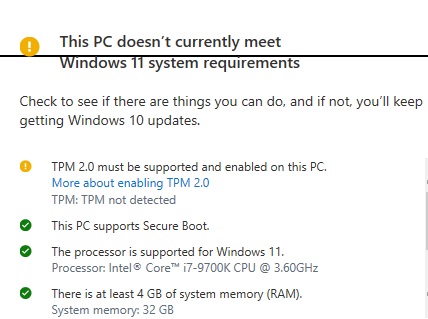
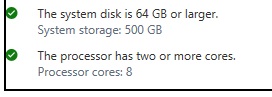
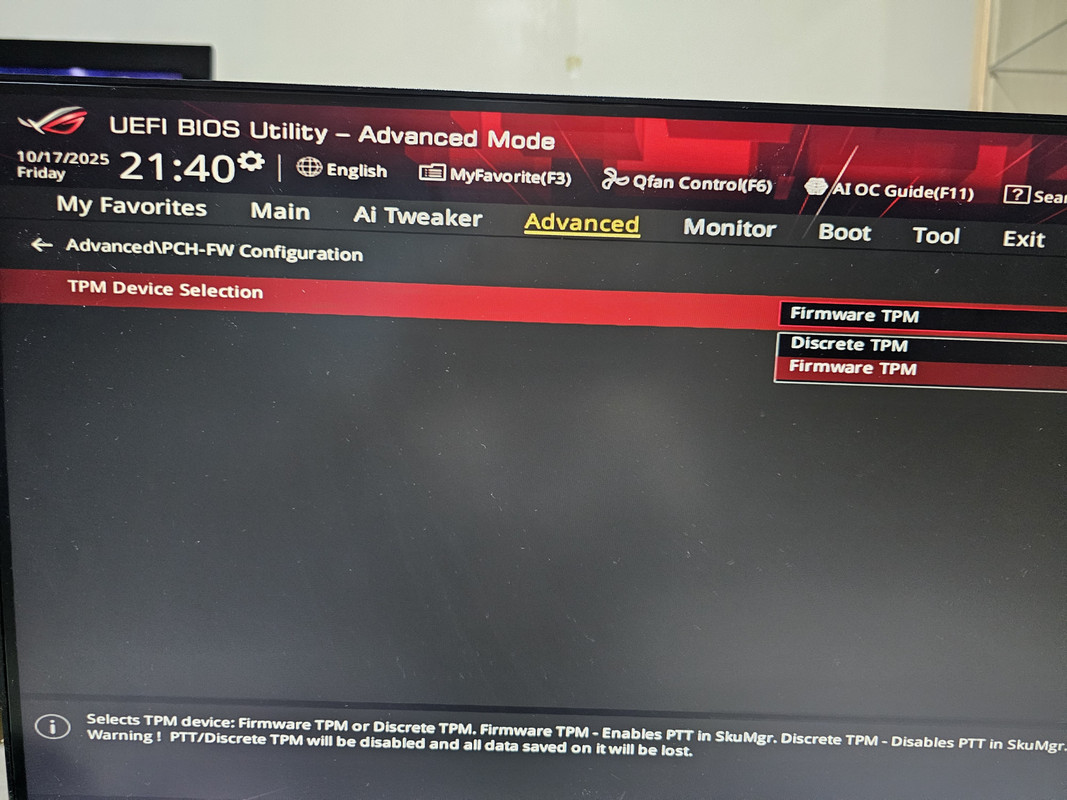
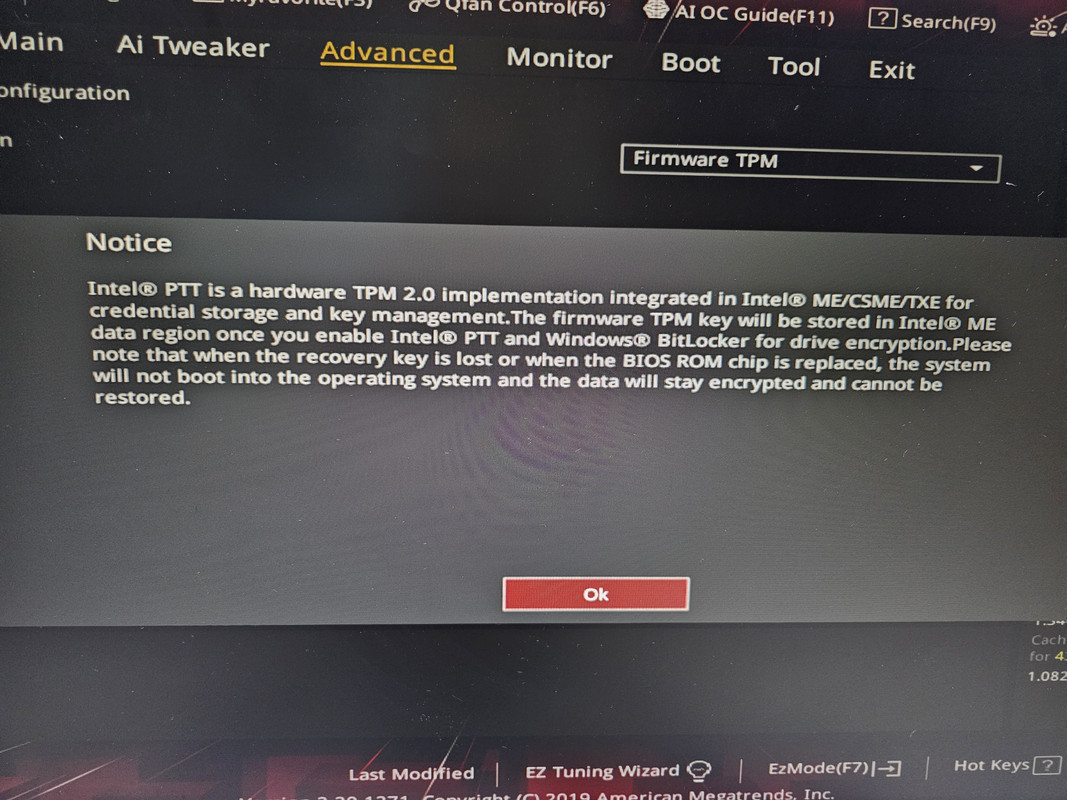
EDIT: ran pc health check & these are the results. then went into BIOS & wanted to switch to firmware TPM then saw this message. duno if i should proceed & if i do does it mean i can install win11?

seems like win11 is not very stable now? i not really IT savvy so appreciate yr help


Last edited:

skjh7`

Member
Joined
Oct 25, 2009
Messages
213
Reaction score
1
issit a must to upgrade to win11? my win10 now also reach end of support but seems like TPM2.0 is not supported. if i carry on using win10 issit ok? last time i upgraded my diy pc was 5 yrs back

EDIT: ran pc health check & these are the results. then went into BIOS & wanted to switch to firmware TPM then saw this message. duno if i should proceed & if i do does it mean i can install win11?

seems like win11 is not very stable now? i not really IT savvy so appreciate yr help


What I did was to do a fresh installation.
 

Jurong640

High Supremacy Member
Joined
Mar 22, 2011
Messages
44,144
Reaction score
17,970
Anyone recently just updated to Windows 11 from Windows 10?

I heard the April and May update broke many computers.

Still thinking whether to upgrade to Windows 11. Though my PC is "not supported" due to TPM 2.0
 

deepblue_82

Arch-Supremacy Member
Joined
Oct 23, 2007
Messages
19,932
Reaction score
2,471
win 11 forced me to update////
KNN... after update the whole system tray+clock all gone...
i had to run a few stuff to fix the problem....
 
Important Forum Advisory Note
This forum is moderated by volunteer moderators who will react only to members' feedback on posts. Moderators are not employees or representatives of HWZ Forums. Forum members and moderators are responsible for their own posts. Please refer to our Community Guidelines and Standards and Terms and Conditions for more information.
Top