

Unused Node is not erased

tormont

Senior Member
Joined
Sep 6, 2004
Messages
609
Reaction score
1
Anyone has this same issue? I'm using iMac mid 2011. My iMac is very laggy after i upgraded to yosemite, so i went on to perform repair disk in disk utility, which then showed "unused node is not erased".

Could any expert provide some advices please.

In addition, any one with any recommendation for a shop which is reputable and with reasonable pricing for SSD upgrade? I don't mind getting SSD directly from the shop or purchase SSD elsewhere.

Thanks in advance.
 

asriznet

Senior Member
Joined
Oct 2, 2009
Messages
981
Reaction score
0
Anyone has this same issue? I'm using iMac mid 2011. My iMac is very laggy after i upgraded to yosemite, so i went on to perform repair disk in disk utility, which then showed "unused node is not erased".

Could any expert provide some advices please.

In addition, any one with any recommendation for a shop which is reputable and with reasonable pricing for SSD upgrade? I don't mind getting SSD directly from the shop or purchase SSD elsewhere.

Thanks in advance.
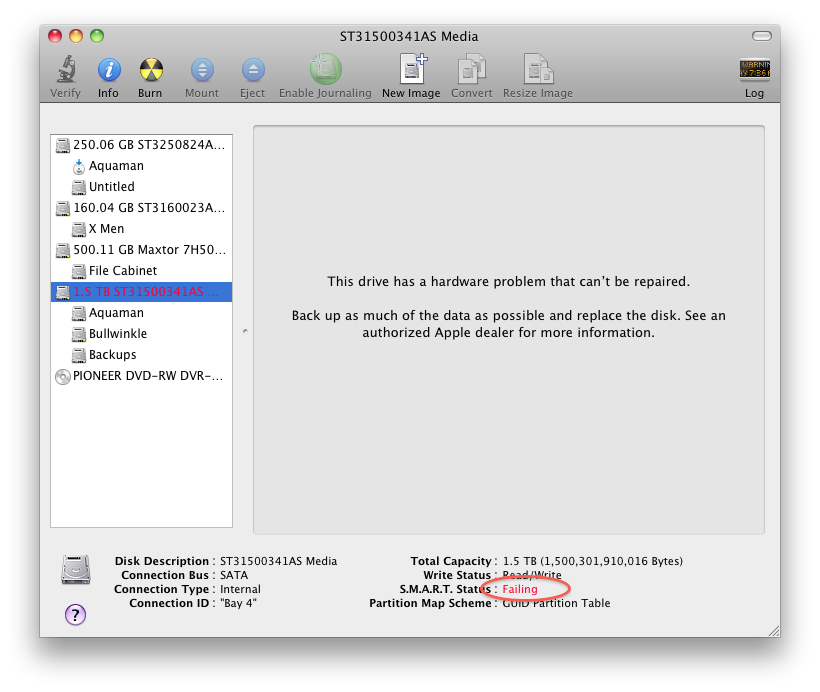
Did the repair ends with "The Volume Macintosh HD appears to be OK" ?
if not then you may have a corrupted system, now is a good time to backup your system to another volume, time machine's my recommendation.

Do you have a 27" imac with 1TB Hard drive? if yes, you might be affected by a HDD recall program but it has since expired - Apple iMac Hard Drive Recall Ends April 13th, 2013 - MacdailyMacdaily

In disk Utility, what does the SMART status say?

disk-utility-2.png


I replied to your post in the other thread - http://forums.hardwarezone.com.sg/89826086-post6.html
 

tormont

Senior Member
Joined
Sep 6, 2004
Messages
609
Reaction score
1
thanks for replying! my disk utility showed the same error msg as that in the photo u posted! Mine is the 21.5inch iMac.

I guess it's time to get it replaced. Do you have kenny's hp or contact no.?
 

asriznet

Senior Member
Joined
Oct 2, 2009
Messages
981
Reaction score
0
thanks for replying! my disk utility showed the same error msg as that in the photo u posted! Mine is the 21.5inch iMac.

I guess it's time to get it replaced. Do you have kenny's hp or contact no.?

PMed you his business card.

While you can still boot into the system, take this time to copy your data to a a portable HDD first.

You never know that when you shut down your computer, your data is gone.

Good Luck!
 
Important Forum Advisory Note
This forum is moderated by volunteer moderators who will react only to members' feedback on posts. Moderators are not employees or representatives of HWZ Forums. Forum members and moderators are responsible for their own posts. Please refer to our Community Guidelines and Standards and Terms and Conditions for more information.
Top