Upgrade recommended?

Sendai

Junior Member
Joined
Feb 4, 2005
Messages
66
Reaction score
5
Hi all, still using my 4750k from 2015 but looking to maybe upgrade some parts. The CPU seems to always hover at 98C whenever I am playing some recent games, but my GPU still maintaining at 70+C.

Thinking probably to upgrade to AMD system as seems that the board can be used for at least 2 generations?

Current set:
CPU: I7-4790K
GPU: Gigabyte 980t
Ram: 24GB DDDR3
Storage: 512GB SSD 950 Pro and 2TB WD 3.5" HD (retain if possible)
PSU: Seasonic Prime 750W Gold (2018) (retain if possible)
Case: Fractal Refine R5 (no front USB C- but intend to retain the case if possible)
Monitor: Dell 2414H (retain if possible)

Upgrade:
Mainboard: ASUS TUF GAMING X670E-PLUS WIFI
CPU: Ryzen 7700X
CPU cooler: ?? Just realised that now that higher end CPU doesn't comes with fan and thus need recommendations
GPU: Gigabyte Radeon RX 6700 XT or nvidia?
RAM: CRUCIAL PC5 4800MHz DDR5 SINGLE STICK 32GB

Choosing a lower speed RAM as probably upgrade further really necessary in future
Will my current case fit this especially the GPU as it seems the graphic cards are getting bigger and bigger now. Hoping to also retain other parts like PSU, hard disk, monitor.

Any recommendations or advice for the upgrade?

Thanks!
 

Sendai

Junior Member
Joined
Feb 4, 2005
Messages
66
Reaction score
5
Yes, I just change the thermal paste somewhere around last year or so when I experienced this.
 

86technie

High Supremacy Member
Joined
Jun 8, 2006
Messages
40,356
Reaction score
5,944
CPU high temperature could mean either the CPU fan have issue or
the thermal paste have dried up.
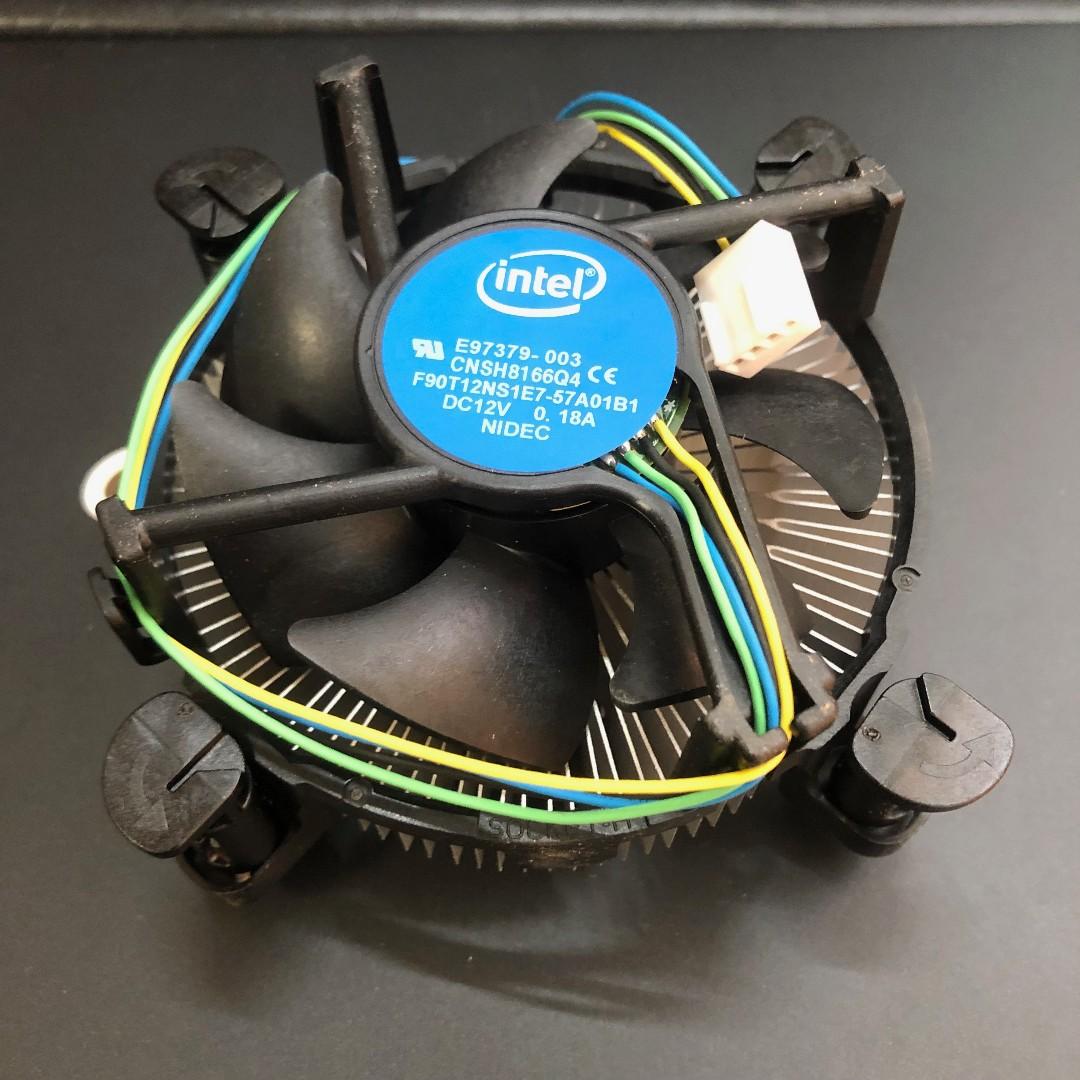
Hope you are not using Intel stock cooler for the i7, if you are
than suggest get a Heatsink fan.

Take note if you want to change motherboard, SSD/HDD
can be reused.
However the Windows have to be installed from scratch especially
moving from Intel to AMD. (Not Windows reset.)

Some may say you can plug and play old SSD, it can work but
when it just crash and Windows could not load you never know.
 

socket_athlon

Senior Member
Joined
Nov 18, 2002
Messages
2,042
Reaction score
31
Almost have the same system as yours.

4790k, Z97 Extreme 6 (I think) DDR3-2400 16Gb, 1080Ti, Raided 2x250gb SSD, Corsair 650W, Meshify C, Corsair 240mm Rad (forgot which model)

Just bought today:
Z790 Strix-F (wanted Aorus Elite AX but no stock)
13700k

From Amazon sale
6400 CL32 Trident Z5 32Gb
2TB 980 Pro
2TB 970 Evo +
Noctua D14

Re-using 1080Ti till I need a GPU upgrade, that goes the same for my PSU and case. Hoping all these nvidia cable nonsense sorts itself out soon. Plan to stick with this CPU for at least 5-8 years.

For your situation, for sure you can reuse your old case and PSU, just try to find a good deal for 3XXX series cards, it should fit unless you go super high end (3090s and such).

Ram just get a generic 5600/6000 2x16 kit would do. No need to upgrade in future.

Cooler wise, IMO you can just get a beefy air cooler would do, something like a Deepcool Gammaxx AG620.

But the thing is, your monitor.... Everyone's on the variable refresh rate train now, so if you're a gamer, you'd be missing out on a lot. If you dont game much, then yeah your current monitor is fine.
 
Last edited:

Sendai

Junior Member
Joined
Feb 4, 2005
Messages
66
Reaction score
5
@86technie Actually yes, I am still using the stock fan from Intel. Seems like changing to amd is quite troublesome.

@socket_athlon Thanks for the suggestions and the cpu cooler, seems like getting the rams and hdd is better through amazon? Seems also that 13700k will have less heat issue than amd am5?

Yes I do play games, actually not sure what will I miss on the lower refresh rate. Tried looking for higher refresh rate with similar size monitor, but I think mostly are the bigger 27" monitor @1440p? Was thinking 1080p will be enough and so maybe a 3060ti or 3070ti will do.
 

NightRaven49

Master Member
Joined
May 17, 2019
Messages
3,741
Reaction score
1,579
@86technie Actually yes, I am still using the stock fan from Intel.
then of course u are going to get super high temperatures, the stock cooler is not great. if u are otherwise ok with the performance of ur rig, i suggest u get a decent tower cooler for less than $100 instead of splashing thousands of dollars on a new rig simply because cpu temps are too high on an inadequate cooler.
Seems also that 13700k will have less heat issue than amd am5?
13700k is actually still very hard to cool even with a high end 360mm aio. am5 will target 95c during heavy all core workload, so while it seems hard to cool, it will do just fine with a decent air cooler.
 

socket_athlon

Senior Member
Joined
Nov 18, 2002
Messages
2,042
Reaction score
31
@86technie Actually yes, I am still using the stock fan from Intel. Seems like changing to amd is quite troublesome.

@socket_athlon Thanks for the suggestions and the cpu cooler, seems like getting the rams and hdd is better through amazon? Seems also that 13700k will have less heat issue than amd am5?

Yes I do play games, actually not sure what will I miss on the lower refresh rate. Tried looking for higher refresh rate with similar size monitor, but I think mostly are the bigger 27" monitor @1440p? Was thinking 1080p will be enough and so maybe a 3060ti or 3070ti will do.

For Amazon order, there's always a risk that you carry.

Pros:
A whole lot cheaper (like for my case average 35%)
Plenty of options in stock

Cons:
Shipped wrong item
RMA issues (or no warranty)

Real hassle if there's an issue with imported stuff, but I will be taking the risk this time.
 

Psycovirus

Senior Member
Joined
Jan 3, 2007
Messages
1,789
Reaction score
381
You can get really cheap RAM and CPU from Amazon.sg

You should run Dual Channel on RAM. Both are viable but 6000 MT/s is the sweet spot for Ryzen.
CORSAIR Vengeance DDR5 32GB (2x16GB) DDR5 5600 (PC5-44800) C36 - $206
G.Skill RipJaws S5 Series (Intel XMP) 32GB (2 x 16GB) 288-Pin SDRAM DDR5 6000 CL36-36-36-96 - $218

For motherboard, do you have a reason to go with X670E?
ASUS TUF Gaming B650-PLUS WiFi - $329
vs
ASUS TUF Gaming X670E-PLUS WiFi - $488

You could go with B650 and save a lot more for other parts. If you plan to upgrade the CPU for future iteration of Ryzen, its wise to go with X670E for better future proofing. (Has PCIe 5.0 for GPU slot, etc)

Also for cooler, I would prefer Aircooling and can suggest you these 2. Very strong performance by both. Deepcool looks nicer.

Thermalright Peerless Assassin 120 - $68

Deepcool AK620 - $99

Both are big and strong air-coolers. Best of all, their AM4 mounting system do not use own backplate thus able to use on AM5 without any issue.
 
Last edited:

86technie

High Supremacy Member
Joined
Jun 8, 2006
Messages
40,356
Reaction score
5,944
@86technie Actually yes, I am still using the stock fan from Intel. Seems like changing to amd is quite troublesome.

For any new PC Windows will definitely need to clean install for better performance and stability.
Before you change, you have to backup your documents, files etc.
Programs, games etc. cannot be backup so have to reinstalled.

intel_stock_cooler_1566028817_ec20202c0_progressive


Intel stock cooler are crap and not meant for gaming. For normal use like surfing net etc. it's still fine.
But when gaming the fan will be loud and noisy so in my opinion if the rig is working fine
except the CPU fan.

Than just change it like get a Cooler Master Hyper 212x black edition or RGB which cost around $60.
Or consider ID cooling but I am not fan of ID cooling HSF as CM HSF are much easier to install.
 

Sendai

Junior Member
Joined
Feb 4, 2005
Messages
66
Reaction score
5
Thanks for the recommendation links and advices. Was contemplating if to upgrade due to realise some games requirements specs are out of my rig or reaching minimal requirements already.

Thus thinking maybe take this opportunity to upgrade some parts to make it hopefully last as long as this 4750k, and partly also due to the GST increase which i have a feeling businesses may take the opportunity to increase the price due to "GST, cost increase" etc. Unless the minimum game specs requirements are not as strict as years ago.

X670 board due to the PCI 5.0, maybe better future proofing though i know the chase never ends but at least something to last.

So maybe the online pricing is worth the risk, but not sure if the graphic cards are packaged well in box mining cards though.
 
Last edited:

elmariachi

Supremacy Member
Joined
May 30, 2005
Messages
6,339
Reaction score
1,489
Delid your CPU and use liquid metal to replace that pigeon poop if you still think it's worth using back. I had the same issue with my 6700k and delidding and replacing to liquid metal dropped my temps my 25 degrees.
 

Koenig168

Arch-Supremacy Member
Joined
Nov 4, 2007
Messages
10,035
Reaction score
1,745
If you are thinking of getting any parts from Amazon that are below S$400, I would suggest you do it soon before GST kicks in next year. Amazon shipping from US is really slow now so better order sooner rather than later.
 

86technie

High Supremacy Member
Joined
Jun 8, 2006
Messages
40,356
Reaction score
5,944
Thanks for the recommendation links and advices. Was contemplating if to upgrade due to realise some games requirements specs are out of my rig or reaching minimal requirements already.

Thus thinking maybe take this opportunity to upgrade some parts to make it hopefully last as long as this 4750k, and partly also due to the GST increase which i have a feeling businesses may take the opportunity to increase the price due to "GST, cost increase" etc. Unless the minimum game specs requirements are not as strict as years ago.

X670 board due to the PCI 5.0, maybe better future proofing though i know the chase never ends but at least something to last.

So maybe the online pricing is worth the risk, but not sure if the graphic cards are packaged well in box mining cards though.

It depend on what game you are playing but I would recommend Intel platform despite
the motherboard platform don't have room for future upgrade.
I do have similar rig in the past which was:
Intel i7 2600k running Win 7 (Still around)
Intel i5 4690k Win 10 than upgraded to Intel i7 9700k Win 10.

Upgrading from Intel i5 4690k does have a significant improvement moving to Intel i5 9600k
before I change to Intel i7 9700k. I don't chase platform like some, so long
still can work and perform I won't change.

Unfortunately GST will kick in next year so best to hoot while you can.
 

Sendai

Junior Member
Joined
Feb 4, 2005
Messages
66
Reaction score
5
Thanks for the replies. I had went ahead and get an intel setup as advised here, but taken from local store, couldn't wait for the online shipping time since this is the only period I have time to spare.

MSI Mortar
I713700k
6700 XT
Corsair 32 GB DDR4

Decide to just use the ddr4 instead of ddr5 as probably won't make much difference since just a normal gamer.

Didn't even know B series board is mAtx until I open and install, and had quite an adventure squeezing everything inside the board, previous atx is easier with more space. :D

Also guessing probably my monitor will bottleneck since its a basic 60hz or something only. 🤣
 
Important Forum Advisory Note
This forum is moderated by volunteer moderators who will react only to members' feedback on posts. Moderators are not employees or representatives of HWZ Forums. Forum members and moderators are responsible for their own posts. Please refer to our Community Guidelines and Standards and Terms and Conditions for more information.
Top