VPN for console

yesman_94

Junior Member
Joined
Feb 23, 2018
Messages
25
Reaction score
2
Hi. Does anyone use VPN with their console to connect to overseas IP address for stuff like Netflix or maybe connect to overseas servers. Can advise on how to setup or what is your setup.

I am currently stuck because I try to use internet connection sharing on my laptop, but my console cannot connect online. But I am using free VPN to try first, so not sure if because of that.

Thanks.
 

tokyofanboi

Senior Member
Joined
Jun 1, 2009
Messages
2,115
Reaction score
1
Hi. Does anyone use VPN with their console to connect to overseas IP address for stuff like Netflix or maybe connect to overseas servers. Can advise on how to setup or what is your setup.

I am currently stuck because I try to use internet connection sharing on my laptop, but my console cannot connect online. But I am using free VPN to try first, so not sure if because of that.

Thanks.

Free VPN is not stable, need to get paid VPN. google VPN for consoles and you will see the recommendations
 

yesman_94

Junior Member
Joined
Feb 23, 2018
Messages
25
Reaction score
2
Free VPN is not stable, need to get paid VPN. google VPN for consoles and you will see the recommendations

I saw the recommendations. But will they usually work for VPN for console? Also have our use internet connection sharing on windows 10 before? Tks.
 

PierceLee

Master Member
Joined
Dec 8, 2005
Messages
4,429
Reaction score
26
When you say 'sharing' internet connection on your laptop, you mean tethering? Like your laptop has internet connection (wired or wireless, connected to a router) and then your console tethers to the laptop wirelessly. Sort of like tethering 4G mobile internet connection on a phone?

If so, you will need to run some program on your laptop (like freeware Virtual Router Manager) to create an ad-hoc wifi on the laptop (basically makes the laptop a router virtually, to allow tethering). Of cos, you then run a VPN on the laptop. I have only tested it very briefly long ago (on Win 7, not Win 10) and I remember it didn't perform too well.

Alternatively, nowadays physical routers have a VPN setting that you can configure directly, so it applies to every device (laptop, console, phone, tablet etc that connects to your router), but I don't know which VPN service supports that (never researched into it). Another alternative is switch to MyRepublic, they have a VPN service (paid service, additional monthly fee, I think called 'teleport'). Basically all your MyRepublic internet connection goes through their VPN and you can switch country (again, never research much on how it works; other ISPs may have similar).

 

yesman_94

Junior Member
Joined
Feb 23, 2018
Messages
25
Reaction score
2
When you say 'sharing' internet connection on your laptop, you mean tethering? Like your laptop has internet connection (wired or wireless, connected to a router) and then your console tethers to the laptop wirelessly. Sort of like tethering 4G mobile internet connection on a phone?

If so, you will need to run some program on your laptop (like freeware Virtual Router Manager) to create an ad-hoc wifi on the laptop (basically makes the laptop a router virtually, to allow tethering). Of cos, you then run a VPN on the laptop. I have only tested it very briefly long ago (on Win 7, not Win 10) and I remember it didn't perform too well.

Alternatively, nowadays physical routers have a VPN setting that you can configure directly, so it applies to every device (laptop, console, phone, tablet etc that connects to your router), but I don't know which VPN service supports that (never researched into it). Another alternative is switch to MyRepublic, they have a VPN service (paid service, additional monthly fee, I think called 'teleport'). Basically all your MyRepublic internet connection goes through their VPN and you can switch country (again, never research much on how it works; other ISPs may have similar).


Mine will be totally wired. No wifi involved. So no wireless adapter necessary in the situation. The console will connect to my laptop with an Ethernet cable. And my com will run the VPN. I am wondering if this will work. Cause I tried with the free VPN, but like the guy said, free VPN is not reliable.
 

PierceLee

Master Member
Joined
Dec 8, 2005
Messages
4,429
Reaction score
26
Mine will be totally wired. No wifi involved. So no wireless adapter necessary in the situation. The console will connect to my laptop with an Ethernet cable. And my com will run the VPN. I am wondering if this will work. Cause I tried with the free VPN, but like the guy said, free VPN is not reliable.
Maybe not, cos your laptop will only have 1 wired LAN adapter typically. So it acts as the 'internet input' to the laptop. It will need an 'internet output' to connect to the console. Either input or output must be wireless as there is only 1 wired port.

Maybe can use a USB LAN adapter as output, but I have not tested it. The freeware I mentioned is for setting up a ad-hoc wifi (making the laptop a 'host' or access point for internet connection), not sure if it can support wired output.
 

yesman_94

Junior Member
Joined
Feb 23, 2018
Messages
25
Reaction score
2
Maybe not, cos your laptop will only have 1 wired LAN adapter typically. So it acts as the 'internet input' to the laptop. It will need an 'internet output' to connect to the console. Either input or output must be wireless as there is only 1 wired port.

Maybe can use a USB LAN adapter as output, but I have not tested it. The freeware I mentioned is for setting up a ad-hoc wifi (making the laptop a 'host' or access point for internet connection), not sure if it can support wired output.

I actually have a spare Ethernet adapter that I use. The one with a USB on one end and an Ethernet port on the other. This is the one that connects my console to my laptop,and the LAN adapter is wired from my laptop to my router.

I think what I'm saying is that my setup is all there. But in terms of settings within the systems (laptop/console) is there something that I should be doing especially when a VPN begins running on the laptop.
 

yesman_94

Junior Member
Joined
Feb 23, 2018
Messages
25
Reaction score
2
I actually have a spare Ethernet adapter that I use. The one with a USB on one end and an Ethernet port on the other. This is the one that connects my console to my laptop,and the LAN adapter is wired from my laptop to my router.

I think what I'm saying is that my setup is all there. But in terms of settings within the systems (laptop/console) is there something that I should be doing especially when a VPN begins running on the laptop.


Just an update, but trying to share my internet connection on my laptop while connected to windscribe(a free VPN) does not allow my console to connect online. Anyone else has any experience connecting your VPN services to devices aside from your PC?
 

PierceLee

Master Member
Joined
Dec 8, 2005
Messages
4,429
Reaction score
26
So you have 2 wired LAN on the laptop (1 built in, 1 USB). To the laptop, these are 2 separate internet connections ('input'). I think you will need to use a 'virtual router' software to bridge these 2 together ('input'->VPN software->'output'). Maybe you can try the wireless 'output' method first, at least see if it works (and how it performs)?
 

yesman_94

Junior Member
Joined
Feb 23, 2018
Messages
25
Reaction score
2
So you have 2 wired LAN on the laptop (1 built in, 1 USB). To the laptop, these are 2 separate internet connections ('input'). I think you will need to use a 'virtual router' software to bridge these 2 together ('input'->VPN software->'output'). Maybe you can try the wireless 'output' method first, at least see if it works (and how it performs)?

It's more like 2 Ethernet adapters. Plugged into the USB ports on my laptop. But aside from that, internet sharing has been proven to work as well as bridging when linking my console Ethernet and my router Ethernet on my laptop.

The problem comes when I activate the VPN service. If I link the router Ethernet and console Ethernet. It gives me Singapore IP address instead. I can't figure out how to link my VPN connection to my console.

I'm not for wireless as my devices are in different rooms and the quality will degrade.

I'm also using a free VPN to test. Im not sure if it doesn't work because it is a free one.
 
Last edited:

ac3knight

Supremacy Member
Joined
Aug 7, 2002
Messages
5,871
Reaction score
51
Get a router that allows you to setup openvpn and to have vpn connections on a per IP address basis.

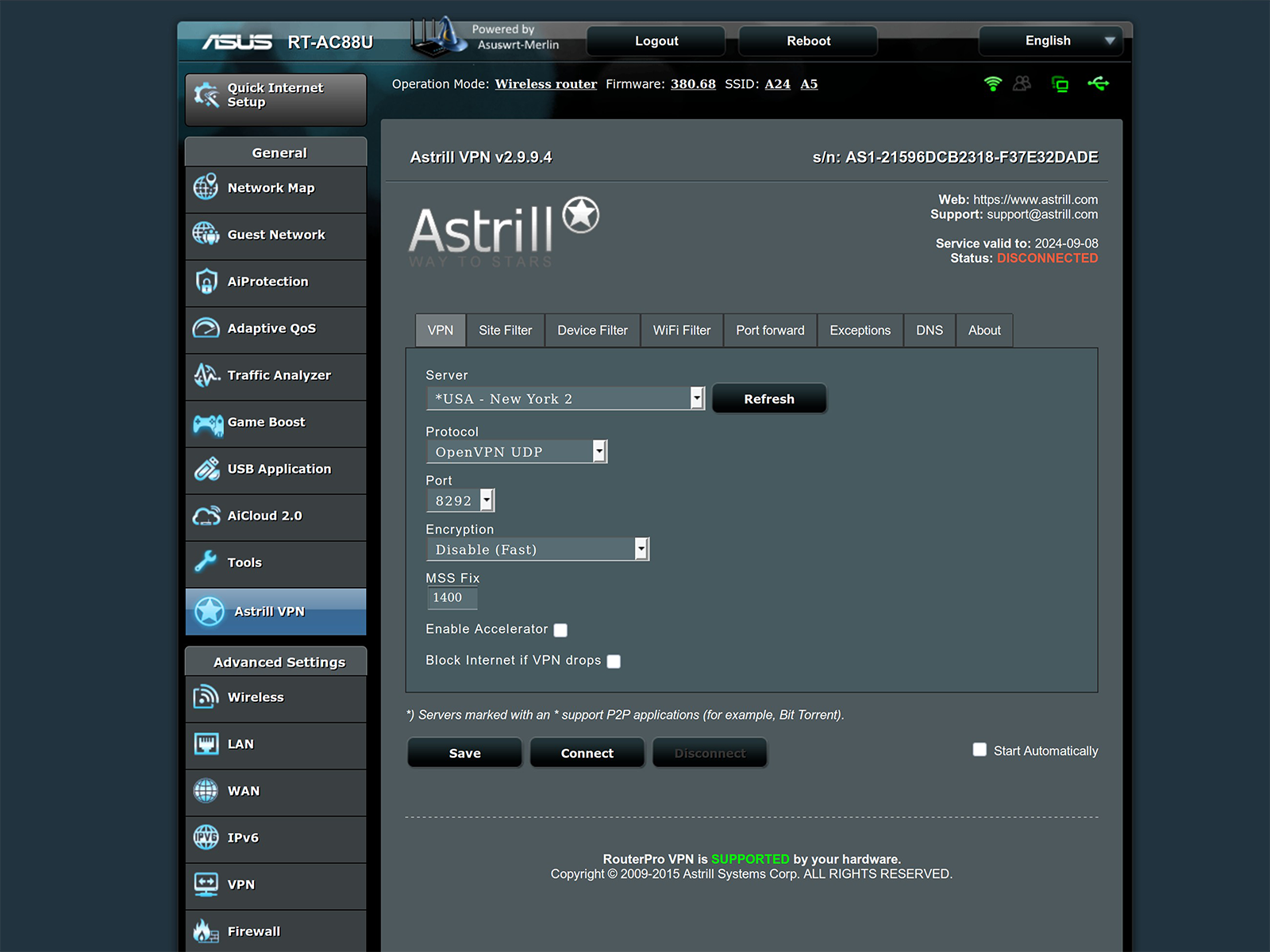
I'm using an Asus router + asus merlin firmware. There's an applet developed by my vpn service provider that I can install directly in the router's menu to enable the above settings.

in this case, I can have select devices (smart TV, android box, xbox, etc) access via VPn while the rest of my network is untouched. VPN settings are via router itself so no individual VPN apps required for your TV, xbox, etc
 
Last edited:

yesman_94

Junior Member
Joined
Feb 23, 2018
Messages
25
Reaction score
2
Get a router that allows you to setup openvpn and to have vpn connections on a per IP address basis.

I'm using an Asus router + asus merlin firmware. There's an applet developed by my vpn service provider that I can install directly in the router's menu to enable the above settings.

in this case, I can have select devices (smart TV, android box, xbox, etc) access via VPn while the rest of my network is untouched. VPN settings are via router itself so no individual VPN apps required for your TV, xbox, etc

This sounds like a good idea. Any recommendations for affordable routers and how is your performance like? Like maybe when it comes to streaming Netflix? Thanks
 

ac3knight

Supremacy Member
Joined
Aug 7, 2002
Messages
5,871
Reaction score
51
Depends on the features in the router you are seeking. $200 should be able to get a good Asus router (and perhaps even the Asus ac88u preowned).

Speed depends a lot on your vpn provider - have a look at the Internet & bandwidth subforum for VPN services feedback.

I can watch 4k US Netflix with no issues
 

yesman_94

Junior Member
Joined
Feb 23, 2018
Messages
25
Reaction score
2
Depends on the features in the router you are seeking. $200 should be able to get a good Asus router (and perhaps even the Asus ac88u preowned).

Speed depends a lot on your vpn provider - have a look at the Internet & bandwidth subforum for VPN services feedback.

I can watch 4k US Netflix with no issues

Wow. That sounds substantial. Although, a few VPNs like cyberghost say that you can use your laptop and connect an Ethernet cable to your console while running the VPN so your console can also use the VPN. Need to activate internet connection sharing(ICS)though. I don't need 4k speeds, just enough for streaming to happen, or even for gaming.
 

ac3knight

Supremacy Member
Joined
Aug 7, 2002
Messages
5,871
Reaction score
51
Most major vpn providers support openvpn configurations in routers.

Some others have applets for tomato or DD-wrt firmware. However, the only one with an Asus-merlin firmware applet is Astrill VPN.

I used to use express vpn + openvpn config in my router but since changed to Astrill vpn + asus applet. Both methods allow for individual device filters (based on individual device IP address).

1.png
 
Last edited:
Important Forum Advisory Note
This forum is moderated by volunteer moderators who will react only to members' feedback on posts. Moderators are not employees or representatives of HWZ Forums. Forum members and moderators are responsible for their own posts. Please refer to our Community Guidelines and Standards and Terms and Conditions for more information.
Top