 Watch Series 7

armadilloshield

Senior Member
Joined
Mar 15, 2011
Messages
745
Reaction score
233
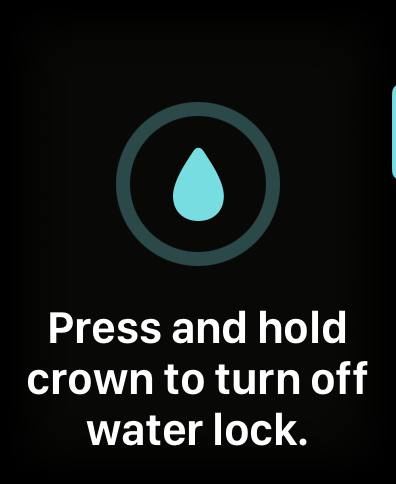
after updating to watchOS 9, very hard to turn off water lock, how to disable to press and hold? any idea? Thank you.
waterlock.jpg
 
Joined
Oct 3, 2002
Messages
129,955
Reaction score
7,233
The low power usage is good. My aw7 can last 2 days with abit of batt left. Somemore went for about 1.5hr of jogging
 

Habrosus

High Supremacy Member
Joined
Jul 23, 2005
Messages
28,984
Reaction score
13,084
after updating to watchOS 9, very hard to turn off water lock, how to disable to press and hold? any idea? Thank you.
waterlock.jpg
Not sure if this is what you want to know, as I'm still pretty much a noob as it's my first Apple Watch.

Before:

How do I turn off crown to unlock and eject water?
How to turn off Water Lock and eject water. Turn the Digital Crown on the side of your Apple Watch until the display says Unlocked. You can rotate the Digital Crown in either direction. A series of tones plays to clear any water that remains in the speaker, and then you can use your display as usual. 23 Apr 2020


After:

To deactivate Water Lock on watches running watchOS 9, press and hold the Digital Crown until the screen unlocks and water is forced out of the speaker of the watch. Once it is turned off, the display of the watch should respond to taps and swipes once again.

I just tried the press-and-hold to eject water from the speaker (if any), and it worked like it used to when I'd to turn the crown...
 

armadilloshield

Senior Member
Joined
Mar 15, 2011
Messages
745
Reaction score
233
Not sure if this is what you want to know, as I'm still pretty much a noob as it's my first Apple Watch.

Before:

How do I turn off crown to unlock and eject water?
How to turn off Water Lock and eject water. Turn the Digital Crown on the side of your Apple Watch until the display says Unlocked. You can rotate the Digital Crown in either direction. A series of tones plays to clear any water that remains in the speaker, and then you can use your display as usual. 23 Apr 2020


After:

To deactivate Water Lock on watches running watchOS 9, press and hold the Digital Crown until the screen unlocks and water is forced out of the speaker of the watch. Once it is turned off, the display of the watch should respond to taps and swipes once again.

I just tried the press-and-hold to eject water from the speaker (if any), and it worked like it used to when I'd to turn the crown...
yes, it's working working with press and hold, but I prefer just turn the digital crown haha,,, I guess no way to change to just turn the digital crown to unlock now :)
 

WestGuy

Banned
Joined
Mar 11, 2001
Messages
14,056
Reaction score
417
Anyone got this problem before?
Watch screen is white and unresponsive and unable to hard reset?

Just bring to any Apple Store?
 

wcmonk

Senior Member
Joined
Sep 16, 2004
Messages
1,741
Reaction score
9
hi all,

like to seek advise
i just got the apple watch 7, yesterday, and i notice the battery drop quite fast, after receiving the watch (had too as it was totally flat can’t power on around 11pm) , i charge it till 100% paid it to my iphone and went to sleep. this morning i check the watch , it was down to 76%.
is this normal for a new watch?(haven’t configure it yet, only pair to iphone)


is three any watch face which can show the lunar calendar date?

thanks i. advance.

regards
wcmonk
 

x3nor_S

Senior Member
Joined
Nov 13, 2011
Messages
1,331
Reaction score
171
Anyone cracked the back of the watch and got repaired by Apple post warranty? I dropped my watch and the back of the watch cracked. For now the functionality are all still working fine but am wondering if I should go Apple Store to repair cause if I wear during sports the sweat might seep through the cracks and cause more damage.

checked with Apple online they are unable to give me an estimated cost. Does anyone know if it’s worth to get it repaired?
 

Habrosus

High Supremacy Member
Joined
Jul 23, 2005
Messages
28,984
Reaction score
13,084
Anyone cracked the back of the watch and got repaired by Apple post warranty? I dropped my watch and the back of the watch cracked. For now the functionality are all still working fine but am wondering if I should go Apple Store to repair cause if I wear during sports the sweat might seep through the cracks and cause more damage.

checked with Apple online they are unable to give me an estimated cost. Does anyone know if it’s worth to get it repaired?
If Apple doesn't charge to do the evaluation before giving you a quote, you might want to check with them first before deciding if you want to buy a new AW instead?
 

iosnewbie

Supremacy Member
Joined
Sep 4, 2015
Messages
9,907
Reaction score
3,098
I’m thinking of buying a second hand AW7 to pair with my IP7+ running iOS 15.7.9. Assuming the AW7 battery life is still around 90%, would it last another 2 years?

I have not owned any AW or fitness trackers before and if AW fits my usage patterns, then I’ll consider getting a new one together with IP16 or maybe IP17 if my IP7+ can still work for another 2 years.
 
Important Forum Advisory Note
This forum is moderated by volunteer moderators who will react only to members' feedback on posts. Moderators are not employees or representatives of HWZ Forums. Forum members and moderators are responsible for their own posts. Please refer to our Community Guidelines and Standards and Terms and Conditions for more information.
Top