
You are using an out of date browser. It may not display this or other websites correctly.
You should upgrade or use an alternative browser.
You should upgrade or use an alternative browser.
What is the difference between these USB ports?
- Thread starter Unic0rn
- Start date
More options
Who Replied?

1982-1994
Great Supremacy Member
- Joined
- Oct 10, 2016
- Messages
- 59,903
- Reaction score
- 29,501
SS USB stand for SuperSpeed USB. The first iteration of SS USB was introduced in November 2008 as USB 3.0, and it ushered in a new era of speed and power from its predecessor, USB 2.0, or High Speed USB.
More recently, USB 3.1, or Gen 2, has come out, bringing further increases in both power and data transfer speeds.
SuperSpeed USB ports are usually labeled with the logo in the picture above. It's the standard USB logo, with the addition of the letters "SS". For faster versions of SuperSpeed, you might see a number 10 or 20 next to the letters, signifying 10 or 20 GB/s transfer speeds.
mechagnome
Master Member
- Joined
- Dec 27, 2009
- Messages
- 4,593
- Reaction score
- 10,795
SS = superspeed
10 = 10gbps

10 = 10gbps

mynickname
High Supremacy Member
- Joined
- May 11, 2012
- Messages
- 29,492
- Reaction score
- 8,737
Thanks. You Ang mo boss reached out for my CV just nowThank youmy ang moh boss asked me and as the CIO and CISO I didn’t know

1982-1994
Great Supremacy Member
- Joined
- Oct 10, 2016
- Messages
- 59,903
- Reaction score
- 29,501
Same herelast time i used to think that usb-c = bestest speed.
until i found out the hard way that usbc also got 480Mbps (which is still in use today, look at fruitphone15).

mocax
Honorary Member
- Joined
- May 3, 2001
- Messages
- 132,064
- Reaction score
- 11,194
last time i used to think that usb-c = bestest speed.
until i found out the hard way that usbc also got 480Mbps (which is still in use today, look at fruitphone15).
usb a b c ish referring to the connector shape....

usb 1 2 3 then ish referring to speed....
1982-1994
Great Supremacy Member
- Joined
- Oct 10, 2016
- Messages
- 59,903
- Reaction score
- 29,501
I wonder why not google insteadThank you
Our info also from Google

xsoldix
Supremacy Member
- Joined
- Apr 17, 2010
- Messages
- 8,874
- Reaction score
- 1,656
look at usb4.usb a b c ish referring to the connector shape....
usb 1 2 3 then ish referring to speed....
also got 20Gbps. really messy sia.
why cannot continue counting from usb 1 - 8?

coyote
Greater Supremacy Member
- Joined
- Sep 20, 2000
- Messages
- 76,825
- Reaction score
- 24,386
Those I can understand.
What's is PD though, it seemed like it's USB-C at both ends, is it for charging laptop and tablets and delivering even higher current than normal USB-C?
What's is PD though, it seemed like it's USB-C at both ends, is it for charging laptop and tablets and delivering even higher current than normal USB-C?
SS USB stand for SuperSpeed USB. The first iteration of SS USB was introduced in November 2008 as USB 3.0, and it ushered in a new era of speed and power from its predecessor, USB 2.0, or High Speed USB.
More recently, USB 3.1, or Gen 2, has come out, bringing further increases in both power and data transfer speeds.
SuperSpeed USB ports are usually labeled with the logo in the picture above. It's the standard USB logo, with the addition of the letters "SS". For faster versions of SuperSpeed, you might see a number 10 or 20 next to the letters, signifying 10 or 20 GB/s transfer speeds.
1982-1994
Great Supremacy Member
- Joined
- Oct 10, 2016
- Messages
- 59,903
- Reaction score
- 29,501
The key difference between USB Type-C and USB-PD is that USB Type-C is a reversible USB connector that has a small form factor, while USB-PD is a power delivery protocol that allows for up to 100W power deliveryThose I can understand.
What's is PD though, it seemed like it's USB-C at both ends, is it for charging laptop and tablets and delivering even higher current than normal USB-C?
coyote
Greater Supremacy Member
- Joined
- Sep 20, 2000
- Messages
- 76,825
- Reaction score
- 24,386
The key difference between USB Type-C and USB-PD is that USB Type-C is a reversible USB connector that has a small form factor, while USB-PD is a power delivery protocol that allows for up to 100W power delivery
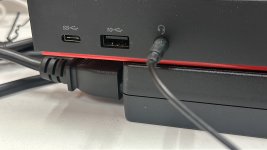
My laptop has USB-C header. It comes with those usual charging port with a power brick cable. How do I know if I can charge the laptop using the USB-C headed? If I just pluck a usb-pd into that USB-C port, will I damage the port?

Lchlch
Honorary Member
- Joined
- Jul 8, 2021
- Messages
- 130,213
- Reaction score
- 115,535
One for android charger, the other iPhone?
1982-1994
Great Supremacy Member
- Joined
- Oct 10, 2016
- Messages
- 59,903
- Reaction score
- 29,501
My replies came from GoogleMy laptop has USB-C header. It comes with those usual charging port with a power brick cable. How do I know if I can charge the laptop using the USB-C headed? If I just pluck a usb-pd into that USB-C port, will I damage the port?
But I really no idea for your questions ,soli
The boss has a cable with a lightning ⚡️ logo on it so confusing? 🫤

Seeing you are using a Thinkpad,
Shall I also add Thunderbolt 3/4 too?
That's Thunderbolt...externally same form factor as USB 3.0..
Most macbook and newer thinkpads have it.
coyote
Greater Supremacy Member
- Joined
- Sep 20, 2000
- Messages
- 76,825
- Reaction score
- 24,386
My replies came from Google
But I really no idea for your questions ,soli
It's ok. Thanks.

xdivider
Great Supremacy Member
- Joined
- Nov 8, 2000
- Messages
- 55,034
- Reaction score
- 15,729
normally those supporting pd will be supplied with pd power brick. at least mine does........My laptop has USB-C header. It comes with those usual charging port with a power brick cable. How do I know if I can charge the laptop using the USB-C headed? If I just pluck a usb-pd into that USB-C port, will I damage the port?
Important Forum Advisory Note
This forum is moderated by volunteer moderators who will react only to members' feedback on posts. Moderators are not employees or representatives of HWZ. Forum members and moderators are responsible for their own posts.
Please refer to our Community Guidelines and Standards, Terms of Service and Member T&Cs for more information.
Please refer to our Community Guidelines and Standards, Terms of Service and Member T&Cs for more information.
