
You are using an out of date browser. It may not display this or other websites correctly.
You should upgrade or use an alternative browser.
You should upgrade or use an alternative browser.
What is this display port?
- Thread starter killerlot
- Start date
More options
Who Replied?


technoglitz87
Senior Member
- Joined
- Nov 28, 2005
- Messages
- 2,389
- Reaction score
- 0
That's the full sized displayport, adapters to hdmi are widely available.
Diff from the mini displayport u see in macs
Diff from the mini displayport u see in macs
U can google for d spec in d web.... wat card u using
Remember seeing triangular vents on some gtx 980/ti or titan x/z...

killerlot
Senior Member
- Joined
- Oct 16, 2004
- Messages
- 973
- Reaction score
- 0
U can google for d spec in d web.... wat card u using
Its a GTX980, just upgraded it so the port is new to me. Just release my old monitor does not support the port. Guess i have to upgrade my monitor too

killerlot
Senior Member
- Joined
- Oct 16, 2004
- Messages
- 973
- Reaction score
- 0
Ppl already posted above. DVI > HDMI or DP > HDMI. Can just get adapter, unless you just want new monitors, then buy buy buy

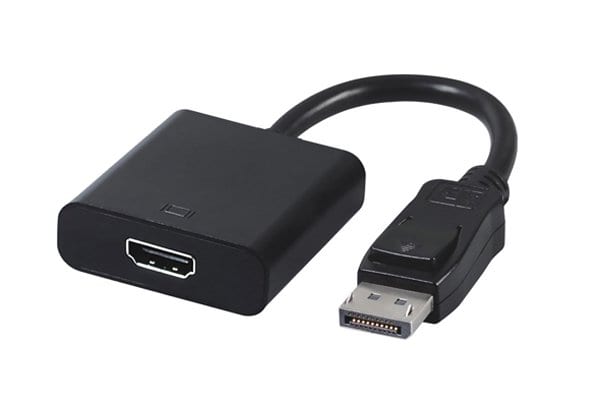
Very confusing, went to the shop. The guy tell me want passive or active adapter? He explain a whole bunch of stuff which i don't understand and i heck it just get active one... of course more expensive...

dreadknight
Supremacy Member
- Joined
- Jul 11, 2009
- Messages
- 5,924
- Reaction score
- 226
Sorry to hijack Abit.
From what I gleaned from the Internet,
I was thinking of setting up a triple monitor setup.
my msi gtx 970 has 2 dvi, 1 Display port and 1 hdmi
But I read some people say that the hdmi and the dvi are sort of tied together...and I have to use the display port for triple monitors
Is it really true that I have to use such a configuration?
And I read some video card needs an active display port signal which is why people get active adapters, to sort of do a digital handshake
Sent from Sent from Dark Matter Universe using Human souls using GAGT
From what I gleaned from the Internet,
I was thinking of setting up a triple monitor setup.
my msi gtx 970 has 2 dvi, 1 Display port and 1 hdmi
But I read some people say that the hdmi and the dvi are sort of tied together...and I have to use the display port for triple monitors
Is it really true that I have to use such a configuration?
And I read some video card needs an active display port signal which is why people get active adapters, to sort of do a digital handshake
Sent from Sent from Dark Matter Universe using Human souls using GAGT
Sorry to hijack Abit.
From what I gleaned from the Internet,
I was thinking of setting up a triple monitor setup.
my msi gtx 970 has 2 dvi, 1 Display port and 1 hdmi
But I read some people say that the hdmi and the dvi are sort of tied together...and I have to use the display port for triple monitors
Is it really true that I have to use such a configuration?
And I read some video card needs an active display port signal which is why people get active adapters, to sort of do a digital handshake
Sent from Sent from Dark Matter Universe using Human souls using GAGT
What's the exact model? RTFM, the answer confirm in there...
dreadknight
Supremacy Member
- Joined
- Jul 11, 2009
- Messages
- 5,924
- Reaction score
- 226
The gaming 4G ver
But as I don't have access to a pc for now and I can't browse sites without my phone browser crashing every 10 mins,
my ability to find proper info is seriously hampered
Sent from Sent from Dark Matter Universe using Human souls using GAGT
But as I don't have access to a pc for now and I can't browse sites without my phone browser crashing every 10 mins,
my ability to find proper info is seriously hampered
What's the exact model? RTFM, the answer confirm in there...
Sent from Sent from Dark Matter Universe using Human souls using GAGT
killerlot
Senior Member
- Joined
- Oct 16, 2004
- Messages
- 973
- Reaction score
- 0
Sorry to hijack Abit.
From what I gleaned from the Internet,
I was thinking of setting up a triple monitor setup.
my msi gtx 970 has 2 dvi, 1 Display port and 1 hdmi
But I read some people say that the hdmi and the dvi are sort of tied together...and I have to use the display port for triple monitors
Is it really true that I have to use such a configuration?
And I read some video card needs an active display port signal which is why people get active adapters, to sort of do a digital handshake
Sent from Sent from Dark Matter Universe using Human souls using GAGT
From what i heard from the shop guy, anything more than 2 monitor and in your case 3 monitor you should go for active adapters if not it will not work. Hope it helps.

avsquare
Arch-Supremacy Member
- Joined
- Oct 27, 2011
- Messages
- 11,314
- Reaction score
- 42
my msi gtx 970 has 2 dvi, 1 Display port and 1 hdmi
But I read some people say that the hdmi and the dvi are sort of tied together...and I have to use the display port for triple monitors
Is it really true that I have to use such a configuration?
Yes that is correct.
I am running Display port + 1 HDMI + 1 DVI
dreadknight
Supremacy Member
- Joined
- Jul 11, 2009
- Messages
- 5,924
- Reaction score
- 226
Yes that is correct.
I am running Display port + 1 HDMI + 1 DVI
From what i heard from the shop guy, anything more than 2 monitor and in your case 3 monitor you should go for active adapters if not it will not work. Hope it helps.
Thanks for the confirmation...
Got 2 more months before I get my house, so I'll keep a look out for a DP monitor...
Else the adapter is always an option
Sent from Sent from Dark Matter Universe using Human souls using GAGT
avsquare
Arch-Supremacy Member
- Joined
- Oct 27, 2011
- Messages
- 11,314
- Reaction score
- 42
Thanks for the confirmation...
Got 2 more months before I get my house, so I'll keep a look out for a DP monitor...
Else the adapter is always an option
Sent from Sent from Dark Matter Universe using Human souls using GAGT
I think this is pertaining to nvidia cards only or something.
I remember back then my R9 290 I also 3 monitor but I did not have to use DP. Was running 2 DVI and 1 HDMI I think.
my msi gtx 970 has 2 dvi, 1 Display port and 1 hdmi
But I read some people say that the hdmi and the dvi are sort of tied together...and I have to use the display port for triple monitors
Is it really true that I have to use such a configuration?
I've been trying to read up on this. Still not 100% sure, but I'm reading some stuff that seems to suggest that this was a requirement for older cards. It does seem like it may not be required for the newer cards? Reading comments on various forums that they don't need to use the dp for a tri-monitor setup, and if they do, active adapters are not required?
Nvidia Surround Configuration Tool states that "Any connectors can be used to enable Surround".

http://www.geforce.com//hardware/technology/surround/system-requirements
----------------------------------------
Ummm nvidia doesnt require you to use the displayport, just AMD. ( I switched and my active adapter is unused now)
Running 2x dvi and 1x hdmi connection just fine for triple screen
https://www.reddit.com/r/gamingpc/comments/2pznr2/nvidia_surround_question/
Nvidia does not require the use of active adapters to enable NV Surround. It doesn't matter what port you have your monitors plugged into.
https://www.reddit.com/r/nvidia/comments/3v1mns/nvidia_surround_3_monitors_dvivga_on_gtx_980_ti/
*A passive adapter is the most basic type of adapter that can purchased. A passive DisplayPort adapter merely allows the GPU to communicate with a “language” that can be understood by the attached monitor, which has a differing connector.
As an example, using a passive adapter to connect a DVI monitor to a GPU’s DisplayPort connection will essentially cause that DisplayPort output to communicate with the “language” of DVI. As far as the GPU is concerned, it does not have a DisplayPort monitor connected, and therefore cannot leverage the benefits that DisplayPort enables (e.g. AMD Eyefinity technology).
In contrast, active adapters will actively translate the DVI signal coming from the monitor into a native DisplayPort signal for the GPU (and vice versa). A native DisplayPort signal is required for AMD Eyefinity because DisplayPort signals can be synchronized by the GPU to keep all of your monitors moving in concert.
This DisplayPort signal can also be synchronized with DVI and HDMI signals, but only two of these signals may be utilized on an AMD Radeon™ GPU. This is why AMD Eyefinity technology requires a native DisplayPort signal for the third (or higher) monitor.
http://support.amd.com/en-us/search/faq/162
dreadknight
Supremacy Member
- Joined
- Jul 11, 2009
- Messages
- 5,924
- Reaction score
- 226
I've been trying to read up on this. Still not 100% sure, but I'm reading some stuff that seems to suggest that this was a requirement for older cards. It does seem like it may not be required for the newer cards? Reading comments on various forums that they don't need to use the dp for a tri-monitor setup, and if they do, active adapters are not required?
Nvidia Surround Configuration Tool states that "Any connectors can be used to enable Surround".
http://www.geforce.com//hardware/technology/surround/system-requirements
----------------------------------------
Noted, and once I'm done moving,
I'm buying a third monitor without a display port.
I have hdmi cables... I'll try using 2x dvi and 1 hdmi
If doesn't work, I'll just buy an active DP adapter...
Sent from Sent from Dark Matter Universe using Human souls using GAGT
Important Forum Advisory Note
This forum is moderated by volunteer moderators who will react only to members' feedback on posts. Moderators are not employees or representatives of HWZ Forums. Forum members and moderators are responsible for their own posts.
Please refer to our Community Guidelines and Standards and Terms and Conditions for more information.
