What is wrong with my rig

zenitro

Member
Joined
Nov 6, 2013
Messages
153
Reaction score
1
Hi all,
I was wondering if anyone have encounter this issue or know how to fix this issue that is currently plaguing me .

Issue:
When I switch on my computer there is several thing that I take note of.
1) fan start spinning for around 1-5 sec and switch off
2) ~2 sec later, fan start spinning again and switch off
3) this will continue forever until I switch off the main switch
4) throughout the whole time, there is nothing appearing on my monitor
5) No particular sound was emitted from my motherboard. All it do is keep booting up and switching off
6) if I were to describe the entire process, it is like a car engine that keep failing to start

What I do:
1) I RMA my motherboard (work for a few weeks and issue pop out again)
2) I RMA my PSU
3) I tried different ram
4) i remove GPU card


My build :

Zotac gtx1050 (Brought 3 mth ago)
2 x 8gb DDR3 ram (3 yrs ago)
super flower leadex silver 550w (recently rma)
harddrive 1TB (3 yrs ago - dont think need to change)

Motherboard - Asrock B75M (recently rma - but I think it is this part that is spoiled)
Processor - Intel i5 3470 ( got to check )

Anyone with knowledge please assist
 

kracie17

Member
Joined
Oct 19, 2017
Messages
268
Reaction score
1
Hi all,
I was wondering if anyone have encounter this issue or know how to fix this issue that is currently plaguing me .

Issue:
When I switch on my computer there is several thing that I take note of.
1) fan start spinning for around 1-5 sec and switch off
2) ~2 sec later, fan start spinning again and switch off
3) this will continue forever until I switch off the main switch
4) throughout the whole time, there is nothing appearing on my monitor
5) No particular sound was emitted from my motherboard. All it do is keep booting up and switching off
6) if I were to describe the entire process, it is like a car engine that keep failing to start

What I do:
1) I RMA my motherboard (work for a few weeks and issue pop out again)
2) I RMA my PSU
3) I tried different ram
4) i remove GPU card


My build :

Zotac gtx1050 (Brought 3 mth ago)
2 x 8gb DDR3 ram (3 yrs ago)
super flower leadex silver 550w (recently rma)
harddrive 1TB (3 yrs ago - dont think need to change)

Motherboard - Asrock B75M (recently rma - but I think it is this part that is spoiled)
Processor - Intel i5 3470 ( got to check )

Anyone with knowledge please assist

You can try with using one stick of ram to see if it works. Also, try unplugging your harddrive to do the test..
 

spiky0180

Senior Member
Joined
Jul 16, 2009
Messages
539
Reaction score
0
Should be your asrock motherboard. When my asrock mobo died also the same symptom. On and off in a loop.
 

gs

Master Member
Joined
Jun 5, 2003
Messages
3,541
Reaction score
0
this issues could be ram/board/psu

buy a ink rubber..and clean the contacts of the ram and u try..if still same den is board/psu

b75m asrock always have this issue as well.
 

gs

Master Member
Joined
Jun 5, 2003
Messages
3,541
Reaction score
0
can spent some $$ getting a h61 from the forums or from sls..as this would be the onli board still able to get to support ur cpu/rams and stuff
 

jayz89

Supremacy Member
Joined
Dec 21, 2009
Messages
5,995
Reaction score
285
shldbe mobo

mine too previously.

11.11 coming

time to upgrade.
 

undead102

Senior Member
Joined
Apr 20, 2006
Messages
1,173
Reaction score
0
Bro its most likely your asrock b75 pro3m board faulty. This sort of symptoms always plague the asrock b75 board one. Also had asrock b75m uplorry with similar symptoms also. Hopefully still can find h61 board replacement because current gen ddr4 ram super expensive so best to stick with your intel 3rd gen system.
 

gld998

High Supremacy Member
Joined
Feb 21, 2008
Messages
38,410
Reaction score
2,330
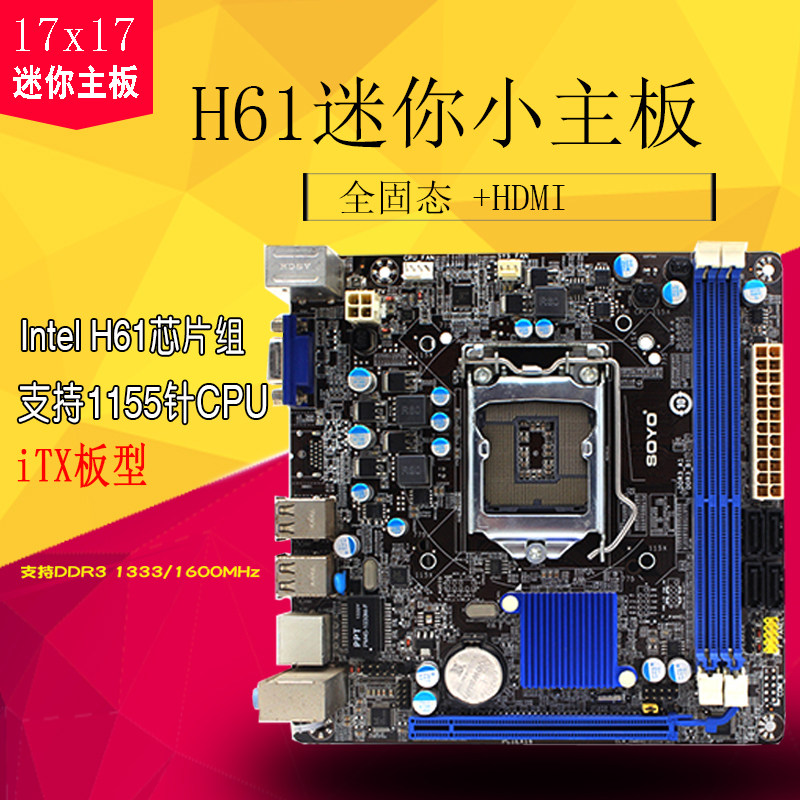
TB2o4NjdzihSKJjy0FeXXbJtpXa_!!2646041583.jpg


hooted over the weekend.. only 25 nia. time to convert to itx form? Anyway just a suggestion. If this board is good moi plan to hoot a few more. Time for small small foot print pc.

https://item.taobao.com/item.htm?id=558171533773&_ezgpid=51000122933082
 

undead102

Senior Member
Joined
Apr 20, 2006
Messages
1,173
Reaction score
0
Woah this board from taobao does it comes with warranty if arrive dead on arrival? Might be interested to buy 1 for my old intel i5 3470 that is homeless and is in need of a new home.
 

gld998

High Supremacy Member
Joined
Feb 21, 2008
Messages
38,410
Reaction score
2,330
Woah this board from taobao does it comes with warranty if arrive dead on arrival? Might be interested to buy 1 for my old intel i5 3470 that is homeless and is in need of a new home.

Dunno le.. I bought a few already, so far ok but not this model.. Warranty is dont have for sure.. but a board at only $25, even at marketplace also cannot find. Those ****rkia selling 2nd hand stuff like gold.
 

craz03

Senior Member
Joined
Jan 18, 2001
Messages
1,829
Reaction score
2
Hi all,
I was wondering if anyone have encounter this issue or know how to fix this issue that is currently plaguing me .

Issue:
When I switch on my computer there is several thing that I take note of.
1) fan start spinning for around 1-5 sec and switch off
2) ~2 sec later, fan start spinning again and switch off
3) this will continue forever until I switch off the main switch
4) throughout the whole time, there is nothing appearing on my monitor
5) No particular sound was emitted from my motherboard. All it do is keep booting up and switching off
6) if I were to describe the entire process, it is like a car engine that keep failing to start

What I do:
1) I RMA my motherboard (work for a few weeks and issue pop out again)
2) I RMA my PSU
3) I tried different ram
4) i remove GPU card


My build :

Zotac gtx1050 (Brought 3 mth ago)
2 x 8gb DDR3 ram (3 yrs ago)
super flower leadex silver 550w (recently rma)
harddrive 1TB (3 yrs ago - dont think need to change)

Motherboard - Asrock B75M (recently rma - but I think it is this part that is spoiled)
Processor - Intel i5 3470 ( got to check )

Anyone with knowledge please assist

does this problem appear after u rma n usage for a while or direct after rma u install n this problem appears?

1) remove ur cpu n check the cpu pins on the mobo see if any pins are bent or missing

2) check the power n reset switches connectors on the mobo

3) check if ur rams are inserted fully.. if is.. den trying cleaning the contacts on the ram with a rubber before slotting back in... ( try 1 pc ram first)

4) did u plug both the psu connector pins onto the mobo?

frm my experience shouldnt have a ram prob coz ram prob normally will emit sounds...

i had a similar experience exactly like urs but is becoz i hand itchy take in n out the cpu chip until 2 pins on the mobo bent n had to rma asrock mb..

seems like asrock mobos has alot of problems.
 

zenitro

Member
Joined
Nov 6, 2013
Messages
153
Reaction score
1
does this problem appear after u rma n usage for a while or direct after rma u install n this problem appears?

1) remove ur cpu n check the cpu pins on the mobo see if any pins are bent or missing

2) check the power n reset switches connectors on the mobo

3) check if ur rams are inserted fully.. if is.. den trying cleaning the contacts on the ram with a rubber before slotting back in... ( try 1 pc ram first)

4) did u plug both the psu connector pins onto the mobo?

frm my experience shouldnt have a ram prob coz ram prob normally will emit sounds...

i had a similar experience exactly like urs but is becoz i hand itchy take in n out the cpu chip until 2 pins on the mobo bent n had to rma asrock mb..

seems like asrock mobos has alot of problems.

This issue actually happen before any RMA. It happen out of the blue.

At the beginning, this issue only plague me once a month or so. Normally resitting the ram will solve the issue.

After around half a year, issue got worse, I have to play around with the ram slot(multiple attempt) to get it to work.

Another half a year later, no matter how I play with the ram slot, I cant boot it up again.

1)I will check the pin again later at night (probably not the issue because i am very gently with the processor)

2) Yes, it is all in

3)i will use the rubber later, is eraser ok?

4) Yes
 

zenitro

Member
Joined
Nov 6, 2013
Messages
153
Reaction score
1

james91lim

Junior Member
Joined
Oct 26, 2017
Messages
5
Reaction score
0
you should take out the pieces one by one and try turning your CPU on and off. If you take out (example ram, turn on your cpu and it works, but put the ram back and cpu doesnt start up, than you know its the ram problem)
 

zenitro

Member
Joined
Nov 6, 2013
Messages
153
Reaction score
1
Its been a month and the motherboard is finally here.
Move everything over and test it out.

And
.
.
.
.
.

same thing happen all over again without even booting up once

I am now running out of idea.
- I have tried different ram
- I have a new GPU
- I have RMA my motherboard (and get a china one)
- I have RMA my PSU
- I have try replacing the battery in the motherboard

Nothing seems to work

the only thing that i have not replace or do not have the replacment for are the CPU and harddrive.

Anyone have more ideas?
 

Red_herring

Senior Member
Joined
Jan 1, 2000
Messages
1,972
Reaction score
20
try taking out everything and boot it outside your casing. It may be something in your case shorting it
 

d5dude

Arch-Supremacy Member
Joined
Nov 30, 2006
Messages
14,238
Reaction score
5,629
Can you get to bios if you only plug in cpu, ram and psu? If cannot then most likely is cpu problem since you already replaced mobo, ram and psu.
 

zenitro

Member
Joined
Nov 6, 2013
Messages
153
Reaction score
1
Can you get to bios if you only plug in cpu, ram and psu? If cannot then most likely is cpu problem since you already replaced mobo, ram and psu.

yes I cannot get to anything.
However, is the following issue that i discuss a common malfunction for the CPU?
 
Important Forum Advisory Note
This forum is moderated by volunteer moderators who will react only to members' feedback on posts. Moderators are not employees or representatives of HWZ Forums. Forum members and moderators are responsible for their own posts. Please refer to our Community Guidelines and Standards and Terms and Conditions for more information.
Top