
Hello. I am checking event logs from 23.10.2018 and have spam of WHEA-LOGGER 19 entries, each every 1 minute,when system is idling or i am just in windows/desktop.
When i run all stress tests and benches and games like Assassin Creed, Far Cry 5,etc,all heavy for cpu and system....no whea in events. But when i am idling or doing something in windows or idling its logging in events. System is smooth and no crashing or data corruption.
Is this reason to worry? My actually Windows 10 is 1803.
Ah and i remember i had them too on 21.01 january but they dissapeared after 21.01 january.
On january 21.01 , Windows 10 1709 build 16299.15 it was.
But now they appeared again after few months. I must say that i was little surprised that i saw them again after few months especially on idle .
Windows 10 1803 actually.
A spam of:
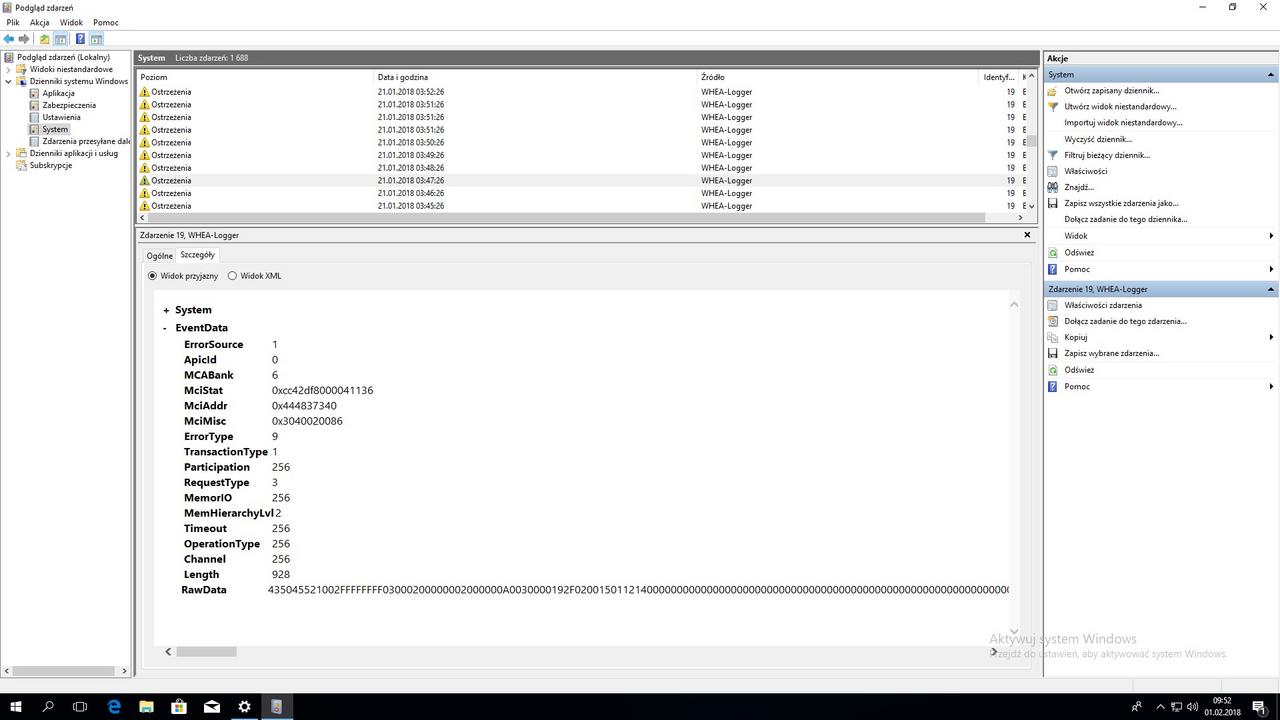
WHEA Event ID 19 CPU-corrected hw error
A corrected hardware error has occurred.
Reported by component: Processor Core
Error Source: Corrected Machine Check
Error Type: Cache Hierarchy Error
Screens are from january 21.01 but this is the same of course warning whea entry:
My pc:
8700K ( MCE is on , always was on 4700mhz )
2x8GB DDR4 3000MHZ GSKILL
Corsair 750rmi
Asus Z370 Pro Gaming ( bios old from august 2017 )
Gtx 2080 Ti Gigabyte Windforce ( actually ). On january i had Aorus 1080 ti.
1xssd , 1xHdd
Dont have any crashing,no freezing,no bsods,scores are fine etc.
In 15.10 october i add only new GPU Rtx 2080 Ti , before was 1080 Ti. Coincidence? Anyway no problems with card,no issues etc.
So question. ANyway is this reason to worry or skip it if they stop it again?
Maybe something with voltage or something ( reading reddit ) but they appeared when system was idling ( not gaming ) and i was away from pc.
All drivers installed. Gpu drivers 411.70
Thanks
ps:No errors in ihc memtest i checked in past .
When i run all stress tests and benches and games like Assassin Creed, Far Cry 5,etc,all heavy for cpu and system....no whea in events. But when i am idling or doing something in windows or idling its logging in events. System is smooth and no crashing or data corruption.
Is this reason to worry? My actually Windows 10 is 1803.
Ah and i remember i had them too on 21.01 january but they dissapeared after 21.01 january.
On january 21.01 , Windows 10 1709 build 16299.15 it was.
But now they appeared again after few months. I must say that i was little surprised that i saw them again after few months especially on idle .
Windows 10 1803 actually.
A spam of:
WHEA Event ID 19 CPU-corrected hw error
A corrected hardware error has occurred.
Reported by component: Processor Core
Error Source: Corrected Machine Check
Error Type: Cache Hierarchy Error
Screens are from january 21.01 but this is the same of course warning whea entry:
My pc:
8700K ( MCE is on , always was on 4700mhz )
2x8GB DDR4 3000MHZ GSKILL
Corsair 750rmi
Asus Z370 Pro Gaming ( bios old from august 2017 )
Gtx 2080 Ti Gigabyte Windforce ( actually ). On january i had Aorus 1080 ti.
1xssd , 1xHdd
Dont have any crashing,no freezing,no bsods,scores are fine etc.
In 15.10 october i add only new GPU Rtx 2080 Ti , before was 1080 Ti. Coincidence? Anyway no problems with card,no issues etc.
So question. ANyway is this reason to worry or skip it if they stop it again?
Maybe something with voltage or something ( reading reddit ) but they appeared when system was idling ( not gaming ) and i was away from pc.
All drivers installed. Gpu drivers 411.70
Thanks
ps:No errors in ihc memtest i checked in past .
Last edited:


