Which NAS to choose?

putrasocool

Member
Joined
Jul 22, 2013
Messages
391
Reaction score
1
Hi.

I am currently using a D-Link DNS340-L. It came as an empty enclosure. I bought a drive and insert it. Not really an advance user here.
I made a decision to buy a NAS as i don't wanna deal with monthly or yearly subscription which every cloud storage does.

Get back to the topic, my NAS is just hard to use. I want a NAS that is user friendly(coz I am such a noob), can be accessed on other network from far far away(I think they called it remote access) and basically thats it.

I am an amateur video editor so I frequently need to share big files to my teammates and they also need to transfer big files(sometimes up to 500-600GB)

I know there is 2 types:
1. Built in disk
2. Without disk.

The thing is, I will consider buying an enclosure only if the price is SGD200-300. I saw some that like SGD800. What is the point? Can somebody explain.

I hope I can buy one NAS that is not highly price, big in capacity, user friendly and able to access it anywhere(not only by the admin, but also other people from other places)

Also my current NAS only allow 2GB data upload and download which is pointless to me. I need something that can download and upload big files.

Lastly, I am using a MAC as my main workstation, so it must be compatible with MAC and all features must also work with MAC.

Thanks for your help
Haiqal
 
Last edited:

ZrE0_Cha0s

Arch-Supremacy Member
Joined
Jun 21, 2011
Messages
16,703
Reaction score
26
Hi.

I am currently using a D-Link DNS340-L. It came as an empty enclosure. I bought a drive and insert it. Not really an advance user here.
I made a decision to buy a NAS as i don't wanna deal with monthly or yearly subscription which every cloud storage does.

so once u insert the drive and whats the issues?

Get back to the topic, my NAS is just hard to use. I want a NAS that is user friendly(coz I am such a noob), can be accessed on other network from far far away(I think they called it remote access) and basically thats it.

Well i think maybe u might want QNAP or Synology?

I am an amateur video editor so I frequently need to share big files to my teammates and they also need to transfer big files(sometimes up to 500-600GB)

I know there is 2 types:
1. Built in disk
2. Without disk.


The thing is, I will consider buying an enclosure only if the price is SGD200-300. I saw some that like SGD800. What is the point? Can somebody explain.

As for the $800, do u have the brands and model number? but are u sure its only an enclosure with no disk included?

I hope I can buy one NAS that is not highly price, big in capacity, user friendly and able to access it anywhere(not only by the admin, but also other people from other places)

Also my current NAS only allow 2GB data upload and download which is pointless to me. I need something that can download and upload big files.

Lastly, I am using a MAC as my main workstation, so it must be compatible with MAC and all features must also work with MAC.

Thanks for your help
Haiqal

So right now what's the budget you looking at? Beside that some offer together with HDD to give a bit further discount too (u can called it bundle deals). Or u still wanna just get an enclosure?
As well as do u need a lot of HDD bay? or more connectivity(dual lan port)? Max storage space (32TB)?

more help : http://forums.hardwarezone.com.sg/hardware-clinic-2/[nas]-synology-nas-owner-club-4133906.html
 
Last edited:

putrasocool

Member
Joined
Jul 22, 2013
Messages
391
Reaction score
1
so once u insert the drive and whats the issues?


There is no issue. I just state there for info.


Well i think maybe u might want QNAP or Synology?


I might consider. Do you have any specific model?


As for the $800, do u have the brands and model number? but are u sure its only an enclosure with no disk included?


example:
Synology DS1515 (0TB) (Black)


So right now what's the budget you looking at? Beside that some offer together with HDD to give a bit further discount too (u can called it bundle deals). Or u still wanna just get an enclosure?
As well as do u need a lot of HDD bay? or more connectivity(dual lan port)? Max storage space (32TB)?

my budget total is maybe SGD600-700. I dont mind with or without disk as both have pros and cons. Bundle or just enclosure, still can't make my mind up but i can consider either.
Dual LAN port from what i know its for speed. I dont really mind about speed. As long as it can transfer files and store, thats it. It would be a plus to have such features.

Thanks btw
 

tremor

High Supremacy Member
Joined
Jan 20, 2001
Messages
37,581
Reaction score
1,257
Synology for sure, so easy to set up. Everything u need to access from outside your network is out of the box.
 

batniss

Arch-Supremacy Member
Joined
Nov 23, 2015
Messages
16,609
Reaction score
577
Any specific model? Thinking to buy one during this IT season...:s12::s12:

Wait for PCShow2016 brochures.

Apart from that with the budget, i will recommend 4Bay drives

But again, synology usually doesnt come with disks unless vendor decide to sell it with it.

You are better off getting them separately. Cheaper in that way.

User friendly wise, synology UI is the best out there. Difficult for you to be wrong.

Those inbuilt hdd nas are usually inferior in many levels as compared to Synology (imo)
 
Last edited:

batniss

Arch-Supremacy Member
Joined
Nov 23, 2015
Messages
16,609
Reaction score
577
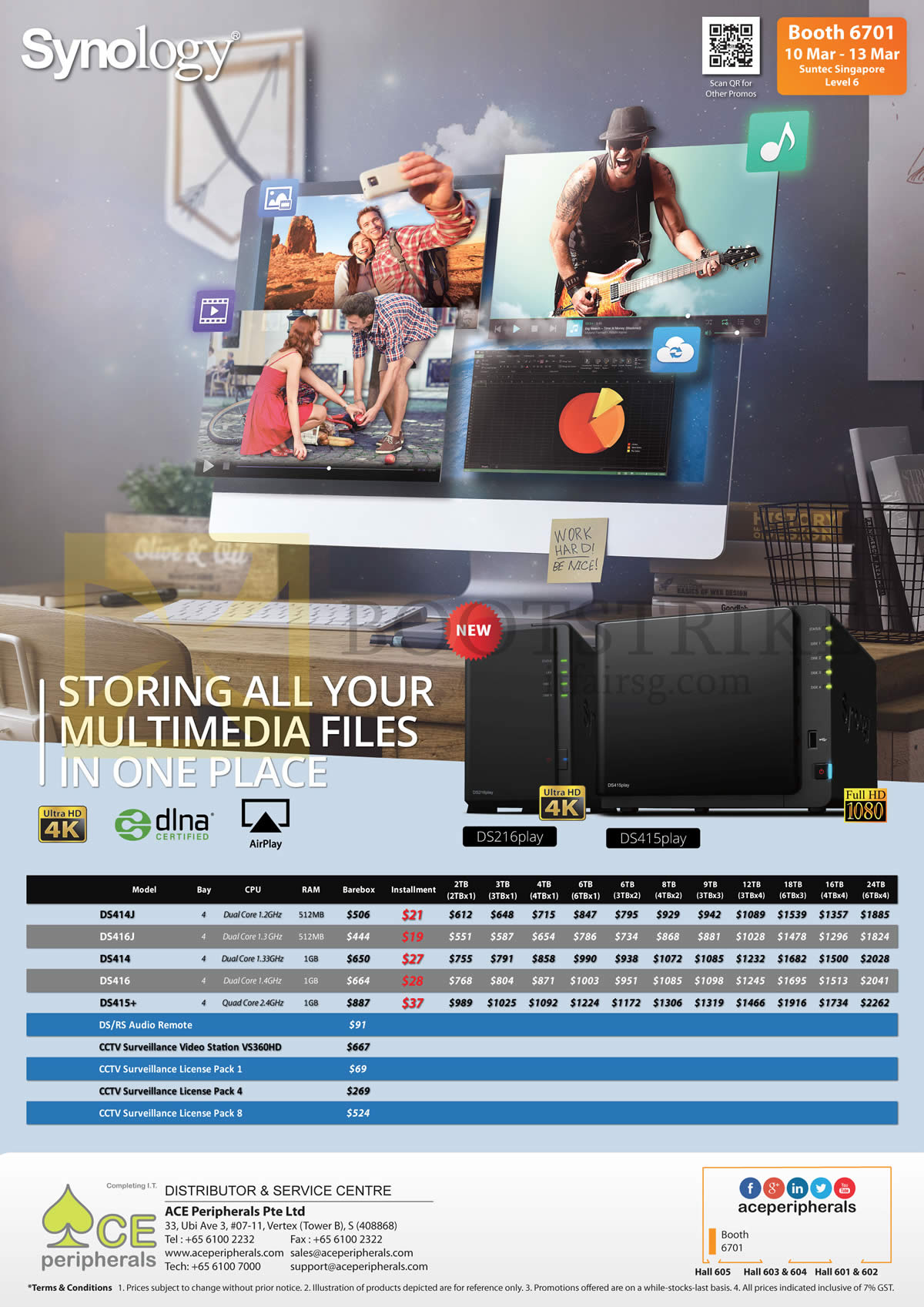
U can use this from itshow2016 as a guide

Ace%20Peripherals%20Synology%20NAS%20DS416slim%20DS414J%20DS414j%20DS414%20DS416%20DS415play%20DS415Plus%20CCTV%20License.jpg
 

fute22

Senior Member
Joined
Jan 1, 2000
Messages
514
Reaction score
2
Another way if you have asus router is connect a external hdd and activate aicloud
 

hikarirayzone

Junior Member
Joined
Apr 23, 2011
Messages
36
Reaction score
0
Any specific model? Thinking to buy one during this IT season...:s12::s12:

You will first need to specify how much space you need. Different NAS enclosures are priced differently because of different features. Some offer different RAID storage options for file security[File mirroring, encryption, HDD hotswap functions], business use, processor and RAM differences etc. That explains why the DS1515 you quoted costs SGD800.

Like the DS216play. It is a 2 bay media centred NAS that can support up to 16 TB on RAID 0, or up to 8 TB on RAID 1. It costs approx SGD 362 without the HDDs. If you need more space you can also look at the DS416 at approx SGD 650 for a 4 bay for up to 32 TB on RAID 0, or up to 16 TB on RAID 1.

I understand that your budget is SGD 600 - 700. You can take a look at this. Note all are without HDDs, which you will need to account to the costs when buying.
 

putrasocool

Member
Joined
Jul 22, 2013
Messages
391
Reaction score
1
Wait for PCShow2016 brochures.

Apart from that with the budget, i will recommend 4Bay drives

But again, synology usually doesnt come with disks unless vendor decide to sell it with it.

You are better off getting them separately. Cheaper in that way.

User friendly wise, synology UI is the best out there. Difficult for you to be wrong.

Those inbuilt hdd nas are usually inferior in many levels as compared to Synology (imo)

Thanks for helping. Appreciate it
 

putrasocool

Member
Joined
Jul 22, 2013
Messages
391
Reaction score
1
Another way if you have asus router is connect a external hdd and activate aicloud

I am using an ASUS router. Didnt know that it has such feature. No upload or download threshold? as that is the main thing i don't want.

Thanks for your help.
 

putrasocool

Member
Joined
Jul 22, 2013
Messages
391
Reaction score
1
You will first need to specify how much space you need. Different NAS enclosures are priced differently because of different features. Some offer different RAID storage options for file security[File mirroring, encryption, HDD hotswap functions], business use, processor and RAM differences etc. That explains why the DS1515 you quoted costs SGD800.

Like the DS216play. It is a 2 bay media centred NAS that can support up to 16 TB on RAID 0, or up to 8 TB on RAID 1. It costs approx SGD 362 without the HDDs. If you need more space you can also look at the DS416 at approx SGD 650 for a 4 bay for up to 32 TB on RAID 0, or up to 16 TB on RAID 1.

I understand that your budget is SGD 600 - 700. You can take a look at this. Note all are without HDDs, which you will need to account to the costs when buying.

Space wise, I need at least more than 3TB.
RAID functions and others like RAM and processor don't need to be so high end as I dont really need that power. Just need to do basic Large file upload and download.

For enclosure wise, its hard for me to spend SGD300 over for just it. I mean MyCloud by WD has already built in drives and might cost less ( which I think is worth it and its a steal)

2-Bay is also fine for me as my budget is just a bit too tight. I want something not too advance. Lowest range and mi range probably the best choice for me.

Other recommendations?
 

putrasocool

Member
Joined
Jul 22, 2013
Messages
391
Reaction score
1
Wait for PCShow2016 brochures.

Apart from that with the budget, i will recommend 4Bay drives

But again, synology usually doesnt come with disks unless vendor decide to sell it with it.

You are better off getting them separately. Cheaper in that way.

User friendly wise, synology UI is the best out there. Difficult for you to be wrong.

Those inbuilt hdd nas are usually inferior in many levels as compared to Synology (imo)

What do you think about SYNOLOGY DS216se and DS214se? What the difference?
 

batniss

Arch-Supremacy Member
Joined
Nov 23, 2015
Messages
16,609
Reaction score
577
What do you think about SYNOLOGY DS216se and DS214se? What the difference?

Didnt know you only need 3TB of space.

In that case;

DS216se is 2016 model
DS214se is 2014 model

SE are considered low-entry NAS. Don't expect too much out of it.

it will serve as a decent file storage media with some multimedia capability.
 

batniss

Arch-Supremacy Member
Joined
Nov 23, 2015
Messages
16,609
Reaction score
577
powerful NAS usually are designed for higher work rate (same principle applies to why some people pay for i7 and some could work with i3)

It depends on what your requirements are.

if you are looking for budget NAS, I will recommend the Synology J over the SE series
 

tremor

High Supremacy Member
Joined
Jan 20, 2001
Messages
37,581
Reaction score
1,257
I'm using DS416J, i strongly suggest go with 4 bay, you won't lose your stuffs so easily if something goes wrong and crashed.
 

koroshiya8

High Supremacy Member
Joined
Feb 12, 2005
Messages
37,713
Reaction score
542
Support for Synology too. from 2 bay to now 4 bay. Been using it for many purpose from storage to media streaming to linking to my Dlink IP Camera recording storage...
 

terry1

Senior Member
Joined
Nov 22, 2005
Messages
565
Reaction score
1
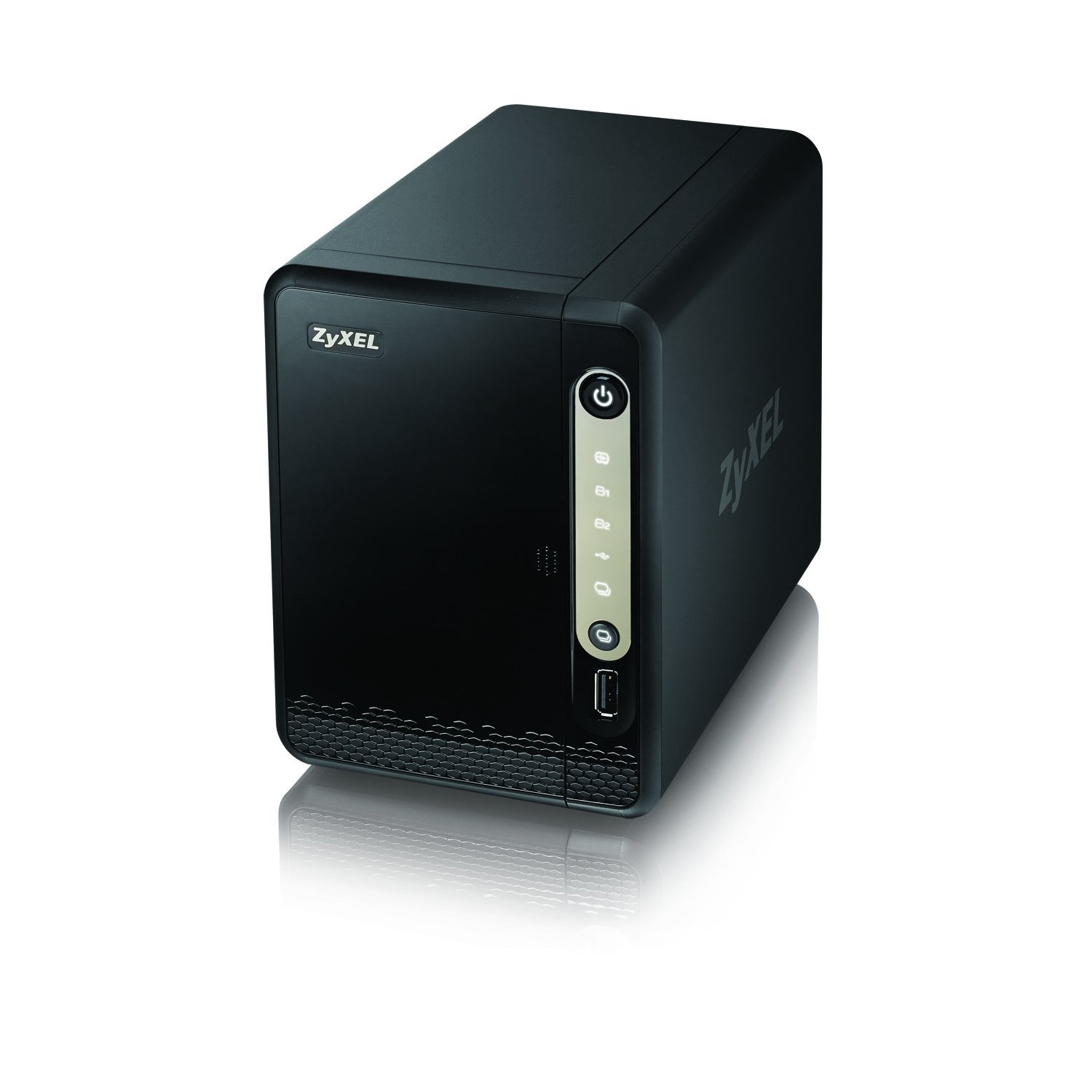
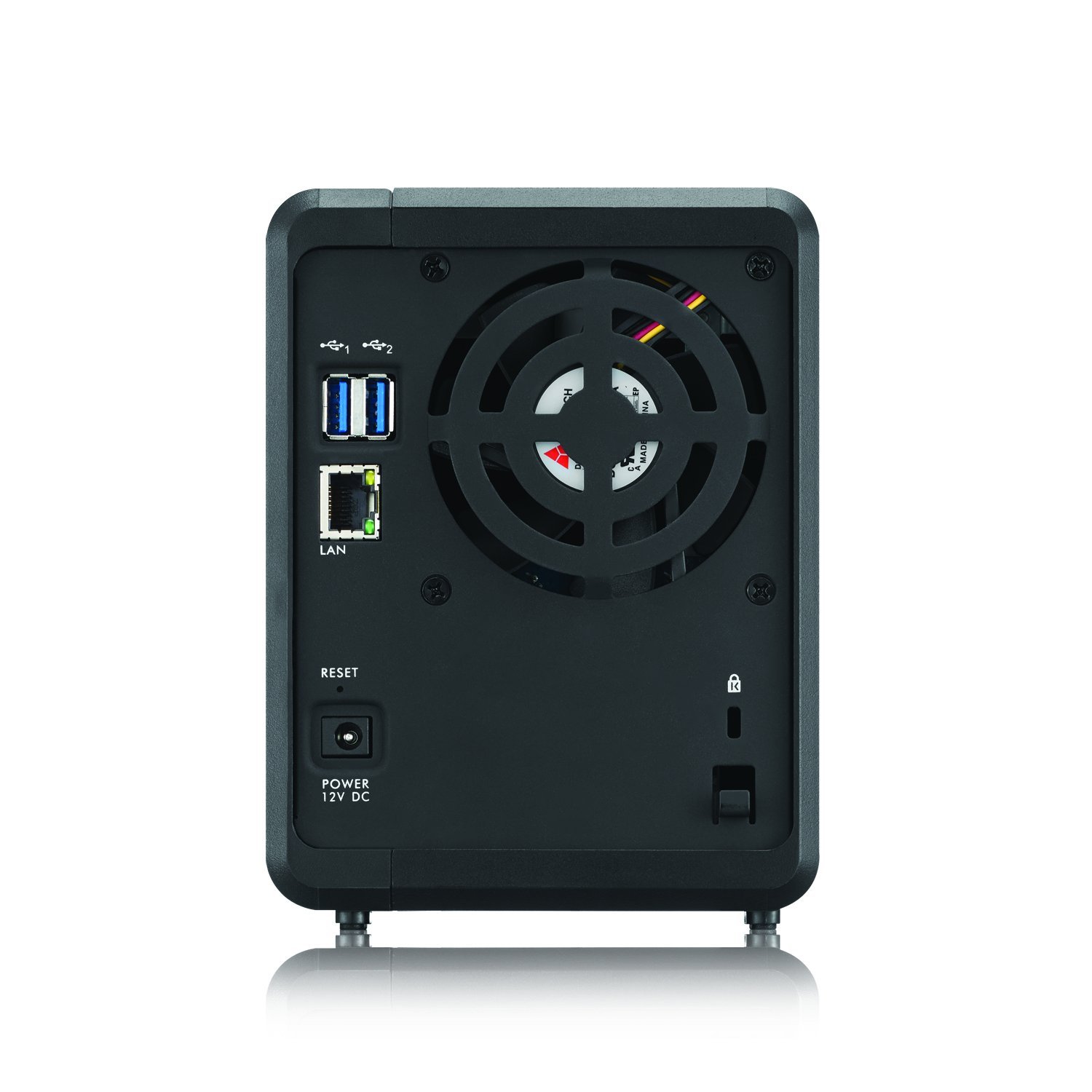
i have used so many types of nas, i must say that this is one of the best nas i have used. super fast, super stable, super reliable and super cheap. bought a few of these when they were on sale on amazon. running on the same specs as some of these branded nas (eg synology, etc) but cost half the price. i have used the dlink nas, etc. they are really slow.

do know that this is one of the few nas that can do wake-on-lan, scheduled startup/shutdown, etc. but most importantly, the nas can be "fun-plugged" :D

http://www.amazon.com/NAS326-2-Bay-...UTF8&qid=1464157416&sr=8-1&keywords=zyxel+nas

611lt%2B23rvL._SL1500_.jpg


61eEolfC9QL._SL1500_.jpg
 
Important Forum Advisory Note
This forum is moderated by volunteer moderators who will react only to members' feedback on posts. Moderators are not employees or representatives of HWZ Forums. Forum members and moderators are responsible for their own posts. Please refer to our Community Guidelines and Standards and Terms and Conditions for more information.
Top