WiFi 7 routers (including WiFi 7 routers without 6GHz band support)

Quegon

Junior Member
Joined
Jul 3, 2006
Messages
8
Reaction score
1
I do not think so. I believe at least you have to get a mainland China mobile phone number in order to register and use the app.

But I do not think there is a need to use the app at all. The ZTE Web UI is quite comprehensive in terms of functions (but not that well organized), if compared to Xiaomi Web UI.

I believe there is a similar problem with Xiaomi or Huawei app if you use their China version routers. Xiaomi Web UI (quite easy to use and well organized) lacks some basic functions like Guest Network which needs the app.

I do not use those apps myself and only use Web UI.

i using ZTE7200 Pro+. i dont use the 中兴智能家居 / ZTE Smart Life app. just access router settings via google chrome.

Thanks Xiaofan and Speed for your replies

The app doesn't require a mobile number but it is not able to connect to and open the router interface. I believe its probably an issue between the global app (tried china ZTE apk keeps crashing) and the china domestic product not being supported.

I did want to use some or the family restriction features on the app that's not available on the browser.
 

jesp15

Junior Member
Joined
Aug 4, 2013
Messages
96
Reaction score
24
From my years of using ASUS routers, there's a reason why they price this model so cheap .... lol .... have to manage expectations ... corners are definitely cut ...
Maybe I got a lemon so I return it. The be92u perfomance that I had felt like it is struggling to keep up the connection of all 3 bands. I only had like 6-8 devices connected.
 
Last edited:

Proximus

Supremacy Member
Joined
May 21, 2001
Messages
6,997
Reaction score
93
Tbh, I was also on the fence between BE92U or BE88U as I was considering 6Ghz. BE98 or BE96 is out as the design is not my cup of tea. Went with BE88U due the variety of ports config.
 

xiaofan

High Supremacy Member
Joined
Sep 16, 2018
Messages
31,162
Reaction score
8,705
Thanks Xiaofan and Speed for your replies

The app doesn't require a mobile number but it is not able to connect to and open the router interface. I believe its probably an issue between the global app (tried china ZTE apk keeps crashing) and the china domestic product not being supported.

I did want to use some or the family restriction features on the app that's not available on the browser.

I see.

This is normal, same as other Chinese vendors Huawei and Xiaomi. The global version app can only access to the global version of the router or other smart devices, but not the Chinese version of the router or smart devices. You have to use the China version of the app.

I learned this last time with Huawei app. You have to switch to China region of the app, which require to have Huawei China account and then that requires a Chinese mobile number.

Now you mentioned, I did try to use the ZTE Smart Life China app (中兴智慧生活) on an old Chinese version Huawei tablet running Hamony OS 2.0 (got no GMS, just for Chinese media streaming apps like Tencent Video, Youku Video and QQ Music). The first step the ZTE app asks you to do is to register which require a mobile number.
 

xiaofan

High Supremacy Member
Joined
Sep 16, 2018
Messages
31,162
Reaction score
8,705
true i do have expectation this would be better than my AX82U when i bough it and i though i was being unlucky to pick the 1st unit.

the replacement unit is all good now and online experience is really much better than AX82U..

no plan to use Dual WAN, as usual I trying to plug 10G WAN as source, and the 2.5G WAN port as normal 1st LAN port for the PC.

I am glad the new unit is better and no more headache for now.

For sure it should be better than RT-AX82U which uses a very slow Broadcom BCM6750 CPU (32 bit tri-core Arm Cortex A7 at 1.5GHz).

Let's see how RT-BE92U goes with your 10Gbps plan. I do not recommend it for 10Gbps plan since it has only one 10G port. But if you do not plan to have a wired 5Gbe/10Gbe device, then hopefully it should still be okay. Quad 2.5G ports are quite useful.

On the other hand, I myself would not use the Asus routers using the BCM6764 CPU as the main router for 10Gbps plan, including Asus ZenWiFi BT10 (dual 10G port) and RT-BE92U (single 10G port, quad 2.5G ports). No issues using them as 10G capable AP or AIMesh mesh node. This is just my personal bias -- too much into HW spec as a HW engineer.
 
Last edited:

xiaofan

High Supremacy Member
Joined
Sep 16, 2018
Messages
31,162
Reaction score
8,705
BTW, I actually do not recommend buying any low end Asus WiFi 6 routers with the BCM6750/6755/6756 32bit ARM CPU (no matter with 256MB RAM or 512MB RAM) as the main router now, even for 1Gbps plan. No issues using them as AP or mesh node.

The reason is that Asus TUF-AX4200 (single 2.5G port) and TUF-AX6000 (dual 2.5G ports) are much better with the better CPU (MediaTek Filogic 830). And if budget is a constraint, then China version of TUF-AX6000 is called TX-AX6000 is of very good value. Higher budget users may go with GT-AX6000.

These low end 32bit BCM675x CPUs are used inside Asus ZenWiFi XD4/XD4S/XD5/XD6/XT8, RT-AX53U/55/56U/57/58U/82U, RT-AX3000P, TUF-AX3000, TUF-AX5400 and the ROG GT6.

Asus ZenWiFi XT8 and ROG GT6 are triband, so they can be the exeptions if the users have to use wireless backhaul, since Asus TUF-AX4200 and TUF-AX6000 are only dual band.

Again, this is just my personal bias -- too much into HW spec as a HW engineer.

But I do strongly suggest not to use the lowest end ones with the BCM675x CPU and 256MB RAM (RT-AX53U, RT-AX55 and RT-AX3000P) as the main rout
er, unless you only have a few devices.
 

Yongkit

Supremacy Member
Joined
Oct 9, 2015
Messages
5,774
Reaction score
2,417
For sure it should be better than RT-AX82U which uses a very slow Broadcom BCM6750 CPU (32 bit tri-core Arm Cortex A7 at 1.5GHz).

Let's see how RT-BE92U goes with your 10Gbps plan. I do not recommend it for 10Gbps plan since it has only one 10G port. But if you do not plan to have a wired 5Gbe/10Gbe device, then hopefully it should still be okay. Quad 2.5G ports are quite useful.

On the other hand, I myself would not use the Asus routers using the BCM6764 CPU as the main router for 10Gbps plan, including Asus ZenWiFi BT10 (dual 10G port) and RT-BE92U (single 10G port, quad 2.5G ports). No issues using them as 10G capable AP or AIMesh mesh node. This is just my personal bias -- too much into HW spec as a HW engineer.
many thanks for sharing.

I am currently still on 1G plan, in day to day usage i really felt the AX82U is getting hard to keep up with my usage especially when i stream 4K contents (youtube & netflix) more on daily basis. the 512mb RAM is getting more buffering on 4K streaming.

BE92U on the other hand have tremedous improvement whenever i skip time stamp on 4K streaming within seconds or 2 it will load unlike AX82U i need to reduce the resolution before i can stream faster.
 

xiaofan

High Supremacy Member
Joined
Sep 16, 2018
Messages
31,162
Reaction score
8,705
many thanks for sharing.

I am currently still on 1G plan, in day to day usage i really felt the AX82U is getting hard to keep up with my usage especially when i stream 4K contents (youtube & netflix) more on daily basis. the 512mb RAM is getting more buffering on 4K streaming.

BE92U on the other hand have tremedous improvement whenever i skip time stamp on 4K streaming within seconds or 2 it will load unlike AX82U i need to reduce the resolution before i can stream faster.

I see.

For 1Gbps service, then of course RT-BE92U is more than enough. It should be good enough for 2.5Gbps/3Gbps plans as well. It is just that I will be reluctant to use it with 5Gbps/10Gbps service myself. But it may work for typical users if the user does not need to use 5Gbe/10Gbe wired device.

And indeed I upgraded from RT-AX82U (BCM6750 tri-core 32bit Arm Cortex A7 CPU at 1.5GHz) to RT-AX86U (BCM4908 quad-core 64bit Arm Cortex A53 CPU at 1.8GHz, 1GB RAM) back in late 2022 because of the slower CPU and 512MB RAM since I have many devices. I also like the much faster Wireguard VPN server performance of the RT-AX86U. I was using Singtel 1Gbps service until this August.
 
Last edited:

xiaofan

High Supremacy Member
Joined
Sep 16, 2018
Messages
31,162
Reaction score
8,705
Interesting findings about the poor 2.4GHz WiFi coverage of Xiaomi BE7000 by one forum user.

I do not really use 2.4GHz rather than for a few legacy 2.4GHz clients.

Just wondering if any users have come across one WiFi 7 routers with good 2.4GHz wireless coverage performance.

https://forums.hardwarezone.com.sg/...-ax3200-ax3000-xiaomi-ax3000t.6438353/page-39

my room has quite a bit of interference and can’t really receive the 5ghz one. All the while ax3600 has no issue on 2.4 and running well.
Do u mean be7000 2.4 is not as good as ax3600? I thought the advertised 2.4 speed should be up to 1147mbps?
Mine max 100mbps

I believe none of the consumer wireless routers can reach 450Mbps with 2.4GHz in Singapore due to congestions, no matter which brands. You will be very happy to reach 200Mbps in close range.

And yes, I am saying all the new Xiaomi WiFi 7 routers (including Xiaomi BE6500 Pro, BE7000 and BE10000) will have worse 2.4GHz wireless coverage performance than Xiaomi AX3600 China version.

You can probably keep using Xiaomi AX3600 as an AP just for 2.4GHz band.

why does it seem like I am downgrading? and isit normal for 2.4 to hit intermittent buffering issue when opening up DBS app or TikTok?

Yes, you are downgrading in terms of 2.4GHz performance.

As per the following review, Xiaomi BE7000 may have worse 2.4GHz wireless coverage and signal strength than Xiaomi BE6500 Pro which is not good with 2.4GHz already.

In fact, Xiaomi BE7000 2.4GHz signal score is quite bad based on the review. The score of 2.61 belongs to the worst grade.

I am sorry to say but you buy the wrong router for your use case...

cgPLRZv.png
 

dodongdodong

Master Member
Joined
Nov 10, 2007
Messages
3,830
Reaction score
395
For sure it should be better than RT-AX82U which uses a very slow Broadcom BCM6750 CPU (32 bit tri-core Arm Cortex A7 at 1.5GHz).

Let's see how RT-BE92U goes with your 10Gbps plan. I do not recommend it for 10Gbps plan since it has only one 10G port. But if you do not plan to have a wired 5Gbe/10Gbe device, then hopefully it should still be okay. Quad 2.5G ports are quite useful.

On the other hand, I myself would not use the Asus routers using the BCM6764 CPU as the main router for 10Gbps plan, including Asus ZenWiFi BT10 (dual 10G port) and RT-BE92U (single 10G port, quad 2.5G ports). No issues using them as 10G capable AP or AIMesh mesh node. This is just my personal bias -- too much into HW spec as a HW engineer.
Just to add... be92u 5g/6g antennas are a disappointing 2x2 only
 

Yongkit

Supremacy Member
Joined
Oct 9, 2015
Messages
5,774
Reaction score
2,417
Just to add... be92u 5g/6g antennas are a disappointing 2x2 only
I curious to know what devices on the consumer market can use higher than 2x2 ?

Just curious does the router shown in the gui with logo wifi 7 5ghz & wifi 7 6ghz is just a gimmick?
 
Last edited:

xiaofan

High Supremacy Member
Joined
Sep 16, 2018
Messages
31,162
Reaction score
8,705
I curious to know what devices on the consumer market can use higher than 2x2 ?

4x4 on the router is really useful since you may have two or more 2x2 devices.

Reference: the following article may not have the theories behind right (he thinks it is because of beam forming) and I do not know the exact reason myself. But the results (4x4 is better than 2x2) are in line with my own experiences when I upgraded from Huawei AX3 Pro (2x2 160MHz channel bandwidth on 5GHz band, AX3000) to Asus RT-AX82U (4x4 160MHz channel bandwidth on 5GHz band, AX5400) back in late 2020.
https://www.acwifi.net/18179.html
 
Last edited:

Yongkit

Supremacy Member
Joined
Oct 9, 2015
Messages
5,774
Reaction score
2,417
4x4 on the router is really useful since you may have two or more 2x2 devices.

Reference: the following article may not have the theories behind right (he thinks it is because of beam forming) and I do not know the exact reason myself. But the results (4x4 is better than 2x2) are in line with my own experiences when I upgraded from Huawei AX3 Pro (2x2 160MHz channel bandwidth on 5GHz band, AX3000) to Asus RT-AX82U (4x4 160MHz channel bandwidth on 5GHz band, AX5400) back in late 2020.
https://www.acwifi.net/18179.html
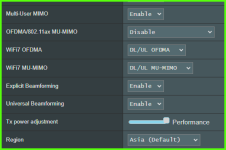
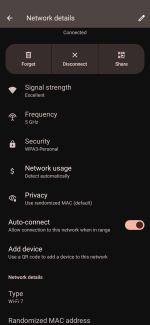
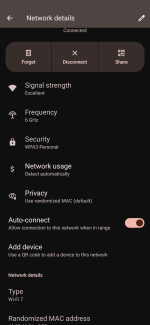
many thanks, i check my setting i have on my BE92U now have more option example below different from AX wifi does it still apply the same?

1732021669426.png


1000003827.png


1000003828.png
 

xiaofan

High Supremacy Member
Joined
Sep 16, 2018
Messages
31,162
Reaction score
8,705
many thanks, i check my setting i have on my BE92U now have more option example below different from AX wifi does it still apply the same?

View attachment 52907

My take is that it is still the same.

But again I do not know the reason behind myself.

Basically I myself will not buy RT-BE92U because of lower end CPU (not for me as a router) and 2*2 WiFi on the 5GHz/6GHz band (not for me as an AP).

But it may well be okay for your use case.

You can say I am too much into HW specifications, and yes, that is me.

I will not use Asus ZenWiFi BT10 as a router (lower end CPU) but it will be fine as an AP (4*4 on 5GHz and 6GHz, 320 MHz support on 6GHz band).
 
Last edited:

Yongkit

Supremacy Member
Joined
Oct 9, 2015
Messages
5,774
Reaction score
2,417
My take is that it is still the same.

But again I do not know the reason behind myself.

Basically I myself will not buy RT-BE92U because of lower end CPU (not for me as a router) and 2*2 WiFi on the 5GHz/6GHz band (not for me as an AP).

But it may well be okay for your use case.

You can say I am too much into HW specifications, and yes, that is me.

I will not use Asus ZenWiFi BT10 as a router (lower end CPU) but it will be fine as an AP (4*4 on 5GHz and 6GHz, 320 MHz support on 6GHz band).
Thanks for sharing, hardware specifications can be very good reason to buy higher spec and I do agreed as long as one can afford. 😄

Would you be able to share your experience on the mlo feature from your wifi7 router or any post I can read from your posting?
 

xiaofan

High Supremacy Member
Joined
Sep 16, 2018
Messages
31,162
Reaction score
8,705
Thanks for sharing, hardware specifications can be very good reason to buy higher spec and I do agreed as long as one can afford. 😄

Would you be able to share your experience on the mlo feature from your wifi7 router or any post I can read from your posting?

No good experience with MLO at all. 2.4GHz/5GHz MLO does not work with our two Acer Swift Go 14 OLED version (Intel BE200 chipset based Killer 1750 WiFi 7 adapter) under latest Windows 24H2, using all of my four dual band China WiFi 7 routers (Asus TUF-BE6500, ZTE BE7200 Pro+, TP-Link TL-7DR6560 and Xiaomi BE5000). They do not support 6GHz band. BTW, I only need two of them but somehow bought the TP-Link and Xiaomi as I wanted to know more about the two popular brands.

Take note I am still waiting for a good 10G capable WiFi 7 AP with 6GHz band myself, probably will buy only next year with the budget of S$400.

Hopefully next year MLO will work better for both the wireless router side and device side.
 

Yongkit

Supremacy Member
Joined
Oct 9, 2015
Messages
5,774
Reaction score
2,417
No good experience with MLO at all. 2.4GHz/5GHz MLO does not work with our two Acer Swift Go 14 OLED version (Intel BE200 chipset based Killer 1750 WiFi 7 adapter) under latest Windows 24H2, using all of my four dual band China WiFi 7 routers (Asus TUF-BE6500, ZTE BE7200 Pro+, TP-Link TL-7DR6560 and Xiaomi BE5000). They do not support 6GHz band. BTW, I only need two of them but somehow bought the TP-Link and Xiaomi as I wanted to know more about the two popular brands.

Take note I am still waiting for a good 10G capable WiFi 7 AP with 6GHz band myself, probably will buy only next year with the budget of S$400.

Hopefully next year MLO will work better for both the wireless router side and device side.
many thanks for sharing :D
 

phayze

Supremacy Member
Joined
Aug 14, 2000
Messages
5,284
Reaction score
231
No good experience with MLO at all. 2.4GHz/5GHz MLO does not work with our two Acer Swift Go 14 OLED version (Intel BE200 chipset based Killer 1750 WiFi 7 adapter) under latest Windows 24H2, using all of my four dual band China WiFi 7 routers (Asus TUF-BE6500, ZTE BE7200 Pro+, TP-Link TL-7DR6560 and Xiaomi BE5000). They do not support 6GHz band. BTW, I only need two of them but somehow bought the TP-Link and Xiaomi as I wanted to know more about the two popular brands.

Take note I am still waiting for a good 10G capable WiFi 7 AP with 6GHz band myself, probably will buy only next year with the budget of S$400.

Hopefully next year MLO will work better for both the wireless router side and device side.

There is not much 10G link access point in the market now and so far all that i saw also need 802.3bt PoE++ for full capabilities instead of 802.3at PoE+.
 

dodongdodong

Master Member
Joined
Nov 10, 2007
Messages
3,830
Reaction score
395
I curious to know what devices on the consumer market can use higher than 2x2 ?

Just curious does the router shown in the gui with logo wifi 7 5ghz & wifi 7 6ghz is just a gimmick?
The $192 Hb710v from SH is a 4x4 5g/6g but I've yet seen any review of this router.
 
Important Forum Advisory Note
This forum is moderated by volunteer moderators who will react only to members' feedback on posts. Moderators are not employees or representatives of HWZ. Forum members and moderators are responsible for their own posts.

Please refer to our Community Guidelines and Standards, Terms of Service and Member T&Cs for more information.
Top