Windows 11 24H2 Feature Update Causing BSOD Problem

eauyong

Senior Member
Joined
Jul 29, 2000
Messages
2,100
Reaction score
181
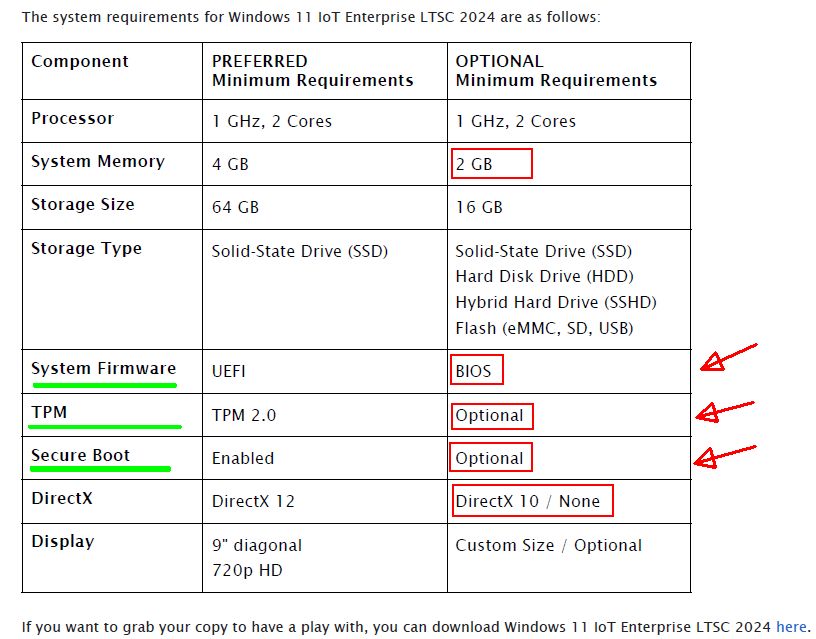
W11 IoT Ent LTSC 24H2 is fine
The reasons that worked for this "latest" version.;)
40P03Vj
 

eauyong

Senior Member
Joined
Jul 29, 2000
Messages
2,100
Reaction score
181
W11 IoT Ent LTSC (Long-Term Servicing Channel) version 24H2 START DATE: 2024‑10‑01; End of Servicing: 2034‑10‑10. 10-years (y)
 

naked123

Supremacy Member
Joined
Feb 16, 2010
Messages
7,586
Reaction score
989
The reasons that worked for this "latest" version.;)
40P03Vj

Bitlocker is also disabled by default in enterprise LTSC

Same with reserved storage feature (mainly for windows updates). Most users will be fine with it disabled unless your windows os drive is like 40gb 🙃
 

nakedtons

Banned
Joined
May 31, 2010
Messages
5,219
Reaction score
1,832
24H2 isn't causing any rumored issues. It is a big update. Almost like a completely new version of Windows. You need to format your drive and do a clean installation.
 

jq75

Honorary Member
Joined
Dec 5, 2000
Messages
142,748
Reaction score
4,907
24H2 isn't causing any rumored issues. It is a big update. Almost like a completely new version of Windows. You need to format your drive and do a clean installation.
huh, format the drive?? seriously? not just an update?
 

nakedtons

Banned
Joined
May 31, 2010
Messages
5,219
Reaction score
1,832
huh, format the drive?? seriously? not just an update?
Saw some replies from reddit. They recommend a clean installation to avoid problems with 24H2. Just copy the files you need to another drive and do a clean install.
 
Last edited:

86technie

High Supremacy Member
Joined
Jun 8, 2006
Messages
40,004
Reaction score
5,747
huh, format the drive?? seriously? not just an update?

Cuz different WIndows version is not a WIndows update itself.
Example WIn 11 23H2 to 24H2, there are a lot of under the hood changes.
The most obvious will be icon on 24H2 some of it have been replaced.

You can update using Win update, not only you will face issue
but won't reap the full benefit of the newer WIndows.
Anyway at this point if you think your PC runs fine than just use Win 11 23H2.

About 6 months later than you can upgrade to 24H2.
Every new Win version is best to do a clean install that means format.
If you think is troublesome my place have a few PC to install.

I have to backup such PC first than redo the WIndows than can use no problem.
Installation should be fast within an hour done, you should try setting up older
Windows like WIn 7 which I still have.

At least a day to setup the Win 7 PC due to Win update.
 

Phen8210

High Supremacy Member
Joined
Jul 29, 2011
Messages
28,989
Reaction score
8,272
Cuz different WIndows version is not a WIndows update itself.
Example WIn 11 23H2 to 24H2, there are a lot of under the hood changes.
The most obvious will be icon on 24H2 some of it have been replaced.

You can update using Win update, not only you will face issue
but won't reap the full benefit of the newer WIndows.
Anyway at this point if you think your PC runs fine than just use Win 11 23H2.

About 6 months later than you can upgrade to 24H2.
Every new Win version is best to do a clean install that means format.
If you think is troublesome my place have a few PC to install.

I have to backup such PC first than redo the WIndows than can use no problem.
Installation should be fast within an hour done, you should try setting up older
Windows like WIn 7 which I still have.

At least a day to setup the Win 7 PC due to Win update.

ya.. and also those third party plugin to tweak whatever UI most likely gonna break or cause glitch if they dont revert before update
 

cybertech

Arch-Supremacy Member
Joined
Dec 3, 2000
Messages
16,500
Reaction score
1,520
I also updated office laptops and home PC to 24H2 so far no issue.
I like the File Explorer now when right click on file, it will show Cut Copy Paste wordings instead of just icons shown previously.
 

Phen8210

High Supremacy Member
Joined
Jul 29, 2011
Messages
28,989
Reaction score
8,272
Those 24H2 Win 11 users dont forget disable the auto enabled BitLocker if it's unintended, I already did for my laptop.

Run as admin

manage-bde -off C:

it will start decrypting, so type

manage-bde -status

You should see

Conversion status: Decryption in Progress
 

Phen8210

High Supremacy Member
Joined
Jul 29, 2011
Messages
28,989
Reaction score
8,272
https://learn.microsoft.com/en-us/windows/release-health/status-windows-11-24h2#known-issues

Please note the following issues for those updating to 24H2, especially for assassin creed players and also people who play games that uses easy anti cheat on an alder lake+ will cause a BSOD due to incompatibility, this also include device that use Intel Smart Sound Technology.

Microsoft Recommendation:
Important: We recommend that you do not attempt to manually update to version 24H2 using the Windows 11 Installation Assistant or the media creation tool until this issue has been resolved.
 

final1

Master Member
Joined
Nov 6, 2005
Messages
4,827
Reaction score
986
For me personally, 24H2 destroyed my PC yesterday. Windows 11 cannot start.
I had to do a clean install of windows 11 23H2 yesterday.
Lucky i have backup of my important files.

I dont recommend updating to 24H2 if it pops up on windows update.
 

ragnarok95

Senior Moderator
Senior Moderator
Joined
Mar 9, 2004
Messages
125,078
Reaction score
6,326
Already on 24H2 with my intel 265K. Everything installs and works without issue. As smooth as butter.
 

stanlawj

Supremacy Member
Joined
Jul 11, 2021
Messages
9,426
Reaction score
5,091
For me personally, 24H2 destroyed my PC yesterday. Windows 11 cannot start.
I had to do a clean install of windows 11 23H2 yesterday.
Lucky i have backup of my important files.

I dont recommend updating to 24H2 if it pops up on windows update.
My PC 12700k on DDR4-3600 XMP has just updated to Windows 24H2 without any incident.
What is your Intel/AMD CPU generation?
 
Last edited:

Encrypted11

Supremacy Member
Joined
Jun 9, 2012
Messages
5,911
Reaction score
255
Windows update (delta incremental updates) are very harsh on users that use XMP on DDR5 or untested profiles on higher rigour stress tests like Google Stressapptest.

Just like nvlddmkm crashing, it is not evil novideo/nVidia out there to get the average person. It is unstable memory.

Thank DDR5 XMP or unchecked PMIC temperatures above DDR5-5600.

If you stressapptest your XMP and manual OC windows update feels like a PC update on an all stock computer and if its an AMD PC with a weaker memory controller relative to Intel, the more you should validate mem OCs. You might get a free pass on Intel IMC.
 

86technie

High Supremacy Member
Joined
Jun 8, 2006
Messages
40,004
Reaction score
5,747
Windows update (delta incremental updates) are very harsh on users that use XMP on DDR5 or untested profiles on higher rigour stress tests like Google Stressapptest.

Just like nvlddmkm crashing, it is not evil novideo/nVidia out there to get the average person. It is unstable memory.

Thank DDR5 XMP or unchecked PMIC temperatures above DDR5-5600.

If you stressapptest your XMP and manual OC windows update feels like a PC update on an all stock computer and if its an AMD PC with a weaker memory controller relative to Intel, the more you should validate mem OCs. You might get a free pass on Intel IMC.

DDR5 Memory issue is more on motherboard and RAM kit pairing.
Especially for AMD Ryzen PCs, I won't say weaker memory controller.
Is just that AMD Ryzen can bluescreen using certain RAM kit and going above
certain RAM speed.

So for AMD Ryzen PC you have to play around with which RAM kit is suitable
with the motherboard.
As well as update the motherboard BIOS to ensure RAM is compatible.

Intel wise isn't that picky, any RAM kit can work and more stable.
AMD Ryzen has been like that since Ryzen AM4 and AM5 era.
Not all RAM kit can work out of the box, some may argue with me that
this isn't true.

Nvlddmkm is either driver or GPU got issue so what you sharing here
relates to different issue here.
 

Phen8210

High Supremacy Member
Joined
Jul 29, 2011
Messages
28,989
Reaction score
8,272
Already on 24H2 with my intel 265K. Everything installs and works without issue. As smooth as butter.

same here, luckily my 8845H laptop also not affected by those issue, but those system that got issue already blacklisted won't receive the update until its resolved
 
Important Forum Advisory Note
This forum is moderated by volunteer moderators who will react only to members' feedback on posts. Moderators are not employees or representatives of HWZ Forums. Forum members and moderators are responsible for their own posts. Please refer to our Community Guidelines and Standards and Terms and Conditions for more information.
Top