
Wireless IP Camera thread

Dave27

Member
Joined
Jul 21, 2001
Messages
310
Reaction score
0
I heard so many good reviews about Sineoji ipcam.. however after using the Sineoji PT716V.. i find there is one major letdown:

Not so good motion-activated recording:
a) unable to set higer fps/bitrate - it records using cam default firmware setting which i believe is 6fps.
b) too sensitive even at setting "1" - it records when nothing/nobody is moving at all.
c) not very well recorded - only able to capture when object is 80-90% move off..

good thing is picture is clear and turning the cam is fast and smooth... video recording is able to set at higher fps/bitrate (however its different from motion-activated recording not sure why so strange) - also settings will revert back to default settings once you click "view HD" on the Sineoji Plus phone apps.. its a bug...

i believe some users do want to have the feature of motion-activated recording instead of looking through the full recorded video which can take forever scanning through.

hope the new firmware is able to solve above such issue if not may switch back to vstarcam.. at least the motion-activated recording is damn solid and smooth.

I am a user of the same camera you have, sineoji PT716V, I do have PT713V and PT528V as well. Your information was incorrect, probably you are not familiar with the parameters and settings. You have to play it more often before you get it correct. Let me correct you and guide you through.

Motion recording can be recorded in FULL HD but you need to set it to 1st stream and turn off the 24 hours recording option. Besides, the 6fps is baseless as you claimed as that is the frame rate based on live streaming subject to the bandwidth of the network such as your mobile data network. Not the recording. Check out my motion detection recording with the same camera as yours sineoji PT716V, which I requested my brother to tigger the motion alarm in singapore with a recorded clip recorded and screenshot it with the media information. 25 frames per second.
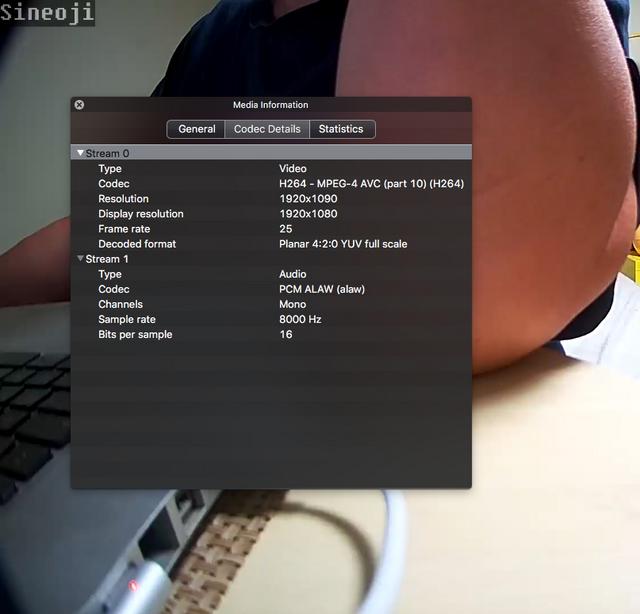
263737.jpg


Secondly, the reason why it was recording despite there is no motion is because you set to 1.
1 is the most sensitive and 10 is the least sensitive. You have to determine the best value subject to your environment surroundings. Obviously, being the most sensitive at 1 will trigger the recording despite no motion.

Besides, it is kind of contradicting that you mention it is recorded despite there is no motion and yet you claimed that only able to capture when object is 80-90% move off..which doesn't happen to me with the same cam I am using.

You claimed that settings will revert back to default settings once you click "view HD" on the Sineoji Plus phone apps.. its a bug... It is not a bug, you have need to define in the settings of the camera "the dpi" to 1st stream from 2nd stream. After you done that, go to your sineoji app, select HD mode. This will stay in HD mode even when you exit the app and log in again in the next attempt. But I turn off this feature instead, only when I need to view on HD, then I will tap HD in the app as I want to avoid enormous data usage on my data plan in case I blew it. But of course if you have unlimited data plan, by all means you can turn on that HD permanently.

I am currently in California and I verified what you claimed was incorrect by remote accessing my sineoji cam in Singapore, perhaps you are not familiar with the settings. As soon as you get your hands on it, this will work.

My favourite app for sineoji cameras is the tinycam Pro. That app is really top notched for professionals.

Cheers !
 
Last edited:

earthlink

Junior Member
Joined
May 26, 2016
Messages
47
Reaction score
0
Dave27, a good tutorial, helps those who are relatively new, especially the configuration section. Although mine is a Sineoji 714, my alarm motion recorded are in HD H.264. Anyway thumbs up to that tutorial of yours.

The tinycam is awesome, thanks to Dean ! He helped me to set it up during the mounting and installation when I ordered it.
 

vvaness40

Member
Joined
Oct 23, 2004
Messages
130
Reaction score
0
Saw Sineoji Pt713v going for $159 valueclub member at Challenger today. Good buy indeed but I already had 2 sets which I bought at $165 with the free mounting and installation promo 2 months ago. :)
 

sgnimo

Junior Member
Joined
Dec 6, 2015
Messages
41
Reaction score
0
Those days Sineoji cams promotion with the free mounting services, including drilling and trunking with wires was really a steal. Too bad, the promotion has ended since.

Double sided tape will give way if you mount on the ceiling especially false ceiling. The best is mount with the screws and bracket provided in the box.
 

NCMK

Master Member
Joined
Jan 1, 2000
Messages
2,884
Reaction score
34
Those days Sineoji cams promotion with the free mounting services, including drilling and trunking with wires was really a steal. Too bad, the promotion has ended since.

Double sided tape will give way if you mount on the ceiling especially false ceiling. The best is mount with the screws and bracket provided in the box.


The promotion is back...valid from 4th Dec 2018 to 30 Dec 2018

christmas-3.jpg
 

henryjjl

Junior Member
Joined
Jul 19, 2011
Messages
58
Reaction score
0
Just bought an Aztech WIPC309HD ip camera. Able to link my phone with the camera, but when it comes to the step of signing in WiFi password to connect the camera, it keeps saying "connection failed...". I am using 2.4ghz channel, and have tried on both android phone and iPhone.

Any brother has any idea or suggestion?
 

earthlink

Junior Member
Joined
May 26, 2016
Messages
47
Reaction score
0
I recently upgraded my WiFi router to Linksys Velop WiFi mesh. I reset up my sineoi ipcams , however, I still unable to get it up working.

I whatapp Dean at almost past 12 midnight for assistance and told him no hurry as we can do it tomorrow. Out of surprise, I got a reply and he assisted remotely to install all my cameras instantly at past midnight !

Kudos to his service !
 

Hot2002

Senior Member
Joined
Mar 5, 2002
Messages
656
Reaction score
77
I downloaded the video from my pt528v but could not view it. Error message is file corrupted. Tried rebooting the pt528v but still fail

Before i send it to the service centre, I would like to try to upgrade the firmware to see if it fixed the issue. Where can I download the latest firmware ? The sineoji website only has brochure and specifications.......

Thanks !
 

goodwin

Member
Joined
Sep 11, 2004
Messages
199
Reaction score
0
I downloaded the video from my pt528v but could not view it. Error message is file corrupted. Tried rebooting the pt528v but still fail

Before i send it to the service centre, I would like to try to upgrade the firmware to see if it fixed the issue. Where can I download the latest firmware ? The sineoji website only has brochure and specifications.......

Thanks !

Did you download the file using the chrome web browser interface ? 192.168.x.x:8081/sd ?

As the file is H.264 MP4 compression, please use VLC player to play the file instead of windows player. If the player doesn't support H.264 compression , it will say the file is corrupted or error.

Hope that helps.
 

vvaness40

Member
Joined
Oct 23, 2004
Messages
130
Reaction score
0
Hot2002, to play H.264, use vlc media player, one of the best now and is free.

Follow this video. Enjoy.


Pseudomonas

Junior Member
Joined
Mar 6, 2016
Messages
76
Reaction score
0
Those days Sineoji cams promotion with the free mounting services, including drilling and trunking with wires was really a steal. Too bad, the promotion has ended since.

Double sided tape will give way if you mount on the ceiling especially false ceiling. The best is mount with the screws and bracket provided in the box.

The promotion is back...valid from 4th Dec 2018 to 30 Dec 2018

christmas-3.jpg

Do note that the waiting time for installation services is 1-2months long..
 

monfrisco

Junior Member
Joined
Jul 31, 2016
Messages
54
Reaction score
0
Do note that the waiting time for installation services is 1-2months long..

December is rather a short month due to the Christmas year end. Next 2 weeks till Christmas, installation slots are full. The next available slots are 10th Jan onwards.

Average is 1 month. You will receive your cameras within 2 working days first by courier.
 

ailiguan

Senior Member
Joined
Jan 3, 2008
Messages
755
Reaction score
0
I know the IR lights is not shining brightly like those LED bright lights, what i was trying to say was the red lights on some of my IP Cam are no longer there and my other cams some of them have the red light but some of the led bulb doesn't light up anymore, i'm still able to use the IR Mode but it became darker and might due to the IR light bulb worn out and no longer able produce proper "light" to brighten up in the darkness.

It's ok i will ask dean about it since he is the guy with the knowledge.

Have you got an answer? I'm having the same thing also. Rather than having the IR led lights on, I want to have them off. I have 3 cameras working. 1 does not have the led lights on when the infra-red mode is on while the other 2 has the led lights on. All 3 cameras infra red mode is working fine.
 

Hot2002

Senior Member
Joined
Mar 5, 2002
Messages
656
Reaction score
77
Did you download the file using the chrome web browser interface ? 192.168.x.x:8081/sd ?

As the file is H.264 MP4 compression, please use VLC player to play the file instead of windows player. If the player doesn't support H.264 compression , it will say the file is corrupted or error.

Hope that helps.

Yes, I download using the url above

I use the default window player. I have other units of pt528v and I could view the video using window default player. I don’t think it’s player issue but I will try using VLC

Thanks for sharing. !
 

szh83

Junior Member
Joined
Dec 14, 2001
Messages
8
Reaction score
0
Hi new here.
Wonder if can use power bank as UPS for IPcam? Means continously charge a power bank and at same time IPcam is plugged to this power bank.

Will the lithium battery spoil faster or catch fire?
 

nightkids86

Senior Member
Joined
Aug 15, 2005
Messages
1,321
Reaction score
0
I noticed sineoji ipcam will allow their mobile app to connect from internet without doing any port forwarding on the router. Is this safe ?

After I blocked the ipcam to have internet access, the mobile app stop working despite the phone is connected to VPN. Now the mobile app only works if I am connected using the same home WiFi.
 
Important Forum Advisory Note
This forum is moderated by volunteer moderators who will react only to members' feedback on posts. Moderators are not employees or representatives of HWZ Forums. Forum members and moderators are responsible for their own posts. Please refer to our Community Guidelines and Standards and Terms and Conditions for more information.
Top
