Wireless IP Camera thread

starlust

Arch-Supremacy Member
Joined
Feb 21, 2007
Messages
24,288
Reaction score
3,856
looking to get Aztech WIPC302 or WIPC401, but would like to confirm the following first:

- does it record video with audio?
- can i save the videos direct to pc? is third party software required to do this?

anyone who has experience with the above, please share.
 
Joined
Jul 15, 2011
Messages
400
Reaction score
1
Thanks for the useful comparisons.

What about recording on SD card?

Isn't that ideal since you don't need to connect to PC, which is vital for me since I use Mac and I'm having a tough time looking for a IP cam that works for Mac.
 

bigfoot

Master Member
Joined
Jan 1, 2000
Messages
3,495
Reaction score
22
Just bought WIPC401 today. Everything was fine. But I have problem doing recording. I would like to record the video. But when I click on the Record button, nothing happen. Where is the video recording? Under Advance>Other Setting, the Record Path is C:\Users\Public\Documents. But when I went into that folder, nothing is there. When I tried to change the Path, it will always give me a Set Record Path Fail Message. May I know what should I do in order to record? Am I missing some steps?

Really appreciate if anyone here can advise me. Thanks in advance! :)
 

starlust

Arch-Supremacy Member
Joined
Feb 21, 2007
Messages
24,288
Reaction score
3,856
Just bought WIPC401 today. Everything was fine. But I have problem doing recording. I would like to record the video. But when I click on the Record button, nothing happen. Where is the video recording? Under Advance>Other Setting, the Record Path is C:\Users\Public\Documents. But when I went into that folder, nothing is there. When I tried to change the Path, it will always give me a Set Record Path Fail Message. May I know what should I do in order to record? Am I missing some steps?

Really appreciate if anyone here can advise me. Thanks in advance! :)

interested to get this model as well as knowing if the recording is with audio as well. have you tried calling/emailing their support?
 

marixsupport

Member
Joined
Aug 3, 2011
Messages
107
Reaction score
0
Good news to VStarcam H6837WIP Users. There is an update on the APPS Store for P2PCAM264 application. This update will allow users to HEAR the sound from camera (very loud) through its built-in speaker instead of via the headphone jack.

Do update your iPhone when you see it. Also, we will be releasing the latest firmware for H6837WIP soon.

H6837WI users will receive an email notification as well for a firmware upgrade soon over the next few days.
 

yuepoker

Member
Joined
Aug 6, 2011
Messages
125
Reaction score
0
hi guys, i need ip camera that can detect motion and send notifications such as sms to user. is this possible?
 

alexlau

Senior Member
Joined
Feb 9, 2005
Messages
2,071
Reaction score
6
Also, we will be releasing the latest firmware for H6837WIP soon

What's the current version and what will be the one to release? any updates on what's the changes/improvements?
 

alexlau

Senior Member
Joined
Feb 9, 2005
Messages
2,071
Reaction score
6
Anyone using Synology NAS with IP cameras for recording?

It seems Vstarcam is not in the supported list for Synology. Maybe they should let Synology have a test unit, so that it could be supported in the future.
 

consigliere

Supremacy Member
Joined
Mar 4, 2006
Messages
9,198
Reaction score
1,320
Anyone using Synology NAS with IP cameras for recording?

It seems Vstarcam is not in the supported list for Synology. Maybe they should let Synology have a test unit, so that it could be supported in the future.


You can record to NAS using generic path method.
It will record in MJPEG. I do not know if H.264 recording is supported on both Qnap and Synology NAS. Personally I tried H6837WI & H6891WP.
H6837WI recording is choppy but the new H6891WP seems to be much better.
 

alexlau

Senior Member
Joined
Feb 9, 2005
Messages
2,071
Reaction score
6
Personally I tried H6837WI & H6891WP.
H6837WI recording is choppy but the new H6891WP seems to be much better.

Thanks~~ H6891WP is H264, so maybe the H6837WIP should be similar?

If the generic path method (is is the FTP method?) works, then maybe any NAS should do the job, is this correct? :)
 

geckoSG

Master Member
Joined
Oct 16, 2006
Messages
3,040
Reaction score
5
H6837WIP n H6891WP shares similar technology. Difference is IR-CUT Filter. Synology n QNAP is only able to record M-JPEG from the VStarcam which is not optimised.

VStarcam is niche in their H.264 cameras as far as I compare their M-JPEG and H.264. The latest H6837WIP coupled with their P2PCAM264 application on iphone and android wins hands down I would say in terms of true video surveillance (LIVE Streaming with some time delay).

Few days back, some angmo executive I had meeting with show me their Foscam's streaming over the mobile on the APPS, I show them my H6837WIP streaming over iPhone. Can see them frowning over their purchases when the apps can hear better and see much better streaming. Even one of them were saying. "Well, pay peanuts, get monkeys."

H6837WIP is in fact a big breakthru in VStarcam's camera series. Heard that 2nd Gen users will not be left behind too, MARIX is recruiting pple to build the mobile apps for H6837WI users to see the same streaming as well.

Now waiting for my 10x Zoom VStarcam camera to come.
 
Last edited:

geckoSG

Master Member
Joined
Oct 16, 2006
Messages
3,040
Reaction score
5
Anyone using Synology NAS with IP cameras for recording?

It seems Vstarcam is not in the supported list for Synology. Maybe they should let Synology have a test unit, so that it could be supported in the future.

I think its not that they dun want to, but implication of $$$ may be involved. I see if I can get some news from MARIX on this area. Since they also resell the Synology and QNAP NAS.
 

zilojian

Senior Member
Joined
Sep 19, 2008
Messages
539
Reaction score
6
SMC WIPCAM-PZ

hi bros
i just got a pre-owned smcwipcam
i tried numerous attempts to get it hook up but still no live view using the IP Cam Manager fro my laptop running on windows xp 2002
when i tried to activate the cam using the address
192.168.1.240
its say user name password
i tried admin /smcadmin all say invalid
any bros can enlighten me?
the tech support not picking up.. the seller seems nowhere to be found
thanks a million!
 

consigliere

Supremacy Member
Joined
Mar 4, 2006
Messages
9,198
Reaction score
1,320
Thanks~~ H6891WP is H264, so maybe the H6837WIP should be similar?

If the generic path method (is is the FTP method?) works, then maybe any NAS should do the job, is this correct? :)


generic path method is using /videostream.cgi
 

geckoSG

Master Member
Joined
Oct 16, 2006
Messages
3,040
Reaction score
5
Hi , was wondering will a IP cam works on a mobile data plan ???

U need to elaborate on this question. LOLz. If viewing of IP camera via mobile data plan,
then yes.

If you are talking about hooking up the IP camera to mobile data plan, also possible with a 3G router. But streaming wise... Good LUCK to you... Possible but not recommended. Most of the time you will curse and swear.
 

alexlau

Senior Member
Joined
Feb 9, 2005
Messages
2,071
Reaction score
6
a BIG THANK YOU to geckoSG for the informative sharing! Indeed the vstarcam images are more fluent while streaming.

Regarding remote straming via PC, I realized that I can use VLC player to view the video via http://ip/videostream.cgi ( as suggested by consigliere, thank you~) however the problem is: I can only view the video, no audio comes out :(

1. Is there any way to get the audio via videostream.cgi method?
2. Is it possible to record the video via videostream.cgi method to a PC directly? (i.e. the office PC) because in this case, I don't even need the NAS@home running :D

Thank you all~

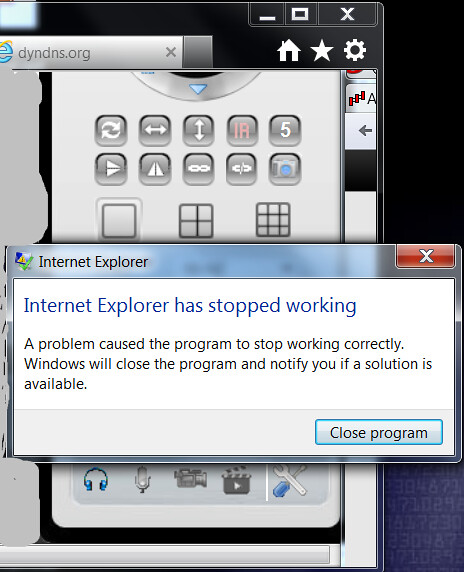
btw what's the latest stable firmware for H6837WIP? Mine is a .177 I think.... I still have the problem with IE when listening to the audio. this is how it happens:

log in to the cam using IE, turn the audio on, after 10-15 minutes, there will be an error message, and IE will restart & return to the camera page (This time audio is not on automatically though, need to click on the headset icon again :().
7437871300_4fae48fba6_z.jpg
 
Last edited:

consigliere

Supremacy Member
Joined
Mar 4, 2006
Messages
9,198
Reaction score
1,320
i think videostream.cgi = Mjpeg
For H.264 I think the is either /livestream.cgi or htp://ip:port/H264
Any experts on Vstarcam, please help
 
Important Forum Advisory Note
This forum is moderated by volunteer moderators who will react only to members' feedback on posts. Moderators are not employees or representatives of HWZ Forums. Forum members and moderators are responsible for their own posts. Please refer to our Community Guidelines and Standards and Terms and Conditions for more information.
Top