
You are using an out of date browser. It may not display this or other websites correctly.
You should upgrade or use an alternative browser.
You should upgrade or use an alternative browser.
Xiaomi TV Discussion Thread VI [consolidated]
- Thread starter pcuser123
- Start date
- Status
- Not open for further replies.
More options
Who Replied?
Yup using stage 2.1, the Bluetooth takes a while to detect n pair when I power up the stage (at least 1 min).Yes, there is an option in the sound setting for SPDIF or Speaker. But it's quite troublesome. I've not tested it as I don't have an optical cable. You can check the setting on your TV first.
I'm using HDMI to the Create Stage 2.1 (not the new V2).
If you have the Creative Stage Air, then it's not possible to connect via Optical as the Air does not have optical. It's SPDIF Aux. So you might end up using BT instead.
If you're talking about Stage 2.1 or the new V2, it has HDMI, would be a better option.
I have the Stage 2.1 using HDMI but there is a problem I need to tell you in advance. The HDMI ARC has some problem in switching on the Sound bar. Most of the time, I have to manually switch it on. Sometimes it works.
BUT there is no option to select internal speaker or sound bar on HDMI. And if it automatically switches on, you have to manually switch it off if you don't want to use the sound bar.
If you use 2.1, yes, you can also use optical.
I'm thinking if use optical cable will it be faster to connect + less lag.
GoodBetterBest
Supremacy Member
- Joined
- Jan 23, 2019
- Messages
- 6,257
- Reaction score
- 2,127
Yup using stage 2.1, the Bluetooth takes a while to detect n pair when I power up the stage (at least 1 min).
I'm thinking if use optical cable will it be faster to connect + less lag.
If you have an optical cable, you can try. I just find it very troublesome to switch between SPDIF and Speaker. I'm not sure if optical will trigger the Sound Bar to turn on and off.
For me using HDMI, it also take quite long for the SB to turn on automatically, probably 45 sec.
Cheers.
If you have an optical cable, you can try. I just find it very troublesome to switch between SPDIF and Speaker. I'm not sure if optical will trigger the Sound Bar to turn on and off.
For me using HDMI, it also take quite long for the SB to turn on automatically, probably 45 sec.
Cheers.
I was hoping that someone has tried this and confirmed that it is good before purchasing an optical cable.

ODACHEK
Banned
- Joined
- May 5, 2014
- Messages
- 15,238
- Reaction score
- 6,778
Just got a Xiaomi Mi 4S 43" TV, the optical audio out connecting to DA converter to my amplifier output sound very super soft with some distortion. But connect optical out from my Android box to amplifier sound ok normal volume. Meaning Xiaomi TV optical out not so stable.
DA Converter
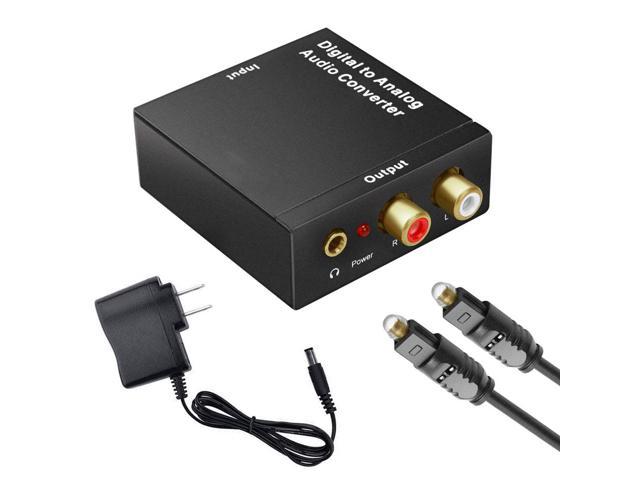
DA Converter
Teo Ming Ern
Arch-Supremacy Member
- Joined
- Jan 1, 2000
- Messages
- 12,284
- Reaction score
- 279
Initially I thought it found in the Sound Setting but it's TV related.
No wonder cannot find... so illogical leh...
Teo Ming Ern
Arch-Supremacy Member
- Joined
- Jan 1, 2000
- Messages
- 12,284
- Reaction score
- 279
If you have an optical cable, you can try. I just find it very troublesome to switch between SPDIF and Speaker. I'm not sure if optical will trigger the Sound Bar to turn on and off.
For me using HDMI, it also take quite long for the SB to turn on automatically, probably 45 sec.
Cheers.
Since both Bluetooth and HDMI take a while for the soundbar to wake, it seems that it's the soundbar's problem... not the connection option...
Or it could be the way the TV is programmed to check the sound output connection which comes later in the booting up or waking up process...
Only way to find out is to connect this soundbar to another TV of another brand with the same connection and check lor...
Last edited:
Thank you very much
Posted from PCWX using SM-G985F
System Setting -> TV -> Audio Tracks
Posted from PCWX using SM-G985F
GoodBetterBest
Supremacy Member
- Joined
- Jan 23, 2019
- Messages
- 6,257
- Reaction score
- 2,127
No wonder cannot find... so illogical leh...
Should be TV setting what. It's relating to the audio tracking of the incoming signal, not the audio setting of the TV itself.

GoodBetterBest
Supremacy Member
- Joined
- Jan 23, 2019
- Messages
- 6,257
- Reaction score
- 2,127
Since both Bluetooth and HDMI take a while for the soundbar to wake, it seems that it's the soundbar's problem... not the connection option...
Or it could be the way the TV is programmed to check the sound output connection which comes later in the booting up or waking up process...
Only way to find out is to connect this soundbar to another TV of another brand with the same connection and check lor...
I think it's both sides having problem.
If I use the soundbar and then off, the soundbar will come on in about 45sec.
If I reboot my TV (not standby), the soundbar seems to come on after 45sec (though I only tested once).
If I leave the soundbar off for prolong period, the soundbar will not respond.
Not just the above, there are more. My conclusion is both side seems to have problems.
Yes, if somebody connects the soundbar to another TV to test, that would be good.
Valid points will try it out.you don't need the cable to check the settings on your TV. You can go through it and see if it's a hassle to you to switch. May be you're ok but others at home may find it a hassle. eg after you watching some muscials, then you just off the TV. Next time you on the TV to watch the news, there is no sound from the TV speaker until the person goes through the settings to change it back to TV speaker.
When I'm on TV speaker or HDMI ARC, when I switch to SPDIF, the audio is cut off, so I presume it's going to SPDIF.
GoodBetterBest
Supremacy Member
- Joined
- Jan 23, 2019
- Messages
- 6,257
- Reaction score
- 2,127
Valid points will try it out.
And should you intend to use HDMI, remember, there is no setting. Once connected via cable, the sound will go to the sound bar. And sometimes, it auto-on, sometimes not. (but you can borrow HDMI cable to try... may be your set does not have this problem. HDMI cable easier to borrow, I think)
info for you to think about.
apostrophe
Senior Member
- Joined
- Apr 22, 2004
- Messages
- 1,967
- Reaction score
- 2
Anyone knows if any Courts outlet is having a sale on the 55" model 4S? Saw someone saying they bought it there once for $509. But online showing $699.
I'm trying to use my google home to turn it on/off Xiaomi TV 4s 65inch, and able to turn it off with voice assistant however when i try to tell it to turn it on it says that it will turn the tv on but nothing happens.
Anyone encounter same issue? Thanks
Mine is working fine for me thou.
Inputs -> HMDI Control (Turn on to make cec and arc available)
Is this switch on?
also check if there anything blocking your tv sensor? I notice mine when soundbar is blocking, it will not switch on.. plus google account need to be sign in for it to work.
GoodBetterBest
Supremacy Member
- Joined
- Jan 23, 2019
- Messages
- 6,257
- Reaction score
- 2,127
Thanks. I've already set it already. Which soundbar and tv model you using ? Xiaomi 4s which size ?
I guess your sound bar is not Creative Stage 2.1 cause this sound bar remembers the last volume setting. I guess the it's a sound bar feature, not the TV. The TV and sound bar setting is independent for me.
I guess your sound bar is not Creative Stage 2.1 cause this sound bar remembers the last volume setting. I guess the it's a sound bar feature, not the TV. The TV and sound bar setting is independent for me.
Not sure if this helps, but there is an setting to switch on soundbar when tv power is switch on.
You may find this via Settings -> Inputs
There is a few hdmi settings.. I personally using device auto power off - Switch on so when my tv is switch off or on, it powers my soundbar together at the same time.
There is another setting like TV auto power on but i did not try that out as the above works well for me.. but please take note soundbar volume will always be at the loudest.. not sure if will happen to you but something to take note in case you get a shock
Might be worth a shot there.

3xistence
Supremacy Member
- Joined
- Sep 7, 2006
- Messages
- 6,580
- Reaction score
- 10
anyone bought from lazada Mu TV Store and brought down to their IMM store to repair before?
there's 2 vertical lines on my panel. Msg them and was askeed to bring to IMM for repair. Wanted to know the process because it's travelling to the other side of the island for me and i dont have transport to move the TV over.
there's 2 vertical lines on my panel. Msg them and was askeed to bring to IMM for repair. Wanted to know the process because it's travelling to the other side of the island for me and i dont have transport to move the TV over.
apostrophe
Senior Member
- Joined
- Apr 22, 2004
- Messages
- 1,967
- Reaction score
- 2
anyone bought from lazada Mu TV Store and brought down to their IMM store to repair before?
there's 2 vertical lines on my panel. Msg them and was askeed to bring to IMM for repair. Wanted to know the process because it's travelling to the other side of the island for me and i dont have transport to move the TV over.
From what I've read Xiaomi can (and should) send a tech to collect/fix your TV. Pester your seller and Xiaomi repeatedly. It's really silly of them to expect a paying customer to lug a 40/50/60 inch TV to their outlet to have it fixed.
Thanks. I've already set it already. Which soundbar and tv model you using ? Xiaomi 4s which size ?
I guess your sound bar is not Creative Stage 2.1 cause this sound bar remembers the last volume setting. I guess the it's a sound bar feature, not the TV. The TV and sound bar setting is independent for me.
You're welcome! Glad to be able to help.
I am using the 55 inch one with tcl soundbar.
Ah, didn't know about that. Thanks for that! How's your soundbar so far?
GoodBetterBest
Supremacy Member
- Joined
- Jan 23, 2019
- Messages
- 6,257
- Reaction score
- 2,127
You're welcome! Glad to be able to help.
I am using the 55 inch one with tcl soundbar.
Ah, didn't know about that. Thanks for that! How's your soundbar so far?
Soundbar ok. One issue is the more or less unpredictable behaviour of the HDMI turn-on. Another is I find the speaker a little boomy. Not so suitable for speech type, etc new, documentary. May be it's my living room. Otherwise, good. Get it and use. After a while, just routine.
- Status
- Not open for further replies.
Important Forum Advisory Note
This forum is moderated by volunteer moderators who will react only to members' feedback on posts. Moderators are not employees or representatives of HWZ Forums. Forum members and moderators are responsible for their own posts.
Please refer to our Community Guidelines and Standards and Terms and Conditions for more information.
