Xiaomi TV Discussion Thread VI [consolidated]

Status
Not open for further replies.

Davo23

Senior Member
Joined
Feb 18, 2005
Messages
528
Reaction score
15
hi everyone,

my Mitv is 2018 china version. Still on MIUI Tv version 1.3.85 with android 6.0.1 and processor is A53.

are there any ways i can upgrade/update it to Patchwall 3.0? i can only download apps via aptoide tv and no google playstore. :(

i googled and found patchwall apk but in india version so dont dare to install it.

Can anyone help pls?
 

gregory_choo

Arch-Supremacy Member
Joined
Nov 7, 2007
Messages
10,480
Reaction score
1,973
Thanks @xiaofan, would consider that option, but will just look out for the older MiTV 4S with the USB 3.0 as don't want to over spend on my tight budget

Thanks for reading & answering the question I was asking :)

the older mitv4s might not be able to handle high bit rate rips despite having a usb3 port.

don't come here and CPCB if you found it in hard way.
 

skyteoh83

Junior Member
Joined
Aug 30, 2019
Messages
13
Reaction score
0
Hi, i selected other region and patch wall can not be used... Any advice to use patch wall? Thank you!
 

buzzlight

Member
Joined
Apr 1, 2001
Messages
319
Reaction score
0
Sorry if this question has been asked before.

Does anyone know where to register the xiaomi TV warranty?

TIA
 

kelvinloh

Member
Joined
Jan 1, 2000
Messages
340
Reaction score
1
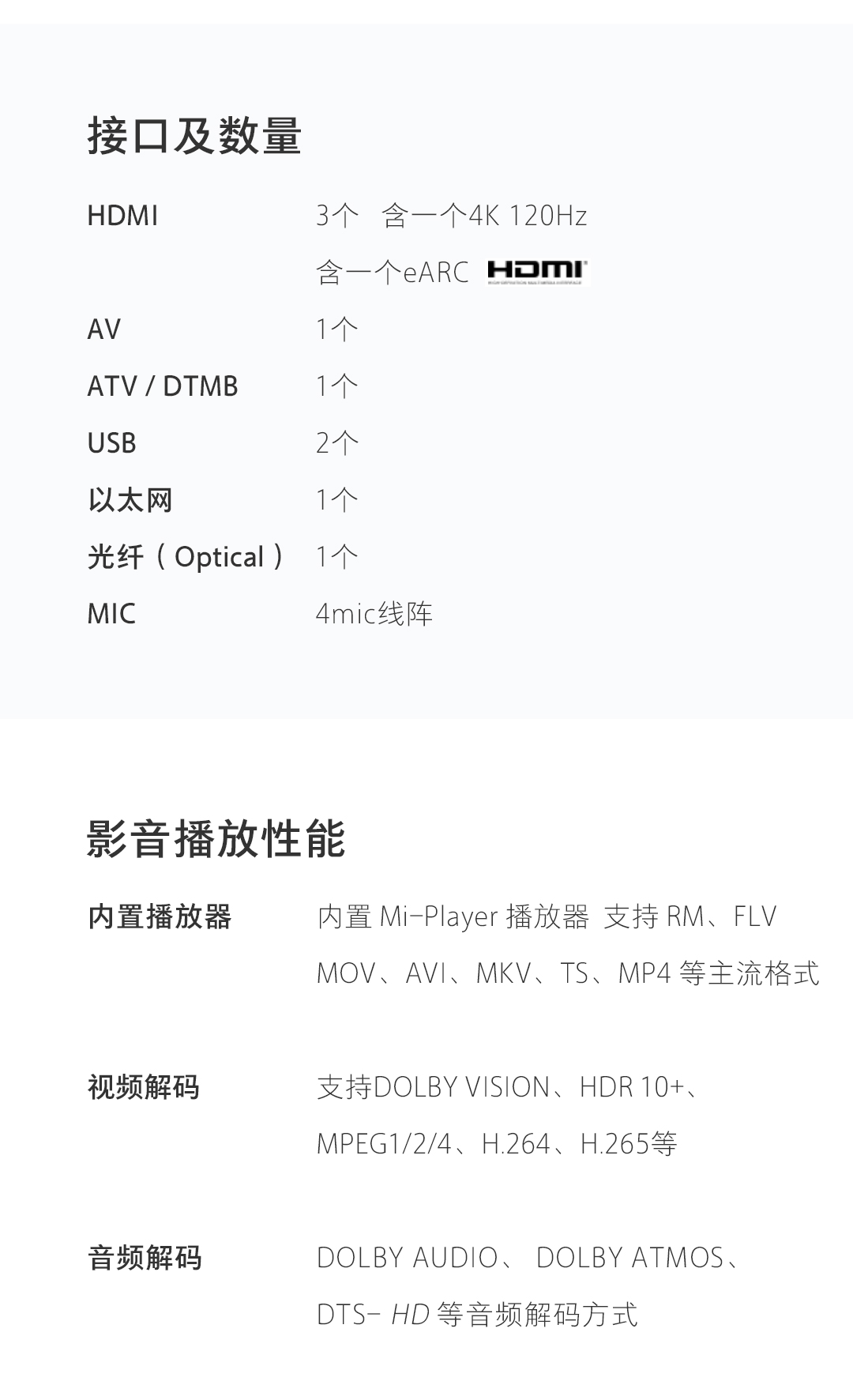
For the LAN Port connection, is it up to 100mb only? if so, so it be better to connect via Wi-fi 5GHz instead?
 

doglefox

Senior Member
Joined
Aug 2, 2004
Messages
835
Reaction score
0
Wow bro thanks for ur advice.

What I had already done - enabled HDMI 2.0 for that specific HDMI port (in fact I did the same for all HDMI ports), enabled 4K and streaming quality set to High on Apple TV. I even bought the Belkin Ultra HD High speed HDMI cable (48 Gbps) to try. Also tried it on different HDMI ports on the TV. Same result.

Anyway it is fine probably i will just play them in non Dolby Vision format as 4K is fine. Thanks!~

Not sure if this will help.

(4K) HDR10 / Dolby Vision needs higher bandwidth in the HDMI connection. You need to enable HDMI 2.0 mode on the Xiaomi Mi TV 4S 43" TV.

If I'm not wrong,

When you first connect a device to any HDMI port on the Xiaomi Mi TV 4S 43" TV -- that (particular) HDMI port on the TV doesn't operate in HDMI 2.0 mode by default.

If not done so yet, enable HDMI 2.0 mode -- for the (exact) HDMI port on the Xiaomi Mi TV 4S -- that you connect the Apple TV 4K device. Read post #76 (& post #880) -- in earlier Part V of this thread.

Next, ensure that HDMI display output from the Apple TV 4K device is set to 4K 60fps.

You also need to set streaming quality to 'High' under Netflix. See this link below:
https://help.netflix.com/en/node/42384

Now proceed to select a HDR10 enabled (or Dolby Vision enabled) show/movie on Netflix to test.
(Not all shows on Netflix are available in HDR10 or Dolby Vision.)

If still not OK, switch to use another HDMI port on the TV & repeat the above.

Also, check the HDMI cable to ensure you don't have a faulty or poor quality HDMI cable.
 

Teo Ming Ern

Arch-Supremacy Member
Joined
Jan 1, 2000
Messages
12,268
Reaction score
272
Wow bro thanks for ur advice.

What I had already done - enabled HDMI 2.0 for that specific HDMI port (in fact I did the same for all HDMI ports), enabled 4K and streaming quality set to High on Apple TV. I even bought the Belkin Ultra HD High speed HDMI cable (48 Gbps) to try. Also tried it on different HDMI ports on the TV. Same result.

Anyway it is fine probably i will just play them in non Dolby Vision format as 4K is fine. Thanks!~

Bro... just my experience with Belkin... I bought 2 Cat 6 LAN cables just before circuit breaker from Challenger to troubleshoot my home network speed... but when I used iperf to check both cables they were not up to spec... they returned 600+ MBps while my other older no brand Cat 6 cables returned 800-900+ MBps... so while Belkin is branded and pretty expensive... may not be up to spec... for your consideration...
 

gregory_choo

Arch-Supremacy Member
Joined
Nov 7, 2007
Messages
10,480
Reaction score
1,973
Bro... just my experience with Belkin... I bought 2 Cat 6 LAN cables just before circuit breaker from Challenger to troubleshoot my home network speed... but when I used iperf to check both cables they were not up to spec... they returned 600+ MBps while my other older no brand Cat 6 cables returned 800-900+ MBps... so while Belkin is branded and pretty expensive... may not be up to spec... for your consideration...

based on your theory, if someone caught one thief in singapore, the whole singapore are full of thieves.
 

doglefox

Senior Member
Joined
Aug 2, 2004
Messages
835
Reaction score
0
Thanks bro. The Belkin cables are working fine. In fact I have many at home to test, from the cheap AmazonBasics to Belkin and all yield the same result.

Bro... just my experience with Belkin... I bought 2 Cat 6 LAN cables just before circuit breaker from Challenger to troubleshoot my home network speed... but when I used iperf to check both cables they were not up to spec... they returned 600+ MBps while my other older no brand Cat 6 cables returned 800-900+ MBps... so while Belkin is branded and pretty expensive... may not be up to spec... for your consideration...
 

bigbadber

Banned
Joined
Mar 7, 2007
Messages
44,799
Reaction score
2,799
has anybody tested the LAN speed connection?

i install a speed test app. seems like dl and up speeds are only 90+ mbps
 

Davo23

Senior Member
Joined
Feb 18, 2005
Messages
528
Reaction score
15
hi everyone,

my Mitv is 2018 china version. Still on MIUI Tv version 1.3.85 with android 6.0.1 and processor is A53.

are there any ways i can upgrade/update it to Patchwall 3.0? i can only download apps via aptoide tv and no google playstore. :(

i googled and found patchwall apk but in india version so dont dare to install it.

Can anyone help pls?

Anyone can help me on this please? Or its not possible due to old tv/version?
 

boonkang

Senior Member
Joined
Oct 5, 2007
Messages
738
Reaction score
308
Hi All,

Not sure if anyone faces the same issue as me. I am using Mi TV 4S 43 inch and Apple TV 4K. In Netflix after i set to 4K HDR, the menu looks dim and washed out. This is particularly obvious when i view movies with HDR/Dolby Vision. I also tried changing to 4K SDR and enabled match content (dynamic range and match frame rate) in Apple TV settings also same result.

Not sure if this has anything to do with the display settings in my Mi TV. So for now i switch back to 4K SDR (without enabling match content) but this will mean i cannot enjoy the HDR/Dolby Vision offered by the Apple TV 4K.

Anyway it is fine probably i will just play them in non Dolby Vision format as 4K is fine. Thanks!~

After making the previous reply to you, I (later) then realised what you're doing -- don't seems to make sense.

If I'm not wrong, Xiaomi Mi TV 4S 43" TV can support HDR10 -- but don't support the Dolby Vision HDR format.

Some known specs for Xiaomi Mi TV 4S (32"/43"/55") can be found at this link:
https://skyjuiceiswater.blogspot.com/2019/12/the-global-mitv-with-android-tv.html

So, why do you want to enable Dolby Vision on your Apple TV 4K device -- when the TV you're using don't support Dolby Vision?
(Unless I'm wrong, I'm not aware you can playback/stream a Dolby Vision enabled video -- to a TV that don't support Dolby Vision)

Refer to this article below about 4K, HDR, and Dolby Vision on your Apple TV 4K device:
https://support.apple.com/en-sg/HT208074

From above article -- depending on capabilities of your 4K TV, the Apple TV 4K device can operate differently:
(a) 4K Standard Dynamic Range (SDR): Used for 4K televisions that don’t support HDR10 or Dolby Vision.
(b) 4K High Dynamic Range (HDR): Used for 4K televisions that support HDR10
(c) 4K Dolby Vision: Used for 4K televisions that support Dolby Vision HDR

You should just configure/setup your Apple TV 4K device to operate at (b) -- since your Xiaomi Mi TV 4S 43" TV can support HDR10 (but not support Dolby Vision).

***
A known list of Xiaomi TVs can be found at this link (updated to 2020-09-29):
https://github.com/KHwang9883/MobileModels/blob/master/brands/mitv.md

What is the exact model of your Xiaomi Mi TV 4S 43" TV? Is it L43M5-5ASP?

If it is L43M5-5ASP -- this is already a Netflix certified 4K Android TV.

By right, for the Xiaomi L43M5-5ASP TV -- you can simply just run the Netflix app on the (Android) TV directly -- and you should be able to watch 4K HDR10 Netflix shows.

If you can successfully watch 4K HDR10 Netflix shows -- by running the Netflix app on the Xiaomi Mi TV 4S 43" TV itself -- you no need the Apple TV 4K device.

If you wanted to get Dolby Vision on Netflix -- then you should have bought a TV that supports Dolby Vision.

There is a long (heated debate) thread on Samsung Web site -- because of no Dolby Vision support on Samsung TVs !! See this link:
https://eu.community.samsung.com/t5/tv/samsung-you-have-to-introduce-dolby-vision/td-p/1264207/

Yes, I know -- sometimes as users, we may have difficulty getting a right mixed/combination of HDR devices to work the way we want.

That's why, according to this 2020 Jun article below, HDR is a mess -- w/ multiple competing standards + "made even more difficult to navigate because of all of the moving parts" (in the industry):
https://www.digitaltrends.com/home-theater/hdr-is-a-hot-mess/

(I've also shared the above link to the 2020 Jun article in another thread.)

Hope the above helps.
 
Last edited:

xiaofan

High Supremacy Member
Joined
Sep 16, 2018
Messages
31,682
Reaction score
9,029
https://m.mi.com/commodity/detail/12049

Only this model of Xiaomi OLED TV supports Dolby Vision (and HDR10+. It also supports Dolby Atmos), as far as I know.

Not so sure when the global version will be out (L65M5-OD-xxx?).

c8e076bee72569382fa1aab10b6874c5.jpg
 
Last edited:

Davo23

Senior Member
Joined
Feb 18, 2005
Messages
528
Reaction score
15
Newer version of android?

Currently i can only download apps from aptoide and there is no google playstore. My youtube app sucks and i cant type chinese.

Mostly all the pre-install apps cant be used and always hang. I can only watch netflix and another 1-2 apps installed via apk.
 

Teo Ming Ern

Arch-Supremacy Member
Joined
Jan 1, 2000
Messages
12,268
Reaction score
272
Newer version of android?

Currently i can only download apps from aptoide and there is no google playstore. My youtube app sucks and i cant type chinese.

Mostly all the pre-install apps cant be used and always hang. I can only watch netflix and another 1-2 apps installed via apk.

Seems more worthwhile to buy an Android box than to jump through all the hoops?
 
Status
Not open for further replies.
Important Forum Advisory Note
This forum is moderated by volunteer moderators who will react only to members' feedback on posts. Moderators are not employees or representatives of HWZ. Forum members and moderators are responsible for their own posts.

Please refer to our Community Guidelines and Standards, Terms of Service and Member T&Cs for more information.
Top