
Xiaomi TV Discussion Thread IV [consolidated]

Status
Not open for further replies.

RaptureM3

Member
Joined
Jul 14, 2005
Messages
440
Reaction score
10
On the mi tv remote.
7vK54ZXl.jpg


Sent from Razer PHONE 2 using GAGT

Hi bro,

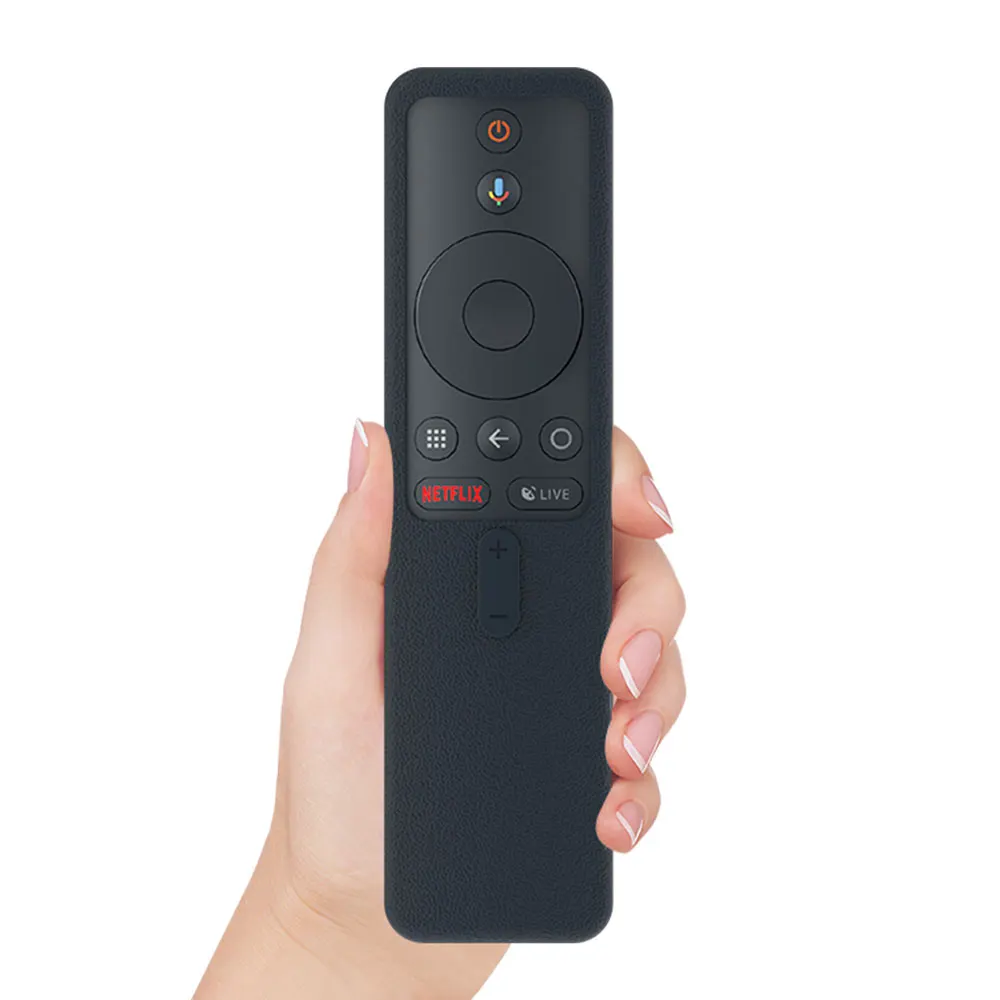
Unfortunately both my Mi TV and Mi Box S remote are a bit different from that. Instead of 3 dots, it's 1 big circle. Pressing that button brings me back to the Home screen.

Like this:
SIKAI-Silicone-Remote-Control-Case-For-Xiaomi-mi-Box-s-Remote-Controller-Case-For-Xiaomi-Soft.jpg
 

pcuser123

Master Member
Joined
Dec 21, 2007
Messages
3,845
Reaction score
454
Hi bro,

Unfortunately both my Mi TV and Mi Box S remote are a bit different from that. Instead of 3 dots, it's 1 big circle. Pressing that button brings me back to the Home screen.

Like this:

SIKAI-Silicone-Remote-Control-Case-For-Xiaomi-mi-Box-s-Remote-Controller-Case-For-Xiaomi-Soft.jpg

The top one is the remote controller of the old type of TV4 and the bottom one must the Mi Box controller. The Global MiTV4's HDMI 2.0 cannot be set by the "Home" and "Menu" (3 horizontal bar) buttons. Think they can only be set through the "setting" controls of the Android TV OS. correct me if I am wrong.
 

MZeee18

Senior Member
Joined
Jan 26, 2014
Messages
912
Reaction score
9
Hi! I just want to check.

I am looking to upgrade from
Mi TV 4S 43” to Mi TV 4A 50”

Is it worth the upgrade?
I wanted a bigger tv. And if can with HDR capability
 

RaptureM3

Member
Joined
Jul 14, 2005
Messages
440
Reaction score
10
The top one is the remote controller of the old type of TV4 and the bottom one must the Mi Box controller. The Global MiTV4's HDMI 2.0 cannot be set by the "Home" and "Menu" (3 horizontal bar) buttons. Think they can only be set through the "setting" controls of the Android TV OS. correct me if I am wrong.

Hi bro, as i have checked, there is no setting for HDMI 2.0 in the Mi TV and Mi Box S, unfortunately.

Btw, anyone knows how to install Netflix APK onto the Mi TV Global set? If can do this, i will have no further need for the Mi Box S. I tried downloading the APK and install on the TV, all went well, until i open the app it said something like "This app is not compatible with your TV, etc".

Thanks!
 

pcuser123

Master Member
Joined
Dec 21, 2007
Messages
3,845
Reaction score
454
Hi bro, as i have checked, there is no setting for HDMI 2.0 in the Mi TV and Mi Box S, unfortunately.

Btw, anyone knows how to install Netflix APK onto the Mi TV Global set? If can do this, i will have no further need for the Mi Box S. I tried downloading the APK and install on the TV, all went well, until i open the app it said something like "This app is not compatible with your TV, etc".

Thanks!

One should be able to install the Netflix apps in MiTV but it will only have 850x 480p picture quality which is acceptable for normal viewing.


I have posted this link before, some said it is working; other said it is not.. please let us know if it works in Global TV model. These are modded versions, do not attempt to update them.

https://skyjuiceiswater.blogspot.com/2019/04/playing-netflix-movies-in-xiaomi-tv4.html#jumpspot3

I have also Mibox S but I never use it.
 

pcuser123

Master Member
Joined
Dec 21, 2007
Messages
3,845
Reaction score
454
Here is some good information about the various Chinese made Xiaomi Global MiTV made for markets in Russia and Spain and also those MiTVs assembled in India. The ones that have Netflix and Prime Video buttons are only available in Spain and India. The rest just come with ordinary remote controllers. Think there is a licensing restriction.

Those on-line and available in Singapore are from warehouses in Russia, Spain and Hong Kong. The Global MiTV available outside India are all manufactured/assembled by Xiaomi's Authorised agents including BOE vision, TCL or by Xiaomi themselves.

https://skyjuiceiswater.blogspot.com/2019/12/the-global-mitv-with-android-tv.html
 

RaptureM3

Member
Joined
Jul 14, 2005
Messages
440
Reaction score
10
One should be able to install the Netflix apps in MiTV but it will only have 850x 480p picture quality which is acceptable for normal viewing.


I have posted this link before, some said it is working; other said it is not.. please let us know if it works in Global TV model. These are modded versions, do not attempt to update them.

https://skyjuiceiswater.blogspot.com/2019/04/playing-netflix-movies-in-xiaomi-tv4.html#jumpspot3

I have also Mibox S but I never use it.

Nope, doesn't work unfortunately. I'm fine with viewing Netflix in HDR only but have some issues with flickering when using Mi Box S. Quite a weird problem.

Posted in another thread here for those who are interested:

Having some issues with my Mi Box S hope the bros here can help me out.

I have it paired with a Mi TV 4S Global version, and notice that when i scroll through the apps, or within the Netflix app, scroll from show to show, the screen will flicker once before the preview/auto-play starts playing. When playing YouTube or Netflix videos however, buttery smooth with no flickering. It only happens when scrolling through apps/videos.

I have tried different HDMI cable, different HDMI port, and even put the Mi Box S on another TV, not able to replicate the problem. I don't think it's the TV issue as my Mi TV 4S is global version so comes with Playstore (only no Netflix) and it doesn't flicker as i scroll through the apps or in YouTube.

Might be an issue with the resolution in Mi Box S but i've tried 4k/1080p/etc still flickers.

Have searched Google but doesn't seem to have anyone else facing the same issue.

Thanks in advance!

P.S. Will try to take a video and post here soon.
 

pcuser123

Master Member
Joined
Dec 21, 2007
Messages
3,845
Reaction score
454
Nope, doesn't work unfortunately. I'm fine with viewing Netflix in HDR only but have some issues with flickering when using Mi Box S. Quite a weird problem.

Posted in another thread here for those who are interested:

Which means it only work in the older MiTV that has A53 CPU.. worked fine in my MiTV4 bought early 2018. They have changed not only the chip but also the chip designer.
 
Last edited:

busybeeman

Junior Member
Joined
Jul 30, 2018
Messages
23
Reaction score
0
Shipping on delivery since 5am this morning. Let’s hope it’s today...

Did you shipping status change? I just got reply from seller saying to expect delivery by end of week...no set date or time means dunno when have to stay home and receive the package..
 

pcuser123

Master Member
Joined
Dec 21, 2007
Messages
3,845
Reaction score
454
Thanks for the file bro. Just tried, similar to the one on Aptoide TV, causes the Mi TV to hang and reboot. Appreciate it though!

What if you try the earliest version in Apitoide TV? go to other version and select one of the very old ones..try other version also.. Are u not able to install the Netflix from the playstore?
 
Last edited:

1a2a3a

Senior Member
Joined
Sep 5, 2006
Messages
1,665
Reaction score
45
Just got my set. It’s the Russia model.

I can’t seems to go to patchwall to see the tv specs, any idea how to go about doing so?
 

pcuser123

Master Member
Joined
Dec 21, 2007
Messages
3,845
Reaction score
454
What if you try the earliest version in Apitoide TV? go to other version and select one of the very old ones..try other version also.. Are u not able to install the Netflix from the playstore?

https://www.apkmirror.com/apk/netfl...oid-tv-7-0-2-build-3104-android-apk-download/

Try this, the website said it is targeted for Android 9.0. the version 3104 and 3109 have claimed to work..but it was for A53 chip as in India's 4X 55"


Understand many codings for A53 does not work in A55 & A57. The Russian sets come with A55 chip where as the one from Spain come with A53 for similar Global TV unit. Try and let us know..
 
Last edited:

pcuser123

Master Member
Joined
Dec 21, 2007
Messages
3,845
Reaction score
454
Just got my set. It’s the Russia model.

I can’t seems to go to patchwall to see the tv specs, any idea how to go about doing so?

Only the Russian, the Spain DVB models are available here in Singapore. The Hong Kong one is from the same distributor as Spain.

No point going to Patch wall OS.

Try Miinfo.apk and CPUZ.apk
 
Last edited:

1a2a3a

Senior Member
Joined
Sep 5, 2006
Messages
1,665
Reaction score
45
Uhh I can’t find CPUz in the Google play store. Means what ah?

Also, I can’t set the contrast and brightness all since the patchwall os is not working.... any advice?
 
Last edited:

jtec14

Supremacy Member
Joined
Dec 5, 2001
Messages
8,855
Reaction score
572
Uhh I can’t find CPUz in the Google play store. Means what ah?

Also, I can’t set the contrast and brightness all since the patchwall os is not working.... any advice?

Mean sideload the apk lor.

I thought can adjust the settings using the android TV settings??
 
Status
Not open for further replies.
Important Forum Advisory Note
This forum is moderated by volunteer moderators who will react only to members' feedback on posts. Moderators are not employees or representatives of HWZ. Forum members and moderators are responsible for their own posts.

Please refer to our Community Guidelines and Standards, Terms of Service and Member T&Cs for more information.
Top