
Yes 知电bro use the RT-AX89X as the benchmark for all the PRC routers to measure against. I think that depends if you want to go 10Gig or not. I got the RT-AX8X because I signed up for SI's 10Gig plan back then. GT6 Wifi performance is not bad from the reviews I've seen but since each unit only has one 2.5G port, that may become your ethernet/LAN speed bottleneck, especially in wired backhaul for AiMesh. If you got the budget maybe pay another $250 more to get the ZenWifi Pro XT12 (2-pack) from Courts. Each unit has 2 X 2.5G ports to give you multigig ethernet backhaul or 2.5G LAN speed.time to get a 私房号
I saw AX89X getting quite good reviews on 知晓哥 and other reviews. I am torn between getting AX89X B2 version or a pair of GT6 .....
You are using an out of date browser. It may not display this or other websites correctly.
You should upgrade or use an alternative browser.
You should upgrade or use an alternative browser.
New 10Gbps/5Gbps/6Gbps/3Gbps XGS-PON based plans
- Thread starter xiaofan
- Start date
More options
Who Replied?
Could be the ONT's 10G LAN port a bit finicky/loose. Over the past week I tried shaking the CAT 8 ethernet cable linking the ONT to my router's WAN port, it will cause network outage and will also have to power cycle the ONT and router to get connection again,Just tested the AXE300 with TPLink TX401, can reach ~7200Mbps but upload only 2000Mbps. Don't know if its MR limiting upload or NIC too lousy. No other device to test.
Tried to connect AXE300 to act as switch, couldn't work cause AXE300 only allow router or AP mode. Tried to have onboard to AX6000 and TX401 to AXE300 but MR keep disconnecting, didn't have this problem when I connect MR to AX6000 pri WAN for the pass 4 days. Tried to update TX401 with the latest driver from TP Link website, still the same problem. Gave UP!
After I connect back the MR to AX6000 pri WAN, the MR disconnection continue! not only happen to my system, also the other systems in the house. Power up/down all devices a few times, now its been stable for the pass one hour only.
Kind of disappointed with both MR and AXE300, never experience disconnection so frequently for the pass >5 years. May want to sell the AXE300 away, if I can't make use of the MultiGig ports, this is useless to me, even a gigabit switch is more useful. Somehow I'm not surprise with TP Link, the powerful hardware is castrated by their limited software.

- Joined
- Sep 16, 2018
- Messages
- 34,741
- Reaction score
- 11,516
time to get a 私房号
I saw AX89X getting quite good reviews on 知晓哥 and other reviews. I am torn between getting AX89X B2 version or a pair of GT6 .....
Haha, looks like you are having a trade-off between high end single router (Asus RT-AX89X, with high end CPU and 10G capability) vs mid-high-end triband mesh solution (Asus ROG Rapture GT6, with excellent wireless coverage, but with pretty low end CPU BCM6756 CPU, slightly faster than the BCM6755 CPU in ZenWiFI XT8).
Since you have already have the ZenWiFi XT8, I tend to think it is not that essential to upgrade to GT6. Yes you do get some nice wireless spec upgrade but the CPU upgrade is minimum. But you probbaly do not care about the CPU since you are not running them in router mode but AP mode behind another powerful router. Still even the wireless upgrade is nice but still modest (AX10000=574+4804+4804Mbps vs AX6600=574+1201+4804Mbps). Maybe it better to wait for other choices. Then both XT8 and GT6 have single 2.5G port which is another limitation.
On the other hand, I am thinking that RT-AX89X may not be the best choice to go with the 10G plan either. So it is probably better to wait for some better 10G routers (wired or wireless).
For wireless, it seems WiFi 7 Wireless router or APs are the way to go for 10G plans.
- Joined
- Sep 16, 2018
- Messages
- 34,741
- Reaction score
- 11,516
Yes 知电bro use the RT-AX89X as the benchmark for all the PRC routers to measure against. I think that depends if you want to go 10Gig or not. I got the RT-AX8X because I signed up for SI's 10Gig plan back then. GT6 Wifi performance is not bad from the reviews I've seen but since each unit only has one 2.5G port, that may become your ethernet/LAN speed bottleneck, especially in wired backhaul for AiMesh. If you got the budget maybe pay another $250 more to get the ZenWifi Pro XT12 (2-pack) from Courts. Each unit has 2 X 2.5G ports to give you multigig ethernet backhaul or 2.5G LAN speed.
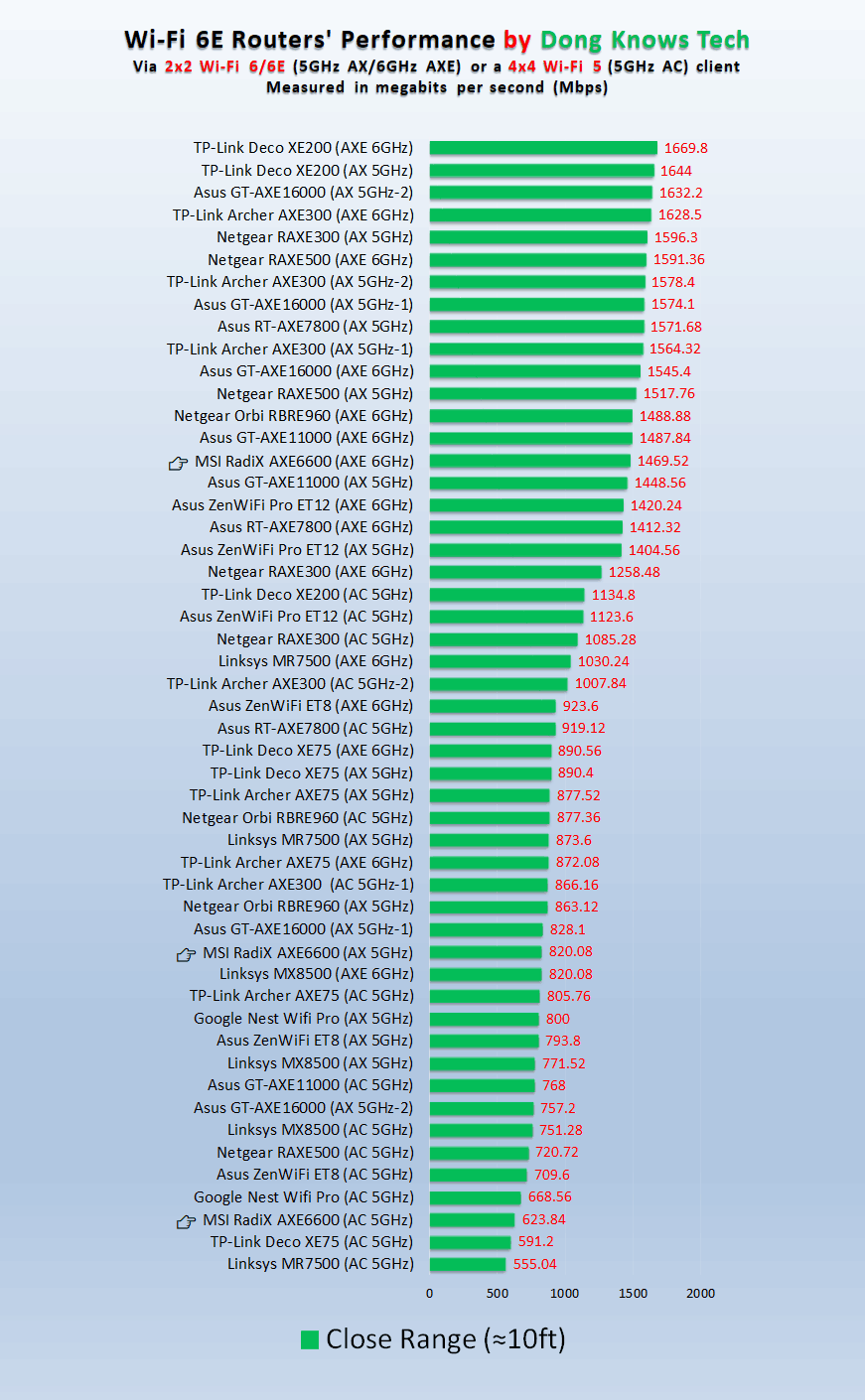
Even with the best WiFi 6 and WiFi 6E router out there, 2x2 WiFi 6/6E clients can not achieve 2Gbps as of now.
Therefore I think WiFi 7 is the way to go for 10Gbps plan if wireless speed is one of the main focus. I understand that some people will mainly focus on the wired speed for 10Gbps plan. The early 2x2 WiFi 7 clients (mobile phoes) already can achieve >=3Gbps wireless speed due to the use of 320MHz channel bandwidth. I tend to think next year's Intel WiFi 7 laptop adapter should be able to achieve >=4Gbps speed.
2x2 WiFi 6/6E 160MHz 1024QAM --> 2402 Mbps max PHY speed
2x2 WiFi 6/6E 160MHz 4096QAM --> 2882 Mbps max PHY speed
2x2 WiFi 7 320MHz 4096QAM --> 5764 Mbps max PHY speed
- Joined
- Sep 16, 2018
- Messages
- 34,741
- Reaction score
- 11,516
How i see that the USB 3.2 type c is Gen 2x2?
You can get a USB to 10Gbps LAN adaptor. Then connect using cat 6 LAN cables from ONT to router and from router to USB to 10Gbps LAN adaptor to get 10Gbps speed.
It is suprisingly difficult to tell under Windows 11 whether you have USB 3.2 Gen 2x2. Blame Microsoft.
https://techcommunity.microsoft.com...-2-10gb-s-and-gen-2-2-20gb-s-by-c/m-p/3053969
You can tell us what is your laptop model number and then you can check the chipset to see whether it supports USB 3.2 Gen 2x2. And in fact there are not many USB 3.2 Gen 2x2 devices out there either.
And there are no USB 3.2 to 10G adapters (Copper or SFP+) as far as I know, only Thunderbolt 3 to 10G adapters. Newer laptops may have USB4/TB3 ports where you can use the TB3 to 10G adpter. You can check whether your system is USB 4 enabled or not. Right now higher-end AMD CPU based laptop will have USB4/TB3 support and some high end Intel CPU based laptop will have USB4/TB4 support. Apple M2 CPU based laptop will have USB4/TB4 support as well (but not USB 3.2 Gen 2x2).
https://learn.microsoft.com/en-us/w...component-guidelines/usb4-settings-enablement
https://www.xda-developers.com/best-usb4-laptops/
https://www.apple.com/sg/macbook-pro-13/specs/
Reference: only 5G adapter avaiilable for USB 3.1/3.2.
https://www.amazon.com/TRENDnet-TUC-ET5G-2-5GBASE-T-Integrated-Compatible/dp/B07TBPLR2V?th=1
Reference: discussion of this topic in Reddit
Last edited:
sg_rangers
Member
- Joined
- May 23, 2009
- Messages
- 155
- Reaction score
- 28
Torrenting for "linux ISOs"...

Downloaded Dota2 in 2 mins.

Downloaded Dota2 in 2 mins.
Last edited:
This is true, the fastest wireless speed I can get on the RT-AX8X on the 5Ghz band (160Mhz DFS channels) is around 1600Mbps on my Wifi 6E Samsung Galaxy S21 Ultra.Even with the best WiFi 6 and WiFi 6E router out there, 2x2 WiFi 6/6E clients can not achieve 2Gbps as of now.
Therefore I think WiFi 7 is the way to go for 10Gbps plan if wireless speed is one of the main focus. I understand that some people will mainly focus on the wired speed for 10Gbps plan. The early 2x2 WiFi 7 clients (mobile phoes) already can achieve >=3Gbps wireless speed due to the use of 320MHz channel bandwidth. I tend to think next year's Intel WiFi 7 laptop adapter should be able to achieve >=4Gbps speed.
2x2 WiFi 6/6E 160MHz 1024QAM --> 2402 Mbps max PHY speed
2x2 WiFi 6/6E 160MHz 4096QAM --> 2882 Mbps max PHY speed
2x2 WiFi 7 320MHz 4096QAM --> 5764 Mbps max PHY speed
On the RT-BE98U with the 5Ghz band (160Mhz DFS channels) on the same (2X2) Wifi 6E client, I managed to hit 1932Mbps when I was standing directly over the router.
But I suspect there are also other factors to take into other consideration like maximum allowed output power for wifi. I remember discussing this with Dong Ngo a while back and it seems that North America is at the top of the list with Effective Isotropic Radiated Power (EIRP) of 1 Watt. Singapore is also near there with between 200 milliwatt to 1 Watt if I'm not wrong. I think the key difference is that North America (USA and Canada) have access to the 6Ghz channels as well, something that we should expect to get soon (at least the lower half of the 6Ghz spectrum).
Last edited:

- Joined
- Aug 9, 2011
- Messages
- 17,162
- Reaction score
- 1,004
It is suprisingly difficult to tell under Windows 11 whether you have USB 3.2 Gen 2x2. Blame Microsoft.
https://techcommunity.microsoft.com...-2-10gb-s-and-gen-2-2-20gb-s-by-c/m-p/3053969
You can tell us what is your laptop model number and then you can check the chipset to see whether it supports USB 3.2 Gen 2x2. And in fact there are not many USB 3.2 Gen 2x2 devices out there either.
And there are no USB 3.2 to 10G adapters (Copper or SFP+) as far as I know, only Thunderbolt 3 to 10G adapters. Newer laptops may have USB4/TB3 ports where you can use the TB3 to 10G adpter. You can check whether your system is USB 4 enabled or not. Right now higher-end AMD CPU based laptop will have USB4/TB3 support and some high end Intel CPU based laptop will have USB4/TB4 support. Apple M2 CPU based laptop will have USB4/TB4 support as well (but not USB 3.2 Gen 2x2).
https://learn.microsoft.com/en-us/w...component-guidelines/usb4-settings-enablement
https://www.xda-developers.com/best-usb4-laptops/
https://www.apple.com/sg/macbook-pro-13/specs/
Reference: only 5G adapter avaiilable for USB 3.1/3.2.
https://www.amazon.com/TRENDnet-TUC-ET5G-2-5GBASE-T-Integrated-Compatible/dp/B07TBPLR2V?th=1
Reference: discussion of this topic in Reddit
My Laptop is HP ENVY 15.6 inch Laptop PC
HP ENVY Laptop 15-ep1089TX
and the base board is HP 88CC Version 94.30I checked my HP support website with my serial number and and product code and see that i am actually having the following ports.
1 SuperSpeed USB Type-A 5Gbps signaling rate (HP Sleep and Charge); 1 SuperSpeed USB Type-A 5Gbps signaling rate; 1 HDMI 2.1; 1 AC smart pin; 1 headphone/microphone combo; 2 Thunderbolt™ 4 with USB4™ Type-C® 40Gbps signaling rate (DisplayPort™ 1.4, HP Sleep and Charge)
But when i go to device manager it show that i am usb3.2 1.2 so i am a bit confused.
Last edited:

leongws
Master Member
- Joined
- May 31, 2003
- Messages
- 3,020
- Reaction score
- 670
I'm using AX300 + TP link TX401. Encountered intermittent dc once a while but it will auto reconnects in less than 20 sec. Solved this by updating TX401 driver from below:Just tested the AXE300 with TPLink TX401, can reach ~7200Mbps but upload only 2000Mbps. Don't know if its MR limiting upload or NIC too lousy. No other device to test.
Tried to connect AXE300 to act as switch, couldn't work cause AXE300 only allow router or AP mode. Tried to have onboard to AX6000 and TX401 to AXE300 but MR keep disconnecting, didn't have this problem when I connect MR to AX6000 pri WAN for the pass 4 days. Tried to update TX401 with the latest driver from TP Link website, still the same problem. Gave UP!
After I connect back the MR to AX6000 pri WAN, the MR disconnection continue! not only happen to my system, also the other systems in the house. Power up/down all devices a few times, now its been stable for the pass one hour only.
Kind of disappointed with both MR and AXE300, never experience disconnection so frequently for the pass >5 years. May want to sell the AXE300 away, if I can't make use of the MultiGig ports, this is useless to me, even a gigabit switch is more useful. Somehow I'm not surprise with TP Link, the powerful hardware is castrated by their limited software.
https://www.marvell.com/support/downloads.html#
Marvell AQtion Windows 64-bit Driver - 3.1.7
Marvell AQtion Firmware updater Utility - 1.8.0_3.1.121a
I am consistently getting 6000+ DL and 8000+ UL. However, once my PC wakes up from sleep, my DL will be like cap to 2000 but UL still 8000+. Not sure why this happens. Will need to disable and re-enable tx401 when that happens.
Still no update for wifi 6e from IMDA?
sg_rangers
Member
- Joined
- May 23, 2009
- Messages
- 155
- Reaction score
- 28
i'm using TPlink NT521 10G NIC, which i believe is using the same marvell AQN-107 chip. Faced the same issue for intermittent disconnection.I'm using AX300 + TP link TX401. Encountered intermittent dc once a while but it will auto reconnects in less than 20 sec. Solved this by updating TX401 driver from below:
https://www.marvell.com/support/downloads.html#
Marvell AQtion Windows 64-bit Driver - 3.1.7
Marvell AQtion Firmware updater Utility - 1.8.0_3.1.121a
I am consistently getting 6000+ DL and 8000+ UL. However, once my PC wakes up from sleep, my DL will be like cap to 2000 but UL still 8000+. Not sure why this happens. Will need to disable and re-enable tx401 when that happens.
Still no update for wifi 6e from IMDA?
Updating to the latest drivers 3.1.7 and the firmware updater did not help.
What apparently fixed the issue was from some reddit post about using this Z690 Aorus Master Onboard Aquantia 10G NIC. version 3.1.3. (i can't find older drivers from marvell website)
https://www.gigabyte.com/Motherboard/Z690-AORUS-MASTER-rev-1x/support#support-dl-driver-lan

limcc
Supremacy Member
- Joined
- Jan 1, 2000
- Messages
- 6,561
- Reaction score
- 203
i'm using TPlink NT521 10G NIC, which i believe is using the same marvell AQN-107 chip. Faced the same issue for intermittent disconnection.
Updating to the latest drivers 3.1.7 and the firmware updater did not help.
What apparently fixed the issue was from some reddit post about using this Z690 Aorus Master Onboard Aquantia 10G NIC. version 3.1.3. (i can't find older drivers from marvell website)
https://www.gigabyte.com/Motherboard/Z690-AORUS-MASTER-rev-1x/support#support-dl-driver-lan
I'm using AX300 + TP link TX401. Encountered intermittent dc once a while but it will auto reconnects in less than 20 sec. Solved this by updating TX401 driver from below:
https://www.marvell.com/support/downloads.html#
Marvell AQtion Windows 64-bit Driver - 3.1.7
Marvell AQtion Firmware updater Utility - 1.8.0_3.1.121a
I am consistently getting 6000+ DL and 8000+ UL. However, once my PC wakes up from sleep, my DL will be like cap to 2000 but UL still 8000+. Not sure why this happens. Will need to disable and re-enable tx401 when that happens.
Still no update for wifi 6e from IMDA?
Thanks both of you,i'm using TPlink NT521 10G NIC, which i believe is using the same marvell AQN-107 chip. Faced the same issue for intermittent disconnection.
Updating to the latest drivers 3.1.7 and the firmware updater did not help.
What apparently fixed the issue was from some reddit post about using this Z690 Aorus Master Onboard Aquantia 10G NIC. version 3.1.3. (i can't find older drivers from marvell website)
https://www.gigabyte.com/Motherboard/Z690-AORUS-MASTER-rev-1x/support#support-dl-driver-lan
 will try both driver to see if it solve the disconnection issue.
- Joined
- Sep 16, 2018
- Messages
- 34,741
- Reaction score
- 11,516
My Laptop is HP ENVY 15.6 inch Laptop PC
HP ENVY Laptop 15-ep1089TX
and the base board is HP 88CC Version 94.30
I checked my HP support website with my serial number and and product code and see that i am actually having the following ports.
1 SuperSpeed USB Type-A 5Gbps signaling rate (HP Sleep and Charge); 1 SuperSpeed USB Type-A 5Gbps signaling rate; 1 HDMI 2.1; 1 AC smart pin; 1 headphone/microphone combo; 2 Thunderbolt™ 4 with USB4™ Type-C® 40Gbps signaling rate (DisplayPort™ 1.4, HP Sleep and Charge)
But when i go to device manager it show that i am usb3.2 1.2 so i am a bit confused.
Indeed your laptop has USB4/TB4 and 11th gen Intel Core™ i7-11800H CPU. It is normal that this laptop does not support USB 3.2 gen 2x2, but only USB 3.2 gen 1x2.
It is actually the same for some new 12th gen and 13th gen Intel laptop with USB4/TB4 and new AMD laptops with USB4/TB4 but with no support of USB 3.2 gen 2x2. Same for M2 based Apple laptops/desktops which do not support USB 3.2 gen 2x 2 (20Gbps).
https://support.hp.com/sg-en/document/c08184071
But this should not be a real problem as your laptop should be able to work with TB3 to 10G adapter, if you are keen to subscribe to the 10G plan.
On the other hand, it is cheaper for desktops to add 10G PCIE adapters (SFP+ or Copper).
Reference 1: some new Intel laptops with USB4/TB4 support also have USB 3.2 gen 2x2 support.
Lemovo Yoga 9 14IRP8 with Intel 13th gen Core i7-1360P, USB4/TB4, but no USB 3.2 gen 2x2 support.
https://psref.lenovo.com/syspool/Sys/PDF/Yoga/Yoga_9_14IRP8/Yoga_9_14IRP8_Spec.pdf
Ports[1] Standard Ports
• 1x Headphone / microphone combo jack (3.5mm)
• 1x USB 3.2 Gen 2
• 1x USB-C 3.2 Gen 2 (support data transfer, Power Delivery 3.0 and DisplayPort™ 1.4)
• 2x Thunderbolt 4 / USB4® 40Gbps (support data transfer, Power Delivery 3.0 and DisplayPort 1.4)
Notes:
[1] The transfer speed of following ports will vary and, depending on many factors, such as the processing speed of the host device, file attributes and other factors related to system configuration and your operating environment, will be slower than theoretical speed.
USB 2.0: 480 Mbit/s;
USB 3.2 Gen 1 (SuperSpeed USB 5Gbps, formerly USB 3.0 / USB 3.1 Gen 1): 5 Gbit/s;
USB 3.2 Gen 2 (SuperSpeed USB 10Gbps, formerly USB 3.1 Gen 2): 10 Gbit/s;
USB4 20Gbps / USB 3.2 Gen 2x2 (SuperSpeed USB 20Gbps): 20 Gbit/s;
USB4 40Gbps (USB 40Gbps): 40 Gbit/s;
Thunderbolt 3/4: 40 Gbit/s.
Reference 2: some AMD laptops with USB4/TB4 support do not have USB 3.2 gen 2x2 support.
https://www.hp.com/ie-en/products/laptops/product-details/product-specifications/2101766554
Ports
2 Thunderbolt™ 4 with USB Type-C® 40Gbps signaling rate (USB Power Delivery, DisplayPort™ 1.4);
2 USB Type-A 5Gbps signaling rate (1 charging);
1 HDMI 2.0;
1 stereo headphone/microphone combo jack 12
Footnotes and disclaimers
12. SuperSpeed USB 20Gbps is not available with Thunderbolt™ 4.
haha yeah, i just feel itch seeing bro @TanRich mentioning AX89X, that why i considering lolHaha, looks like you are having a trade-off between high end single router (Asus RT-AX89X, with high end CPU and 10G capability) vs mid-high-end triband mesh solution (Asus ROG Rapture GT6, with excellent wireless coverage, but with pretty low end CPU BCM6756 CPU, slightly faster than the BCM6755 CPU in ZenWiFI XT8).
Since you have already have the ZenWiFi XT8, I tend to think it is not that essential to upgrade to GT6. Yes you do get some nice wireless spec upgrade but the CPU upgrade is minimum. But you probbaly do not care about the CPU since you are not running them in router mode but AP mode behind another powerful router. Still even the wireless upgrade is nice but still modest (AX10000=574+4804+4804Mbps vs AX6600=574+1201+4804Mbps). Maybe it better to wait for other choices. Then both XT8 and GT6 have single 2.5G port which is another limitation.
On the other hand, I am thinking that RT-AX89X may not be the best choice to go with the 10G plan either. So it is probably better to wait for some better 10G routers (wired or wireless).
For wireless, it seems WiFi 7 Wireless router or APs are the way to go for 10G plans.
With my current 301W + XT8s, i dont really need the upgrade. most of my wireless devices are ios and i dont need higher wireless speed. dont think i will need wifi7 anytime soon too. i also have dual boot into Openwrt on my 301w.
i am pretty much covered for 10gbps broadband with my current and spare gears.
- Joined
- Aug 9, 2011
- Messages
- 17,162
- Reaction score
- 1,004
I see. At first I still thinking that HP short changed me and gave me a lower end port. I got this laptop because it has UHD screen for 4k video streaming on Curiosity stream 4k video streaming and it is portable so I can move about with it. It meant that if I am to plug in a portable device with Thunderbolt 4 it will still work but only 10Gbps or 40Gbps speed?Indeed your laptop has USB4/TB4 and 11th gen Intel Core™ i7-11800H CPU. It is normal that this laptop does not support USB 3.2 gen 2x2, but only USB 3.2 gen 1x2.
It is actually the same for some new 12th gen and 13th gen Intel laptop with USB4/TB4 and new AMD laptops with USB4/TB4 but with no support of USB 3.2 gen 2x2. Same for M2 based Apple laptops/desktops which do not support USB 3.2 gen 2x 2 (20Gbps).
https://support.hp.com/sg-en/document/c08184071
But this should not be a real problem as your laptop should be able to work with TB3 to 10G adapter, if you are keen to subscribe to the 10G plan.
On the other hand, it is cheaper for desktops to add 10G PCIE adapters (SFP+ or Copper).
Reference 1: some new Intel laptops with USB4/TB4 support also have USB 3.2 gen 2x2 support.
Lemovo Yoga 9 14IRP8 with Intel 13th gen Core i7-1360P, USB4/TB4, but no USB 3.2 gen 2x2 support.
https://psref.lenovo.com/syspool/Sys/PDF/Yoga/Yoga_9_14IRP8/Yoga_9_14IRP8_Spec.pdf
Ports[1] Standard Ports
• 1x Headphone / microphone combo jack (3.5mm)
• 1x USB 3.2 Gen 2
• 1x USB-C 3.2 Gen 2 (support data transfer, Power Delivery 3.0 and DisplayPort™ 1.4)
• 2x Thunderbolt 4 / USB4® 40Gbps (support data transfer, Power Delivery 3.0 and DisplayPort 1.4)
Notes:
[1] The transfer speed of following ports will vary and, depending on many factors, such as the processing speed of the host device, file attributes and other factors related to system configuration and your operating environment, will be slower than theoretical speed.
USB 2.0: 480 Mbit/s;
USB 3.2 Gen 1 (SuperSpeed USB 5Gbps, formerly USB 3.0 / USB 3.1 Gen 1): 5 Gbit/s;
USB 3.2 Gen 2 (SuperSpeed USB 10Gbps, formerly USB 3.1 Gen 2): 10 Gbit/s;
USB4 20Gbps / USB 3.2 Gen 2x2 (SuperSpeed USB 20Gbps): 20 Gbit/s;
USB4 40Gbps (USB 40Gbps): 40 Gbit/s;
Thunderbolt 3/4: 40 Gbit/s.
Reference 2: some AMD laptops with USB4/TB4 support do not have USB 3.2 gen 2x2 support.
https://www.hp.com/ie-en/products/laptops/product-details/product-specifications/2101766554
Ports
2 Thunderbolt™ 4 with USB Type-C® 40Gbps signaling rate (USB Power Delivery, DisplayPort™ 1.4);
2 USB Type-A 5Gbps signaling rate (1 charging);
1 HDMI 2.0;
1 stereo headphone/microphone combo jack 12
Footnotes and disclaimers
12. SuperSpeed USB 20Gbps is not available with Thunderbolt™ 4.
- Joined
- Sep 16, 2018
- Messages
- 34,741
- Reaction score
- 11,516
I see. At first I still thinking that HP short changed me and gave me a lower end port. I got this laptop because it has UHD screen for 4k video streaming on Curiosity stream 4k video streaming and it is portable so I can move about with it. It meant that if I am to plug in a portable device with Thunderbolt 4 it will still work but only 10Gbps or 40Gbps speed?
If you have TB3 or TB4 or USB 4 40Gbps compatible devices, you should be fine to get up to 40Gbps, as per HP website. The only thing is that it is not compatible with USB 3.2 gen 2x2 (20Gbps), only USB 3.2 gen 1x2 (10Gbps).
https://support.hp.com/sg-en/document/c08184071
1 SuperSpeed USB Type-A 5Gbps signaling rate (HP Sleep and Charge);
1 SuperSpeed USB Type-A 5Gbps signaling rate;
1 HDMI 2.1; 1 AC smart pin;
1 headphone/microphone combo;
2 Thunderbolt™ 4 with USB4™ Type-C® 40Gbps signaling rate (DisplayPort™ 1.4, HP Sleep and Charge)

IHasChimken
Junior Member
- Joined
- Nov 6, 2022
- Messages
- 80
- Reaction score
- 46
2a73b48b-5543-465b-b892-41195e11c76a


Here you go
IHasChimken
Junior Member
- Joined
- Nov 6, 2022
- Messages
- 80
- Reaction score
- 46
Depends on speedtest server for me. Usually if not always the download and upload is pretty close. Singtel seem to have better speedtest server. I just hope to see closer to 10gbps speeds like 9000+ instead of only 8000 lolHave been happily using the MR 10G for 1 week and so far so good.
Want to check... Is it normal to expect to see a big speed difference between download and upload speed (the MR offered router TPL AXE300 with a 10G QNAP switch)? The download speed has been around 1500-2500 mbps and upload speed has been always much higher at 5000-7000 mbps range.
- Joined
- Sep 16, 2018
- Messages
- 34,741
- Reaction score
- 11,516
2a73b48b-5543-465b-b892-41195e11c76a
Here you go
There are a few spikes during the download process, upload is better. But waveform.com server apparently can not handle 10Gbps as of now.

https://www.waveform.com/tools/bufferbloat?test-id=2a73b48b-5543-465b-b892-41195e11c76a
- Joined
- Sep 16, 2018
- Messages
- 34,741
- Reaction score
- 11,516
Depends on speedtest server for me. Usually if not always the download and upload is pretty close. Singtel seem to have better speedtest server. I just hope to see closer to 10gbps speeds like 9000+ instead of only 8000 lol
I think that is a router limitation. Internet speed (or WAN speed, NAT required) is limited by the router HW. If you test local LAN speed with iperf or libreSpeed test server, you should be able to get higher speed, as mentioned in previous comments.
You need to set up your own librespeed server, on a PC with 10G Ethernet adapter.
https://github.com/librespeed/speedtest (HTML 5)
https://github.com/librespeed/speedtest-go (Go based client)
You can also use iperf3.
https://iperf.fr/iperf-download.php
https://github.com/ar51an/iperf3-win-builds (Windows binary)
Important Forum Advisory Note
This forum is moderated by volunteer moderators who will react only to members' feedback on posts. Moderators are not employees or representatives of HWZ Forums. Forum members and moderators are responsible for their own posts.
Please refer to our Community Guidelines and Standards and Terms and Conditions for more information.
