

Please log in and verify your age to view this post. Why?
You are using an out of date browser. It may not display this or other websites correctly.
You should upgrade or use an alternative browser.
You should upgrade or use an alternative browser.
Starhub TV+ Recontract
- Thread starter wolnavi
- Start date
More options
Who Replied?
Solution
Hi, I was recently contacted by Starhub to recontract my TV and was told that I’ll need to switch to the TV+ variant as the Fibre TV has been discontinued and would be unable to keep the existing Fibre TV if I wish to recontract. So I recontracted but am awaiting the installation of the TV+ box
So far I have been reading here and found that we would need to use the Nokia Beacon 2 router if we want to continue watching Mediacorp channels on the TV+ box
My question is why can’t we just connect the TV+ to port 2 of the ONT to maintain the Mediacorp channels as per the previous way like the Fibre TV? Thanks
They are using totally different technology with Starhub TV+ box...

- Joined
- Aug 9, 2011
- Messages
- 17,072
- Reaction score
- 975
I usually go to TV guide and then see which one i want to watch and select it and it will play. If want to watch Hub Sport 1 just select the box for that channel. Do not need to remember any channel number, just the channel name. CNN just select CNN box. Easier. I love it.That is very unfortunate as I believe their current Samsung TV is from before 2019. Are existing FiberTV users able to access the app? If so, I will still go home to check if they can still download the app an test it out. Once in the app, do my parents just press the number of the channel they wanna watch (i.e 106 for Channel U, 803 for whatever cable channel that is...), just like they would with the Android box?
- Joined
- Aug 9, 2011
- Messages
- 17,072
- Reaction score
- 975
It will usually got its renewal near the expiry date especially for two TV passes to get it for free and it is their selling point.For those who sign up the ultra speed 10gbps.. the Disney premium is until mar 2025 only right

Kyubi
Great Supremacy Member
- Joined
- Jun 2, 2002
- Messages
- 61,184
- Reaction score
- 583
So will only know near date.. went to sign up.. hope StarHub will give a good experience lolIt will usually got its renewal near the expiry date especially for two TV passes to get it for free and it is their selling point.
Last edited:
So u had joined the green camp !So will only know near date.. went to sign up.. hope StarHub will give a good experience lol
yeah..For those who sign up the ultra speed 10gbps.. the Disney premium is until mar 2025 only right
I had signed up mine.......... it will be till Mar 25,.. at least for now..
decision might change ...
Kyubi
Great Supremacy Member
- Joined
- Jun 2, 2002
- Messages
- 61,184
- Reaction score
- 583
Yeah.. first time jump ship.. hopefully all is well.. haha .. only issue is whether 1. I should get another set of the tp link router or something similar for mesh and sell my 2 ASUS ax router or 2. complimenting it with my 2 asus ax router .. 3. Don’t use the 10gbps router, continue my 2 ASUS setup at 2.5gbps and get new ASUS router when there is a cheaper model out thereSo u had joined the green camp !

Last edited:

so which option did u go forYeah.. first time jump ship.. hopefully all is well.. haha .. only issue is whether 1. I should get another set of the tp link router or something similar for mesh and sell my 2 ASUS ax router or 2. complimenting it with my 2 asus ax router .. 3. Don’t use the 10gbps router, continue my 2 ASUS setup at 2.5gbps and get new ASUS router when there is a cheaper model out there
keep the asus or use the provided tp link router?
Kyubi
Great Supremacy Member
- Joined
- Jun 2, 2002
- Messages
- 61,184
- Reaction score
- 583
Keep the ASUS router and sell the tp link router (sold) because home internal cable (cat5 or 5e) also cannot support 2.5gb lan, no device utilizing WiFi 7 yet, need to buy one moreso which option did u go for
keep the asus or use the provided tp link router?
device to supplement the mesh, and I don’t like the router lol so it’s a no no after considering all these factors.. wait for a yr or 2 then see how.. 4 yrs later changing house..
- Joined
- Aug 9, 2011
- Messages
- 17,072
- Reaction score
- 975
Unlikely as they are using this Disney+ for free for 2 TV passes users and it is a good selling point to push for their sale for this Homehub+ ultra speed. Now selling quite ok.yeah..
I had signed up mine.......... it will be till Mar 25,.. at least for now..
decision might change ...
- Joined
- Aug 9, 2011
- Messages
- 17,072
- Reaction score
- 975
Actually it is cheap to run a cat. 6 LAN cable but it is ok as what we want is the TV contents.Keep the ASUS router and sell the tp link router (sold) because home internal cable (cat5 or 5e) also cannot support 2.5gb lan, no device utilizing WiFi 7 yet, need to buy one more
device to supplement the mesh, and I don’t like the router lol so it’s a no no after considering all these factors.. wait for a yr or 2 then see how.. 4 yrs later changing house..
Kyubi
Great Supremacy Member
- Joined
- Jun 2, 2002
- Messages
- 61,184
- Reaction score
- 583
It’s cheap but not when the cables are internal and you have to redo all cablings.. doesn’t make any sense in my caseActually it is cheap to run a cat. 6 LAN cable but it is ok as what we want is the TV contents.
- Joined
- Aug 9, 2011
- Messages
- 17,072
- Reaction score
- 975
No need to change all the cables as you can always change just one cable for your main computer only. The rest do not care. I also waiting to move in 4.5 years time.For those who sign up the ultra speed 10gbps.. the Disney premium is until mar 2025 only right
Archer_Elf
Junior Member
- Joined
- Aug 5, 2020
- Messages
- 43
- Reaction score
- 19
Good day, my family is due to recontract my old SH BB and FibreTV soon. I have read thru the past 9 pages but need to seek clarification. My use case is a common one - *seamless* switching of channels across FTA and paid TV channels for my elderly parents.
I understand the TV+ pass subcription works with any ISP and and router, yes?
I am thinking of saving money by subscribing to a TV+ pass BUT skip the TV+ box and use a 3rd party Android TV box (eg. Mi Box Gen 2) instead. Internet-wise, will probably stick with SH BB.
For such a hardware setup, will I still be able to toggle across paid and FTA channels *seamlessly* (just like FibreTV experience) using 3rd party Android TV boxes? Or is there a trade-off?
Appreciate the advice, thanks all.
I understand the TV+ pass subcription works with any ISP and and router, yes?
I am thinking of saving money by subscribing to a TV+ pass BUT skip the TV+ box and use a 3rd party Android TV box (eg. Mi Box Gen 2) instead. Internet-wise, will probably stick with SH BB.
For such a hardware setup, will I still be able to toggle across paid and FTA channels *seamlessly* (just like FibreTV experience) using 3rd party Android TV boxes? Or is there a trade-off?
Appreciate the advice, thanks all.
Last edited:
- Joined
- Aug 8, 2012
- Messages
- 8,322
- Reaction score
- 3,550
Yes, download the Starhub TV+ app and it will work, just a little clunky/slower transmission as compared to native Starhub TV box from experience.Good day, my family is due to recontract my old SH BB and FibreTV soon. I have read thru the past 9 pages but need to seek clarification. My use case is a common one - seamless switching of channels across FTA and paid TV channels for my elderly parents.
I understand the TV+ pass subcription works with any ISP and and router, yes?
I am thinking of saving money by subscribing to a TV+ pass BUT skip the TV+ box and use a 3rd party Android TV box (eg. Mi Box Gen 2) instead. Internet-wise, will probably stick with SH BB.
For such a hardware setup, will I still be able to toggle across paid and FTA channels seamlessly (just like FibreTV experience) using 3rd party Android TV boxes? Or is there a trade-off?
Appreciate the advice, thanks all.
No restriction to telco now, so as long as there's internet connectivity, it will work.
- Joined
- Aug 9, 2011
- Messages
- 17,072
- Reaction score
- 975
The Starhub Homehub will come with one TV+ box and for second or third TV can use Samsung Smart TV and chromecast and other devices. My second and third TV is on chromecast. I got the show on my mobile then cast it over to my TV chromecast. Then it is ok. For Netflix and Prime Video, any smart TV can watch at home. One TV+ pass with 10Gbps internet is $88 and two TV passes is $98.Good day, my family is due to recontract my old SH BB and FibreTV soon. I have read thru the past 9 pages but need to seek clarification. My use case is a common one - *seamless* switching of channels across FTA and paid TV channels for my elderly parents.
I understand the TV+ pass subcription works with any ISP and and router, yes?
I am thinking of saving money by subscribing to a TV+ pass BUT skip the TV+ box and use a 3rd party Android TV box (eg. Mi Box Gen 2) instead. Internet-wise, will probably stick with SH BB.
For such a hardware setup, will I still be able to toggle across paid and FTA channels *seamlessly* (just like FibreTV experience) using 3rd party Android TV boxes? Or is there a trade-off?
Appreciate the advice, thanks all.
- Joined
- Aug 8, 2012
- Messages
- 8,322
- Reaction score
- 3,550
Tested wIll detect that not in SG and get blocked.Yup, I've went by to Starhub to verify and unofficial reply is, yes. lol
So literally can bring overseas and plug into TV to stream?
With VPN then able to work overseas.

Does anyone have this message at the top band when you open the Starhub TV+ app? I am using a Nvidia TV Shield.
UPDATE YOUR TV+APP
Your current app version is no longer supported on your set-up box. Follow the instructions to ensure you're up to date!
I followed the instructions to reboot my set-top box, but the update message still appeared on the homepage.
I also tried uninstalling and reinstalling the app, but that didn’t make any difference. I contacted their tech support but they were of no help.
The app version is 4.617.977.
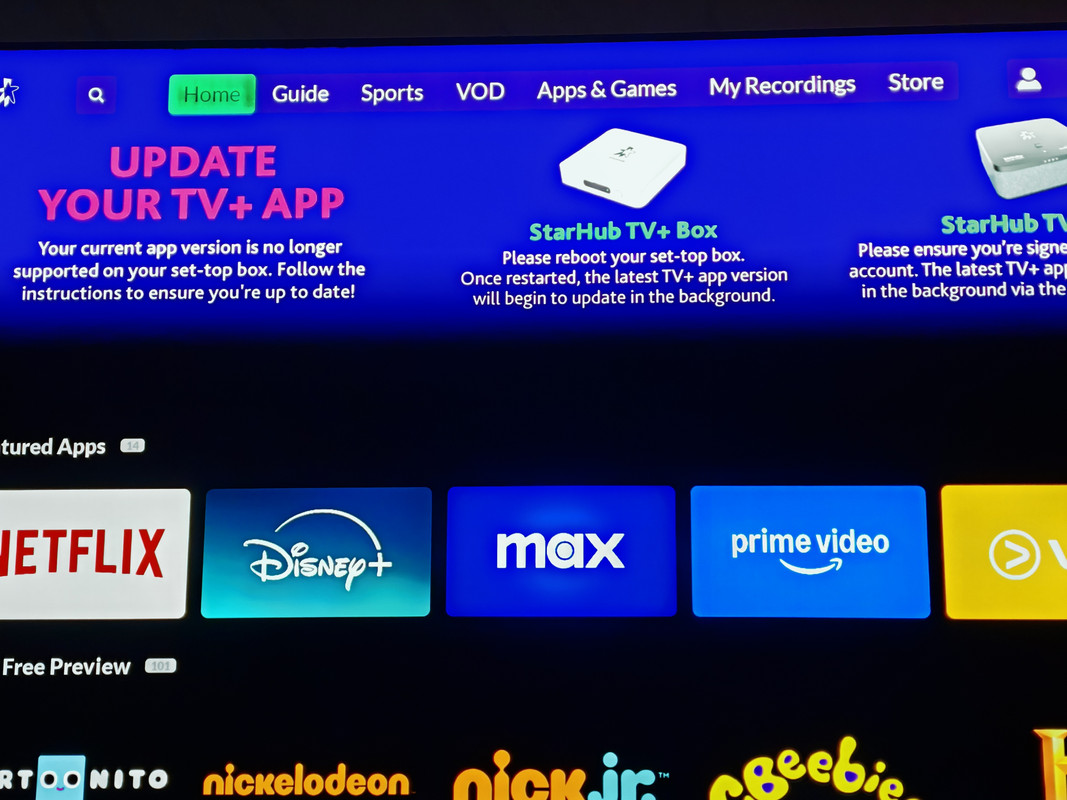
UPDATE YOUR TV+APP
Your current app version is no longer supported on your set-up box. Follow the instructions to ensure you're up to date!
I followed the instructions to reboot my set-top box, but the update message still appeared on the homepage.
I also tried uninstalling and reinstalling the app, but that didn’t make any difference. I contacted their tech support but they were of no help.
The app version is 4.617.977.
- Joined
- Aug 9, 2011
- Messages
- 17,072
- Reaction score
- 975
Now their TV+ app can not use Chromecast anymore so may be now they are trying to force user to get their TV box.Does anyone have this message at the top band when you open the Starhub TV+ app? I am using a Nvidia TV Shield.
UPDATE YOUR TV+APP
Your current app version is no longer supported on your set-up box. Follow the instructions to ensure you're up to date!
I followed the instructions to reboot my set-top box, but the update message still appeared on the homepage.
I also tried uninstalling and reinstalling the app, but that didn’t make any difference. I contacted their tech support but they were of no help.
The app version is 4.617.977.
Important Forum Advisory Note
This forum is moderated by volunteer moderators who will react only to members' feedback on posts. Moderators are not employees or representatives of HWZ. Forum members and moderators are responsible for their own posts.
Please refer to our Community Guidelines and Standards, Terms of Service and Member T&Cs for more information.
Please refer to our Community Guidelines and Standards, Terms of Service and Member T&Cs for more information.
