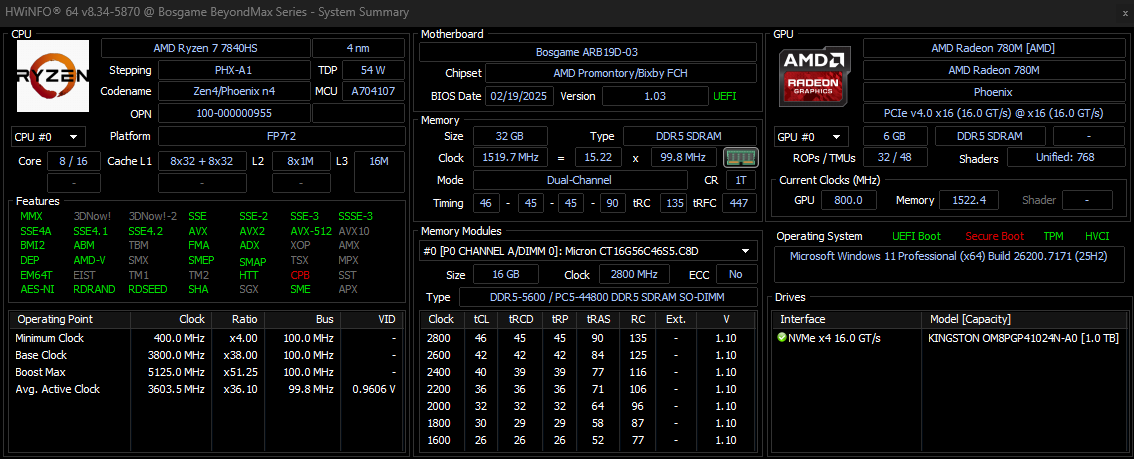
Bought the Ryzen 7 7840HS 32GB 1TB for S$553.65.
Finally can replace my 10 year old laptop
where did you buy from? Can share how did you get this price?
Bought the Ryzen 7 7840HS 32GB 1TB for S$553.65.
Finally can replace my 10 year old laptop

Yeah, even 256GB these days can't cut it for OS anymore.you could but you may run the risk of running out of space if you install other programs by C: default.
It doesn't matter actually nowadays to partition part of the drive for OS. If it fails , the entire drive fails.
.
No share link, I just post direct hyperlink can? 15% off still have leh.where did you buy from? Can share how did you get this price?
TLC expensiveit is fine unless you do a lot of writing on it. TLC is always better (if the price is right) , ssd with dram is always better for OS system drive (again if the price is right).
You dun want something that will be hot to run so anything with a pci 4 gen should do. Maybe the lexar NM790
Will they give the UK 3pin plug?No share link, I just post direct hyperlink can? 15% off still have leh.
https://www.amazon.sg/dp/B0F6CSKQ57
You can either use HWZ $20 off, Citi $12 off or $15 Unionpay to offset the price.
Updated the hyperlink.Will they give the UK 3pin plug?
BTW, will you guys reinstall a fresh copy of windows on a new box?Forgot to add.
Is it good to replace the OS drive with a 500gb TLC ssd and use the default 1tb as storage?
Any good TLC ssd to recommend?
@xiaofan @NightRaven49 @iceblendedchoc

this one browsing also lag. Trust me. I just sold off one because of its suckiness
Because of the cui processor..this one browsing also lag. Trust me. I just sold off one because of its suckiness
N95 too slow.

hmm would be good to remove the bloatware from win 11BTW, will you guys reinstall a fresh copy of windows on a new box?
@xiaofan @NightRaven49 @iceblendedchoc
Yeah, reinstalled a fresh OS.hmm would be good to remove the bloatware from win 11
.N95 too slow.
N100 if you're on a budget.
Read reviews that the fan is loud. Is it still the same case for u?Yeah, reinstalled a fresh OS.
Compact box, runs really quiet and not hot at all.
Really amazed at how powerful it is, hopefully can last more than 10 years
Not at all bro even with turbo enabled. At most you hear a slight fan wizz when it rev up.Read reviews that the fan is loud. Is it still the same case for u?
Yes, even n100 is slow, running Linux is good.Both are okay to run Windows 11 if your requirement is low.
However, I feel Windows Update is extrememly slow with my two Chuwi mini PC with Intel N100 CPU. So I have deleted Windows and install Linux.
I have three Mini PCs with Intel N100 CPU for my mini "home lab" setup, all running Proxmox VE.
Main one -- with dual 10G SFP+ ports and dual 2.5Gbe ports -- using this as my main router for Singtel 5Gbps plan (Virtual Openwrt), also a few Linux LxC containers.
Second one -- with quad 2.5Gbe ports -- used as my main router previously for Singtel 1Gbps plan (Virtual OpenWRT or Virtual pfSsense), now mainly running Linux/BSDs VMs and Linux LxC containers, plus playing with Virtual OpenWRT/pfSense/OPNsense)
Third one -- with dual 2.5Gbe ports -- running Linux/BSDs VMs and Linux LxC containers.
Yes, even n100 is slow, running Linux is good.
Is Proxmox VE good as a daily driver? I go check when there's time.
Mine only dual ports.
Bought the Ryzen 7 7840HS 32GB 1TB for S$553.65.
Finally can replace my 10 year old laptop