[Maylyn's Preview ~ Networking] ASUS RT-AC68U

ckh98258

Senior Member
Joined
Feb 23, 2002
Messages
820
Reaction score
0
Previously i was on 3.0.0.4.374.339, my WD tv live could not detect my desktop sharing folder.

upgraded to 3.0.0.4.374.371, now can detect the folder but its so lag that the video pause and buffer every 5 seconds.

The WD tv live is running on the 2.4ghz band.
I used to be able to stream huge files like 25GB before .339 .. now couldn't even stream 7GB files.
Did a speed test from my laptop on the 2.4ghz band.. previously was 123mbps and now dropped to 45mbps.

Hope to see fix for the 2.4ghz band as soon as possible. =D

Conclusion better to revert back to 339.
 

sg_rangers

Member
Joined
May 23, 2009
Messages
155
Reaction score
28
Must revert to before .339.. cuz .339 cannot even detect the network folder.
I believe it's something to do with the NAT thing that they were saying.
 

maylyn

Master Member
Joined
Jul 12, 2007
Messages
4,861
Reaction score
77
Asuswrt-Merlin 3.0.0.4.374.35_2 is out for all ASUS RT-N66/AC66/AC56 and AC68 :) :D

Howdy folks,

374.35 has been released. This release took longer than usual due to the combination of Asus having made major changes in the latest release, and things being quite busy lately here both at home and at work.

The biggest focus of this new release is the merge with GPL 374.339 (from RT-AC68U). This means Time Machine support is now available for both RT-AC56U and RT-AC68U. Support is not possible for other routers, as it requires a newer closed-source component, and at this time Asus hasn't decided yet whether they would add support for TM to these older routers or not (as it requires them to pay for a licence).

339 also means integrating Asus's own OpenVPN implementation. While Asus based theirs on the Asuswrt-Merlin one, they made extensive changes to it to make it more user-friendly. This means that I had to find a common ground between both implementations, so not to lose the advanced features of my implementations (such as the ability of having two separate OpenVPN server instances configured), but benefit from theirs such as the ability to import an .ovpn config file, or configure just a basic username/password based style of authentication. This required the OpenVPN webui to be completely overhauled. It should still be familiar enough to current Asuswrt-Merlin users. One big change is the OpenVPN Keys page is now gone, being integrated directly into the Server/Client config page as a clickable link (same as Asus).

One new feature did get slipped into this release, with support for the Namecheap DDNS (patch provided by Saintdev). A new qos-start custom script was also added, for people wanting to manually customize their QoS implementation.

The NAT loopback fix for AC56/AC68U is included (this is the patch that Asus integrated in their recent 374_371 AC68U release).

IPTraffic should now be able to count traffic that goes through an OpenVPN tunnel. Along the way, I reworked the way IPTraffic iptables rules were configured, making them more optimum performance-wise.

Various bugfixes were also slipped in:

- Fixed broken Settings backup which would generate an empty CFG file
- Fixed IPv6 firewall rules that would be corrupted if entering long IPs/CIDRs
- Asus's bruteforce protection on the web server have been disabled, as they would frequently cause users to be locked out of their own router

A few more details, which are all listed in the Changelog.

IMPORTANT: Due to changes with Mediafire (they no longer allow custom URLs with their service), people using the old download link pointing at Mediafire might no longer be able to access the download site. Always use the following download URL, as I can easily adjust this one to accomodate any change on the download site provider's end:

Next on the agenda: things are still as busy on my end, so I expect development to remain slower until the Holidays. Most likely the focus of the next release will be to merge with the next GPL release from Asus (which seem to be working overtime on fixing issues lately!).

Note that I might start slowing down with merging with new GPL, as these merges are becoming increasingly complex to accomplish. That means I will probably no longer push out a new release every time Asus pushes a new one.

There's one or two features I have in mind that should slip into the next release, but expect the focus to remain on the new GPL and on bugfixes for the time being.

RMerlin's download link ~> http://www.lostrealm.ca/asuswrt-merlin/download
 
Last edited:

maylyn

Master Member
Joined
Jul 12, 2007
Messages
4,861
Reaction score
77

HKSboy

Member
Joined
Jul 31, 2010
Messages
448
Reaction score
0
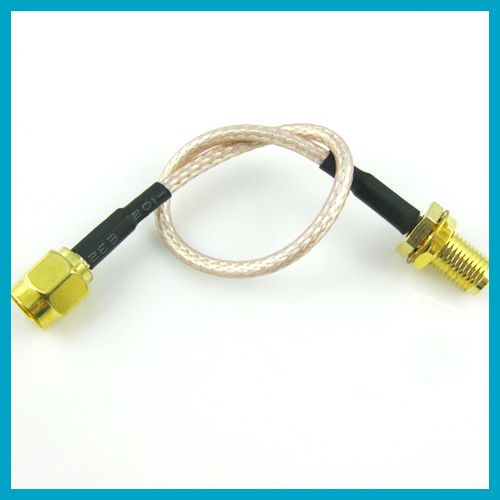
is there 3rd pArty extension cable for SMA connecters to be used on the ACE-68 ??
 

sobanoodles

Senior Member
Joined
Mar 27, 2008
Messages
1,998
Reaction score
14
My AC68U will occasionally have this problem where the laptop in my network will be unable to authenticate. Clearing the network profile and trying to reconnect back to the router will result in a network key mismatch. The only solution I've found to this problem is to connect to the Router through ethernet and then , the laptop will have no problem authenticating to the router for awhile and then the problem will arise again.

The network key I entered matches the one in the setting.

Any idea how to fix this?
 

HKSboy

Member
Joined
Jul 31, 2010
Messages
448
Reaction score
0
i never see before.

Thought can get something like a male - female extension as shown..

extension-cable-rp-sma-male-to-rp-sma-female.jpg
 

ASUS@SG

Suspended
Joined
Jul 26, 2011
Messages
7,579
Reaction score
3
My AC68U will occasionally have this problem where the laptop in my network will be unable to authenticate. Clearing the network profile and trying to reconnect back to the router will result in a network key mismatch. The only solution I've found to this problem is to connect to the Router through ethernet and then , the laptop will have no problem authenticating to the router for awhile and then the problem will arise again.

The network key I entered matches the one in the setting.

Any idea how to fix this?

which firmware are you using?

and which encryption?
 

maylyn

Master Member
Joined
Jul 12, 2007
Messages
4,861
Reaction score
77
Hi All,

Just a quick update.

We are going to release another update soon for the RT-AC68U and RT-AC56U aiming to address those affected by the slow down on 2.4Ghz. We are aiming to release it by the end of this week or by next week.

Meanwhile, the workaround for some cases is to set the channel bandwidth to 20Mhz only and set the channel manually preferably close to 1 or 11.

So far, i have seen promising results on my side on internal builds, so far so good ;) :D
 

maylyn

Master Member
Joined
Jul 12, 2007
Messages
4,861
Reaction score
77
So far, i have seen promising results on my side on internal builds, so far so good ;) :D

Some updates ;) from the ASUS networking representative over @ smallnetbuilder forums, there is a slight delay in releasing the newer ASUS RT-AC68U firmware based on the newer Broadcom SDK, wireless results are really promising on my side and it's back on par with the ASUS RT-N66U/ASUS RT-N66U or even higher :D.

Nevertheless anyone whom is interested please drop Asusnet a PM over @ the smallnetbuilder forums.

SmallNetBuilder Forums - View Single Post - New AC68U firmware available on Asus Site -3.0.0.4.374.371

Hi All,

Unfortunately, the firmware update is not likely to release this week for the RT-AC68U. I am sorry to those anticipating this firmware. The upcoming firmware is on based on a new SDK and we a little more time to test it before it is released to the public. I cannot state an exact ETA at this time, but I am hoping by the next two weeks (could be sooner!).

I do have beta versions available, which have received positive results. I will not be releasing these betas publicly. If you wish to try the beta firmware, please contact me via private message.

Note: We are not forgetting the RT-AC56U! I do not have a beta yet for this model, but feel free to message me. I will try to provide a copy when available.

Some very nice comments as well :p

FWIW, that's pretty classy. Now a list of other manufacturers that would make that offer, on a user forum...

1
2
3

Well played sir.
 

maylyn

Master Member
Joined
Jul 12, 2007
Messages
4,861
Reaction score
77
Some sneak peeps :D ;)

2.4GHz ~ Channel 1/40MHz/WPA2 AES


5GHz ~ Channel 149/80MHz/WPA2 AES


WiFi AC 80MHz is a force to be reckon with :p very acceptable ping as well
 
Last edited:

XiiaoJinx

Member
Joined
May 9, 2008
Messages
425
Reaction score
0
Can anyone advise if I can buy AC68U and connect directly to the NEW Singtel ONT and still get MioTV and digital voice? Basically use the AC68U to replace completely the Aztech 7002. (Technician coming to set up TP, ONT and RG next week)

Don't want to waste ~$300 and realise not be able to use it. Especially with people saying that the latest Singtel ONT not able to connect to 3rd party routers without bridging the Aztech.

If can replace completely, would really like to get the AC68U for better wireless performance, although not sure if wired performance/homeplug will be affected?
 

renfred89

Arch-Supremacy Member
Joined
Nov 11, 2007
Messages
17,520
Reaction score
19
Can anyone advise if I can buy AC68U and connect directly to the NEW Singtel ONT and still get MioTV and digital voice? Basically use the AC68U to replace completely the Aztech 7002. (Technician coming to set up TP, ONT and RG next week)

Don't want to waste ~$300 and realise not be able to use it. Especially with people saying that the latest Singtel ONT not able to connect to 3rd party routers without bridging the Aztech.

If can replace completely, would really like to get the AC68U for better wireless performance, although not sure if wired performance/homeplug will be affected?

You need to tell us which new ONT is it?

The black ZTE ONT is still usable with ac68u according to asus@sg
 

XiiaoJinx

Member
Joined
May 9, 2008
Messages
425
Reaction score
0
You need to tell us which new ONT is it?

The black ZTE ONT is still usable with ac68u according to asus@sg

Problem is I am only getting my fibre set up next week, haven't even install TP, ONT yet - so I can only check the model and details when it arrives, the model will probably be the very latest that Singtel is offering, so if people are saying the new ONTs can't be used with Asus routers, then probably mine also can't be used? :/
 

renfred89

Arch-Supremacy Member
Joined
Nov 11, 2007
Messages
17,520
Reaction score
19
Problem is I am only getting my fibre set up next week, haven't even install TP, ONT yet - so I can only check the model and details when it arrives, the model will probably be the very latest that Singtel is offering, so if people are saying the new ONTs can't be used with Asus routers, then probably mine also can't be used? :/

You need to find out the model first. my fibre was installed 2 months ago and i got the black ONT which is certified to be compatible with asus.

I dont think my ont can be that old. hahas.

So far, those who reported to be not compatible with ONT might have some configuration done wrongly on their router, not the ONT fault.
 

mkaeda

Member
Joined
Jul 23, 2011
Messages
388
Reaction score
0
Hey guys. just set up my AC68U with my mio 100mbps ONT, everything works fine, but I'm thinking of using OpenVPN or any router vpn you guys can recommend? How do I set that up with my AC68U? People seem to recommend Merlin's custom firmware, should I go that route because I prefer the firmware to be official, not much of a tech guy, thanks!
 

maylyn

Master Member
Joined
Jul 12, 2007
Messages
4,861
Reaction score
77
Upcoming ASUS RT-AC68U Firmware changelog leaked :D

ASUS RT-AC68U Firmware version 3.0.0.4.374.454

Fixed:

1. Improved 2.4Ghz speed.
2. Fixed OpenVPN manual client setting UI issues.
3. Changed Time machine and VPN client FAQ URL link.
4. Fixed port forwarding issues in dual wan load balanced mode.
5. Fixed dual wan UI issues.
6. Updated descriptions in VPN server.
7. Fixed VPN client unable to get DNS response issue.

IPv6

1. Allowed LAN stateful auto configuration while DHCP-PD enabled.
2. Fixed DHCPv6 related issues.

Add:

1. Added RSSI/PSM/SGI/STBC information in wireless log.
 
Last edited:

felali

Senior Member
Joined
Jan 1, 2000
Messages
1,026
Reaction score
6
Hi maylyn, just to say thanks for your updates on this thread! I've been watching this thread since I got my router in September, and have finally done my first firmware flash (RT-AC68U_3.0.0.4_374.35_4), and its wonderful!! Thank you!
 
Important Forum Advisory Note
This forum is moderated by volunteer moderators who will react only to members' feedback on posts. Moderators are not employees or representatives of HWZ Forums. Forum members and moderators are responsible for their own posts. Please refer to our Community Guidelines and Standards and Terms and Conditions for more information.
Top