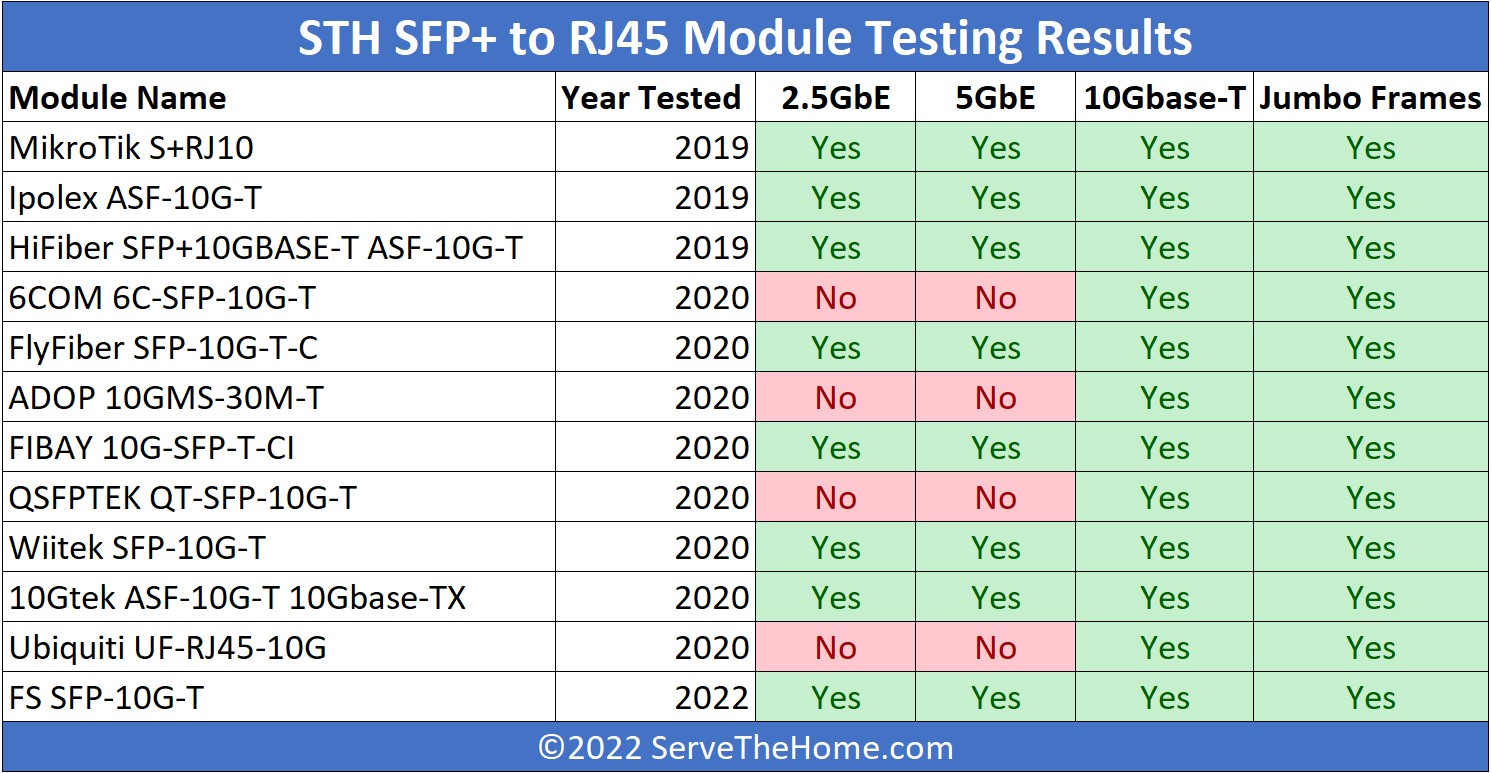
10Gbase-T Module :Ubiquiti VS 10Gtek (simple test)

ddgp1105

Member
Joined
Oct 2, 2007
Messages
136
Reaction score
35

Ubiquiti
mKeOQqA.jpg


temperature :47
wmBmsCn.jpg


speed test

neRrMpw.jpg


10Gtek
c9ksQNG.jpg


temperature :47
mCHKQPR.jpg


speed test
e4JnfeP.jpg


1.Both modules are stable and working at the same temperature of 47 degrees
2.10Gtek's upload speed is lower than Ubiquiti's, but it supports 1.25G, 2.5G, 5G, and 10G, while Ubiquiti only supports 10G
3. Ubiquiti costs twice as much as 10Gtek
 

kindredSG

Member
Joined
Jun 3, 2024
Messages
201
Reaction score
204
Nice, temp has always been in the back of mind when thinking about options.

Maybe try iperf if you're testing locally? Might be able to squeeze more out of it.
 

Apparatus

Great Supremacy Member
Joined
May 27, 2005
Messages
58,427
Reaction score
13,887
Last edited:

xiaofan

High Supremacy Member
Joined
Sep 16, 2018
Messages
36,722
Reaction score
12,428
Nice, temp has always been in the back of mind when thinking about options.

Maybe try iperf if you're testing locally? Might be able to squeeze more out of it.

OpenSpeedTest is also running locally (not to be affected by ISP). The current 10Gbps plan from Singtel/Starhub/MyRepublic use XGS-PON technology and can only achieve around 8.2Gbps anyway (some Starhub and MR users are struggling to get that speed now).

iperf3/iperf may well be slower than OpenSpeedTest based on my own testing, especially under Windows.
 

xiaofan

High Supremacy Member
Joined
Sep 16, 2018
Messages
36,722
Reaction score
12,428
There are many cheap SFP+ modules from Taobao (eg: Huawei, H3C, Ruijie, TP-Link, etc). Not so sure how they performs in terms of thermal.
 

Apparatus

Great Supremacy Member
Joined
May 27, 2005
Messages
58,427
Reaction score
13,887
Ubiquiti
mKeOQqA.jpg


temperature :47
wmBmsCn.jpg


speed test

neRrMpw.jpg


10Gtek
c9ksQNG.jpg


temperature :47
mCHKQPR.jpg


speed test
e4JnfeP.jpg


1.Both modules are stable and working at the same temperature of 47 degrees
2.10Gtek's upload speed is lower than Ubiquiti's, but it supports 1.25G, 2.5G, 5G, and 10G, while Ubiquiti only supports 10G
3. Ubiquiti costs twice as much as 10Gtek

Can check something with you?

WIth the 10Gbase-T Module do you use a pair or a single transceiver and the other end connect to a RJ45 port?

Thanks
 

Mach3.2

Great Supremacy Member
Joined
Apr 8, 2011
Messages
72,512
Reaction score
2,489
i think 47deg Celsius for 3/4 tests is suspect, perhaps DDM readout bug?

DAC should be very close to room temp, and usually they don't have DDM nor do they have temperature readout.

AOC shouldn't be that high also, if you touch the casing it should be barely above room temp, probably 30+deg Celsius on the case.

I believe those SFP+ to 10GbE RJ45 modules are running at least 50 to 60deg Celsius, you'll know if you actually touch those modules with your finger.
 

ddgp1105

Member
Joined
Oct 2, 2007
Messages
136
Reaction score
35
this is an unprofessional test, no idea how UDM-Pro works to measure the temperature 🤪
Maybe we can wait for those who have the "Golden Finger" test report to know the actual result 😂

It is important to highlight that all the tests were conducted using the UDM-Pro SFP+ port only.

One more thing to share, I have an 8-port SFP 10G switch, and the module's temperature used in the switch gives different results.

Regardless of whether the modules are from Ubiquiti or 10Gtek, they become very hot (tested with my finger; I believe the temperature is above 70 degrees, causing pain in my finger for a few days 🥶).
After a few hours, the network begins to hang and becomes unstable.

Maybe it’s due to compatibility, but I’m not sure. I would suggest not using the module or using it less, if possible

For those who still have 2.5g NAS,AP,I will suggest switch with mixing port (RJ45 & sfp) and supporting multi-gig is more reliable.

 
Last edited:

Apparatus

Great Supremacy Member
Joined
May 27, 2005
Messages
58,427
Reaction score
13,887
this is an unprofessional test, no idea how UDM-Pro works to measure the temperature 🤪
Maybe we can wait for those who have the "Golden Finger" test report to know the actual result 😂

It is important to highlight that all the tests were conducted using the UDM-Pro SFP+ port only.

One more thing to share, I have an 8-port SFP 10G switch, and the module's temperature used in the switch gives different results.

Regardless of whether the modules are from Ubiquiti or 10Gtek, they become very hot (tested with my finger; I believe the temperature is above 70 degrees, causing pain in my finger for a few days 🥶).
After a few hours, the network begins to hang and becomes unstable.

Maybe it’s due to compatibility, but I’m not sure. I would suggest not using the module or using it less, if possible

For those who still have 2.5g NAS,AP,I will suggest switch with mixing port (RJ45 & sfp) and supporting multi-gig is more reliable.

10Gbase-T Module consumes the greatest power so they can become very hot. If your switch has built-in fan(s) then it's still not too bad. If still hot or fanless then it's best to use an external small fan to blow to dissipate the heat.

Generally, one piece of 10Gbase-T Module per four slots is recommended. In your 8-port switch you can use a max of 2 pcs of 10Gbase-T Module. Separate them as far as possible like place at both ends of the switch
 

xiaofan

High Supremacy Member
Joined
Sep 16, 2018
Messages
36,722
Reaction score
12,428
There are many cheap SFP+ modules from Taobao (eg: Huawei, H3C, Ruijie, TP-Link, etc). Not so sure how they performs in terms of thermal.

Test results from acwifi.net for three cheap SFP+ copper modules (around RMB 150).
https://www.acwifi.net/27839.html

1) 联果 LG-10GE-T based on RealTek RTL821BL -- hot, 64°C
2) CPP-TA192-03C based on AQR113C -- hot, 64°C
3) CPP-TA192-03C based on Broadcom BCM84891 -- a bit better at 54°C

More expensive branded module:
TP-LINK TL-SM510U based on AQR114C -- 62.5°C, about RMB 299

Note: pricing is based on PDD platform. Taobao/Tmall may be a bit more expensive.
 

omelet

Senior Member
Joined
Dec 9, 2006
Messages
2,251
Reaction score
346
Ubiquiti actually has 2 different models, the older UF-RJ45-10G(what you have here) and the current UACC-CM-RJ45-MG.
The newer module has lower power consumption and rated at 100m, it is also multi-gig and from what I gather doesn't run as hot. I have been trying to get one but It seem to have been out of stock for many months already.
The only equivalent I found is from FS, but it cost almost twice of Ubiquiti's.

10Gtek also has multiple different models, the one you have here is rated 30m (Probably marvell based) and cost less than half of the Ubiquiti's. They also have one rated at 80m (Probably broadcom) and cost almost the same as Ubiquiti's.
 

Mach3.2

Great Supremacy Member
Joined
Apr 8, 2011
Messages
72,512
Reaction score
2,489
if you're going to negotiate NBASE-T on those SFP+ modules, the avoid the Marvell based ones because the Marvell chip doesn't have flow control implemented and you need flow control to properly handle the PHY speed mismatch.

The AQR113C modules support flow control so that's the one you want to get.
 

xiaofan

High Supremacy Member
Joined
Sep 16, 2018
Messages
36,722
Reaction score
12,428
if you're going to negotiate NBASE-T on those SFP+ modules, the avoid the Marvell based ones because the Marvell chip doesn't have flow control implemented and you need flow control to properly handle the PHY speed mismatch.

The AQR113C modules support flow control so that's the one you want to get.

Hmm, which Marvell based chips are to be avoided?

AQR113C/AQR113 are from Marvell and the datasheet says they support 10Gbps / 5Gbps / 2.5Gbps / 1Gbps / 100Mbps / 10Mbps.
https://www.marvell.com/content/dam...ys-transceivers-aqrate-gen4-product-brief.pdf
 

xiaofan

High Supremacy Member
Joined
Sep 16, 2018
Messages
36,722
Reaction score
12,428
As per the report here, looks like 10GTek ASF-10G2-T (based on Marvell AQR113C) is the one to go with for typical home use here in Singapore (30m).


ASF-10G-T
  • Controller: Marvell 88X3310
  • Max distance: 30m
  • Power: <2.5W
  • Temperature: 89C for 10G.
  • Price: £46.99
  • Notes: Officially only supports 10G. I didn't try any slower speeds.
ASF-10G2-T
  • Controller: Marvell AQR113C
  • Max distance: 30m
  • Power: <2.5W
  • Temperature: 68C for 10G and 45C for 2.5G.
  • Price: £46.99
  • Manufacture date: Nov 2023
  • Notes: Officially supports 1/2.5/5/10G operation. The actual link speed isn't visible from the switch as it always sees it as 10G. The controller automatically generates pause frames if running at <10G. It isn't possible to force a specific speed with autoneg on or off.
ASF-10G-T80
  • Controller: Broadcom BCM84891L
  • Max distance: 80m
  • Power: <2W - 10Gtek lists 1.6W for <30m and 2.0W for <80m
  • Temperature: 41C for 10G and 30C for 2.5G.
  • Price: £66.99
  • Manufacture date: Dec 2023
  • Notes: Officially only supports 10G operation as autoneg is broken. It always negotiates as 10G and doesn't do pause frames like the AQR113C. Disabling autoneg and forcing it to 2.5GBASE-T did work though. Autoneg on but only allowing 2.5GBASE-T didn't work. YMMV as this is out of spec.
  • I had port flapping at 2.5G but it appears to a compatibility quirk with that particular Realtek 2.5G USB interface? It worked fine at 10G and at 2.5G with an Intel 2.5G NIC.
 

Mach3.2

Great Supremacy Member
Joined
Apr 8, 2011
Messages
72,512
Reaction score
2,489
Avoid the modules using Marvell 88X3310 if you intent to use NBASE-T speeds. Some modules using this chip will negotiate NBASE-T link rate, but they can't properly do it because flow control isn't implemented on the PHY chip.

No, flow control on the switch won't save you here, you need it on the PHY chip becasue the translation from NBASE-T to SFP+ is trasparent to the swtich.
 

Mach3.2

Great Supremacy Member
Joined
Apr 8, 2011
Messages
72,512
Reaction score
2,489

Apparatus

Great Supremacy Member
Joined
May 27, 2005
Messages
58,427
Reaction score
13,887
As per the report here, looks like 10GTek ASF-10G2-T (based on Marvell AQR113C) is the one to go with for typical home use here in Singapore (30m).


ASF-10G-T
  • Controller: Marvell 88X3310
  • Max distance: 30m
  • Power: <2.5W
  • Temperature: 89C for 10G.
  • Price: £46.99
  • Notes: Officially only supports 10G. I didn't try any slower speeds.
ASF-10G2-T
  • Controller: Marvell AQR113C
  • Max distance: 30m
  • Power: <2.5W
  • Temperature: 68C for 10G and 45C for 2.5G.
  • Price: £46.99
  • Manufacture date: Nov 2023
  • Notes: Officially supports 1/2.5/5/10G operation. The actual link speed isn't visible from the switch as it always sees it as 10G. The controller automatically generates pause frames if running at <10G. It isn't possible to force a specific speed with autoneg on or off.
ASF-10G-T80
  • Controller: Broadcom BCM84891L
  • Max distance: 80m
  • Power: <2W - 10Gtek lists 1.6W for <30m and 2.0W for <80m
  • Temperature: 41C for 10G and 30C for 2.5G.
  • Price: £66.99
  • Manufacture date: Dec 2023
  • Notes: Officially only supports 10G operation as autoneg is broken. It always negotiates as 10G and doesn't do pause frames like the AQR113C. Disabling autoneg and forcing it to 2.5GBASE-T did work though. Autoneg on but only allowing 2.5GBASE-T didn't work. YMMV as this is out of spec.
  • I had port flapping at 2.5G but it appears to a compatibility quirk with that particular Realtek 2.5G USB interface? It worked fine at 10G and at 2.5G with an Intel 2.5G NIC.


Get this one

Cisco SFP-10G-T-100 Compatible SFP+ 10GBASE-T Copper 100m RJ-45 Transceiver Module (LOS) ($215.82) Power Consumption <1.8W

https://www.fs.com/sg/products/154916.html
 
Important Forum Advisory Note
This forum is moderated by volunteer moderators who will react only to members' feedback on posts. Moderators are not employees or representatives of HWZ Forums. Forum members and moderators are responsible for their own posts. Please refer to our Community Guidelines and Standards and Terms and Conditions for more information.
Top