Asus notebook, what should I do

woshihock

Banned
Joined
Mar 13, 2010
Messages
16,633
Reaction score
4,320
Hi All

I'm currently stuck with this problem. please share if you guys have the same problem or how to deal with Asus service centre.

My setup is notebook hooked up with monitor and speaker, notebook closed.

New Notebook bought in Aug2020, first day give problem. While using and charging suddenly "locking" message will appear like less than 0.5s( I set up camera to video down the moment to see the message) then my monitor will blackout. Press any key won't wake the notebook, the only way is to press the power button.

I sent in my laptop to the service centre for a total of 5 times, downtime 2 months and counting.

First time - changed the motherboard

Second time - no fault found

Third time - no fault found, ask me to make sure nothing blocks the vent of the notebook. Cannot duplicate the problem

forth time - change the keyboard, when asked if can duplicate the problem, staff told me they change part for a reason :s22:

fifth time - told me they finally duplicate the problem and asking for expert advice. Took them more than 2 weeks of testing and told me my notebook cannot be closed while using, if not the notebook will overheat then error occur. also told me this is not a design fault :s13:

Fellow forumer, do you think this is acceptable? what can I do, LLST? or somewhere I can report the problem?

Asked to talk to the manager, manager say they will do their best, ask for refund or change set say no this kind of policy. I asked if there is any other higher management I can complain to, she told me she the highest I can complain to.
 
Last edited:

86technie

High Supremacy Member
Joined
Jun 8, 2006
Messages
40,422
Reaction score
5,988
Reinstall Windows and try again.
*Reinstall means not reset, delete any existing partition on SSD/HDD than install Windows from fresh.
To me sound like software issue in particular sleep mode.
 

woshihock

Banned
Joined
Mar 13, 2010
Messages
16,633
Reaction score
4,320
Reinstall Windows and try again.
*Reinstall means not reset, delete any existing partition on SSD/HDD than install Windows from fresh.
To me sound like software issue in particular sleep mode.

thank you for your suggestion, the notebook still with Asus.

they did a window reinstall before, I believe to be on the second or third sent in.

was wondering can I go report to CASE?

does it make any sense that notebook or laptop can't close during usage? especially I'm hooking up with monitor
 

firesong

Supremacy Member
Deluxe Member
Joined
Jan 17, 2001
Messages
8,877
Reaction score
4,889
thank you for your suggestion, the notebook still with Asus.

they did a window reinstall before, I believe to be on the second or third sent in.

was wondering can I go report to CASE?

does it make any sense that notebook or laptop can't close during usage? especially I'm hooking up with monitor
Why not? I use my setup with both displays on. It's mounted on a dual-arm monitor stand, with one holding the laptop and the other the monitor.

In terms of thermals, most consumer class laptops are designed to be operated open, not closed. Since that is the expected usage pattern for those laptops.

It's in the office when people started to hook up to larger external displays and then begun to shut the laptop. And those laptops are designed differently: Just look at the Thinkpad, the Latitude, and the Elitebook - their vents and thermals are differently designed.


As for CASE, invoke lemon law and ask for their help to look into it.
 
Last edited:

firesong

Supremacy Member
Deluxe Member
Joined
Jan 17, 2001
Messages
8,877
Reaction score
4,889
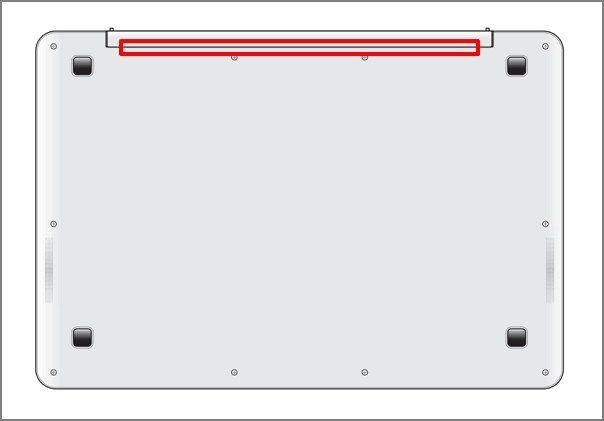
Can you confirm the design? Asus actually has a guide to overheating at their web site. :s13:

If your exhaust vents are at the back in the hinge area, then there's a good chance they are blocked when you close the lid. This design is terribly common for a lot of modern laptops now.
ee2f1923-7b6f-49b1-8c87-89e59dd82253.png


Simply put, you are blocking the laptop exhaust and causing the overheating by the way you use it with the lid shut. If so, technically, they can argue that this is user-caused damage and they are hence not obliged under Lemon law to replace. After all, not all laptops are designed to be operated with the lid shut.
Consumers are not entitled to remedies under the Lemon Law if:
  • The consumer had damaged the item.
  • The consumer had misused the item and caused the fault.
  • The consumer had tried to repair the item himself or had someone else try to repair it, and in the process damaged it.
  • The consumer had been told about the fault before he bought the item.
  • The consumer had changed his mind and no longer wanted the item.
  • The fault is due to wear and tear.

For the Thinkpads that I've used, the exhaust vents are at the side.
 

ckctam

Member
Joined
Nov 9, 2011
Messages
344
Reaction score
3
Can you confirm the design? Asus actually has a guide to overheating at their web site. :s13:

If your exhaust vents are at the back in the hinge area, then there's a good chance they are blocked when you close the lid. This design is terribly common for a lot of modern laptops now.
ee2f1923-7b6f-49b1-8c87-89e59dd82253.png


Simply put, you are blocking the laptop exhaust and causing the overheating by the way you use it with the lid shut. If so, technically, they can argue that this is user-caused damage and they are hence not obliged under Lemon law to replace. After all, not all laptops are designed to be operated with the lid shut.


For the Thinkpads that I've used, the exhaust vents are at the side.

The first question is are you sure it is bc of overheating? I suggest installing Hwinfo64 and check the cpu temp.
 
Last edited:

86technie

High Supremacy Member
Joined
Jun 8, 2006
Messages
40,422
Reaction score
5,988
thank you for your suggestion, the notebook still with Asus.

they did a window reinstall before, I believe to be on the second or third sent in.

was wondering can I go report to CASE?

does it make any sense that notebook or laptop can't close during usage? especially I'm hooking up with monitor

For them, they did was reclone/reimage the machine.
If the image have issue which I suspect could be due to the sleep
function could not work.

If go CASE or Small Claim, they need concrete evidence that
either the design had flaws or not working as intended.
As well as go through all avenue to rectify the issue not to avail.

My stance is the OS but no harm if you want to approach CASE.
Since you mention since the laptop is with Asus, wait for them
to return the unit back to them.

Maybe send to a shop for another opinion before filing a case with CASE.
 

firesong

Supremacy Member
Deluxe Member
Joined
Jan 17, 2001
Messages
8,877
Reaction score
4,889
The first question is are you sure it is bc of overheating? I suggest installing Hwinfo64 and check the cpu temp.

If you read the TS's original post, that's what was told to him by Asus staff.

I was merely offering support info as to why it might have led to overheating. He omitted the model, so we can only guess at best what the thermal design is like.

For them, they did was reclone/reimage the machine.
If the image have issue which I suspect could be due to the sleep
function could not work.

If go CASE or Small Claim, they need concrete evidence that
either the design had flaws or not working as intended.
As well as go through all avenue to rectify the issue not to avail.

My stance is the OS but no harm if you want to approach CASE.
Since you mention since the laptop is with Asus, wait for them
to return the unit back to them.

Maybe send to a shop for another opinion before filing a case with CASE.

I think sending to a third party (unofficial service agent) might give them more reason to dispute with CASE about the incident. It potentially hurts his lemon law claim process since a lot of them have clauses about visiting unauthorised service centres. Even if nothing is done, the fact that it was opened up by one of these service centres could be grounds for them to argue unauthorised repair attempts.

All devices sold at retail in Singapore should come under the Lemon law which covers for six months from date of sale, so the manager is pulling a fast one about rejecting refund processes goes against that, and it can be enforced by CASE.
 
Last edited:

woshihock

Banned
Joined
Mar 13, 2010
Messages
16,633
Reaction score
4,320
Hello everyone thank you guys for all the input and suggestion.

1) I bought a Vivobook

2)I even buy a laptop stand to elevate my notebook.

3) the vent is not at the hinge area, even without my stand it's definitely can work

It's under warranty, so I don't think I want to go to 3rd party repair shop.

ah yes, I told the manager that I will go to CASE if you guys can't solve the problem but she yaya-papaya say we are doing as per what the warranty stated even CASE will ask them to repair only.
 

woshihock

Banned
Joined
Mar 13, 2010
Messages
16,633
Reaction score
4,320
The first question is are you sure it is bc of overheating? I suggest installing Hwinfo64 and check the cpu temp.

pretty sure

the problem happened at the same pattern

morning go work with battery full by afternoon drained to 20%

then I will charge it. At about 90%-92% full, the fan gets very loud and get

ready for the locking message:s13:
 

SpecialKeyboardService

Arch-Supremacy Member
Joined
Jun 24, 2020
Messages
17,236
Reaction score
4,933
I tell u why.
Vivobook is passive cooling. I.e to say no heat pipe connected to cpu.

Ur computer overheat is ur problem
Reason why warranty is 1 year
 

woshihock

Banned
Joined
Mar 13, 2010
Messages
16,633
Reaction score
4,320
I tell u why.
Vivobook is passive cooling. I.e to say no heat pipe connected to cpu.

Ur computer overheat is ur problem
Reason why warranty is 1 year

But if the whole world only I face this problem then it's still a user fault or product fault?

I asked the service centre why other users don't have this problem and they haven't get back to me. :eek:

I tried to google for solution when the problem first occurs, 99% of the solution says its the setting issue but nothing works la.
 

firesong

Supremacy Member
Deluxe Member
Joined
Jan 17, 2001
Messages
8,877
Reaction score
4,889
Hello everyone thank you guys for all the input and suggestion.

1) I bought a Vivobook

2)I even buy a laptop stand to elevate my notebook.

3) the vent is not at the hinge area, even without my stand it's definitely can work

It's under warranty, so I don't think I want to go to 3rd party repair shop.

ah yes, I told the manager that I will go to CASE if you guys can't solve the problem but she yaya-papaya say we are doing as per what the warranty stated even CASE will ask them to repair only.

Passive cooling. Pretty sure the stand does not help very much. It doesn't even do much for active cooling units, with fans blowing directly at heat pipes. Closing the laptop makes the heat problem even worse cos you trap the heat inside.

Passively cooled laptops might not even have cooling vents since they are for air intake/exhaust purposes. No fan blowing, so no point cutting vents for that purpose.

Either change your computing style and use the laptop the way it was designed (open) so that cooling is a little better, or change your laptop and get one that is actively cooled and vent not blocked when you close your lid - or look for an enterprise model laptop cos those usually are designed for that work style when they are plugged into docking stations.
 

SpecialKeyboardService

Arch-Supremacy Member
Joined
Jun 24, 2020
Messages
17,236
Reaction score
4,933
But if the whole world only I face this problem then it's still a user fault or product fault?

I asked the service centre why other users don't have this problem and they haven't get back to me. :eek:

I tried to google for solution when the problem first occurs, 99% of the solution says its the setting issue but nothing works la.

Macbook air also having the same issue as well.
Intel macbook air ***** problematic as well.
M1 doesnt.
 

SpecialKeyboardService

Arch-Supremacy Member
Joined
Jun 24, 2020
Messages
17,236
Reaction score
4,933
As i repeated with another thread in this forum, it is expensive to be cheap.

One spoilt, one must really suck thumb

Tldr get thinkpad or bizness line up laptop.
 

woshihock

Banned
Joined
Mar 13, 2010
Messages
16,633
Reaction score
4,320
Passive cooling. Pretty sure the stand does not help very much. It doesn't even do much for active cooling units, with fans blowing directly at heat pipes. Closing the laptop makes the heat problem even worse cos you trap the heat inside.

Passively cooled laptops might not even have cooling vents since they are for air intake/exhaust purposes. No fan blowing, so no point cutting vents for that purpose.

Either change your computing style and use the laptop the way it was designed (open) so that cooling is a little better, or change your laptop and get one that is actively cooled and vent not blocked when you close your lid - or look for an enterprise model laptop cos those usually are designed for that work style when they are plugged into docking stations.


My laptop has vents at the bottom and fans too. that's why when fans get loud I know the error going to occurs.

The service centre also advised me not to block the vent which I pretty sure I did not and even buy a stand to double confirm.
 

86technie

High Supremacy Member
Joined
Jun 8, 2006
Messages
40,422
Reaction score
5,988
so in the end nothing I can do with Asus or their service centre?:vijayadmin:

Think for now wait for the laptop to come back.
Than maybe approach CASE for assistance.
Lemon law is within 6 months of purchase you can ask
for resolution for faulty product.
 

SpecialKeyboardService

Arch-Supremacy Member
Joined
Jun 24, 2020
Messages
17,236
Reaction score
4,933
Think for now wait for the laptop to come back.
Than maybe approach CASE for assistance.
Lemon law is within 6 months of purchase you can ask
for resolution for faulty product.
File for return ah.

In the mean time, just look for a more reliable lineup.
The laptop is designed to make you replace your laptop within 2 years.
 
Important Forum Advisory Note
This forum is moderated by volunteer moderators who will react only to members' feedback on posts. Moderators are not employees or representatives of HWZ Forums. Forum members and moderators are responsible for their own posts. Please refer to our Community Guidelines and Standards and Terms and Conditions for more information.
Top