
Hi i just bought a asrock x470 taichi on newegg to pair with 3700x. From what i know that this board need a bios update to make it work. The problem is the board doesn't have bios flashback feature and i might need a previous gen processor to make the update. Do you know any shop that do this? How much roughly it cost? Thanks.
You are using an out of date browser. It may not display this or other websites correctly.
You should upgrade or use an alternative browser.
You should upgrade or use an alternative browser.
Bios update
- Thread starter Dzikri
- Start date
More options
Who Replied?bobozhang137
Senior Member
- Joined
- Jun 27, 2010
- Messages
- 2,436
- Reaction score
- 0
Hi i just bought a asrock x470 taichi on newegg to pair with 3700x. From what i know that this board need a bios update to make it work. The problem is the board doesn't have bios flashback feature and i might need a previous gen processor to make the update. Do you know any shop that do this? How much roughly it cost? Thanks.
If you just bought it chances are it’s already bios updated to the most recent one. Just look for the 3000 sticker on the box.
I bought a msi b450i off amazon USA and even though there was no Ryzen 3000 sticker on the box. It booted with my 3500 out of the box.
If you are unable to boot tho. I think am4 platform allows to go to bios without a processor. I read it somewhere let me look it up
Edit: read wrong you cant boot bios without a chip

wwenze
Greater Supremacy Member
- Joined
- Dec 2, 2002
- Messages
- 87,365
- Reaction score
- 30,917
^^ above.
And even if it doesn't, you can DIY: Get this thing, take out your mobo BIOS chip and plug into this, save the old BIOS and flash the new one in. This comes in useful when your BIOS get bricked for whatever reason also.

And even if it doesn't, you can DIY: Get this thing, take out your mobo BIOS chip and plug into this, save the old BIOS and flash the new one in. This comes in useful when your BIOS get bricked for whatever reason also.

hafiz116
Senior Member
- Joined
- Sep 27, 2008
- Messages
- 1,151
- Reaction score
- 0
Can the BIOS chip be pulled out with just a pair of tweezers or is some special tool needed?
Have to research it for your exact motherboard. I just did a quick check for mine and its a dual bios that is actually soldered to the motherboard so not something I would even attempt. Having said that since its a Dual BIOS there should never be the need to replace it as there is a backup.
I have seen older motherboards that have them plug into a socket. The key to those is to slowly dislodge it and try to pull it out evenly to avoid damaging the legs. Below is an example but it does date back to 2013!
wwenze
Greater Supremacy Member
- Joined
- Dec 2, 2002
- Messages
- 87,365
- Reaction score
- 30,917
Can the BIOS chip be pulled out with just a pair of tweezers or is some special tool needed?
Generally I would advice having this
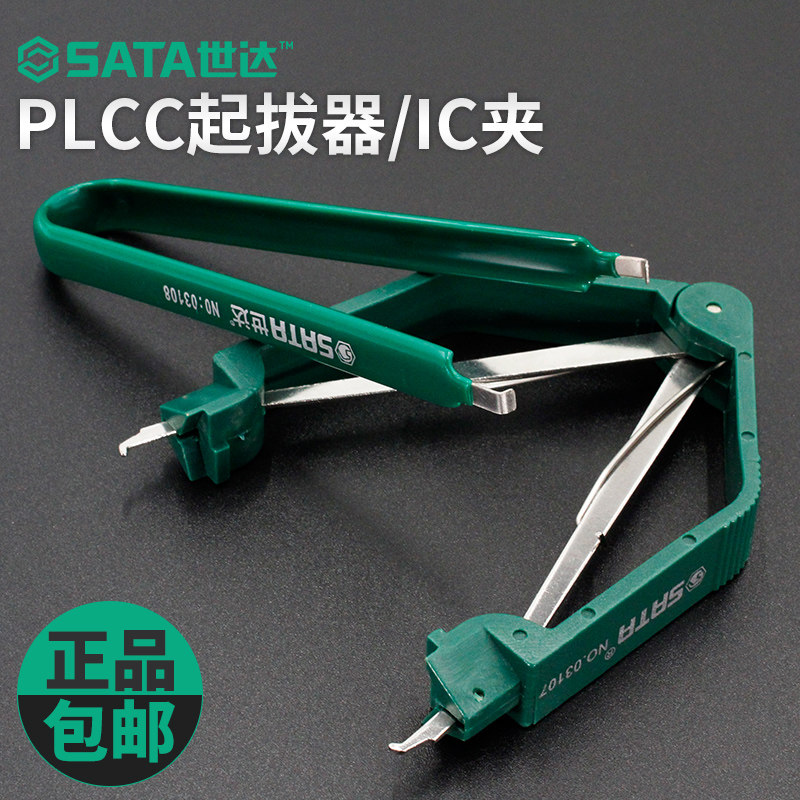
It should come in a set of standard computer / DIY screwdrivers/tools bag.
You can use hand also, but first timers would likely bend the edgemost pins upon removing. Actually I still do that if I'm not careful. And actually even with the tweezer you can still bend the pins... Key point is to pull up and release the grip on each side slowly.
wwenze
Greater Supremacy Member
- Joined
- Dec 2, 2002
- Messages
- 87,365
- Reaction score
- 30,917
Have to research it for your exact motherboard.
True that. TS can ignore what I said for asrock x470 taichi

Even back then there were SOIC (soldered) ICs, and even today there are DIP ICs, like in my H110m-ITX
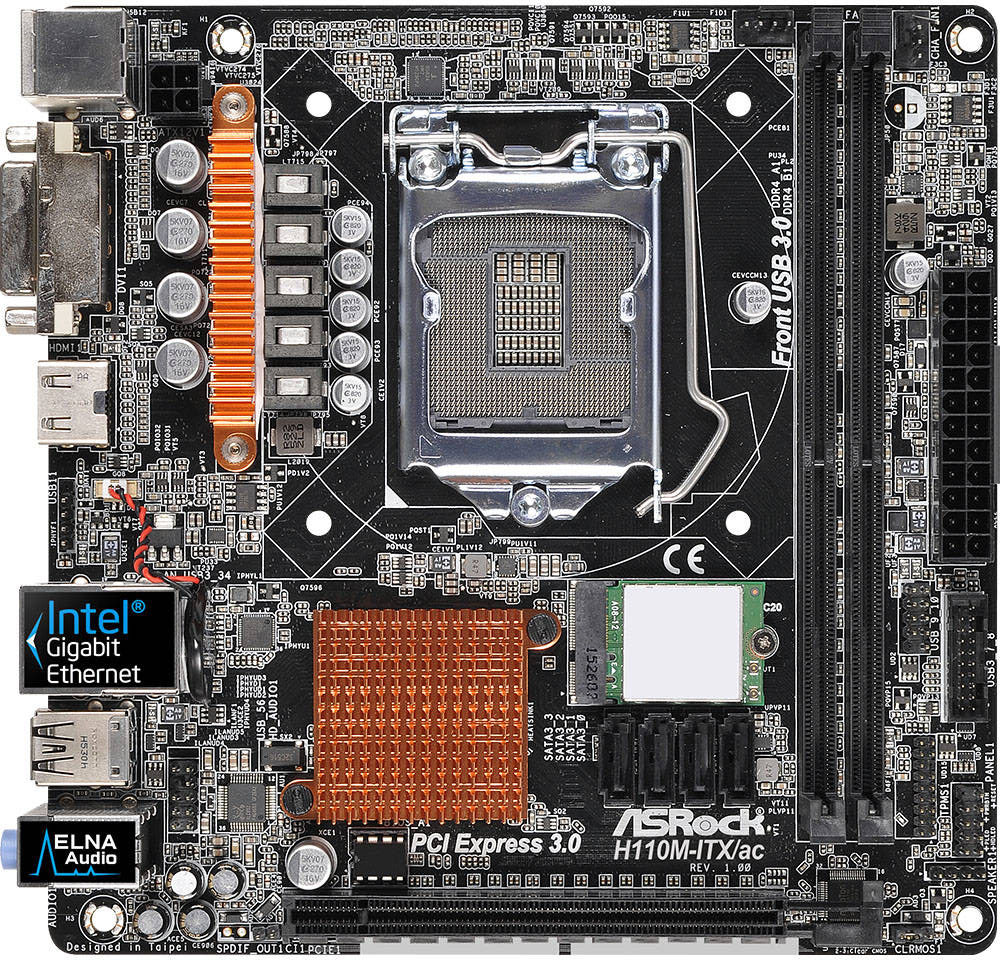
Funny thing is usually those soldered ones would have some auto update feature for easier recovery...

Koenig168
Arch-Supremacy Member
- Joined
- Nov 4, 2007
- Messages
- 10,104
- Reaction score
- 1,780
Have to research it for your exact motherboard. I just did a quick check for mine and its a dual bios that is actually soldered to the motherboard so not something I would even attempt. Having said that since its a Dual BIOS there should never be the need to replace it as there is a backup.
I have seen older motherboards that have them plug into a socket. The key to those is to slowly dislodge it and try to pull it out evenly to avoid damaging the legs. Below is an example but it does date back to 2013!
Generally I would advice having this
It should come in a set of standard computer / DIY screwdrivers/tools bag.
You can use hand also, but first timers would likely bend the edgemost pins upon removing. Actually I still do that if I'm not careful. And actually even with the tweezer you can still bend the pins... Key point is to pull up and release the grip on each side slowly.
Thanks, guys.
Can the BIOS chip be pulled out with just a pair of tweezers or is some special tool needed?
May be 10 or 20 years ago! Now a day is all surface mount soldering on board.
Asrock board usually flash bios thru USB drive. First download the latest bios from Asrock support site. Put it on USB drive using FAT or FAT32 format. Then boot PC. There is a Fx key to select to flash bios. Could not remember which F key right now. Board user manual mention it.
Edit: Is F6 key to flash BIOS file store on USB drive. (method 2). If not, goes into BIOS and follow method 1.
https://www.asrock.com/support/BIOSIG.asp?cat=BIOS10
Last edited:
Koenig168
Arch-Supremacy Member
- Joined
- Nov 4, 2007
- Messages
- 10,104
- Reaction score
- 1,780
May be 10 or 20 years ago! Now a day is all surface mount soldering on board.
....
Gigabyte uses removable BIOS chips for their X570 boards.
Gigabyte uses removable BIOS chips for their X570 boards.
Strange, base on manual. It is not.
https://www.newegg.com/global/sg-en...MI3_-oxKT-6QIVEyQrCh2dfgUxEAQYAyABEgIjvfD_BwE


Seriously don't know why people like to get asrock just to save a bit.
Actually Asrock is related to ASUS in early day. They are quite a large motherboard maker. I use it before. Is not bad actually.
https://en.wikipedia.org/wiki/ASRoc...ginally spun off,on the Taiwan Stock Exchange.
https://www.techpowerup.com/forums/threads/asrock-and-asus-mythbust.151469/
Last edited:
Important Forum Advisory Note
This forum is moderated by volunteer moderators who will react only to members' feedback on posts. Moderators are not employees or representatives of HWZ Forums. Forum members and moderators are responsible for their own posts.
Please refer to our Community Guidelines and Standards and Terms and Conditions for more information.
