Can this dual dac setup work?

fluffyhamster

Junior Member
Joined
Jan 15, 2018
Messages
35
Reaction score
0
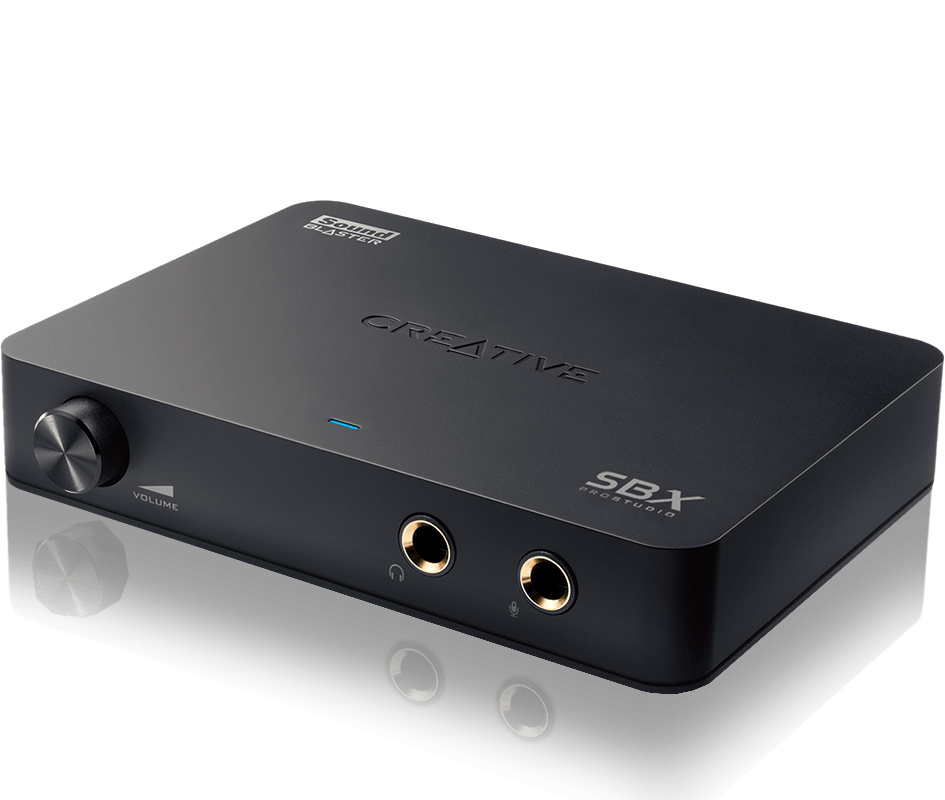
Hi guys, i am thinking of disabling onboard realtek soundcard for some reasons and got a creative soundblaster omni which is an external sound card.

Currently i am using Audioengine D1 DAC. I wonder would this setup work?

PC ----> Soundblaster Omni -----> Audioengine DAC ------> Speakers

If anyone has tried it, any pros and cons?
 

sglords

Supremacy Member
Joined
Jan 17, 2011
Messages
6,568
Reaction score
38
PC → Audioengine DAC → Speakers
Throw away soundblaster omni

Sent from Xiaomi MI 6 using GAGT
 

wwenze

Greater Supremacy Member
Joined
Dec 2, 2002
Messages
86,463
Reaction score
30,152
I used to do something similar with Audigy SPDIF out to an external DAC.

This is useful when you need to use the sound effects or hardware acceleration of the sound card yet want to use a better external DAC.
 

fluffyhamster

Junior Member
Joined
Jan 15, 2018
Messages
35
Reaction score
0
I used to do something similar with Audigy SPDIF out to an external DAC.

This is useful when you need to use the sound effects or hardware acceleration of the sound card yet want to use a better external DAC.

So basically SB omni to DAC to speaker is good as i can use the SB enhancement or features and DAC clean it all up?
 

wwenze

Greater Supremacy Member
Joined
Dec 2, 2002
Messages
86,463
Reaction score
30,152
DAC does digital to analog conversion. There is a DAC in every sound card, even onboard sound.

When the DAC on the soundcard is not high quality, we connect the soundcard to an external DAC of higher quality.
 

fluffyhamster

Junior Member
Joined
Jan 15, 2018
Messages
35
Reaction score
0
DAC does digital to analog conversion. There is a DAC in every sound card, even onboard sound.

When the DAC on the soundcard is not high quality, we connect the soundcard to an external DAC of higher quality.

Thanks! So it will work, cheers!
 

ronnie_gogs

Member
Joined
Apr 4, 2012
Messages
472
Reaction score
60
Well the DAC is converting digital to analog.

S/PDIF(Optical) and USB are both digital signals. It doesn't matter who many devices you put in digial path the sound won't change as the final DAC is main source of sound. So all digital signals are exactly same.

SPDIF from onboard (realtek), USB direct connection are just digital signals with no sound quality difference.

In terms of will it work. I think it will connected via SPDIF or toslink. Unless creative disables its outputs on SPDIF. You will have 2 DACs to connect speakers and headphones.
 

twentytwoeighty

Senior Member
Joined
Nov 12, 2009
Messages
1,195
Reaction score
0
Why not just use the onboard audio? It's free and nowhere as bad as claimed by the audio snake oil salesman and believers.
 

fluffyhamster

Junior Member
Joined
Jan 15, 2018
Messages
35
Reaction score
0
Why not just use the onboard audio? It's free and nowhere as bad as claimed by the audio snake oil salesman and believers.

My Onboard is realtek HD, truth is the audio sounds alright but i listen to dedicated sound card they are less muddy and more oomph. I will not be able to tell if i am using a normal speakers but since i bought Audioengine A5+ many years ago i can hear more clarity but still muddy.
 

sglords

Supremacy Member
Joined
Jan 17, 2011
Messages
6,568
Reaction score
38
Connect like that won't have more chance of jitter in digital signal?

Sent from Xiaomi MI 6 using GAGT
 

fluffyhamster

Junior Member
Joined
Jan 15, 2018
Messages
35
Reaction score
0
Connect like that won't have more chance of jitter in digital signal?

Sent from Xiaomi MI 6 using GAGT

From what i research there will be no changes or improvement over connecting this omni and D1 together, but using just DAC only helps clarity whereby with omni theres amp and enhancement.

Right now i am using onboard Realtek for the enhancement, which sound really bad, i have to disable all those fake noise.

Another thing why i disable onboard is because it cause stuttering in games. Btw i am multi-tasking heavily outside the game like 20 chrome tabs, movies or music on second monitor plus several other task intensive programs. For normal usage there will not be any difference. I am not looking at increasing performance of games, rather remove any stuttering due to cpu processes.
 

shadow84

High Supremacy Member
Joined
Apr 15, 2009
Messages
34,286
Reaction score
420
Just curious, you alrdy have both omni and D1 or just either? Your 1st post seems to indicate that you had alrdy bought both.

If already have both, then try connect PC to omni via usb and omni to D1 via toslink. See if you can hear any diff.
 

fluffyhamster

Junior Member
Joined
Jan 15, 2018
Messages
35
Reaction score
0
Just curious, you alrdy have both omni and D1 or just either? Your 1st post seems to indicate that you had alrdy bought both.

If already have both, then try connect PC to omni via usb and omni to D1 via toslink. See if you can hear any diff.

I am using Audioengine D1 and from another post i just send my AE5 speakers to repair the amp. i have the omni now so in a few days when i get back my speakers i will test it and report back here. Cheers!
 

xdivider

Great Supremacy Member
Joined
Nov 8, 2000
Messages
60,001
Reaction score
18,634
Hi guys, i am thinking of disabling onboard realtek soundcard for some reasons and got a creative soundblaster omni which is an external sound card.

Currently i am using Audioengine D1 DAC. I wonder would this setup work?

PC ----> Soundblaster Omni -----> Audioengine DAC ------> Speakers

If anyone has tried it, any pros and cons?

The only reason u need a omni is for surround sound, the audioengine is more than capable of being the only sound card if ur interest is music only........
 

-Synchronicity-

Senior Member
Joined
Apr 29, 2012
Messages
2,463
Reaction score
198
I am using Audioengine D1 and from another post i just send my AE5 speakers to repair the amp. i have the omni now so in a few days when i get back my speakers i will test it and report back here. Cheers!

Hmmm actually can't you just use your omni's amp? It should work hence no need to waste money to repair.
 

fluffyhamster

Junior Member
Joined
Jan 15, 2018
Messages
35
Reaction score
0
Alright, i will be getting back my Audioengine A5+ speakers tomorrow but i did testing on the omni+dac.

I use Pc usb to omni to toslink Audioengine D1 to speakers. (Using earphone to test it for now)

Just using Audioengine D1 by itself brings clear mids and clarity but it might be the songs i am test, there's a bit of low bass.

Next, I fix omni to pc through USB 3.0 and issues starting popping out. Crackling and stuttering sounds. So i switch over to USB 2.0 port and TATA! everything is gone.

One of the best thing i found is that under sound control panel i can finally switch the default format to 2 channel, 24 bit, 96000Hz (Studio quality) whereby previously for onboard it will stutter/lag pretty badly. One thing to note is that Omni uses software processing instead of hardware dsp. Disappointing but it works really gooooooood quality sound together with D1 dac!

So now i find pc to omni and then to AE D1 dac. Wow, i mean, wow. Now i really know what it means to play at 24bit sound quality! Immersive i would say.

First test, meddling with omni sound settings.
Surround Off
Bass Off
Smart Volume Off
Dialog Plus Off
Crystalizer - 60% (I think this is the option which increase the sound quality)

Game scout mode Off
Speaker - Stereo ( i only use 2speakers, not a fan of surround unless it is on my headset.)

Decorder - Off or Dolby digital life (Off for now)
Line in/Mic in/ all other not needed stuff Off for now.
EQ - Either off or i am using my custom EQ for more bass.

By using this setup, just the crystalizer is worth it, plus omni is definitely much better than onboard realtek HD. No need to compare.

Personally, the audioengine D1 24bit Dac is really good for music and if you just want music, don't need to get Omni. If you are like me, i play different music genre with different EQ, i use different enhancement for my headset, AE speakers or my bluetooth Jaybird earphone. I play games and prefer a bit more bass and punch. (Going to try the game scout mode on omni)

For me it is worth it just for all the sound improvement Omni provides. I will keep this setup until another better USB sound card comes out which can do hardware sound processing and with a bigger sound improvement.

Cheers!
 

86technie

High Supremacy Member
Joined
Jun 8, 2006
Messages
40,373
Reaction score
5,955
Usually for most use either DAC or soundcard but not both.

There is one more model above Omni Surround which is intended
for gaming but not music which is the

pdt-mhl-sb-xfi-hd.png


SB X-fi premium music

But if you really want better sound, get sound interface.

SCARLETTSOLOPACKII-D7_x700.jpg


focusrite scarlett solo

The sound will be much better than PC soundcard since it is intended for recording purposes.
Sound interface you just need to plug in and install driver that is it.
No need to tweak any settings and etc. for better sound.
 

86technie

High Supremacy Member
Joined
Jun 8, 2006
Messages
40,373
Reaction score
5,955
Alright, i will be getting back my Audioengine A5+ speakers tomorrow but i did testing on the omni+dac.

I use Pc usb to omni to toslink Audioengine D1 to speakers. (Using earphone to test it for now)

Just using Audioengine D1 by itself brings clear mids and clarity but it might be the songs i am test, there's a bit of low bass.

Next, I fix omni to pc through USB 3.0 and issues starting popping out. Crackling and stuttering sounds. So i switch over to USB 2.0 port and TATA! everything is gone.

One of the best thing i found is that under sound control panel i can finally switch the default format to 2 channel, 24 bit, 96000Hz (Studio quality) whereby previously for onboard it will stutter/lag pretty badly. One thing to note is that Omni uses software processing instead of hardware dsp. Disappointing but it works really gooooooood quality sound together with D1 dac!

So now i find pc to omni and then to AE D1 dac. Wow, i mean, wow. Now i really know what it means to play at 24bit sound quality! Immersive i would say.

First test, meddling with omni sound settings.
Surround Off
Bass Off
Smart Volume Off
Dialog Plus Off
Crystalizer - 60% (I think this is the option which increase the sound quality)

Game scout mode Off
Speaker - Stereo ( i only use 2speakers, not a fan of surround unless it is on my headset.)

Decorder - Off or Dolby digital life (Off for now)
Line in/Mic in/ all other not needed stuff Off for now.
EQ - Either off or i am using my custom EQ for more bass.

By using this setup, just the crystalizer is worth it, plus omni is definitely much better than onboard realtek HD. No need to compare.

Personally, the audioengine D1 24bit Dac is really good for music and if you just want music, don't need to get Omni. If you are like me, i play different music genre with different EQ, i use different enhancement for my headset, AE speakers or my bluetooth Jaybird earphone. I play games and prefer a bit more bass and punch. (Going to try the game scout mode on omni)

For me it is worth it just for all the sound improvement Omni provides. I will keep this setup until another better USB sound card comes out which can do hardware sound processing and with a bigger sound improvement.

Cheers!

I think I will explain what those features are for:

Surround - For Gaming but only suitable for 5.1 speaker and above.
2.1 not recommended it can drown the SQ
Bass - Off is recommended as it may make bass sound distorted
Smart Volume - This is useless feature since it helps to "soften" or lower
the volume
Dialog Plus - For speaker with 5.1 so the Dialog will be in the center not
from all speaker
Crystalizer - Just leave it at default settings. What it done is not say make
it sound better but rather upscale it and clean it up.
However this tech have it's scrutiny especially how it works.
Game scout mode - This is gaming feature, if you are not gaming turn it off
Speaker - Stereo Depend on your speaker, if you are using 2.0/2.1 than stereo will do

Decorder - Off or Dolby digital life
This is for use with AVR/Soundbar so it can send Dolby surround to it.
Line in/Mic in/ all other not needed stuff Off for now.
Usually these are turned off, unless you have mic, phone you want to plug it in.
EQ - Either off or i am using my custom EQ for more bass.

Take note of one more setting is the build in dual mic on the soundcard.
Usually the mic don't cause any interference so you can turn it off or on.
Pretty much Omni surround is intended for gaming than Music.

The other model I mention the X-fi premium Music feature like game scout are missing. Sound interface wise you don't need to fiddle with so much settings.

 

fluffyhamster

Junior Member
Joined
Jan 15, 2018
Messages
35
Reaction score
0
My friend says no different in quality in x-fi and omni or cannot hear the difference plus theres some issues I know exist with x-fi

Nice, I have not thought of using a preamp. That focusrite can used to record for guitar? Now u get me itchy fingers haha. Thanks for the recommendation, I will think about that when I have more personal time to play my music.
 

fluffyhamster

Junior Member
Joined
Jan 15, 2018
Messages
35
Reaction score
0
I think I will explain what those features are for:

Surround - For Gaming but only suitable for 5.1 speaker and above.
2.1 not recommended it can drown the SQ
Bass - Off is recommended as it may make bass sound distorted
Smart Volume - This is useless feature since it helps to "soften" or lower
the volume
Dialog Plus - For speaker with 5.1 so the Dialog will be in the center not
from all speaker
Crystalizer - Just leave it at default settings. What it done is not say make
it sound better but rather upscale it and clean it up.
However this tech have it's scrutiny especially how it works.
Game scout mode - This is gaming feature, if you are not gaming turn it off
Speaker - Stereo Depend on your speaker, if you are using 2.0/2.1 than stereo will do

Decorder - Off or Dolby digital life
This is for use with AVR/Soundbar so it can send Dolby surround to it.
Line in/Mic in/ all other not needed stuff Off for now.
Usually these are turned off, unless you have mic, phone you want to plug it in.
EQ - Either off or i am using my custom EQ for more bass.

Take note of one more setting is the build in dual mic on the soundcard.
Usually the mic don't cause any interference so you can turn it off or on.
Pretty much Omni surround is intended for gaming than Music.

The other model I mention the X-fi premium Music feature like game scout are missing. Sound interface wise you don't need to fiddle with so much settings.


Wa pro! Thanks for input. I have never use any enhancement or surround for music ever. Sounds so wierd. But these are a must if I am watching on my 4k TV or playing games. I will follow your setting advices thanks!

Edit: able to use 24bit 96k hz format with no stutter or lag is the best upgrade I feel.
 
Last edited:
Important Forum Advisory Note
This forum is moderated by volunteer moderators who will react only to members' feedback on posts. Moderators are not employees or representatives of HWZ Forums. Forum members and moderators are responsible for their own posts. Please refer to our Community Guidelines and Standards and Terms and Conditions for more information.
Top