difficult to build own pc?

bladez87

Arch-Supremacy Member
Joined
Dec 13, 2008
Messages
22,633
Reaction score
1,274
I read up on building pc, many step by step guides. But have yet to really done it myself.

My concern is the static shocking of the processors as well as damaging the processor when placing it into the socket.
that is like throwing money down the drain...

are there any freelancers who can teach how to set up a pc?

with US BF sales coming up, I was thinking of shipping the cpu parts here to build my own, but a little worried about damaging the parts when I install them.
 

jiaweiii

Senior Member
Joined
Sep 3, 2013
Messages
812
Reaction score
0
Tbh buying frm singapore is better as if anythings goes wrong warranty can claim locally while oversea shipping if anything go wrong i believe you need to pay to ship back and ship the new one to you . And watch youtube on how to diy :D
 

Ark Law

Arch-Supremacy Member
Joined
Jan 29, 2013
Messages
11,578
Reaction score
540
First time buy parts from SG. Build yourself, DIY, gain confidence, gain experience. Dunno Google; whatever you might want to ask here probably already got answered 10x in other forums

Next time confident already can just hoot from Amazon
 

fleas1

Senior Member
Joined
May 16, 2009
Messages
819
Reaction score
1
you can ground yourself by touching your PC case.

most static build up happens in an air-conditioned room eg: office.
 

MevolutionX

Senior Member
Joined
Jul 11, 2010
Messages
1,300
Reaction score
0
It is super easy. READING THE MANUALS is a must. Sometimes old birds also need to consult manuals. Don't be stupid and mount the processor upsize down & bent the pins you will be fine. The most tedious part of building PC is getting the cable management right IMO. All the best :)
 

LeonZai

Senior Member
Joined
Mar 5, 2012
Messages
2,452
Reaction score
5
I read up on building pc, many step by step guides. But have yet to really done it myself.

My concern is the static shocking of the processors as well as damaging the processor when placing it into the socket.
that is like throwing money down the drain...

are there any freelancers who can teach how to set up a pc?

with US BF sales coming up, I was thinking of shipping the cpu parts here to build my own, but a little worried about damaging the parts when I install them.

if u scared, SLS ppl normally provide build service
 

Maeda_Toshiie

Supremacy Member
Joined
May 12, 2007
Messages
6,310
Reaction score
3
Unless you do your assembly in a carpeted room 10C with 40% humidity, static is rarely an issue. Then again, there are locals who are born and raised in such environments.

But I digress. Just don't touch the contact points if you are that scared. In the old days where Intel CPUs have pins (pre LGA775), dropping the CPU and bending the pins was a real hazard.
 

bladez87

Arch-Supremacy Member
Joined
Dec 13, 2008
Messages
22,633
Reaction score
1,274
i read a lot of guides already. but i dont know what is the standoff pins for on the mobo...

i lack the confidence to build 1 myself ba.
 

muddle

Supremacy Member
Joined
Apr 26, 2000
Messages
6,988
Reaction score
0
The purpose of standoffs is just to elevate the motherboard away from the casing so that the many solder points on the motherboard doesn't touch the casing and thus causing shorts. Even Wikipedia has full description.
 

royfrosty

High Supremacy Member
Joined
Jul 23, 2009
Messages
27,727
Reaction score
1,553
Standoff is a screw that elevates the mobo away from the chassis. Its very simple. Every chassis have some engraving marks on them saying what are the holes to put the standoff screws.

Like atx 1, 3, 6, etc.
Matx 2, 4, 6 etc.

Building a com first time requires a day max. Just find a good time and slowly do. The satisfaction of turning it on for the first time is good.
 

xuan87

Senior Member
Joined
May 1, 2007
Messages
2,373
Reaction score
2
I agree with most of the comments here.

Firstly, the Singapore is so humid that you don't really have to worry about statics unless you're in aircon room or carpet floor. Personally, I find the hardest part is to buy the right components, to ensure that they are compatible with each other (for example, motherboard must contain right socket for processor, power unit must have enough wattage etc).

Secondly, putting together all the various parts together is like assembling furniture from IKEA, just read the manual (i think the one from the motherboard is the most detailed) and just double check when going through the process. Although it's simple to just buy everything from SLS and get them to assemble for you for free, I feel that it is good to learn how to put it together too. In the future, if you want to just upgrade a part (for me, I install a SSD by myself), it'll be much easier too. Any question, just ask google, confirm can find answer.

Buying overseas vs buying local.... that one I leave it up to you. Price wise, I honestly do not know which is cheaper, but buying locally will have warranty.

End of the day: Try building yourself, very rewarding.
 

Ark Law

Arch-Supremacy Member
Joined
Jan 29, 2013
Messages
11,578
Reaction score
540
Personally, I find the hardest part is to buy the right components, to ensure that they are compatible with each other (for example, motherboard must contain right socket for processor

Meh, if you're buying locally, this case wont be a problem since shops are already selling CPU and mobos as a combo
 

peterchan75

Supremacy Member
Joined
Apr 26, 2003
Messages
6,752
Reaction score
533
i read a lot of guides already. but i dont know what is the standoff pins for on the mobo...

i lack the confidence to build 1 myself ba.

All my desktops are DIY. I usually buy the motherboard, CPU and RAM(if no onboard video, then need to get GPU) from the same shop. Then tell the shop that you want to them to do power test i.e. assemble the cpu, RAM modules and GPU(if no onboard video) and power up. You verify your RAM size and cpu model & clock speed. Don't disassemble. Just bring these assembled parts home. Must nego this for free.

Example of standoff.
STANDOFFM3Alarge-10-2-BD.jpg


Align the standoff to the motherboard screw hole.
InsideClean.jpg


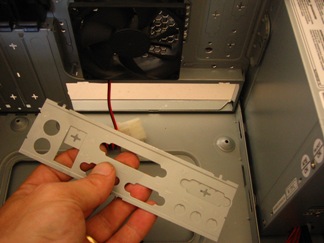
Don't forget to install the backplate that comes with the motherboard.
3_back_plate_removed.jpg
 
Last edited:

UDeepEX

Member
Joined
Feb 13, 2011
Messages
391
Reaction score
0
Well, IMO it's not really that difficult to build a PC. I just built my very first PC from scratch 3 weeks ago (and it's undergoing upgrades already). It's not rocket science; you do need to set aside a bit of time for building (and testing for stability) but you can get it done pretty easily.

My best advice is to research, read where the parts go to, watch videos on DIY PCs from either Newegg TV or Linus Tech Tips or better still watch people close up on how to build a system. Most importantly, if you've manuals, use them.
 

voiceoflove

Supremacy Member
Joined
Dec 9, 2006
Messages
7,412
Reaction score
0
i read a lot of guides already. but i dont know what is the standoff pins for on the mobo...

i lack the confidence to build 1 myself ba.

every mobo is different, tats y u need to learn to read the big layout given ..it will show u which color the connector u need to connect.

for me the hard part is hiding all the cables
 

xtwis7

Arch-Supremacy Member
Joined
Oct 13, 2006
Messages
21,848
Reaction score
597
The standoff screws come with the casing right? I don't think I installed any of the screws man. I just mounted my board by aligning the various holes. If someone uses a magnetized screw driver, will it risk damaging the board?
 

royfrosty

High Supremacy Member
Joined
Jul 23, 2009
Messages
27,727
Reaction score
1,553
The standoff screws come with the casing right? I don't think I installed any of the screws man. I just mounted my board by aligning the various holes. If someone uses a magnetized screw driver, will it risk damaging the board?

If you do not use the stand off then you most probably will short various components IF it is screw tightly to the case. Quite risky imo.
 
Important Forum Advisory Note
This forum is moderated by volunteer moderators who will react only to members' feedback on posts. Moderators are not employees or representatives of HWZ Forums. Forum members and moderators are responsible for their own posts. Please refer to our Community Guidelines and Standards and Terms and Conditions for more information.
Top