e-Remote Broadlink RM-Pro

killer00

Junior Member
Joined
Oct 8, 2007
Messages
12
Reaction score
1
Livolo 2 way

Is there a A and B line on Livolo switch, I managed to wired mine using Yoogee with the video demo on Yoogee website

Thanks your for sharing the Yongee website, my Livolo 2 way is working now.
 

ferbulous

Member
Joined
Jan 13, 2016
Messages
297
Reaction score
50
Tc2 with AC170-250V cannot use in Singapore?
I see some people on carousell selling.
Singapore voltage is 220/240v so should be usable right?

I don't really recommend TC2, got some QC issues. My friend bought a few and already KO in less than a month, try sonoff t1 instead, has both wifi & rf.
 

ferbulous

Member
Joined
Jan 13, 2016
Messages
297
Reaction score
50
Hi all! I'm getting my bto keys soon and I'm keen to diy my own smart home with the following gadgets. Can anyone advise if I missed out anything and recommend anywhere I can read up with some step by step on how to set up?

1) yoogee or livolo switches for lights/shower heater/kettle/fan
2) broadlink RM+ for TV/sound system/fan speed/Aircon
3) Google echo & echo dot for voice control. (Normally how many echo y'all using?)

I'm still trying to figure out how to link them all. Also understand that electric bill might increase due to all the smart switches. Anyone know how significant is the increase?

Sent from Xiaomi MI MAX 2 using GAGT

1) For light switch, try sonoff t1. You can also get on/off indicator since it's controlled by wifi so no need extra broadlink hubs. Just need neutral wire for installation behind the switch.
2) There's already google/alexa skill available so you can integrate easily for smart speakers
3) At least 1 speaker in each room/area for the devices you want to control

Don't really see much significant increase.
 

ferbulous

Member
Joined
Jan 13, 2016
Messages
297
Reaction score
50
First of all , there must be a tv remote object created in the ihc app . Only tv remote object , not light object etc . Alexa only can discover tv remote object with broadlink rm pro

How's your experience so far with ihc app?
I tried it but I frequently get timeout errors when it executes commands for stuff like tuning channels on tv. For example if I try to select channel 701, it would fire commands for 7, 1 and missed the 0.
I ended up just using homeassistant back to control broadlink
 

sellun

Senior Member
Joined
Feb 15, 2013
Messages
1,487
Reaction score
51
1) For light switch, try sonoff t1. You can also get on/off indicator since it's controlled by wifi so no need extra broadlink hubs. Just need neutral wire for installation behind the switch.
2) There's already google/alexa skill available so you can integrate easily for smart speakers
3) At least 1 speaker in each room/area for the devices you want to control

Don't really see much significant increase.
Hi. Seems like HDB default wiring doesn't have neutral.. what is the difference between sonoff T1 vs the normal yoogee or livolo ?
If it's worth it, I don't mind paying to pull additional neutral wire.

Sent from Xiaomi MI MAX 2 using GAGT
 

shawniiex

Arch-Supremacy Member
Joined
Mar 29, 2011
Messages
10,586
Reaction score
156
1) For light switch, try sonoff t1. You can also get on/off indicator since it's controlled by wifi so no need extra broadlink hubs. Just need neutral wire for installation behind the switch.
2) There's already google/alexa skill available so you can integrate easily for smart speakers
3) At least 1 speaker in each room/area for the devices you want to control

Don't really see much significant increase.

That's precisely the reason why people aren't getting it. The need for a neutral wire.
 

shacboi

Senior Member
Joined
Oct 25, 2017
Messages
758
Reaction score
0
That's precisely the reason why people aren't getting it. The need for a neutral wire.

Hi. Seems like HDB default wiring doesn't have neutral.. what is the difference between sonoff T1 vs the normal yoogee or livolo ?
If it's worth it, I don't mind paying to pull additional neutral wire.

Sent from Xiaomi MI MAX 2 using GAGT

Hi sellun,

Yea, sonoff T1 might be the best switch around bcos it has both WIFI + RF433mhz BUt the issue is that it needs Neutral wire.

RF switches without Neutral wires are broadlink tc2, livolo, yoogee, eTouch(broadlink tc2 similar).

i'm using livolo switches, bought from AliExpress from the official livolo dealer, so far so gd for the switches, had been using for like 4mths.

The issue with the mentioned RF switches is that they do not have status feedback, so u can only visually see if the light is already ON or OFF, no app status check FYI.
 

ferbulous

Member
Joined
Jan 13, 2016
Messages
297
Reaction score
50
That's precisely the reason why people aren't getting it. The need for a neutral wire.

Hi sellun,

Yea, sonoff T1 might be the best switch around bcos it has both WIFI + RF433mhz BUt the issue is that it needs Neutral wire.

RF switches without Neutral wires are broadlink tc2, livolo, yoogee, eTouch(broadlink tc2 similar).

i'm using livolo switches, bought from AliExpress from the official livolo dealer, so far so gd for the switches, had been using for like 4mths.

The issue with the mentioned RF switches is that they do not have status feedback, so u can only visually see if the light is already ON or OFF, no app status check FYI.

Yeah, the neutral wire requirement is the main concern with most home automation community.

For me, the only diy job I did was looping neutral wire from power outlet that's right next to a switch. For the rest I just hired wireman to do it.

A friend of mine who just recently started using sonoff t1 just add the neutral wire by himself. He said it's not that difficult just a bit tedious since you need to climb to the ceiling and find the power switch outlets :spin:

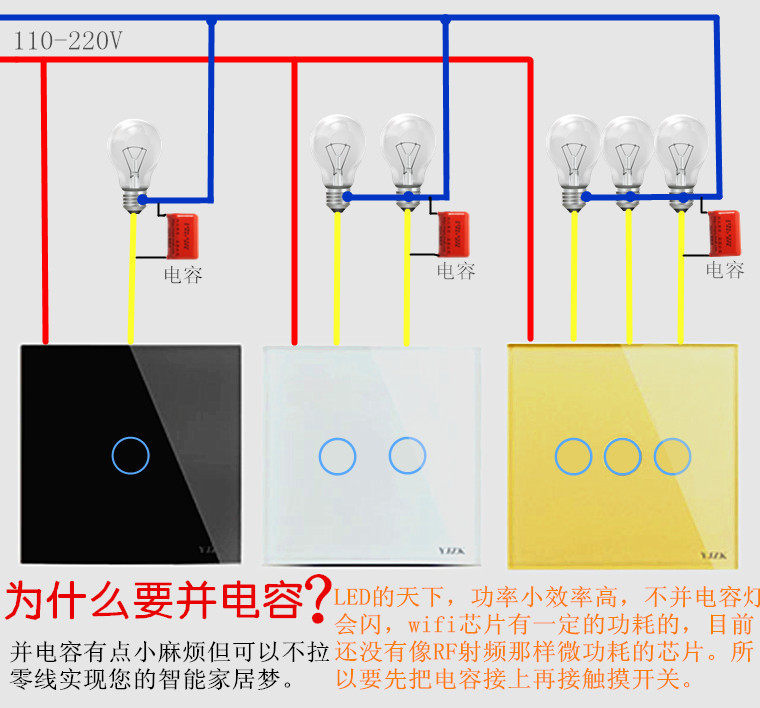
I was checking taobao and apparently there's 3rd party wifi switch that's also using itead chipset relies on adding capacitor to your lights without using neutral wire.

TB2_Nr5uR8lpuFjy0FnXXcZyXXa_!!2711363145.jpg
 

Aditshar

Member
Joined
Sep 26, 2017
Messages
218
Reaction score
0
Most smart switches will come with the capacitor. The capacitor is to prevent low watts LED from flickering that all.

Yeah, the neutral wire requirement is the main concern with most home automation community.

For me, the only diy job I did was looping neutral wire from power outlet that's right next to a switch. For the rest I just hired wireman to do it.

A friend of mine who just recently started using sonoff t1 just add the neutral wire by himself. He said it's not that difficult just a bit tedious since you need to climb to the ceiling and find the power switch outlets :spin:

I was checking taobao and apparently there's 3rd party wifi switch that's also using itead chipset relies on adding capacitor to your lights without using neutral wire.

TB2_Nr5uR8lpuFjy0FnXXcZyXXa_!!2711363145.jpg
 

ferbulous

Member
Joined
Jan 13, 2016
Messages
297
Reaction score
50
Hi. Seems like HDB default wiring doesn't have neutral.. what is the difference between sonoff T1 vs the normal yoogee or livolo ?
If it's worth it, I don't mind paying to pull additional neutral wire.

Sent from Xiaomi MI MAX 2 using GAGT

For me, it's definitely worth it, and the price isn't that much different from tc2
Got both support for alexa/google and as long there's wifi you can install it anywhere in your home
If you wanna stick to rf switch, there's also another brand called chuguan, still working fine for me since last year.
 

ChaozHoi

Master Member
Joined
Mar 30, 2005
Messages
2,919
Reaction score
2
just set up my RM pro+ and TC2 today. Experienced some issues and would like to seek advice and help here.

1) I am able to turn on both lights on my 2-gang TC2 using the IHC app. (Swich 1 on/off, switch 2 on/off all working properly). However, switch 1 cannot work if I assign scene to it. It will not turn on using the scene that was set up but switch 2 got no problem at all.) I also tried to delete and re-add the scene but no success.

2) I added broadlink to my google home app and successfully sync-ed all the scenes into my GH app. When I tried to trigger the command, GH replied "activating <scene>" but there's no response from the RM Pro. lights didn't turn on. Those scenes worked on IHC app. Seems like my GH got problem communicating with IHC for RM Pro to start working?

Thanks.
 

sellun

Senior Member
Joined
Feb 15, 2013
Messages
1,487
Reaction score
51
Hi sellun,

Yea, sonoff T1 might be the best switch around bcos it has both WIFI + RF433mhz BUt the issue is that it needs Neutral wire.

RF switches without Neutral wires are broadlink tc2, livolo, yoogee, eTouch(broadlink tc2 similar).

i'm using livolo switches, bought from AliExpress from the official livolo dealer, so far so gd for the switches, had been using for like 4mths.

The issue with the mentioned RF switches is that they do not have status feedback, so u can only visually see if the light is already ON or OFF, no app status check FYI.
Hi thanks for the advice. Are you using any voice command? I'll need to have a bridge between broadlink RM+ with either Google home or echo if I use livolo switches?

Sent from Xiaomi MI MAX 2 using GAGT
 

Aditshar

Member
Joined
Sep 26, 2017
Messages
218
Reaction score
0
Cant read chinese. But from what i see, its pretty similar to TC2 or livolo or those standard smart switches but i may be wrong.

To me it all depends on how intensive you want to go into home automation game.

Im using TC2 with rm pro and rm mini cos i want my switches and hub to be compatible with one another. If there any updates, broadlink will give advantages to their own products 1st. (That how i feel)

I'm using RF powerplugs for my standing fans and they play well with rm pro so i have no issue with them.

For voice commands and control, i'm using Google Assistant on my phone and Nvidia Shield TV. So far its been a blast and working well. Easy to use and i can link a few google accounts to 1 ihc app.

As for feedback issue, I added IP Cams for surveillance and to monitor my lights as well. Well at least you can "physically" see the lights on or off from the ipcam app. (Killing 2 birds with 1 stone)

I see, so that's the function for the capacitor
Maybe you check the item details if it requires anything else?

https://item.taobao.com/item.htm?sp...86863a5ZTtSJb&id=554114857768&_u=22avq0dobc70
 

freemanuk

Junior Member
Joined
Nov 21, 2007
Messages
15
Reaction score
0
Best option? I am using rm pro +, ihc, alexa and livolo. Voice control no prob

Hi rza29, I am using rm pro+ with livolo remote light switch, however I cannot link the switch to rm pro+ (via ihc) even with an additional livolo RF mini remote controller.

I have been meddling with them for a month already and I still can’t figure out what’s wrong. Can you share with me how you did it? Thanks a million.
 

shacboi

Senior Member
Joined
Oct 25, 2017
Messages
758
Reaction score
0
Hi thanks for the advice. Are you using any voice command? I'll need to have a bridge between broadlink RM+ with either Google home or echo if I use livolo switches?

Sent from Xiaomi MI MAX 2 using GAGT

Hi, yes im using both Alexa on echoDots & also google-assistant via handphone.

For the 'bridge' , i guess u r refering to RM Plugin, u need it to run on a always-on android device so it can 'be connected' to Alexa. This is the better choice.

Another alternative is to use IHC app , create 'TV template' which is the only recgonisable broadlink template to Alexa.

As for Google, i only know it can only detect 'Light template' on IHC app.
 

ferbulous

Member
Joined
Jan 13, 2016
Messages
297
Reaction score
50
Cant read chinese. But from what i see, its pretty similar to TC2 or livolo or those standard smart switches but i may be wrong.

To me it all depends on how intensive you want to go into home automation game.

Im using TC2 with rm pro and rm mini cos i want my switches and hub to be compatible with one another. If there any updates, broadlink will give advantages to their own products 1st. (That how i feel)

I'm using RF powerplugs for my standing fans and they play well with rm pro so i have no issue with them.

For voice commands and control, i'm using Google Assistant on my phone and Nvidia Shield TV. So far its been a blast and working well. Easy to use and i can link a few google accounts to 1 ihc app.

As for feedback issue, I added IP Cams for surveillance and to monitor my lights as well. Well at least you can "physically" see the lights on or off from the ipcam app. (Killing 2 birds with 1 stone)

For the capacitor, assuming it's installed but the light still flicker.
What's the next step to fix that?
 

Aditshar

Member
Joined
Sep 26, 2017
Messages
218
Reaction score
0
There 2 type of flickering. If just your light flickering fast, the watt of LED light is too low that even the capacitor cant resolve it. Change to a higher watt LED will solve it. If its the hazzard light type of flicker together with the switch, it means that the switch is resetting. It could be you press too hard on the switch or your hand is wet when you touch it. The switch is touch sensitive, if you press too hard, the glass panel might stick to the connector.

For the capacitor, assuming it's installed but the light still flicker.
What's the next step to fix that?
 

freemanuk

Junior Member
Joined
Nov 21, 2007
Messages
15
Reaction score
0
Hi sellun,

Yea, sonoff T1 might be the best switch around bcos it has both WIFI + RF433mhz BUt the issue is that it needs Neutral wire.

RF switches without Neutral wires are broadlink tc2, livolo, yoogee, eTouch(broadlink tc2 similar).

i'm using livolo switches, bought from AliExpress from the official livolo dealer, so far so gd for the switches, had been using for like 4mths.

The issue with the mentioned RF switches is that they do not have status feedback, so u can only visually see if the light is already ON or OFF, no app status check FYI.


Hi shacboi, you are using livolo switches too? May I know how did you get the switch to connect to RM pro or RM pro+?
 
Important Forum Advisory Note
This forum is moderated by volunteer moderators who will react only to members' feedback on posts. Moderators are not employees or representatives of HWZ Forums. Forum members and moderators are responsible for their own posts. Please refer to our Community Guidelines and Standards and Terms and Conditions for more information.
Top