eBooks on Tablet

Wyvern8

Senior Member
Joined
Sep 17, 2011
Messages
1,502
Reaction score
1
Hi all, like to get some advices on ebooks. Recently, my wife just started reading ebooks using my tablet. And she purchases the ebooks from Google play store. Just like to know if these purchases are tied to the google account or will it be tied to the tablet itself..?

Maybe to rephrase a bit, I like to know if I were to setup my other tablet using the same google account, would the ebooks also shows up in my other tablet as well...?

Mods: Not sure if this is a place to seek advice. I am sorry if this is not the right channel and do direct me to the right place. Many Thanks... :)
 

reyreina

Senior Member
Joined
Jan 20, 2007
Messages
1,221
Reaction score
0
it will be less confusing if you know which ebook retailer you bought the book from. Here's a few I can remember off my head.

Google Play Books: You buy from Google Play (using a Google account) and you read the books in "Play Books" app. You can read that same book in a Play Books app installed on ANY android device, as long as you add the Google account to the device. There is also a web reader, just click on the book in the store when you are in a browser.

Amazon: Each purchase is tied to your Amazon account. Similar to Google, you can read using the web reader or an app called "Amazon Kindle". Whatever Android, Windows, iOS, Nook tables you use, just install that app and log in to your Amazon account, the book will be downloaded into the app.

Nook works exactly the same as Amazon. I have no experience with Kobo, but I assume it will not be different.

If your ebooks/emags/enewspapers are purchased from other sources (publishers?) then it depends on what they use to allow you to read the digital products. Usually they have an application you need to install (Zinio, Adobe Digital Editions, ...), then you just need to install that app on your tablet and login to the account.

Some publishers are generous and send you a digital file (likely a .pdf, .epub, .mobi) then you can just use any generic application that opens those file formats to read that product.

VERY unlikely there are ebooks "tied to the tablet" as you say. Even for newspaper subscription like NYT, you can just install their app on another device and login the same account to see your purchased book/mag subscriptions.

Your purchases are always tied to your account, unless the retailer has a lending program, like Amazon and many others (NYT). what this means is that you and your wife can have separate Amazon accounts can get to read stuff purchased from different accounts.

 

reyreina

Senior Member
Joined
Jan 20, 2007
Messages
1,221
Reaction score
0
so as you can see, every follow action is dependent on where you purchased your ebook. if you have problems or need help on anything, you get better response by asking the retailers' helpdesk or forum (amazon kindle forum, mobileread, B&N bookclub, ...)
 

Wyvern8

Senior Member
Joined
Sep 17, 2011
Messages
1,502
Reaction score
1
Oh I see... Thanks a lot for sharing..:)

Purchased our ebooks off from Google Playstore and read it via Google playbook. So I guess if I were to setup my wife account in another device, the same purchase will show up there too..

Didn't realize its all so convenient. Maybe I am just thinking too complicated..haha.. :D

Thanks...
 

hnzfaz

Supremacy Member
Joined
Feb 12, 2010
Messages
8,061
Reaction score
0
It's a bit of both. For instance, when I buy an ebook from Amazon, I am allowed to download the ebook to a few kindle devices (the number depends on publishers) registered to my account.

Google books, being a competitor, must have similar rules.
 

jeffyen2

Senior Member
Joined
Aug 29, 2004
Messages
1,280
Reaction score
0
While what's been described works very well, it can get clunky as we forget what accounts we're logged into and wonder whether it's our partner's account etc.

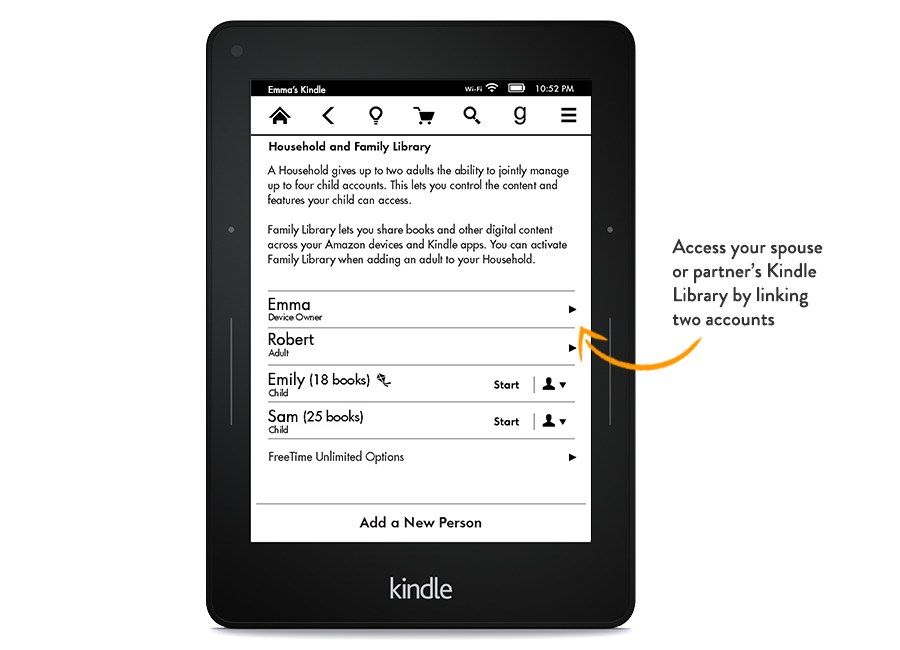
An interesting development this week both for Kindle and iOS is the idea of 'family accounts'. Not released yet but I imagine the industry is going in this direction.

showme-famlibrary.jpg


For iOS, https://www.apple.com/ios/whats-new/family-sharing/
 

hnzfaz

Supremacy Member
Joined
Feb 12, 2010
Messages
8,061
Reaction score
0
As an aside I am really unhappy with sph's rule though, if you ever buy online newspapers from them.

For normal account, they only allow 1 device to be registered and it is completely tied to that device. If you have a mobile and a tablet and you want to be able to read on both, you're forced to either purchase 2 accounts (crazy!) or buy the all-in-one, which allows the registration of 4 devices.

Once the device is registered, it is not switchable until you call them up to reset.

Pretty frustrating buying online newspapers from sph. I find their strict rules too paranoid, too restrictive, too limiting for legimate users.
 

volarth

Supremacy Member
Joined
Apr 13, 2004
Messages
9,367
Reaction score
4,699
Y are you even reading SPH newspapers?

Content (or lack of aside), their online systems as you have noted are crap.
 

hnzfaz

Supremacy Member
Joined
Feb 12, 2010
Messages
8,061
Reaction score
0
Y are you even reading SPH newspapers?

Content (or lack of aside), their online systems as you have noted are crap.

SPH has the monopoly of local news leh. ST/BT are the only way to keep track of what's going on locally. They know they have no competitors, that's why they're charging premium prices and still treat their online subscribers like idiots.
 
Important Forum Advisory Note
This forum is moderated by volunteer moderators who will react only to members' feedback on posts. Moderators are not employees or representatives of HWZ Forums. Forum members and moderators are responsible for their own posts. Please refer to our Community Guidelines and Standards and Terms and Conditions for more information.
Top