

Jirachi
Great Supremacy Member
- Joined
- Jan 17, 2010
- Messages
- 55,172
- Reaction score
- 3,194
Despite the US being the notorious ones, you don't see the crap happening in their country.When government is in bed with businesses
Despite the US being the notorious ones, you don't see the crap happening in their country.When government is in bed with businesses

Today you approach case, machiam pay admin fees of $10.90 and then need to pay membership fees in tier (think is $15 cheapest). And what these group of clowns offer you is some useless paper tiger approach. You might as well spend the money in SCT.Then I hope they get CASE-ed
Strangely I see Case president Mr Melvin Yong Yik Chye profile sibei satki lei. He has my upmost admiration and respect. But the amount they charge vs SCT, SCT sibei friendly priceToday you approach case, machiam pay admin fees of $10.90 and then need to pay membership fees in tier (think is $15 cheapest). And what these group of clowns offer you is some useless paper tiger approach. You might as well spend the money in SCT.
If today I am government, I would have close this cmi company. Form another solid company with real powerhouse young lawyers. No need to talk simi admin fees or membership. Just take 10% of the compensation. Get $1m compensation charge $100k lo. This kind then will be power mah. Else wayang wayang. Today I am business owner, someone said want to complain to CASE, I think I will laugh at them
- As of 24 May 2024
If your contract has not ended but you want to switch to an eSIM, this is chargeable at $10.90.
Good news! There is currently no cap to the number of times you can re-install your GOMO eSIM! You can re-install your eSIM on the same device or transfer it to another device using the same QR code you get when you sign up for GOMO with no additional charges. Remember, your eSIM can only be installed on one device at a time
Please note that the eSIM can only be active on one device at a time. You are allowed up to 3 free downloads regardless of the device. A SIM replacement fee of $5.50 (inclusive of GST) will apply if you require more than 3 downloads.
There is a one-time fee of $12.96.
There is no limit to the number of times you can re-install your eSIM.
3.32.4 There is no limit to the number of eSIM profiles that can be generated for each giga subscriber line. An eSIM fee of $1.00 applies for each eSIM generation.
5.3 Each user is given 2 free downloads of the eSIM profile. Charges (as set out in Clause 7 below) will apply for each subsequent download after the 2 free downloads have been utilised.\
5.4 There is a limit of 4 successful installations per eSIM. If a user has maxed out the number of installations allowed for an eSIM, an eSIM replacement will be required and the respective charges set out in Clause 7 shall apply. eSIM profile download charges will also apply where applicable (i.e. for the 3rd and each subsequent download of the eSIM profile for each mobile line).
5.5 For the avoidance of doubt, each installation of an eSIM profile counts as a new installation, and also counts towards the limit of 4 successful installations per eSIM.
M1 is currently offering a FREE 5G eSIM upgrade for customers who are on 4G SIM / 4G eSIM (SIM charge worth $38.15) until further notice.
What happens if I want to change my eSIM profile to another device?
You will be able to retain your 5G eSIM number however you will need to remove your eSIM profile from the current device and re-download into the new intended device (a fee of $5.45 applies for the re-download). This change can be done via My M1+ app. Simply retrieve the QR code via App Settings in the new device and re-download the eSIM profile. Be sure to do this while connected to Wi-Fi.
How do I transfer my eSIM to my new phone
- Every eSIM can only be added to and removed from any device for a maximum of 10 times.
- Any subsequent transfer will require a new eSIM to be sent to you, which is chargeable one-time in your next bill for $25.00.
Upon verification of ID and phone compatibility, you will be issued with an eSIM QR Code. A $5 fee apply per replacement.
Been a while since, need to revisit and update liao.looks like zero1, maxx and eight now all support eSIM already

zym still sleeping with physical SIM.looks like zero1, maxx and eight now all support eSIM already
Zero1 don't seems to publish their esim replacement policy, does anyone have info on that ?looks like zero1, maxx and eight now all support eSIM already

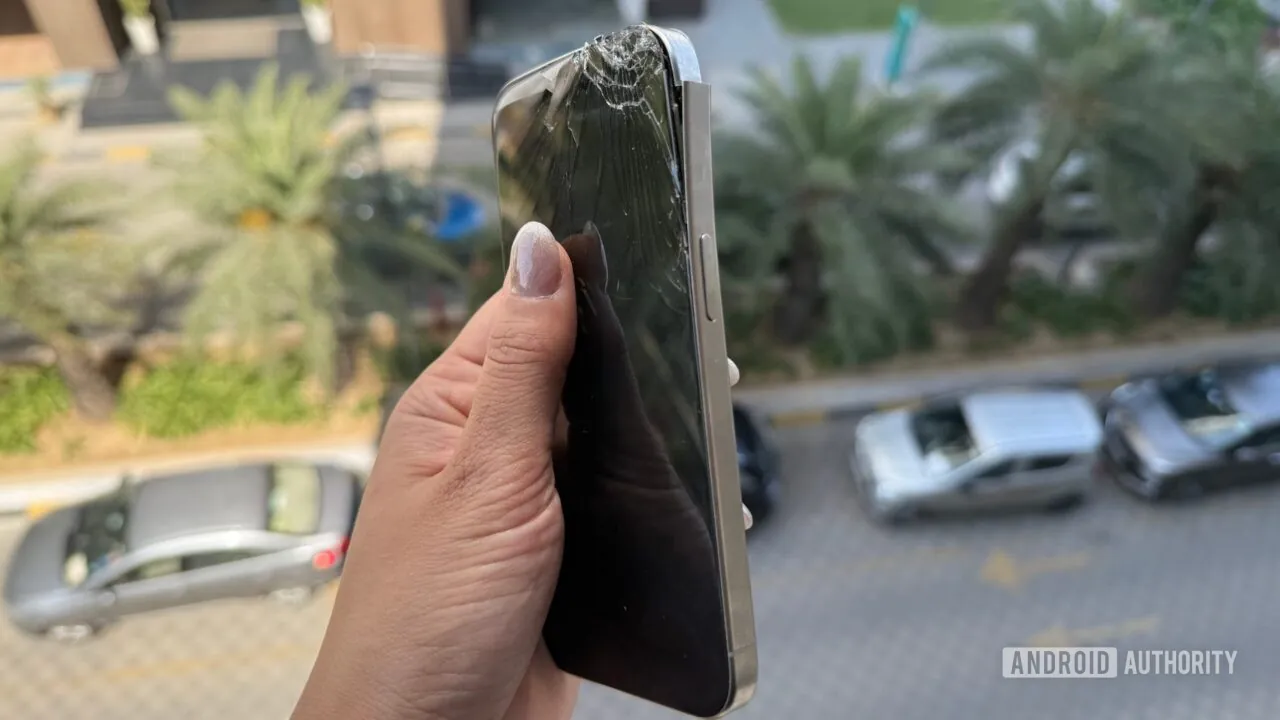
The pros of eSIM convenience got defeated due to telcos and security concerns e.g. SIMJacking, so in the end eSIM ends up especially worst when facing such situations.I was ready to ditch physical SIMs forever — then my toddler threw my phone off a balcony
While on holiday, my toddler decided my phone would look cool skydiving from a ninth-floor balcony. Spoiler Alert: It didn’t stick the landing. Not only did the iPhone’s screen shatter to pieces from one corner, but the grade 5 titanium frame literally tore from the antenna band. Not to mention the internal damage to other crucial components.
After mourning the loss and explaining to my child that phones aren’t actually meant to fly, I faced a new problem. I needed a new phone. And fast. Apple told me the phone can’t be fixed and will need to be replaced. Shedding tears of desperation, I swallowed the bitter pill and coughed up to buy the iPhone 16 Pro.
...
But here’s the catch. You can’t just pop into a store, grab a phone, and swap out the SIM anymore when you’re only using an eSIM. Sure, transferring an eSIM is usually as easy as scanning a QR code, but what happens when your old phone’s display is completely dead?
To make matters worse, I wasn’t even home. I was about to travel to an even more remote location just an hour after the whole mess started. So there I was, holding a brand-new iPhone with no carrier connectivity, meaning I couldn’t access 80% of my apps that relied on two-factor authentication tied to my phone number. Payment and banking apps in my country are also married to the user’s phone number, so I was also left without access to digital payment methods. Not the best scenario when you’re on holiday.
I figured my carrier could just activate the eSIM on my new phone remotely. Turns out, I was wrong.
I ended up stuck without a working phone for three whole days until I could get to a carrier store in the nearest big city, where they finally deactivated the eSIM on my old device (RIP) and got me up and running on the new one.

esim is best for roaming use only for now, imo.The pros of eSIM convenience got defeated due to telcos and security concerns e.g. SIMJacking, so in the end eSIM ends up especially worst when facing such situations.
Oh well....
It is still useful in case of theft, the thief can't remove the sim card or enable airplane mode if they don't have your pin code. The moment the phone is switched back on, it will connect to the network. (assuming you've disabled control panel from locked screen)The pros of eSIM convenience got defeated due to telcos and security concerns e.g. SIMJacking, so in the end eSIM ends up especially worst when facing such situations.
Oh well....
This is not so relevant in tiny SG depending on your telco. I can just leave my house and walk 5-10 mins to the nearest SIMBA service centre and get a replacement eSIM.I was ready to ditch physical SIMs forever — then my toddler threw my phone off a balcony
While on holiday, my toddler decided my phone would look cool skydiving from a ninth-floor balcony. Spoiler Alert: It didn’t stick the landing. Not only did the iPhone’s screen shatter to pieces from one corner, but the grade 5 titanium frame literally tore from the antenna band. Not to mention the internal damage to other crucial components.
After mourning the loss and explaining to my child that phones aren’t actually meant to fly, I faced a new problem. I needed a new phone. And fast. Apple told me the phone can’t be fixed and will need to be replaced. Shedding tears of desperation, I swallowed the bitter pill and coughed up to buy the iPhone 16 Pro.
...
But here’s the catch. You can’t just pop into a store, grab a phone, and swap out the SIM anymore when you’re only using an eSIM. Sure, transferring an eSIM is usually as easy as scanning a QR code, but what happens when your old phone’s display is completely dead?
To make matters worse, I wasn’t even home. I was about to travel to an even more remote location just an hour after the whole mess started. So there I was, holding a brand-new iPhone with no carrier connectivity, meaning I couldn’t access 80% of my apps that relied on two-factor authentication tied to my phone number. Payment and banking apps in my country are also married to the user’s phone number, so I was also left without access to digital payment methods. Not the best scenario when you’re on holiday.
I figured my carrier could just activate the eSIM on my new phone remotely. Turns out, I was wrong.
I ended up stuck without a working phone for three whole days until I could get to a carrier store in the nearest big city, where they finally deactivated the eSIM on my old device (RIP) and got me up and running on the new one.
If you are within support area this is not much of a concern.This is not so relevant in tiny SG depending on your telco. I can just leave my house and walk 5-10 mins to the nearest SIMBA service centre and get a replacement eSIM.
Unless one frequently require eSIM switches, otherwise roaming or not, doesn't seem to be an issue.esim is best for roaming use only for now, imo.
Yes, agreed with this.It is still useful in case of theft, the thief can't remove the sim card or enable airplane mode if they don't have your pin code. The moment the phone is switched back on, it will connect to the network. (assuming you've disabled control panel from locked screen)
SIMJacking also assumes your number is known, not true of someone just taking your phone from your unattended bag. A physical SIM can still be taken out and placed into another phone to discover its number.
This is not so relevant in tiny SG depending on your telco. I can just leave my house and walk 5-10 mins to the nearest SIMBA service centre and get a replacement eSIM.
Seems like a Singapore issue only.eSIM currently unable to port freely by oneself
Need to milk more first to recoup their investments.Seems like a Singapore issue only.
Yeah. But earnings are not seemingly getting better as wellNeed to milk more first to recoup their investments.
Agreed.Seems like a Singapore issue only.
Yeah. But earnings are not seemingly getting better as well
Looking at this list, I think it is much more than SG.Seems like a Singapore issue only.
