Fans Installation HELP

Teng Zai

Senior Member
Joined
Jun 20, 2011
Messages
845
Reaction score
0
Get another FC lo in addition to the Sentry 2 lo. Get one heavy duty de for all these kinda fans. I'm a more traditional kind of person, so no touch screen for me lol. I like Lamptron FC5v2. Knobs :D

FC alot $$$$$$$ :(

Oh ya wanted to ask..
WHERE IS PCTHEMES?!?
I walk 4 times in l4 cant find pc themes.
04-15 right? I always see 04-14 then cut off liao??
 
Last edited:

royfrosty

High Supremacy Member
Joined
Jul 23, 2009
Messages
27,727
Reaction score
1,553
FC alot $$$$$$$ :(

Oh ya wanted to ask..
WHERE IS PCTHEMES?!?
I walk 4 times in l4 cant find pc themes.
04-15 right? I always see 04-14 then cut off liao??

Some corner back alley.

Anw. Can get a fc or an adapter. If you dont want go back there again due to some gf problem like mine, every week i will go down once to get price list till she gets fed up.

What you can do is for now connect the jetflo fans to the mobo first. Try to shop online for the converter or an fc unit. That will be the best option so far.

Or alternatively if you are adventurous enough, you still can cut the head away and solder a 3 pin type. When any fault in future just revert back. Did that to my xigmatek fan the other time. After that faulty i went to revert back and rma thru.
 

Mythmaker

Arch-Supremacy Member
Joined
Nov 29, 2004
Messages
11,772
Reaction score
0
His issue is not the connector. His issue is his fans too powerful. 0.4A per fan... :s13:
 

shadow84

High Supremacy Member
Joined
Apr 15, 2009
Messages
34,286
Reaction score
420
Sorry to interupt, if i get PWM fans and connect them to mobo 4 pin, will it auto decide the PWM, or do i have to go to the BIOS to set the limits, like when reach XX temp, will spin XXXX rpm?

To TS, for your h100i, check your specs of it, see if got mention anything about max ampheres... and BY RIGHT, you should be connecting the 2 fans into the h100i controller with their given fan splitter. In this way, the corsair system itself will control and set the speed based on their temp readings rather than mobo readings. Based on what i watched in youtube.
 
Last edited:

Teng Zai

Senior Member
Joined
Jun 20, 2011
Messages
845
Reaction score
0
Some corner back alley.

Anw. Can get a fc or an adapter. If you dont want go back there again due to some gf problem like mine, every week i will go down once to get price list till she gets fed up.

What you can do is for now connect the jetflo fans to the mobo first. Try to shop online for the converter or an fc unit. That will be the best option so far.

Or alternatively if you are adventurous enough, you still can cut the head away and solder a 3 pin type. When any fault in future just revert back. Did that to my xigmatek fan the other time. After that faulty i went to revert back and rma thru.

Haha my gf is ok la, she jokingly complain only :o
For now I cant even connect the JF fans to the mobo(stupid short wires).
Thanks for the suggestion! But I think I don't solder and cut. I don't have a cutter or solder, so like more mafan leh, might as well head down to get adapters.

Can I connect the JF fans to the h100i?

BTW, since my JF fans is 4pin female and nzxt sentry 2 is 3pin male, if I connect both I need 4pin to 3pin? If i cant find 4pin to 3pin, will 3pin to 3pin work? And I just leave the 4th connector forever alone?


Sorry to interupt, if i get PWM fans and connect them to mobo 4 pin, will it auto decide the PWM, or do i have to go to the BIOS to set the limits, like when reach XX temp, will spin XXXX rpm?

To TS, for your h100i, check your specs of it, see if got mention anything about max ampheres... and BY RIGHT, you should be connecting the 2 fans into the h100i controller with their given fan splitter. In this way, the corsair system itself will control and set the speed based on their temp readings rather than mobo readings. Based on what i watched in youtube.

This I also wish to know, whether the PWM got settings need to set in BIOS or not.
Ok, will read up my h100i manual. I just really hate the cable dropping down from the fans to the h100i, idk how to manage it.
 

shadow84

High Supremacy Member
Joined
Apr 15, 2009
Messages
34,286
Reaction score
420
Haha my gf is ok la, she jokingly complain only :o
For now I cant even connect the JF fans to the mobo(stupid short wires).
Thanks for the suggestion! But I think I don't solder and cut. I don't have a cutter or solder, so like more mafan leh, might as well head down to get adapters.

Can I connect the JF fans to the h100i?

BTW, since my JF fans is 4pin female and nzxt sentry 2 is 3pin male, if I connect both I need 4pin to 3pin? If i cant find 4pin to 3pin, will 3pin to 3pin work? And I just leave the 4th connector forever alone?


This I also wish to know, whether the PWM got settings need to set in BIOS or not.
Ok, will read up my h100i manual. I just really hate the cable dropping down from the fans to the h100i, idk how to manage it.

If you connect the 4 pin to 3 pin, it will regulate based on voltage, instead of pulses (PWM). similar results, but diff ways of doing it.

For your H100i, maybe can route 1 round of your rubber gromets, if it is long enough.
 

ChandlerBing

Senior Member
Joined
Feb 23, 2005
Messages
725
Reaction score
1
Can fit, just damn annoying cos tight. Mainly is the
w%20cable.jpg

That head that I cannot flatten down causing my case to cannot close leh. I manage very well liao and cable tie a lot. I scared it will be hard to work with fans later. Currently, I got 2 intake fans working, 2 corsair stock h100i fans working, and bitfenix spectre led working. Got like 3 jetflo's waiting for me to install at the top leh for pushpull and fill the last hole as an exhaust. Then want to replace h100i fans also.

Aft that still want to add 2 diagonal fan from hdd cage to blow into GPU :s22:
The fans I bought are a pain to work with, so short cables!! Luckily sentry 2 quite long...

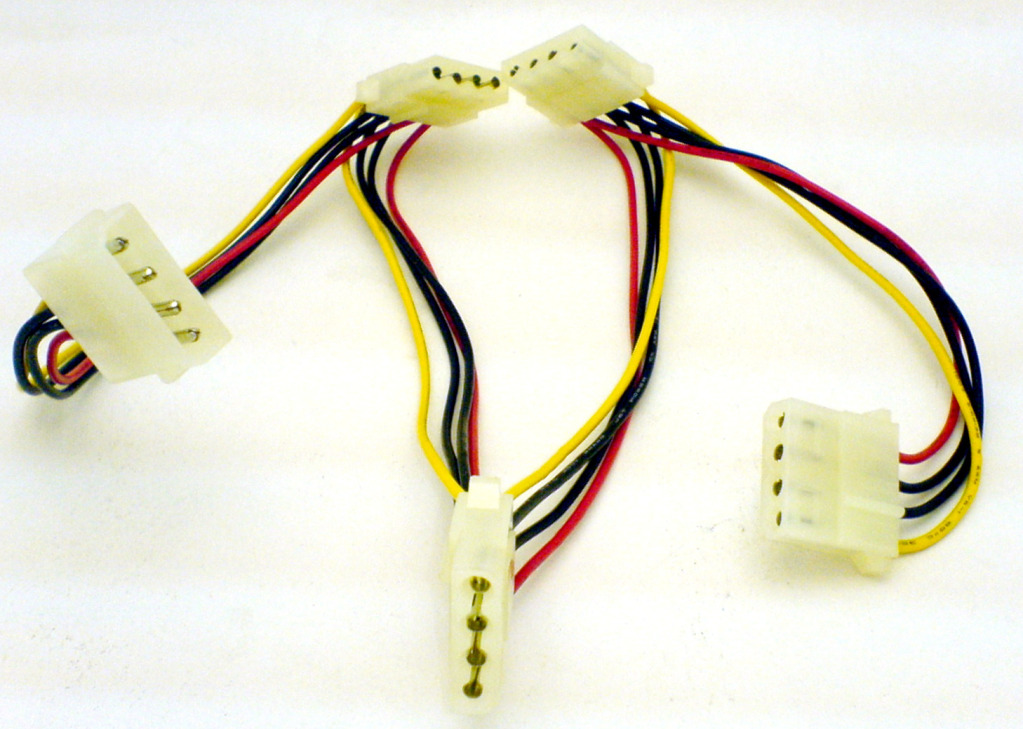
Those are 4 pin Molex power connectors. How come you have so many if you're not using them? You can get 3/4 pin fan connectors to Molex connector adapter too if you want to make use of these Molex connectors to power some of your fans. That's provided you don't want to control their speed and allow them to run max speed though.

As for your h100i fans, best to connect them as per recommended by the manual. Like I mentioned before, this is to enable you to control the fans (as well as your corsair pump led color) using software (Corsair Link).

I would also suggest that you route all h100i cables to the back from the top holes and then back out to the front via the top hole closest to the 24pin position, and the USB h100i cable out through the bottom hole nearest to your PSU to connect to the USB header at the bottom of your board. That way, you won't have too many wires dangling all over your motherboard.


FC alot $$$$$$$ :(

Oh ya wanted to ask..
WHERE IS PCTHEMES?!?
I walk 4 times in l4 cant find pc themes.
04-15 right? I always see 04-14 then cut off liao??

PCT is in the corner alley slightly on your right if you go up to the 4th floor via the escalator.
 
Last edited:

Teng Zai

Senior Member
Joined
Jun 20, 2011
Messages
845
Reaction score
0
Those are 4 pin Molex power connectors. How come you have so many if you're not using them? You can get 3/4 pin fan connectors to Molex connector adapter too if you want to make use of these Molex connectors to power some of your fans. That's provided you don't want to control their speed and allow them to run max speed though.

As for your h100i fans, best to connect them as per recommended by the manual. Like I mentioned before, this is to enable you to control the fans (as well as your corsair pump led color) using software (Corsair Link).


PCT is in the corner alley slightly on your right if you go up to the 4th floor via the escalator.


I think I use molex, 1 for dvddrive, 1for ssd and hdd, 1 for hdd hot swap bay, duno still got anot.. The problem is It got many connector in 1 single cable but I always make use of the last only cos not long enough, even if long enough i cant turn the 2nd or 3rd one to connect to something else(except the hdd and ssd I use same one.

Then since it has alot of heads, it clutter the back and the heads are very thick..
 

shadow84

High Supremacy Member
Joined
Apr 15, 2009
Messages
34,286
Reaction score
420
I think I use molex, 1 for dvddrive, 1for ssd and hdd, 1 for hdd hot swap bay, duno still got anot.. The problem is It got many connector in 1 single cable but I always make use of the last only cos not long enough, even if long enough i cant turn the 2nd or 3rd one to connect to something else(except the hdd and ssd I use same one.

Then since it has alot of heads, it clutter the back and the heads are very thick..

SSD / HDD uses SATA power cables la, not Molex... Molex more for direct fan output or old ODD, even new ODD uses SATA.
 

Teng Zai

Senior Member
Joined
Jun 20, 2011
Messages
845
Reaction score
0
SSD / HDD uses SATA power cables la, not Molex... Molex more for direct fan output or old ODD, even new ODD uses SATA.

Oh ya ps, its both the sata and molex. Same logic one, the sata cable also many input in 1 wire itself and its cluttering everything leh.
 

ChandlerBing

Senior Member
Joined
Feb 23, 2005
Messages
725
Reaction score
1
SSD / HDD uses SATA power cables la, not Molex... Molex more for direct fan output or old ODD, even new ODD uses SATA.

Yup. My point exactly. TS, that was why I was surprised that you are using Molex ribbon cable. I think most of us are using SATA power ribbon cables for SSD HDD and even ODDs. My Molex connectors are minimal, and I use them only to power my fans and LED strip. SATA connectors are flatter and not as bulky as Molex ones. Easier to hide and manage.

TS, if you really have to use Molex cables, try to bunch up the unused ones, tie them up and hide them in your spare 5.25" drive bay, if you're not using it, that is.
 

Teng Zai

Senior Member
Joined
Jun 20, 2011
Messages
845
Reaction score
0
Yup. My point exactly. TS, that was why I was surprised that you are using Molex ribbon cable. I think most of us are using SATA power ribbon cables for SSD HDD and even ODDs. My Molex connectors are minimal, and I use them only to power my fans and LED strip. SATA connectors are flatter and not as bulky as Molex ones. Easier to hide and manage.

TS, if you really have to use Molex cables, try to bunch up the unused ones, tie them up and hide them in your spare 5.25" drive bay, if you're not using it, that is.

Guess I will relook into my cable's later on. But for now can kinda fit them all in liao, just a really tight fit.

BTW, what kind of screws do I need to screw my jetflo's down to the case, and also into h100i inside the case to hold it?
 

shadow84

High Supremacy Member
Joined
Apr 15, 2009
Messages
34,286
Reaction score
420
Guess I will relook into my cable's later on. But for now can kinda fit them all in liao, just a really tight fit.

BTW, what kind of screws do I need to screw my jetflo's down to the case, and also into h100i inside the case to hold it?

The fan got come with screws? Otherwise, for those connected to the case, can try buying long rubber screws, helps to reduce vibrations.

BTW, why You asking about molex ah? I tot you asking about how to connect ur fans to ur H100i?
 

Teng Zai

Senior Member
Joined
Jun 20, 2011
Messages
845
Reaction score
0
The fan got come with screws? Otherwise, for those connected to the case, can try buying long rubber screws, helps to reduce vibrations.

BTW, why You asking about molex ah? I tot you asking about how to connect ur fans to ur H100i?

Oh cos previous post I got say about my wire cluttering, then some of the bros ask me why, and its my molex and sata cable that's choking it making the case cover tight fit.

The fan screw is short one, i need to go though the fans itself and then through the case top compartment and screw into the h100i to hold it in place together with the jetflo.
 

Teng Zai

Senior Member
Joined
Jun 20, 2011
Messages
845
Reaction score
0
Ok bit problem now. I plug 2 jetflow using the given h100i adapter into h100i. Everythjng work all fan spinning for 1hr.
Suddenly the right side of radiator. 1 jetflo stop spinning, 1 corsair stock h100i fan stop spinning.
Restart it, 2nd h100i fan stop spinning leaving 1 jetflo fan on.
I thought maybe the jetflo drawing too much power, so i remove the jetflos. Turn it on and the h100i stock fan not even running anymore. The pump also not lighted up i think.

How?...
 

shadow84

High Supremacy Member
Joined
Apr 15, 2009
Messages
34,286
Reaction score
420
Ok bit problem now. I plug 2 jetflow using the given h100i adapter into h100i. Everythjng work all fan spinning for 1hr.
Suddenly the right side of radiator. 1 jetflo stop spinning, 1 corsair stock h100i fan stop spinning.
Restart it, 2nd h100i fan stop spinning leaving 1 jetflo fan on.
I thought maybe the jetflo drawing too much power, so i remove the jetflos. Turn it on and the h100i stock fan not even running anymore. The pump also not lighted up i think.

How?...

Check your wires, make sure that they are plugged into the correct areas. consult your manual. You should have like 1 fan splitter into the pump and 1 usb plug and 3-pin header(?) connected to your mobo.
 

Teng Zai

Senior Member
Joined
Jun 20, 2011
Messages
845
Reaction score
0
Check your wires, make sure that they are plugged into the correct areas. consult your manual. You should have like 1 fan splitter into the pump and 1 usb plug and 3-pin header(?) connected to your mobo.

Ya all correct brother, it was running a few days ago and just now also running until even with the jetflo. Suddenly stop only now the pump also not on i think cos no led. Dont dare on too long later fry my chip i on few sec see fans spin like 1sec then no spin le.
 

shadow84

High Supremacy Member
Joined
Apr 15, 2009
Messages
34,286
Reaction score
420
Ya all correct brother, it was running a few days ago and just now also running until even with the jetflo. Suddenly stop only now the pump also not on i think cos no led. Dont dare on too long later fry my chip i on few sec see fans spin like 1sec then no spin le.

Need the pros here liao, cant help you much since youtube videos nvr cover this type.. lol
 

Teng Zai

Senior Member
Joined
Jun 20, 2011
Messages
845
Reaction score
0
Ok bit problem now. I plug 2 jetflow using the given h100i adapter into h100i. Everythjng work all fan spinning for 1hr.
Suddenly the right side of radiator. 1 jetflo stop spinning, 1 corsair stock h100i fan stop spinning.
Restart it, 2nd h100i fan stop spinning leaving 1 jetflo fan on.
I thought maybe the jetflo drawing too much power, so i remove the jetflos. Turn it on and the h100i stock fan not even running anymore. The pump also not lighted up i think.

How?...

Any pros can advise..?
 
Important Forum Advisory Note
This forum is moderated by volunteer moderators who will react only to members' feedback on posts. Moderators are not employees or representatives of HWZ Forums. Forum members and moderators are responsible for their own posts. Please refer to our Community Guidelines and Standards and Terms and Conditions for more information.
Top