FREE DNS SERVICE

deepblue_82

Arch-Supremacy Member
Joined
Oct 23, 2007
Messages
19,590
Reaction score
2,361
anyone tried cloudflare and open dns b4? i have been using google dns.. not too bad but slow...


What are the best free public DNS servers in 2021?
DNS providerPrimary DNS server addressSecondary DNS server address
Cloudflare1.1.1.11.0.0.1
OpenDNS208.67.222.222208.67.220.220
Google Public DNS8.8.8.88.8.4.4
 

magix

Arch-Supremacy Member
Joined
May 28, 2000
Messages
16,882
Reaction score
90
Have been using cloud flare dns for awhile. So far so good.
 

szeli

Arch-Supremacy Member
Joined
Mar 24, 2003
Messages
21,348
Reaction score
3,102
iirc tested last yr Cloudflare is fastest followed by Google. but faster is in ms la. not a big difference.
 

firesong

Supremacy Member
Deluxe Member
Joined
Jan 17, 2001
Messages
8,797
Reaction score
4,818
anyone tried cloudflare and open dns b4? i have been using google dns.. not too bad but slow...


What are the best free public DNS servers in 2021?
DNS providerPrimary DNS server addressSecondary DNS server address
Cloudflare1.1.1.11.0.0.1
OpenDNS208.67.222.222208.67.220.220
Google Public DNS8.8.8.88.8.4.4
I use Cloudflare.
 

szeli

Arch-Supremacy Member
Joined
Mar 24, 2003
Messages
21,348
Reaction score
3,102
e good thing about Cloudflare/OpenDNS is they have kid friendly options. can easily filter undesirable stuff.
 

xiaofan

High Supremacy Member
Joined
Sep 16, 2018
Messages
34,711
Reaction score
11,495
I use Cloudflare 1.1.1.3 family protection DNS as the backup for Pi-Hole (hosted on free tier of Google Cloud in US).

I do not see the problem of "slowness" of using 1.1.1.3 and Pi-hole compared to regular 1.1.1.1 or 8.8.8.8 or opendns.
 

11.11.

Arch-Supremacy Member
Joined
Nov 11, 2020
Messages
11,795
Reaction score
35,157
I'm using Cloudflare 1.1.1.2 & secondary 1.0.0.2
 

yusoffb01

Arch-Supremacy Member
Joined
Jun 17, 2008
Messages
16,698
Reaction score
1,715
use opendns. feels good when cisco pops up
208.67.220.123

googledns isnt slow. something wring with your setup
 

ZrE0_Cha0s

Arch-Supremacy Member
Joined
Jun 21, 2011
Messages
16,703
Reaction score
26
but for such test u iirc u must not use any other provider beside your isp before doing the test if not u will get a weird or different results than expected.
 

firesong

Supremacy Member
Deluxe Member
Joined
Jan 17, 2001
Messages
8,797
Reaction score
4,818
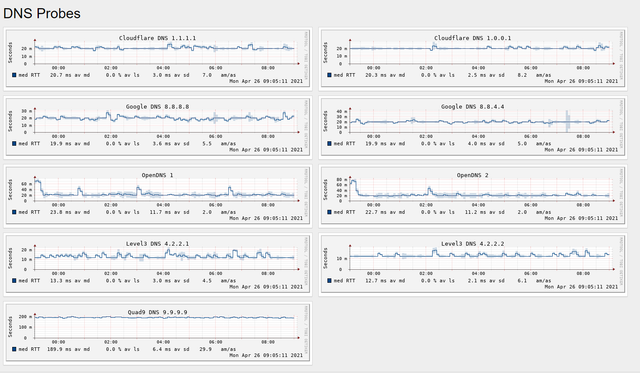
Smokeping works to give you a trend of DNS resolution requests from your own connection. At least I know I'm justified in using Cloudflare, with the added bonus protection from 1.1.1.3 for my family. Quad9 is a great no-no for me, and OpenDNS had far too many spikes, though last night it seems to have settled. You'll note even Google appears to have a more unstable graph, although it's very close to Cloudflare.

From the other ping-time alone graphs, Google DNS is faster. But ping alone does not tell you the total latency of the DNS transactions unlike the probe, so this is a very useful statistic to have.


twinbaby

Supremacy Member
Joined
Jul 8, 2014
Messages
5,417
Reaction score
1,499
Hi there,
My current router can support up to 3 DNS. It is EA8100.
I want DNS that can do the following:
- Block harmful content
- Block advertisement
- Speed up the Internet

Currently I am using the following free options:
185.228.168.10
1.1.1.3
8.8.8.8

Any recommendation.
 

firesong

Supremacy Member
Deluxe Member
Joined
Jan 17, 2001
Messages
8,797
Reaction score
4,818
Hi there,
My current router can support up to 3 DNS. It is EA8100.
I want DNS that can do the following:
- Block harmful content
- Block advertisement
- Speed up the Internet

Currently I am using the following free options:
185.228.168.10
1.1.1.3
8.8.8.8

Any recommendation.
Cloudflare family should do it for you.

Just set 1.1.1.3 and 1.0.0.3. If you really want a fallback, use Google's. However, I've found Cloudflare's uptime generally quite good. I won't use 3 providers myself... Cleanbrowsing should be okay, but I think their resolution times are slower.
 

twinbaby

Supremacy Member
Joined
Jul 8, 2014
Messages
5,417
Reaction score
1,499
Nowhere I see :
1.1.1.3 and 1.0.0.3 blocking ads, tracking and phishing

How about Adguard DNS.

94.140.14.14 and 94.140.15.15
 
Important Forum Advisory Note
This forum is moderated by volunteer moderators who will react only to members' feedback on posts. Moderators are not employees or representatives of HWZ Forums. Forum members and moderators are responsible for their own posts. Please refer to our Community Guidelines and Standards and Terms and Conditions for more information.
Top