
FREE DNS SERVICE

firesong

Supremacy Member
Deluxe Member
Joined
Jan 17, 2001
Messages
8,815
Reaction score
4,834
Nowhere I see :
1.1.1.3 and 1.0.0.3 blocking ads, tracking and phishing

How about Adguard DNS.

94.140.14.14 and 94.140.15.15
https://developers.cloudflare.com/1.1.1.1/1.1.1.1-for-families1.1.1.1 for Families categorizes destinations on the Internet based on the potential threat they pose regarding malware, phishing, or other types of security risks. When enabled, 1.1.1.1 for Families will block resolution to these destinations.

Not ads though. Personally, I don't like slower upstream resolvers for the whole network. At home, pfBlocker-NG handles another set of blockers in place for me. And it blocks much more than ads and phishing but botnets - all at the IP level too (as opposed to merely DNS).

adguard can be set on Android so it's a device-level (which also works outside of home).
 

twinbaby

Supremacy Member
Joined
Jul 8, 2014
Messages
5,418
Reaction score
1,499
https://developers.cloudflare.com/1.1.1.1/1.1.1.1-for-families1.1.1.1 for Families categorizes destinations on the Internet based on the potential threat they pose regarding malware, phishing, or other types of security risks. When enabled, 1.1.1.1 for Families will block resolution to these destinations.

Not ads though. Personally, I don't like slower upstream resolvers for the whole network. At home, pfBlocker-NG handles another set of blockers in place for me. And it blocks much more than ads and phishing but botnets - all at the IP level too (as opposed to merely DNS).

adguard can be set on Android so it's a device-level (which also works outside of home).
1) pfBlocker-NG - interesting.
So you got a pfsense router at home.

First time I know there is IP level and DNS level.

2) Adguard on device , yes at home I can combo them together with router.
 

firesong

Supremacy Member
Deluxe Member
Joined
Jan 17, 2001
Messages
8,815
Reaction score
4,834
1) pfBlocker-NG - interesting.
So you got a pfsense router at home.

First time I know there is IP level and DNS level.

2) Adguard on device , yes at home I can combo them together with router.
A lot of ad providers are working around DNS level blocking because that's the common method now. Since the ad servers are on fairly static servers, IP level blocking works in many cases. Also, since one IP address can have unlimited DNS entries pointing to it, it may be more efficient to block at the IP level rather than DNS level.

Conversely, they could also be hosting critical servers on that IP address so things will break if the IP is blocked - a combination of both IP and DNS ensures a good level of blocking, compared to DNS-alone.

As ads are a way of revenue, sites will definitely try to maximise their revenue sources with whatever underhanded means they can - it's a cat and mouse game, really.
 

xiaofan

High Supremacy Member
Joined
Sep 16, 2018
Messages
34,935
Reaction score
11,630
Nowhere I see :
1.1.1.3 and 1.0.0.3 blocking ads, tracking and phishing

How about Adguard DNS.

94.140.14.14 and 94.140.15.15

Adguard has a nice page talking about different DNS providers.
https://kb.adguard.com/en/general/dns-providers
Adguard Public DNS
94.140.14.14 and 94.140.15.15: blocking ads, tracking and phishing
94.140.14.15 and 94.140.15.16: the above plus blocking adult websites + safe search

Cloudflare Family DNS
1.1.1.2 and 1.0.0.2: Malware blocking onl
1.1.1.3 and 1.0.0.3: Malware and adult content blocking

You can use Adgurad Public DNS on your router and see how it goes. It may be a bit slower compared to Cloudflare. And yes you can use Adguard apps on your devices as well.

Right now I use Pi-hole (as a container) plus 1.1.1.3 as the backup. Some people prefer to use Adguard Home. Adguard Home is not the same as Adguard Public DNS as you can customized the filter list.
https://adguard.com/en/adguard-home/overview.html
It seems to me Adguard will add a new product soon which you can customize the filter list.
https://adguard-dns.com/en/welcome.html
 

bert64

Senior Member
Joined
Jan 20, 2020
Messages
1,027
Reaction score
539
Adguard has a nice page talking about different DNS providers.
https://kb.adguard.com/en/general/dns-providers
Adguard Public DNS
94.140.14.14 and 94.140.15.15: blocking ads, tracking and phishing
94.140.14.15 and 94.140.15.16: the above plus blocking adult websites + safe search

Cloudflare Family DNS
1.1.1.2 and 1.0.0.2: Malware blocking onl
1.1.1.3 and 1.0.0.3: Malware and adult content blocking

You can use Adgurad Public DNS on your router and see how it goes. It may be a bit slower compared to Cloudflare. And yes you can use Adguard apps on your devices as well.

Right now I use Pi-hole (as a container) plus 1.1.1.3 as the backup. Some people prefer to use Adguard Home. Adguard Home is not the same as Adguard Public DNS as you can customized the filter list.
https://adguard.com/en/adguard-home/overview.html
It seems to me Adguard will add a new product soon which you can customize the filter list.
https://adguard-dns.com/en/welcome.html
There is also NextDNS (https://nextdns.io) which can do custom filtering and also logging of what hosts you've been resolving.
 

twinbaby

Supremacy Member
Joined
Jul 8, 2014
Messages
5,418
Reaction score
1,499
Hi there,

I have tried the cloudflare DNS, however it does not block ads from this site.
https://oicanadian.com/
2ndly, is there any DNS that can block by the following features, for example:
Recently got one 22 years old got caught because he sell things through onlyfan.
Don't want to see and hear about him.

Search results must block him
Instagram and youtube must not show him
If the page detects certain keyword, goes to nowhere.

3rdly, is it possible to block harmful adult site from other language, because I notice it can block english but not japanese website.
 

xiaofan

High Supremacy Member
Joined
Sep 16, 2018
Messages
34,935
Reaction score
11,630
Hi there,

I have tried the cloudflare DNS, however it does not block ads from this site.
https://oicanadian.com/
2ndly, is there any DNS that can block by the following features, for example:
Recently got one 22 years old got caught because he sell things through onlyfan.
Don't want to see and hear about him.

Search results must block him
Instagram and youtube must not show him
If the page detects certain keyword, goes to nowhere.

3rdly, is it possible to block harmful adult site from other language, because I notice it can block english but not japanese website.

1. Try adguard dns or NextDNS to see it can do that or not. If not, using Pi-hole
2. no idea
3. Try adguard dns or NextDNS first to see it can do that or not. If not, using Pi-hole

Pi-hole:
1) https://forums.hardwarezone.com.sg/...ole-blocking-on-google-cloud-compute.6375286/
2) https://forums.hardwarezone.com.sg/threads/pi-hole-kit.5825092/
 

twinbaby

Supremacy Member
Joined
Jul 8, 2014
Messages
5,418
Reaction score
1,499
1. Try adguard dns or NextDNS to see it can do that or not. If not, using Pi-hole
2. no idea
3. Try adguard dns or NextDNS first to see it can do that or not. If not, using Pi-hole

Pi-hole:
1) https://forums.hardwarezone.com.sg/...ole-blocking-on-google-cloud-compute.6375286/
2) https://forums.hardwarezone.com.sg/threads/pi-hole-kit.5825092/
Ok I tried NextDNS, the denylist is not working for me. No matterwhat I typed in. Edit; after i restarted my phone working again.
 

twinbaby

Supremacy Member
Joined
Jul 8, 2014
Messages
5,418
Reaction score
1,499
1. Try adguard dns or NextDNS to see it can do that or not. If not, using Pi-hole
2. no idea
3. Try adguard dns or NextDNS first to see it can do that or not. If not, using Pi-hole

Pi-hole:
1) https://forums.hardwarezone.com.sg/...ole-blocking-on-google-cloud-compute.6375286/
2) https://forums.hardwarezone.com.sg/threads/pi-hole-kit.5825092/
I tried nextdns, good but up to 300,000 queries a month only, 2.99 a month for unlimited queries.
I want advanced feature like showing certain ads and pages when certain sites are visited.
 

twinbaby

Supremacy Member
Joined
Jul 8, 2014
Messages
5,418
Reaction score
1,499
Then use Pi-hole and see how it goes.
517652be468f23d65000506b4a1f02163f3192ba.png

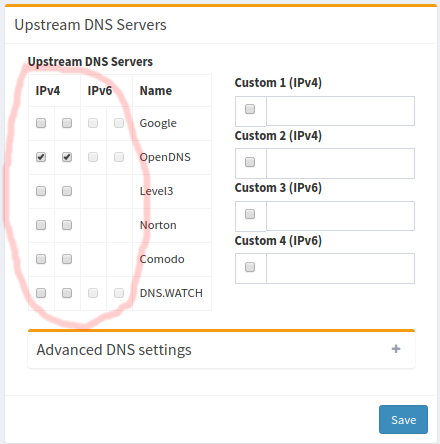
Ah.. interesting.. I just have to get a raspberry pi and configure the local IP as the DNS.
 

xiaofan

High Supremacy Member
Joined
Sep 16, 2018
Messages
34,935
Reaction score
11,630
Ah.. interesting.. I just have to get a raspberry pi and configure the local IP as the DNS.

Yes it is a good idea to get a Raspberry Pi and install Pi-hole on that.

Before you get the Raspberry Pi, you can use the free Google Cloud first. I used that for anout 14 months and just converted to local Pi-hole installation using a mini-PC this month.

Ref: brother yousoffb01 has done a very good job here to explain what you need to do.
https://forums.hardwarezone.com.sg/...ole-blocking-on-google-cloud-compute.6375286/
But if you are even more adventurous, go and use pfSense + pfBlockerNG as it is even more advanced. You need to invest in a mini PC (about S$200 to S$300).
https://forums.hardwarezone.com.sg/threads/starting-pfsense-for-new-users.6390714/
 

twinbaby

Supremacy Member
Joined
Jul 8, 2014
Messages
5,418
Reaction score
1,499
Is there any way to block certain subdirectory if the webpage for example /eat-drink-man-woman
 

twinbaby

Supremacy Member
Joined
Jul 8, 2014
Messages
5,418
Reaction score
1,499
Yes it is a good idea to get a Raspberry Pi and install Pi-hole on that.

Before you get the Raspberry Pi, you can use the free Google Cloud first. I used that for anout 14 months and just converted to local Pi-hole installation using a mini-PC this month.

Ref: brother yousoffb01 has done a very good job here to explain what you need to do.
https://forums.hardwarezone.com.sg/...ole-blocking-on-google-cloud-compute.6375286/
But if you are even more adventurous, go and use pfSense + pfBlockerNG as it is even more advanced. You need to invest in a mini PC (about S$200 to S$300).
https://forums.hardwarezone.com.sg/threads/starting-pfsense-for-new-users.6390714/
Can I use a spare jailbroken or rooted phone to install Pi-Hole or pfSense + pfBlockerNG
 

xiaofan

High Supremacy Member
Joined
Sep 16, 2018
Messages
34,935
Reaction score
11,630
Those using pihole, why not add unbound recursive dns?

Yes that can be a good idea. I just converted my Google Cloud based pi-hole (with DoH to Cloudflare) to local pi-hole installation using Container (Unbound + Pi-hole).
 

Eruditeswine

Member
Joined
Jul 18, 2016
Messages
269
Reaction score
178
Pardon the hijack as I hop on board the Raspberry Pi-hole train. Two questions:

1. For Pi-hole, do you prefer Unbound or Cloudflared?

2. If you have the habit of turning off the network when away, do you A. shut down Raspberry Pi before switch off OR B. just switch off?

Rather troublesome to SSH and shutdown the Pi before switch off. But seemingly the safer option.
 

xiaofan

High Supremacy Member
Joined
Sep 16, 2018
Messages
34,935
Reaction score
11,630
Pardon the hijack as I hop on board the Raspberry Pi-hole train. Two questions:

1. For Pi-hole, do you prefer Unbound or Cloudflared?

2. If you have the habit of turning off the network when away, do you A. shut down Raspberry Pi before switch off OR B. just switch off?

Rather troublesome to SSH and shutdown the Pi before switch off. But seemingly the safer option.

1. Either one is okay. On the cloud based Pi-hole I use Cloudflared. On the local Pi-hole instance I use Unbound.

2. IMHO thiis is not a good habit, but probably different people have different preferences. Electronics product especially the power supply, have inrush current which may stress the front end components every time you turn it on. So the life span may be reduced.

If you are worry about SD card (or USB drive) corruption, then it is probably better to shutdown the Paspberry Pi first before shutting down other things. That being said, no need worry too much either, just duplicate your SD card (or USB drive) so that you have a backup. If the thing got corruptted then just pop in an other one.

Remember to back up after finishing the setup and when you change some settings. Then it is very easy to import the settings (including the adlists) by using the teleporter restore function.
 
Last edited:
Important Forum Advisory Note
This forum is moderated by volunteer moderators who will react only to members' feedback on posts. Moderators are not employees or representatives of HWZ Forums. Forum members and moderators are responsible for their own posts. Please refer to our Community Guidelines and Standards and Terms and Conditions for more information.
Top
