Fully Utilize Singtel 2Gbps Network

stanleywoon

Member
Joined
Sep 14, 2009
Messages
146
Reaction score
13
Interestingly today I tried to bridge Singtel ZTE F8648P ONR Port 5 only and it works fine, as you mentioned, only port 5 working, other LAN ports got no internet at all (even though Singtel ONR still got a vliad IPv4 address).

BTW, I have cancelled my Singtel TV service as it is really not used much in the past three years.
Great to hear that , it is game changer for Singtel if the bridge mode remain working well. Managed to maintain 7 to 8Gbps consistently throughout these few weeks.

The rest of ports is mainly for TV I believe. I plug in the Singtel TV it work fine concurrently with Boardband.
 

alan_HW

Junior Member
Joined
Jan 26, 2011
Messages
3
Reaction score
0
I am currently in 1GB Singtel with the ONT. But I didn't using the Singtel router instead I'm using Pfsense and third-part Mesh.
What is the impact and limitation if I sign up 2GB with the ONR? Am I still able to have my current setting?
 

xiaofan

High Supremacy Member
Joined
Sep 16, 2018
Messages
31,507
Reaction score
8,902
I am currently in 1GB Singtel with the ONT. But I didn't using the Singtel router instead I'm using Pfsense and third-part Mesh.
What is the impact and limitation if I sign up 2GB with the ONR? Am I still able to have my current setting?

Singtel ONR will be the main router of your home network, so your will face Doubel NAT issues which is not desired for pfSense ussrs, unless you try to bridge the ONR by yourself (or even replace the ONR with a GPON Stick/ONU).
 

requimrar

Junior Member
Joined
Sep 15, 2008
Messages
5
Reaction score
1
Piggybacking on this thread since it seems to be the most recently active:

Anyone had any luck with SFP GPON (DFP-34X-2C2) for M1? I've cloned the GPON_SN to the stick but I get stuck at O2/O3 status (LOID error). Tried putting the m1hbb0000XXXXX thing as LOID but no luck there.

Plus, seems like my ONT is some new model HG8140H5 that I can't find any info online about, and I can't even ping it, let alone access the admin page to see if I can extract some of the credentials. Would appreciate if anyone has any ideas.

edit: updated the firmware for the GPON stick, seems like it says I get to O5 state but ONU ID is still 0 and LOID status is still "initial". Still no luck with getting a dhcp lease from ISP side, not sure what else to clone (other than credentials which I can't access from the old ONT)

edit 2: seems like M1 set the ONT IP to 192.168.55.1, so had to set that subnet (192.168.55.0/24) to connect to it. Could SSH with user=root, pw=adminHW. Copied over a few more things (the software versions etc), but still cannot get a dhcp lease ):
 
Last edited:

xiaofan

High Supremacy Member
Joined
Sep 16, 2018
Messages
31,507
Reaction score
8,902
Piggybacking on this thread since it seems to be the most recently active:

Anyone had any luck with SFP GPON (DFP-34X-2C2) for M1? I've cloned the GPON_SN to the stick but I get stuck at O2/O3 status (LOID error). Tried putting the m1hbb0000XXXXX thing as LOID but no luck there.

Plus, seems like my ONT is some new model HG8140H5 that I can't find any info online about, and I can't even ping it, let alone access the admin page to see if I can extract some of the credentials. Would appreciate if anyone has any ideas.

edit: updated the firmware for the GPON stick, seems like it says I get to O5 state but ONU ID is still 0 and LOID status is still "initial". Still no luck with getting a dhcp lease from ISP side, not sure what else to clone (other than credentials which I can't access from the old ONT)

edit 2: seems like M1 set the ONT IP to 192.168.55.1, so had to set that subnet (192.168.55.0/24) to connect to it. Could SSH with user=root, pw=adminHW. Copied over a few more things (the software versions etc), but still cannot get a dhcp lease ):

Try the tip here. Read his other post in the thread as well.
https://forums.hardwarezone.com.sg/threads/diy-ont-with-gpon-sfp-stick-and-openwrt.6771940/

There's some minor settings required:
1) You need to clone the GPON_SN from old ONT. I did this with the V2801F chip, you can find guides on Lowyat and on Github (https://github.com/Anime4000/RTL960x). [surprisingly they are quite active in this area]
2) VLAN 1103, priority 1. On Mikrotik devices, you can refer to this guide: https://www.cflee.com/posts/routeros-tagged-m1-fibre/ ; please note that doing this type of manipulation will be done in software on the Mikrotik devices, so FastTrack won't work [i.e. hopefully you have a fast enough CPU in your device so you can still get full/near-to-full speeds. Probably not much of a concern for pfSense/opnSense devices].

I didn't explore the voice VLAN config for now, which I believe is VL1107, since M1 has already locked down their ONTs further which makes it difficult to retrieve the SIP settings.
 

GlueStik

Junior Member
Joined
Apr 26, 2023
Messages
48
Reaction score
21
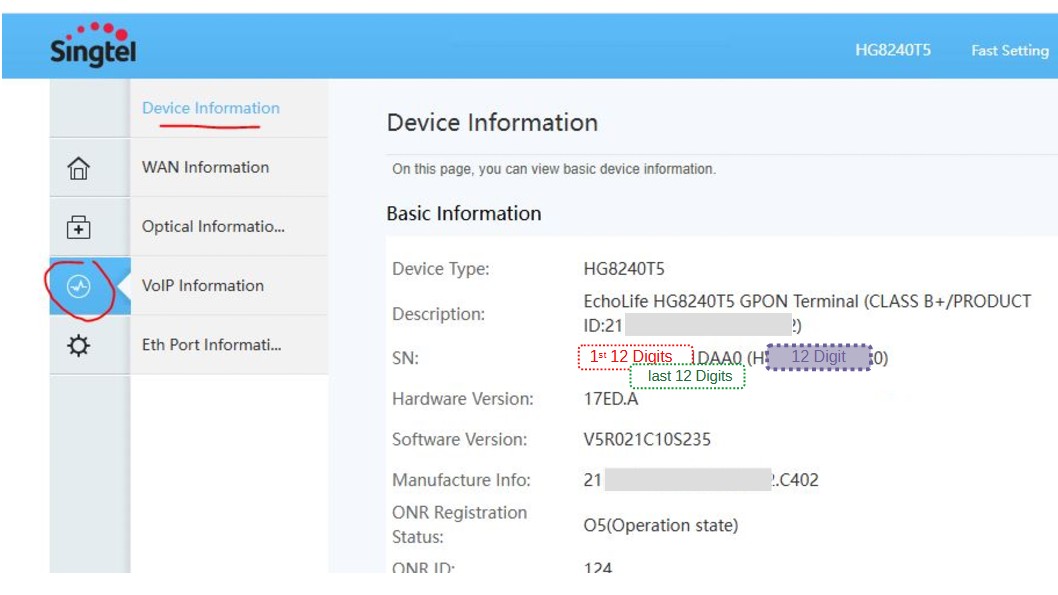
Day 3 of trying to get VSOL working. PLOAM is now my FTTH ID and LOID AND LOID PW Is now 123456. Maybe it's my GPON SN incorrect but I turn to the back of my official device it stats the SN : 16 digits. But the vsol only accept 12 digits.. can anyone help? How do I get 12 digits from that 16 digits it's now showing as the 1st 12 digits and 13 to 16 is ommited
 

dashing_girlboy

Junior Member
Joined
Jan 27, 2017
Messages
45
Reaction score
34
Day 3 of trying to get VSOL working. PLOAM is now my FTTH ID and LOID AND LOID PW Is now 123456. Maybe it's my GPON SN incorrect but I turn to the back of my official device it stats the SN : 16 digits. But the vsol only accept 12 digits.. can anyone help? How do I get 12 digits from that 16 digits it's now showing as the 1st 12 digits and 13 to 16 is ommited
remove the 0x from the label SN

e.g. label is HWZG0xABCD8866, your SN should be HWZGABCD8866
 

Greenaaron

Senior Member
Joined
Feb 24, 2010
Messages
698
Reaction score
1
There are no 0 and x in the SN: LOL... It's alphanumeric 16 digits.

In fact in the entire back label there are no 0 and x. The only 0 i see is HG824(0)T5
Login to the ONR and go to the settings and management page, u will find the 12 digit GPON SN number there.
 

cdjockey

Junior Member
Joined
Aug 14, 2024
Messages
8
Reaction score
0
Login to the ONR and go to the settings and management page, u will find the 12 digit GPON SN number there.
Hi, I have the same issue as others here, I can get PON 'certified' but no connection.

I tried three different versions of SN based on what is on ONR (HG8240TS):
Red - First 12 digits of the 16 digit number
Green - Last 12 digits of the 16 digit number
Purple - 12 digit number shown in brackets

Untitled-1.jpg


Can anyone whos V2802RH is working confirm which they used, especially if the WC provided ONR was a HG8240TS?
 

xiaofan

High Supremacy Member
Joined
Sep 16, 2018
Messages
31,507
Reaction score
8,902
One more successful story here.
https://forums.hardwarezone.com.sg/threads/whizcomms-new-fibre-broadband-provider.5494964/page-137

i got mine working, where you stuck at and which isp?

I'm on Whizzcom, here my settings.
Use the FTTH ID as PLOAM Password.

SN get from device info. You need a string that has (HWTCXXXXXXXX) if you have the longer SN, just replace the first 8 (48575443XXXXXXXX) with the vendor ID. https://hack-gpon.org/vendor/

You will need to go to the firewall page on the onu and enable telnet. Then login and do: flash set GPON_SN HWTCXXXXXXXX

Next create a WAN profile. for me, is bridge -> enable vlan -> set your ID(on whiizzcom is 10/0). lastly check only lan1. Add.

Everything else don't touch.
 

yuzu123

Junior Member
Joined
Nov 19, 2024
Messages
5
Reaction score
14
For those who are trying this on WC 2.5Gbps package and even after following all the steps correctly cannot get a WAN IP/internet access can try the below. This is what worked for me on my VSOL V2802RH.

"Bridge Mode" didnt work for me. I had to select "IPoE" from "Channel Mode". Then after a while I got an IP address to my WAN interface and internet was working.

mzxrO3M.jpeg


EDIT - Managed to get the bridge mode working too! This allows me to avoid double NAT and complications of having two routers in my home network.

If you follow all the instructions properly and if IPoE is working, it means your settings are indeed correct!
Now change Channel Mode > Bridge and leave all other settings as default like you left them in "IPoE" config.

Here is the part where it threw me off initially.

In the WAN Interface Table, you won't see any WAN IP/Gateway/Netmask. This info made me think that that my config is wrong and I don't have internet. But in reality it's still working! I think as long as "Status" > up, everything should be good.

Now you connect your VSOL 2.5G output to to your router's (in my case it's a TP-Link Archer BE230) WAN port.

Login into your router, go to "Internet" settings and configure it to have "Dynamic IP" and hit release/renew.

Voila! Now you should get the WAN IP/Public IP directly to your 2nd router!
hkM6tdt.jpeg
 
Last edited:

yuzu123

Junior Member
Joined
Nov 19, 2024
Messages
5
Reaction score
14
For those who are trying this on WC 2.5Gbps package and even after following all the steps correctly cannot get a WAN IP/internet access can try the below. This is what worked for me on my VSOL V2802RH.

"Bridge Mode" didnt work for me. I had to select "IPoE" from "Channel Mode". Then after a while I got an IP address to my WAN interface and internet was working.

mzxrO3M.jpeg


EDIT - Managed to get the bridge mode working too! This allows me to avoid double NAT and complications of having two routers in my home network.

If you follow all the instructions properly and if IPoE is working, it means your settings are indeed correct!
Now change Channel Mode > Bridge and leave all other settings as default like you left them in "IPoE" config.

Here is the part where it threw me off initially.

In the WAN Interface Table, you won't see any WAN IP/Gateway/Netmask. This info made me think that that my config is wrong and I don't have internet. But in reality it's still working! I think as long as "Status" > up, everything should be good.

Now you connect your VSOL 2.5G output to to your router's (in my case it's a TP-Link Archer BE230) WAN port.

Login into your router, go to "Internet" settings and configure it to have "Dynamic IP" and hit release/renew.

Voila! Now you should get the WAN IP/Public IP directly to your 2nd router!
hkM6tdt.jpeg
Update - Managed to get "Bridge Mode" working on VSOL V2802RH with WC 2.5Gbps plan as well.

Refer to original post as I have added the update as an edit.
 

xiaofan

High Supremacy Member
Joined
Sep 16, 2018
Messages
31,507
Reaction score
8,902
Yes, replace ZTE F8648P ONR for 10Gbps plan with VSOL V2905H. Already get PON and WAN up but can't get public IP in bridge port. Those with GPON experience, can share how to resolve this ?

Not so sure if you want to continue with the experiment or not, but have you copied the ZTE F8648P SN to the VSOL V2905H?

Edit:
Hmm, I see that you have done all the normal stuff like copying the SN and MAC address. So I guess it is indeed more difficult to replace XGS-PON ONR compared to GPON ONR.
 

tetora

Junior Member
Joined
Sep 2, 2024
Messages
1
Reaction score
0
For those who are trying this on WC 2.5Gbps package and even after following all the steps correctly cannot get a WAN IP/internet access can try the below. This is what worked for me on my VSOL V2802RH.

"Bridge Mode" didnt work for me. I had to select "IPoE" from "Channel Mode". Then after a while I got an IP address to my WAN interface and internet was working.

mzxrO3M.jpeg


EDIT - Managed to get the bridge mode working too! This allows me to avoid double NAT and complications of having two routers in my home network.

If you follow all the instructions properly and if IPoE is working, it means your settings are indeed correct!
Now change Channel Mode > Bridge and leave all other settings as default like you left them in "IPoE" config.

Here is the part where it threw me off initially.

In the WAN Interface Table, you won't see any WAN IP/Gateway/Netmask. This info made me think that that my config is wrong and I don't have internet. But in reality it's still working! I think as long as "Status" > up, everything should be good.

Now you connect your VSOL 2.5G output to to your router's (in my case it's a TP-Link Archer BE230) WAN port.

Login into your router, go to "Internet" settings and configure it to have "Dynamic IP" and hit release/renew.

Voila! Now you should get the WAN IP/Public IP directly to your 2nd router!
hkM6tdt.jpeg
Is the User ID in WAN setting Whiz account number?
 

yuzu123

Junior Member
Joined
Nov 19, 2024
Messages
5
Reaction score
14
Is the User ID in WAN setting Whiz account number?
Sorry I edited the post as User ID is not required. User ID is FTTH ID (I guess it's the WC account number too). It wont make a difference if you put this in or not anyway.
 

bikachu

Senior Member
Joined
Mar 30, 2001
Messages
704
Reaction score
0
Yes, replace ZTE F8648P ONR for 10Gbps plan with VSOL V2905H. Already get PON and WAN up but can't get public IP in bridge port. Those with GPON experience, can share how to resolve this ?

I am also having the same problem. PON and WAN connection LED is up but I cannot obtain the public IP in bridge mode. Anyone has any solution to resolve the issue?
 

lifeform

Junior Member
Joined
Mar 25, 2010
Messages
1
Reaction score
0
Sorry I edited the post as User ID is not required. User ID is FTTH ID (I guess it's the WC account number too). It wont make a difference if you put this in or not anyway.

Followed the steps, including
telnet and flash set GPON_SN

At the webpage of 192.168.1.1, cannot get to work with IPoE.
- status shows "up" but IP Addr and Gateway has no IP address.

Have attached some of the settings page, which could reveal some error on my part.
image.png
image.png

image.png

image.png


Questions:
- Observed that FTTH ID (setting from WC provided ZTE F620) is not WC's Account ID, is that correct?
- Used FTTH ID as PLOAM Password, is that correct?
- Under WAN Configuration, what does LAN: LAN1 and LAN2 refer to? What happens when Channel Mode is bridged? Do only checked LAN# get bridged?

Thanks for help.
 
Important Forum Advisory Note
This forum is moderated by volunteer moderators who will react only to members' feedback on posts. Moderators are not employees or representatives of HWZ. Forum members and moderators are responsible for their own posts.

Please refer to our Community Guidelines and Standards, Terms of Service and Member T&Cs for more information.
Top