FYI/A: Bufferbloat 101

xiaofan

High Supremacy Member
Joined
Sep 16, 2018
Messages
32,776
Reaction score
10,256
@hwzlite

Nice info. Thanks.

FYI, you can directly download the Linux binary for your Linux machine, no need to use the package manager.

Go to the section: Download Speedtest CLI.
https://install.speedtest.net/app/cli/ookla-speedtest-1.2.0-linux-x86_64.tgz (x86_64 version)

FYI, I use the above version for my OpenWRT virtual router.

Even for my Ubuntu/Debian VM/LxC Container, I tend to use the above version.

Bash:
mcuee@ubuntu2404vm:~/build/speedtest$ tar zxvf ookla-speedtest-1.2.0-linux-x86_64.tgz
speedtest
speedtest.md
speedtest.5

mcuee@ubuntu2404vm:~/build/speedtest$ ./speedtest
==============================================================================

You may only use this Speedtest software and information generated
from it for personal, non-commercial use, through a command line
interface on a personal computer. Your use of this software is subject
to the End User License Agreement, Terms of Use and Privacy Policy at
these URLs:

        https://www.speedtest.net/about/eula
        https://www.speedtest.net/about/terms
        https://www.speedtest.net/about/privacy

==============================================================================

Do you accept the license? [type YES to accept]: YES
License acceptance recorded. Continuing.


   Speedtest by Ookla

      Server: Singtel - Singapore (id: 13623)
         ISP: Singtel Fibre
Idle Latency:     2.40 ms   (jitter: 0.15ms, low: 2.26ms, high: 2.55ms)
    Download:   936.97 Mbps (data used: 457.2 MB)
                  3.37 ms   (jitter: 0.34ms, low: 2.53ms, high: 4.34ms)
      Upload:   938.88 Mbps (data used: 1.1 GB)
                  5.84 ms   (jitter: 0.59ms, low: 4.08ms, high: 17.36ms)
 Packet Loss:     0.0%
  Result URL: https://www.speedtest.net/result/c/e27a7d53-ce0d-471c-9316-752e68375267
 
Last edited:

xiaofan

High Supremacy Member
Joined
Sep 16, 2018
Messages
32,776
Reaction score
10,256
From OpenWRT thread: it is interesting I got quite worse results using H3C NX30 Pro compared to @hwzlite result using Xiaomi AX3000T.
https://forums.hardwarezone.com.sg/threads/openwrt-router-firmware.5967482/page-26

The following is with latest ImmortalWrt snapshot (Open source driver). The reason to use ImmortalWrt is that I flashed an uboot booloader which does not seem to be compatible with official OpenWRT images. Anyway, ImmortalWrt is quite close to official OpenWRT. Maybe I will flash the OpenWRT uboot later.

Bash:
root@ImmortalWrt:~# ubus call system board | grep 'model\|description'
        "model": "H3C Magic NX30 Pro (NMBM layout)",
                "description": "ImmortalWrt 23.05-SNAPSHOT r27694-e540dc745a"
root@ImmortalWrt:~# iw list | grep 'Wiphy\|TXQS\|AIRTIME_FAIRNESS\|AQL'
Wiphy phy1
                * [ TXQS ]: FQ-CoDel-enabled intermediate TXQs
                * [ AIRTIME_FAIRNESS ]: airtime fairness scheduling
                * [ AQL ]: Airtime Queue Limits (AQL)
Wiphy phy0
                * [ TXQS ]: FQ-CoDel-enabled intermediate TXQs
                * [ AIRTIME_FAIRNESS ]: airtime fairness scheduling
                * [ AQL ]: Airtime Queue Limits (AQL)
root@ImmortalWrt:~# iwinfo | grep 'Hardware:\|PHY name'
          Hardware: embedded [MediaTek MT7981]
          Supports VAPs: yes  PHY name: phy1
root@ImmortalWrt:~# cat /sys/kernel/debug/ieee80211/phy1/aql_txq_limit
AC      AQL limit low   AQL limit high
VO      5000            5000
VI      5000            5000
BE      5000            5000
BK      5000            5000
root@ImmortalWrt:~# cat /sys/kernel/debug/ieee80211/phy0/aql_txq_limit
AC      AQL limit low   AQL limit high
VO      5000            5000
VI      5000            5000
BE      5000            5000
BK      5000            5000

Note: Phy0 is not enabled (2.4GHz WiFi).

OpenWRT virtual router (no sqm) -- H3C NX30 Pro in router mode (Double NAT), CH36, 80MHz channel bandwidth -- wireless -- Acer Windows 11 laptop (2021 model) with Intel AX201 WiFi 6 adapter, signal about -50dBm.

NX30 Pro SQM testing (disable SW/HW offloading) using fq_codel.

Bash:
root@ImmortalWrt:~# cat /etc/config/sqm

config queue 'eth1'
        option enabled '1'
        option interface 'eth1'
        option download '200000'
        option upload '200000'
        option qdisc 'fq_codel'
        option script 'simple.qos'
        option linklayer 'ethernet'
        option debug_logging '0'
        option verbosity '5'
        option overhead '44'

NX30 Pro SQM testing (disable SW/HW offloading) using fq_codel.

NX30 Pro SQM disabled: D
https://www.waveform.com/tools/bufferbloat?test-id=10a286fd-72b9-41b3-abf0-e5cf6d8cec62

NX30 Pro SQM enabled, 500Mbps/500Mbps limit: C
https://www.waveform.com/tools/bufferbloat?test-id=c85aaff0-0401-4ad1-820d-60d218508255

NX30 Pro SQM enabled, 500Mbps/200Mbps limit: A
https://www.waveform.com/tools/bufferbloat?test-id=e26213b9-55b3-4300-9dc2-f1edc6f375cf

NX30 Pro SQM enabled, 300Mbps/200Mbps limit: A
https://www.waveform.com/tools/bufferbloat?test-id=4e3de65d-a77b-4c50-ac27-333b9fd6db03

NX30 Pro SQM enabled, 200Mbps/200Mbps limit: A
https://www.waveform.com/tools/bufferbloat?test-id=8d80dbd7-925b-465e-bf83-fa8e20919929
 

BradenHeat

Supremacy Member
Joined
Apr 4, 2005
Messages
7,360
Reaction score
1,637
Hmmm

m1 fiber --> gl-iNet Slate AX [ use for adblocking if im not traveling ] ---> Ubiquity Cloud Gateway Ultra --> Unifi AP


this is a first for me ,


think this might be the best setup, endgame of sorts for starters


Gl-inet [ adblocker and redundant wireless or extender from say floor. 1 of a mansion / kitchenDB to wall switch ]

UCG ultra [ for managing the IDS/IPS and AP or false APs im sold, if theres a AiO likeOriginal Dream Machine Capsule with 4x4 wifi 6 i WILL push for that ]

Old. any routers to be used as access points [ heck even getting gl-inet might be more worth ]


On Openwrt SQM, im not sure what is wrong but it almost killed my network by halfing it .... which i did try the simplest tf but strictly fq_codel... just odd things


whatever Unifi is doing their Smart queues, it is indeed working


and its the same wireless


changes did were on the slate-AX via terminal on my mac

Code:
sudo sysctl -w net.ipv4.tcp_ecn=1;
ip route | while read p; do ip route change $p initcwnd 20 initrwnd 20; done;
sysctl -w net.ipv4.tcp_slow_start_after_idle=0;
sysctl -w net.core.default_qdisc=fq_codel;
sysctl -w net.ipv4.tcp_congestion_control=hybla;

the same optimization went to UCG ultra as well ,

[ UCG, smart Queuesis enabled, WITH FULL IPS/IDS ]


upload photos online


and heres LAN


upload photos online
 

hwzlite

Master Member
Joined
Jan 27, 2007
Messages
3,060
Reaction score
3,200
Spot-on reasoning on real-world scenarios about bufferbloat in wireless stalk : :cool:

Screenshot-2024-06-09-090113.png


Ref: Cloudflare - Making home Internet faster has little to do with “speed”
 

xiaofan

High Supremacy Member
Joined
Sep 16, 2018
Messages
32,776
Reaction score
10,256

In reality, the reported latency issue by most of the people here in this forum are not due to bufferbloat, but rather poor wireless coverage and wireless congestion.

That is also in line with my own testing.
Signal strength good --- lower latency.
Signal strength bad --- higher latency -- and yes SQM measure may help in some cases. But when the signal is bad (eg: -80dBm), nothing can help.

So to most users in this forum, no need to worry about bufferbloat at all, just get a good router or mesh system (best is using Ethernet backhaul) to ensure good coverage.

And for power users who are interested in chasing solution to bufferbloat issues -- yes, it is good to do that as well to have the best internet experiences.
 
Last edited:

xiaofan

High Supremacy Member
Joined
Sep 16, 2018
Messages
32,776
Reaction score
10,256
The worst bufferbloat I have seen is probably Singtel mobile 5G with super high latency on the upload.
https://forums.hardwarezone.com.sg/threads/comparison-of-sim-only-plans-part-2.6179673/page-528

First day on the recontract S$20.37 Singtel SIM Only with free 5G access for the full duration of the contract. Previously only three months of free 5G data access.

The initial impression is good using SingTel 5G with SA enabled.

Xiaomi Poco X4 GT phone (two year old mid-range Android phone)

1) no more signal drop on the bus around the areas of Chin Bee Avenue (industrial zone near to Taman Jurong). I had signal drop when using Singtel 4G.

2) no need to switch to 5G NSA.

3) speed is quite okay. Latency is not good though.

Fastest and Slowest on the bus around Chin Bee Avenue area. Five tests done.

10319677102.png


10319680617.png

in my experience, unloaded latency is about 10~20ms. the bufferbloat can be quite bad as in the speedtest.
 

xiaofan

High Supremacy Member
Joined
Sep 16, 2018
Messages
32,776
Reaction score
10,256
Bufferbloat test of a desktop running Ubuntu Linux, with Realtek RTL8852BE WiFi 6 adapter.

Singtel ONR -- 10G/2.5G switch -- 2.5G mini PC running PVE and virtual OpenWRT router (no SQM/QOS settings) -- ZTE BE7200 Pro+ AP -- wireless 4m away -- Ryzen 5 5600G desktop running Ubuntu 24.04.

Test result: A
https://www.waveform.com/tools/bufferbloat?test-id=8e890724-5782-4c79-9c7f-a267d5a76cf9
O4msW8y.png


OOkla SpeedTest result for reference
16727229601.png


Cloudflare Speedtest result
rN9UZWk.png


Fast.com test result
mYCZbND.png
 
Last edited:

xiaofan

High Supremacy Member
Joined
Sep 16, 2018
Messages
32,776
Reaction score
10,256

xiaofan

High Supremacy Member
Joined
Sep 16, 2018
Messages
32,776
Reaction score
10,256

dqwong

High Supremacy Member
Joined
Jan 21, 2002
Messages
37,942
Reaction score
11,662
Just a reminder, along side this buffer bloat issue, your network interface card can also be the cause of latency and speed issues. For my case, there is a driver setting in my Intel network adapter called interrupt moderation. By default this is left ON. I would suggest turning this OFF. My download speeds and download stability improve quite a lot after doing this, also web pages loads more instantaneously once this setting is OFF.
 

xiaofan

High Supremacy Member
Joined
Sep 16, 2018
Messages
32,776
Reaction score
10,256
Wireless test: looks like Singtel connection to Waveform.com test servers have improved quite a bit and now the download speed is not much worse than OOkla SpeedTest.

Singtel ONR -- OpenWRT virtual router (2.5G WAN) -- ZTE BE7200 Pro+ in AP mode (2.5G WAN) -- wireless 4m away -- Acer 2021 laptop with Intel AX201 WiFi 6 adapter

1) Without SQM on the OpenWRT --> D

https://www.waveform.com/tools/bufferbloat?test-id=8ed81f3f-c00f-4433-b3f7-de72d989b645
Vjcf2kH.png


1e33cf85-bea2-4b8f-980e-49183e0b9c8a.png


2) With simple SQM (fq_codel/simple_qos, limit the upload to 500Mbps, no limit on the download) --> B (you can see upload latency drops to good value)

https://www.waveform.com/tools/bufferbloat?test-id=6ae7e929-8588-4798-9e6f-0c47b05e0a4a
PrIgoYW.png


2cf0b569-77b3-4553-b1fd-2ff87058ecf7.png


Not using SQM but rather simple bandwidth limited QoS (no limit for download, upload limit at 500Mbps) --> B

https://www.waveform.com/tools/bufferbloat?test-id=85640c8c-2d1a-45ca-8da4-583d67a2afb1
cdNUBsa.png


add6f1fe-35f4-418d-8f9b-f8c2cda6ee0e.png
 
Last edited:

xiaofan

High Supremacy Member
Joined
Sep 16, 2018
Messages
32,776
Reaction score
10,256
Wired test:
Singtel ONR -- OpenWRT virtual router (2.5G WAN) -- ZTE BE7200 Pro+ in AP mode (2.5G WAN)
ZTE BE7200 Pro+ AP 2.5G LAN port --> wired connection --> Acer 2021 laptop with GRiS USB to 2.5G NIC

1) Without SQM on the OpenWRT -->C
https://www.waveform.com/tools/bufferbloat?test-id=5e24e856-f03a-492d-b85f-b9755d27a07a
0galhYp.png


6d92986d-5f6c-40d6-879a-d721ab5b77b2.png


2) With simple SQM (fq_codel/simple_qos, limit the upload to 500Mbps, no limit on the download, take note the virtual CPU can not seem to be handle CAKE so have to use fq_codel) --> A+
https://www.waveform.com/tools/bufferbloat?test-id=dbfb5930-e6d7-42ad-9950-1eb451dab6f9

keYlpPY.png


681d5f41-3ee8-4566-a352-ed2cc89066ea.png
 
Last edited:

John Martino

Junior Member
Joined
Aug 11, 2024
Messages
33
Reaction score
2
How to eliminate bloat on wireless? I have SQM for the WAN side but on wireless side, seems to still have some bloat (~60ms) for download/upload on tplink deco x20 2 unit mesh.
 

xiaofan

High Supremacy Member
Joined
Sep 16, 2018
Messages
32,776
Reaction score
10,256
Wireless test: looks like Singtel connection to Waveform.com test servers have improved quite a bit and now the download speed is not much worse than OOkla SpeedTest.

Singtel ONR -- OpenWRT virtual router (2.5G WAN) -- ZTE BE7200 Pro+ in AP mode (2.5G WAN) -- wireless 4m away -- Acer 2021 laptop with Intel AX201 WiFi 6 adapter

No SQM on OpenWRT, using QoS on the ZTE BE7200 Pro+ in AP mode. Somehow the max setting only goes to 1Gbps, so I just set the limit to 1Gbps for both download and upload (total download/upload both set to 2.5Gbps).

1) Without QoS --> D

ksFzDov.png


2) With QoS --> A (the slow dual core ZTE CPU is probably not able to deal with 1Gbps QoS).

LTIHNrM.png
 

John Martino

Junior Member
Joined
Aug 11, 2024
Messages
33
Reaction score
2
Wireless test: looks like Singtel connection to Waveform.com test servers have improved quite a bit and now the download speed is not much worse than OOkla SpeedTest.

Singtel ONR -- OpenWRT virtual router (2.5G WAN) -- ZTE BE7200 Pro+ in AP mode (2.5G WAN) -- wireless 4m away -- Acer 2021 laptop with Intel AX201 WiFi 6 adapter

No SQM on OpenWRT, using QoS on the ZTE BE7200 Pro+ in AP mode. Somehow the max setting only goes to 1Gbps, so I just set the limit to 1Gbps for both download and upload (total download/upload both set to 2.5Gbps).

1) Without QoS --> D

ksFzDov.png


2) With QoS --> A (the slow dual core ZTE CPU is probably not able to deal with 1Gbps QoS).

LTIHNrM.png
Can try sqm on openwrt instead? No sqm on zte.
i think 850down/750up might be good
Thanks
 

John Martino

Junior Member
Joined
Aug 11, 2024
Messages
33
Reaction score
2
which exact post? with wireless?

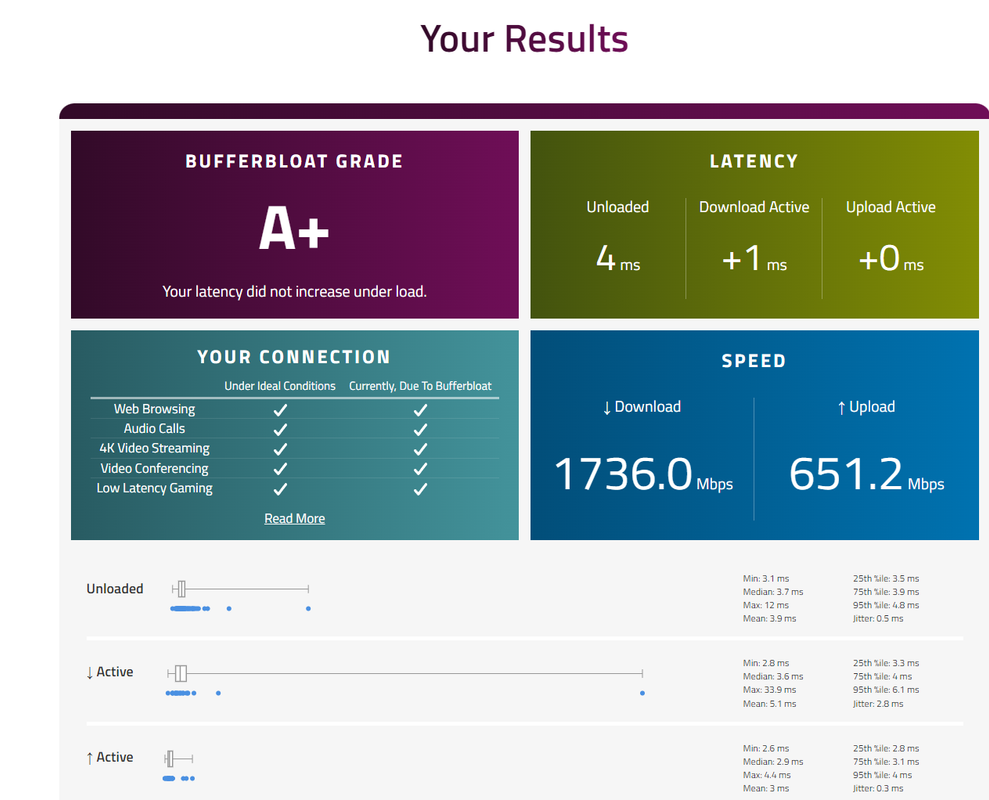
anyway here's mine with MyRepublic (1gbps) ONT -> nanopi R4SE with Cake/pieceofcake SQM 800down/700up -> TP Link Deco x20 -> Wired to work laptop (Intel NIC)
XBih3we.jpeg


wireless i'm suspecting I just need a good wifi/ap mesh that for that low bufferbloat.
 
Important Forum Advisory Note
This forum is moderated by volunteer moderators who will react only to members' feedback on posts. Moderators are not employees or representatives of HWZ Forums. Forum members and moderators are responsible for their own posts. Please refer to our Community Guidelines and Standards and Terms and Conditions for more information.
Top