- Joined
- Jul 5, 2001
- Messages
- 43,224
- Reaction score
- 8,329


Google Gemini tells us that we are wrong about Amos Yee
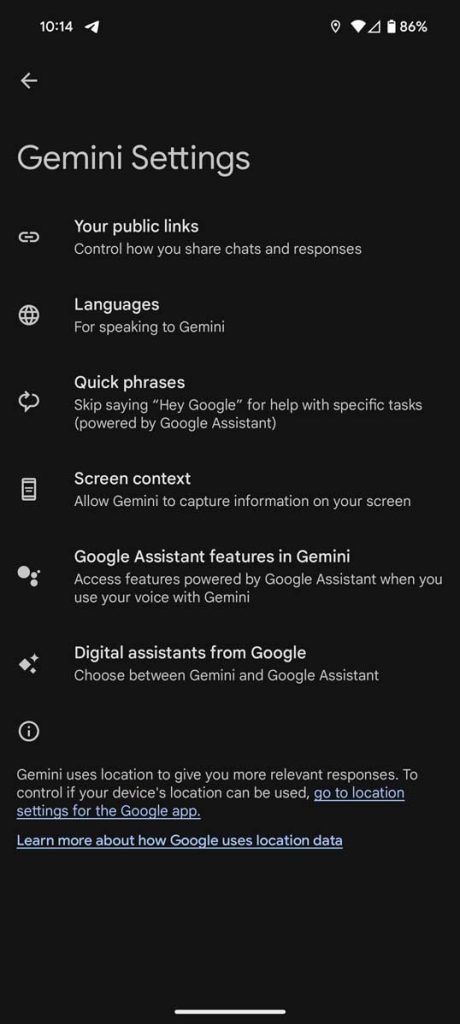
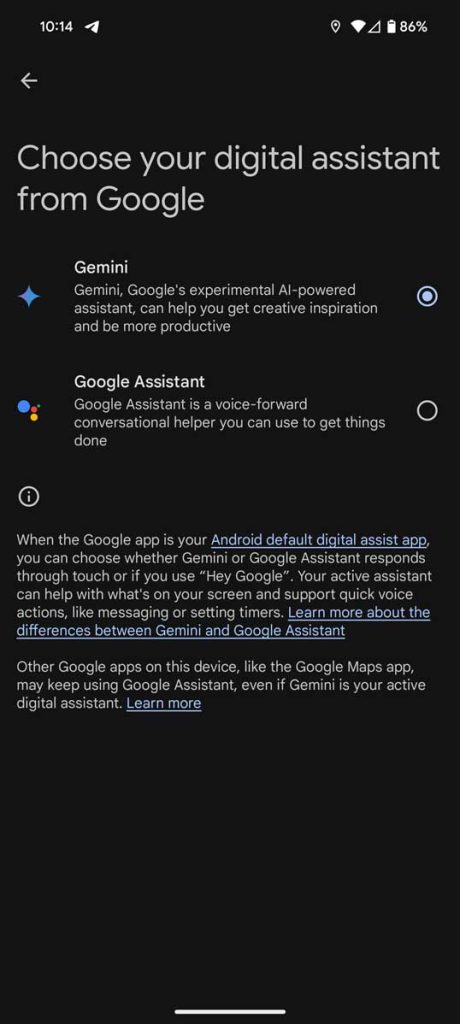
How to switch back to Google Assistant
Until Gemini gets better at completing tasks similar to Google Assistant, on top of offering a vast amount of value as an LLM, you might want to consider switching back to the default assistant.
Fortunately, the option is built into the Gemini app.
- Open Gemini on your Android phone.
- Tap your profile photo and hit Settings.
- Tap Digital assistants from Google at the bottom.
- Select Google Assistant.
Now, when you say “Hey, Google” or hold down the power button, you should see Google Assistant as it was before installing Gemini.
Hmmm. does a reinstall help? maybe there's a difference between stable and QPR3. mine still works thoughSeems like Gemini went and uninstalled itself on my P8P.
Others also reporting this issue on Reddit:
https://www.reddit.com/r/Bard/s/VxKdW0CVlF
The Gemini app is still not officially available for Singapore.Hmmm. does a reinstall help? maybe there's a difference between stable and QPR3. mine still works though

Mine still says that "This item is not available in your country."Gemini app now available for SG