

You are using an out of date browser. It may not display this or other websites correctly.
You should upgrade or use an alternative browser.
You should upgrade or use an alternative browser.
Google Pixel 10 series
- Thread starter limmk
- Start date
More options
Who Replied?

omelet
Senior Member
- Joined
- Dec 9, 2006
- Messages
- 2,251
- Reaction score
- 346
What's the issue you face with the modem and GPS ah?
Reception has improved since P9PXL, in SG seem fine but when in Japan, I kept losing signal here and there though not everywhere. My S25U in comparison did not. Both tested on Ubigi.
For GPS my P8P and P9PXL lock on slower than my S25U. It will keep jumping and move around at some areas. Seem like it is struggling to get a position.
At difficult area, eg. some place in orchard, Wisma Atria, 313 area, it can't even get a GPS signal. But the S25U can. Similar thing when in Japan. Didn't have time to test P10PXL at these area yet.
If you have multiple phones, you can download the GNSSLogger app by Google and compare the satellite that the phone can see at the same area. S25U see more satellites all the time and quicker as well.
I am still evaluating P10PXL, seem to be slight improvement to my P9PXL but still loses to S25U so far in terms of accuracy. eg. when inside a vehicle on road, P10PXL thinks I am on side walking pavement, but S25U show I am on road which is correct.

- Joined
- Jul 5, 2001
- Messages
- 44,697
- Reaction score
- 8,480
The Google Pixel 10 series brings a familiar polish and plenty of new features, but its most interesting, and arguably most controversial, change lies deep inside the Tensor G5 chip. Google has ditched its long-standing partnership with Arm’s Mali GPU range in favor of Imagination Technologies’ DXT-48-1536 graphics unit. On paper, that’s a major shift — but after a week of testing, I’m not convinced it’s for the better.
At first, everything seemed fine. The Pixel 10 Pro XL handles popular Android games smoothly enough, with no significant slowdowns or stability issues during my short tests. But things started to look less rosy when I dug deeper, especially into emulator performance.
To see if there was more to it, I upgraded my performance testing setup and pitted the new Pixel 10 Pro XL against last year’s Pixel 9 Pro XL — a phone with surprisingly solid emulation performance. The video at the top of this article showcases clips from the same data plotted on the graphs throughout this article.
Dolphin emulation test
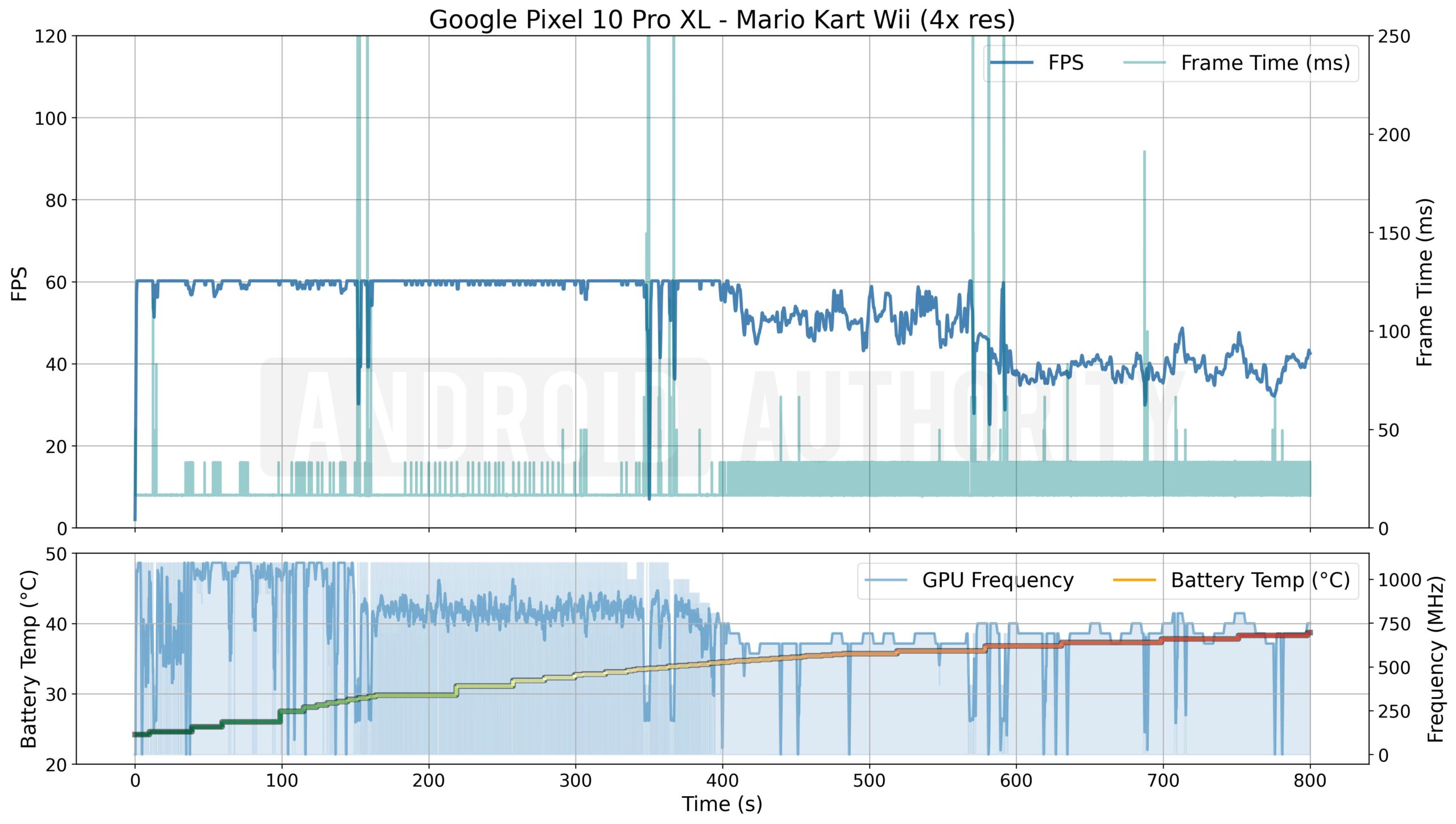
My performance curiosities were first piqued while trying out Mario Kart Wii on the Dolphin emulator. I left the renderer on OpenGL and set the output resolution to 4x for a crisp, native look on the phone’s large display. Technically, both GPUs might fare a little better under Vulkan (Arm in particular is a big advocate), but since OpenGL remains the stable default API for most emulators and popular mobile titles, I stuck with it for testing.
Midway through the third race on the 10 Pro XL, the silky 60fps sheen started to fray, dipping to 50fps and falling below 40fps by the time I’d started the fourth round. For regular games, that might be tolerable; for emulation, where frame rate directly ties to the game clock, it means visible slowdowns and sluggish gameplay that runs slower than real time.
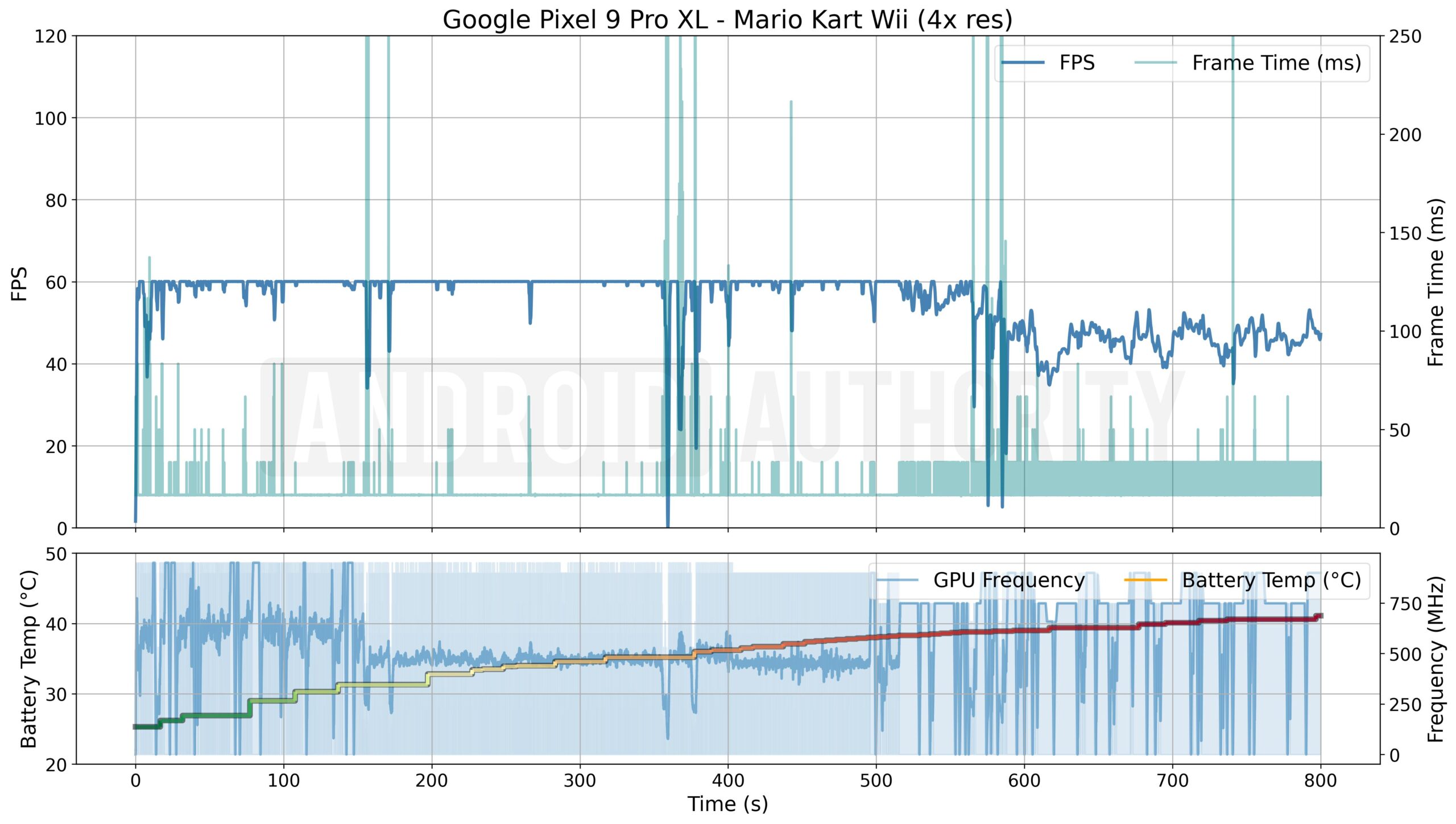
Running the same 150cc Flower Cup on last year’s Pixel 9 Pro XL highlights the issue further. While it’s a little jankier at the start of races, the older Mali GPU maintained near-constant 60fps through the first three races, with only the occasional microstutter. Come the fourth race, performance definitely started to suffer, but still held up between 40 and 50fps, making it 20% or even faster than the Pixel 10.
The key difference isn’t just in the frame rate output, but also in how quickly each chip throttles performance. After six and a half minutes, the Pixel 10’s GPU dropped from its 1.1GHz peak to a locked 630MHz, even though internal temperatures were still only around 35°C, which is not exactly roaring hot. By contrast, the Pixel 9’s GPU held on to its highest clocks for longer, not backing off until it hit 38°C after over eight minutes — and even then only down to 750MHz from its peak of 900MHz, a far smaller decline. Hence the superior performance.
The Pixel 10 Pro XL tries to stay cool and throttles performance far quicker than last year.
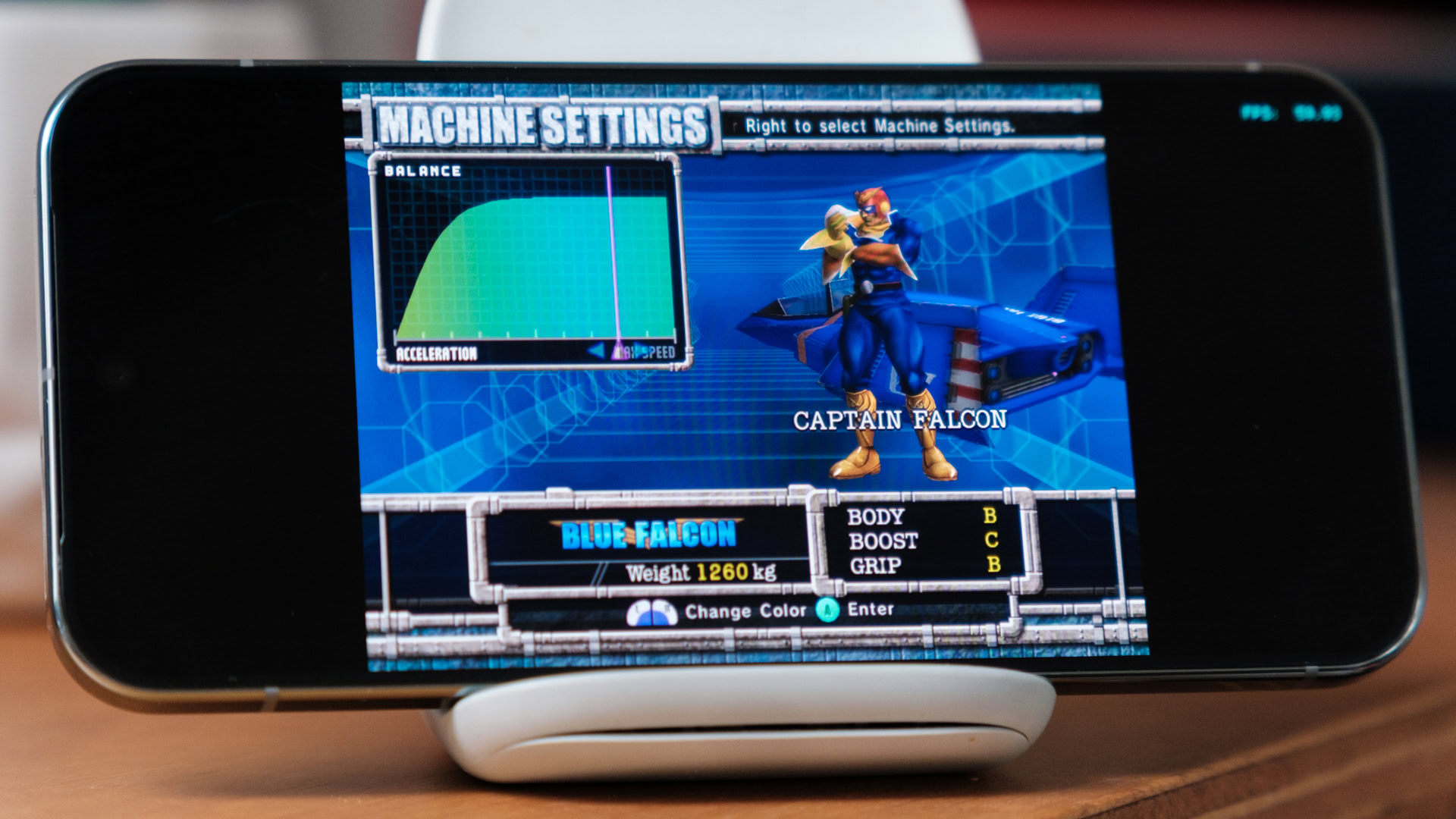
Of course, one game does not make a thorough test. I booted up F-Zero GX, a presumably less demanding GameCube classic, but the results were just as concerning. The Pixel 9 Pro XL delivered a near rock-solid 60fps, while the Pixel 10 Pro XL fluctuated wildly between 40 and 60fps, with some dips to well below 30fps, right from the get-go. Temperatures and throttling aren’t the issue this time; the Pixel 10 simply can’t render the frames fast enough to produce a steady output.

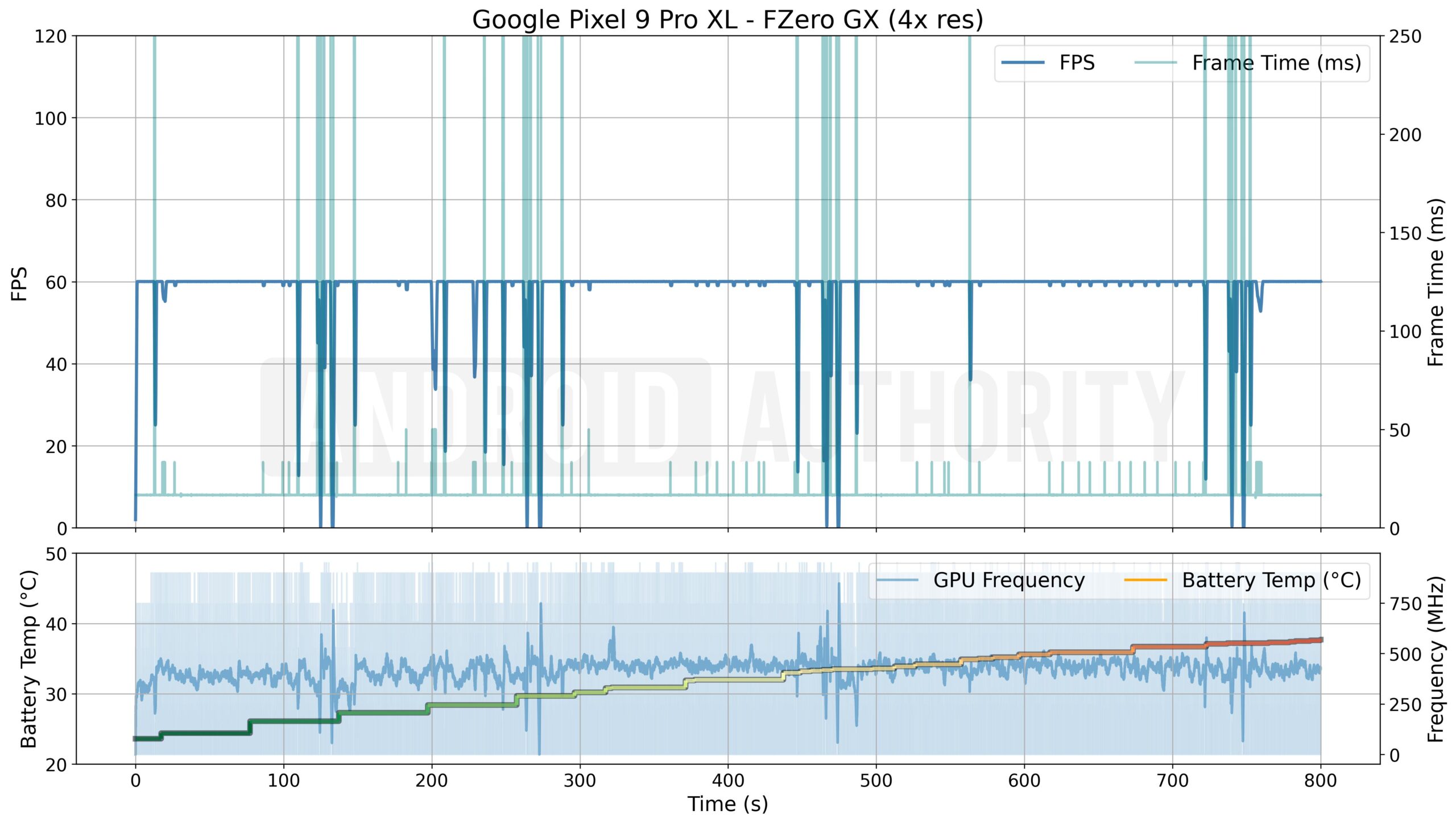
What’s quite interesting again are the differences in GPU clocks, not in terms of raw MHz but in terms of how much work appears to be being done. In the graphs above, the light blue area represents the GPU clock flicking between its peak and minimum frequency (it does this multiple times per second, so it looks like a shaded area when zoomed out on these graphs). Because these GPUs “race to idle,” the current clock speed is a reasonable indicator of when the GPU is busy and when it’s finished and waiting to start the next frame. The darker blue line is the average clock frequency per second. While an incredibly crude estimate, a lower average clock with high peaks indicates longer at rest and therefore more performance headroom.
With that in mind, the Pixel 9’s Mali GPU spends close to half its time at rest, so it has no problem rendering the game, hence easily meeting the 60fps target — bar the occasional jank. The Pixel 10, on the other hand, has a higher average clock utilization yet a lower frame rate, suggesting the core is working harder yet is unable to render quickly enough.
Given the Tensor G5’s more powerful CPU, the new Immagination Technologies DXT GPU is clearly the weak link. However, identifying the exact issue will require further investigation. It could simply be a worse performer, but that doesn’t quite bear out in benchmark tests — it’s supposed to be at least 25% faster. Drivers could be an issue, particularly for emulation; Arm has spent considerable effort establishing Mali as a fine-tuned platform. In any case, the results are what count, and the Pixel 10 Pro XL is pretty dire. Still, I wanted to see if a more CPU-heavy workload would flip the script.
- Joined
- Jul 5, 2001
- Messages
- 44,697
- Reaction score
- 8,480
PlayStation 2 emulation
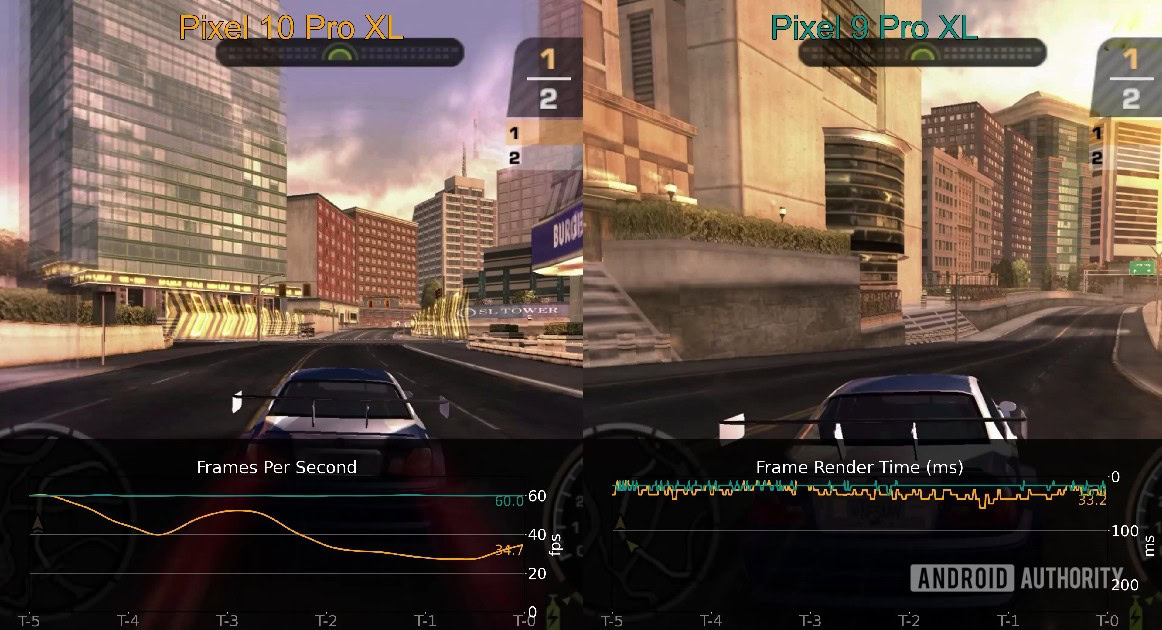
PlayStation 2 emulation is notoriously difficult, relying more heavily on CPU muscle to emulate its unique architecture. So, the Tensor G5’s higher clocks and additional middle CPU cores should have helped here. Unfortunately, the opposite happened when I dabbed in some Need for Speed: Most Wanted nostalgia on NetherSX2.
The Pixel 10 Pro XL struggled to maintain any consistency. Frame rates bounced between 40 and 60fps early on, then plunged below 30fps within three minutes. At that point, gameplay slowed to an unplayable crawl as emulation runs at effectively half speed. Once again, performance drops correlated closely with throttling, as CPU clocks slowed down when internal temps reached roughly 35°C. What’s important to note is that once the CPU clocks fall, average GPU clocks also decline, hinting at lower utilization.

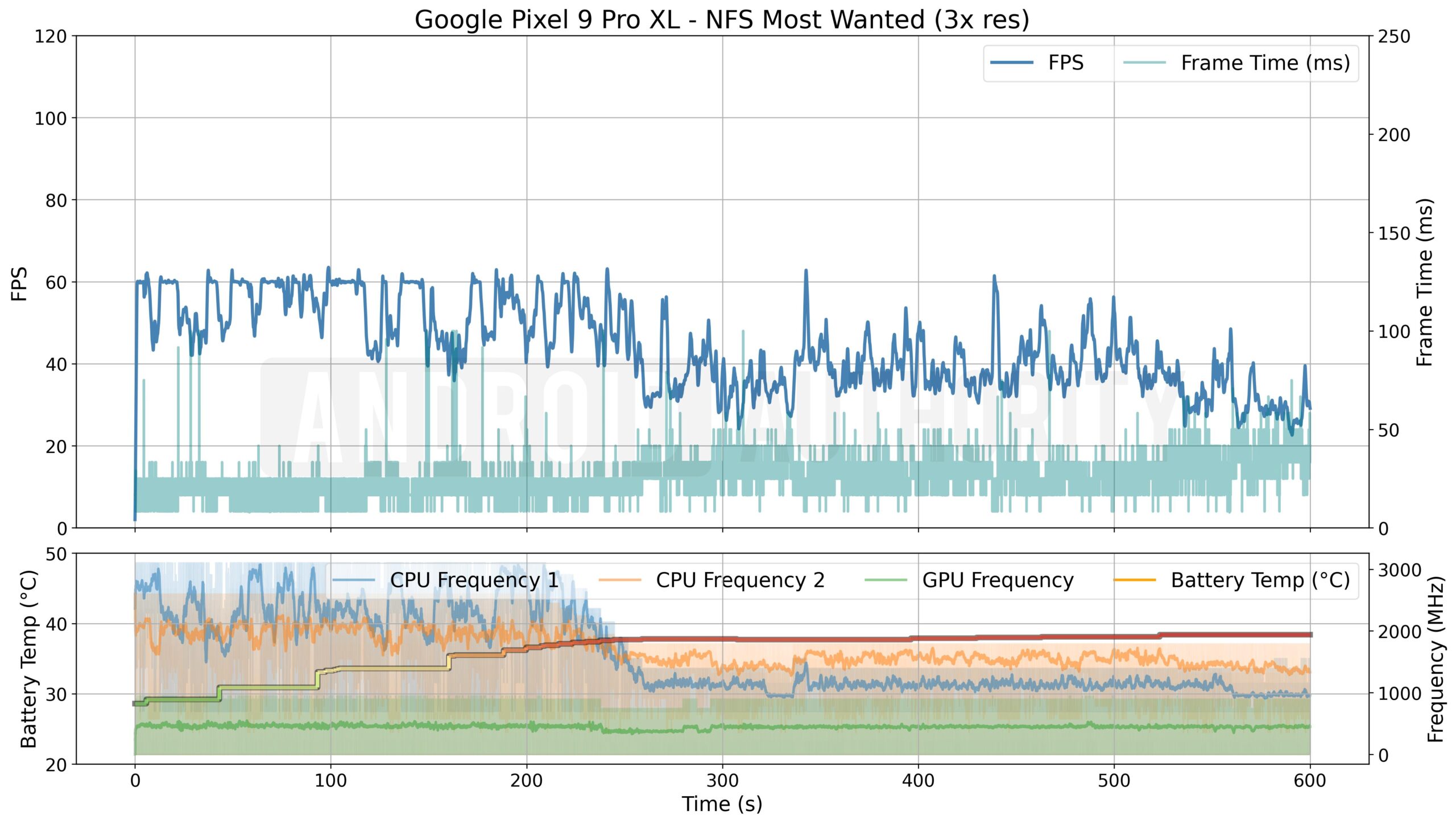
Meanwhile, the Pixel 9 Pro XL fared noticeably better. It managed to sustain periods at a steady 60fps, though the frame rate slid into the 40s quite regularly — not completely disastrous, but enough to make gameplay feel sluggish. However, performance becomes evidently worse once CPU clocks begin to throttle aggressively before the phone reaches 40°C, though again it holds out longer than the newer phone. Interestingly, the GPU clocks appear unchanged even at high temperatures this time, and the Pixel 9 Pro XL throttles its CPU cores far harder than the 10 Pro XL did.
Smooth, high-end emulation is well out of the Tensor G5's grasp.
It’s likely that the GPU is not running all that hot, as its average clock speed is constantly around 50% of its burst potential, suggesting plenty of idle time between rendering frames. This indicates that it’s not the graphics chip that’s the bottleneck here; the Mali GPU likely has some headroom, which fits with the slowdown we witness once CPU clocks take an aggressive nosedive. But then this suggests there’s a serious GPU bottleneck with the Pixel 10 Pro XL, because it has a more powerful CPU.
Seriously, what about Vulkan?
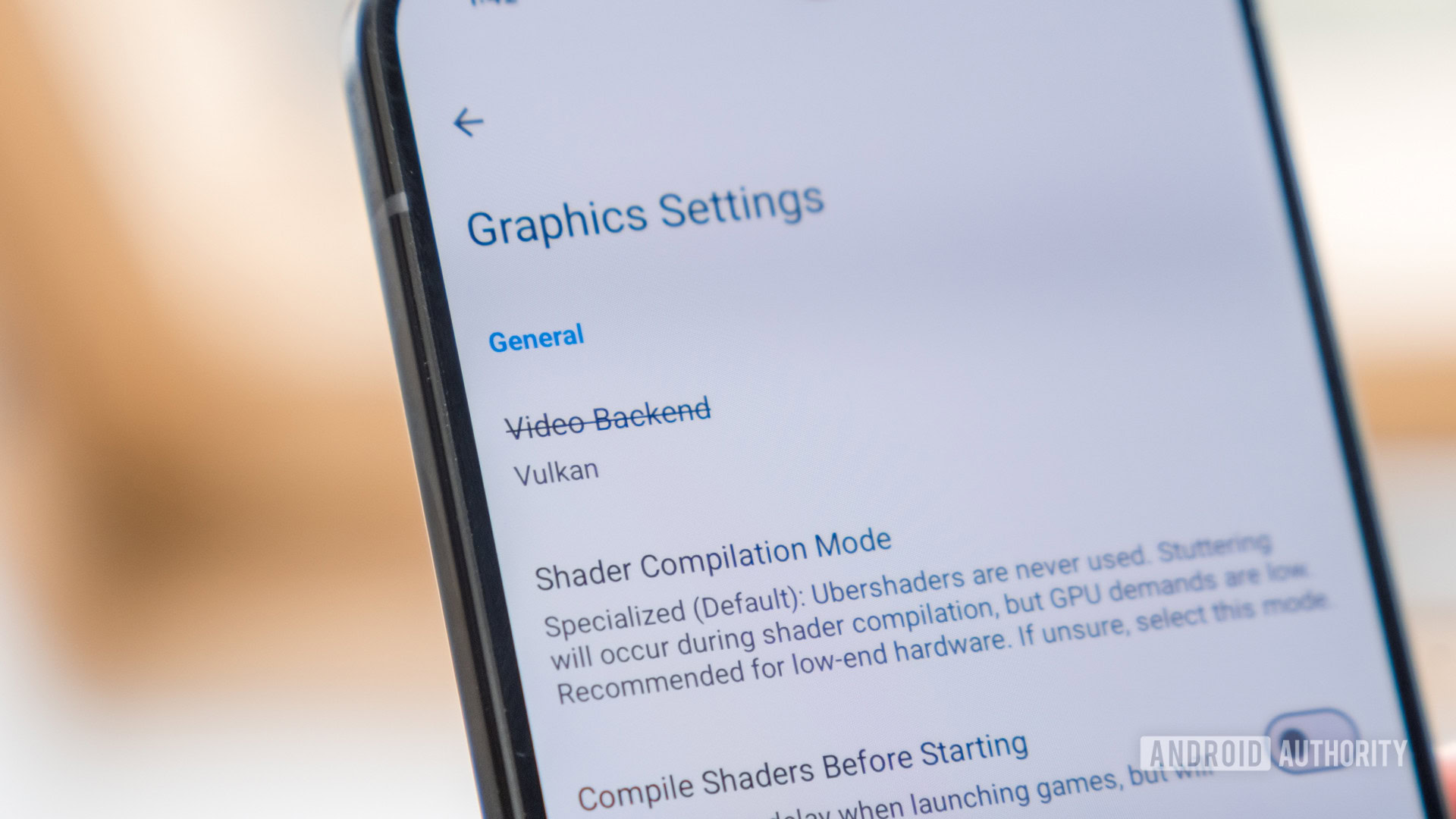
OK, I can already hear the groans about this test. Technically, Vulkan is the more modern graphics API, designed to reduce CPU overhead and improve efficiency. With good driver support, it should outperform the aging OpenGL. So, surely a game like Need for Speed: Most Wanted would benefit?
Well, I tested it — and the results were mixed. On the Pixel 9 Pro XL, the Mali GPU absolutely delivered, locking in a steady 60fps for an entire lap and smoothing out the experience beautifully. However, it was a different story on the Pixel 10 Pro XL: frame rates collapsed to around 25fps and lower, making the game unplayable. I couldn’t bring myself to sit through multiple slow-motion runs to record a graph.
Vulkan performed worse in two of the three games I tested on the Pixel 10.
Switching to Vulkan boosted Dolphin performance on both handsets in the F-Zero GX test, but once again, the Pixel 10 Pro XL lagged behind. While it held 60fps more often than before, dips to 45fps remained, whereas the Pixel 9 Pro XL stayed locked at a perfect 60fps throughout. Curiously, Mario Kart Wii actually ran worse under Vulkan on the Pixel 10 Pro XL — capped at 50fps compared to 60fps in OpenGL — and, again, the older phone had no trouble with either API.
Digging deeper revealed more inconsistencies. Enabling anti-aliasing under OpenGL crashed F-Zero GX on launch, while Vulkan produced missing textures when AA was enabled. Neither issue appeared on the Pixel 9 Pro XL.
Clearly, switching to Vulkan isn’t the silver bullet for the Imagination DXT GPU. In my testing, performance was worse in two of the three games after switching APIs, while the Pixel 9’s Mali GPU improved its perfromance in every title.
Google’s Tensor G5 is a big risk
Undoubtedly, the key takeaway from my time testing these phones is that gamers who use higher-end emulators should think twice about picking up the Google Pixel 10 series. In fact, they’d be better off grabbing last year’s model. It might be harsh to call the switch to the DXT a disaster, but right now, it doesn’t feel like progress. It’s depressing to think that next year’s Tensor G6 will reportedly switch to an even more budget CXT core.
This shows, once again, that Google’s Tensor project remains riddled with inconsistencies and issues. While it’s moved to a more efficient manufacturing node and ramped up the CPU clocks to try and keep up with competitors, the switch to an entirely new GPU vendor — no doubt in a bid to save costs — has resulted in a chip with glaring performance and API issues when compared to its predecessor. Let alone most of this year’s flagship rivals and even more powerful smartphones heading to the market in the next few months that’ll be powered by the Snapdragon 8 Elite Gen 5. If there’s a silver lining, it’s that the chip runs a fraction cooler than last year.
The Tensor G5’s move to Imagination’s GPU feels like a calculated risk that hasn’t paid off. Across multiple emulation tests, the Pixel 10 Pro XL throttles faster, runs hotter relative to its performance, and delivers less consistent gameplay than its predecessor. For a $1,199 flagship, that’s hard to overlook, even if you’re not a big gamer.
Can already emulate Nintendo switch since sd 8gen 1/2 le... Tensor gonna be focusing on just CPU for AI and forgo any GPU capabilities for a flagship premium priced device ??PlayStation 2 emulation
PlayStation 2 emulation is notoriously difficult, relying more heavily on CPU muscle to emulate its unique architecture. So, the Tensor G5’s higher clocks and additional middle CPU cores should have helped here. Unfortunately, the opposite happened when I dabbed in some Need for Speed: Most Wanted nostalgia on NetherSX2.
The Pixel 10 Pro XL struggled to maintain any consistency. Frame rates bounced between 40 and 60fps early on, then plunged below 30fps within three minutes. At that point, gameplay slowed to an unplayable crawl as emulation runs at effectively half speed. Once again, performance drops correlated closely with throttling, as CPU clocks slowed down when internal temps reached roughly 35°C. What’s important to note is that once the CPU clocks fall, average GPU clocks also decline, hinting at lower utilization.
Meanwhile, the Pixel 9 Pro XL fared noticeably better. It managed to sustain periods at a steady 60fps, though the frame rate slid into the 40s quite regularly — not completely disastrous, but enough to make gameplay feel sluggish. However, performance becomes evidently worse once CPU clocks begin to throttle aggressively before the phone reaches 40°C, though again it holds out longer than the newer phone. Interestingly, the GPU clocks appear unchanged even at high temperatures this time, and the Pixel 9 Pro XL throttles its CPU cores far harder than the 10 Pro XL did.
Smooth, high-end emulation is well out of the Tensor G5's grasp.
It’s likely that the GPU is not running all that hot, as its average clock speed is constantly around 50% of its burst potential, suggesting plenty of idle time between rendering frames. This indicates that it’s not the graphics chip that’s the bottleneck here; the Mali GPU likely has some headroom, which fits with the slowdown we witness once CPU clocks take an aggressive nosedive. But then this suggests there’s a serious GPU bottleneck with the Pixel 10 Pro XL, because it has a more powerful CPU.
Seriously, what about Vulkan?
OK, I can already hear the groans about this test. Technically, Vulkan is the more modern graphics API, designed to reduce CPU overhead and improve efficiency. With good driver support, it should outperform the aging OpenGL. So, surely a game like Need for Speed: Most Wanted would benefit?
Well, I tested it — and the results were mixed. On the Pixel 9 Pro XL, the Mali GPU absolutely delivered, locking in a steady 60fps for an entire lap and smoothing out the experience beautifully. However, it was a different story on the Pixel 10 Pro XL: frame rates collapsed to around 25fps and lower, making the game unplayable. I couldn’t bring myself to sit through multiple slow-motion runs to record a graph.
Vulkan performed worse in two of the three games I tested on the Pixel 10.
Switching to Vulkan boosted Dolphin performance on both handsets in the F-Zero GX test, but once again, the Pixel 10 Pro XL lagged behind. While it held 60fps more often than before, dips to 45fps remained, whereas the Pixel 9 Pro XL stayed locked at a perfect 60fps throughout. Curiously, Mario Kart Wii actually ran worse under Vulkan on the Pixel 10 Pro XL — capped at 50fps compared to 60fps in OpenGL — and, again, the older phone had no trouble with either API.
Digging deeper revealed more inconsistencies. Enabling anti-aliasing under OpenGL crashed F-Zero GX on launch, while Vulkan produced missing textures when AA was enabled. Neither issue appeared on the Pixel 9 Pro XL.
Clearly, switching to Vulkan isn’t the silver bullet for the Imagination DXT GPU. In my testing, performance was worse in two of the three games after switching APIs, while the Pixel 9’s Mali GPU improved its perfromance in every title.
Google’s Tensor G5 is a big risk
Undoubtedly, the key takeaway from my time testing these phones is that gamers who use higher-end emulators should think twice about picking up the Google Pixel 10 series. In fact, they’d be better off grabbing last year’s model. It might be harsh to call the switch to the DXT a disaster, but right now, it doesn’t feel like progress. It’s depressing to think that next year’s Tensor G6 will reportedly switch to an even more budget CXT core.
This shows, once again, that Google’s Tensor project remains riddled with inconsistencies and issues. While it’s moved to a more efficient manufacturing node and ramped up the CPU clocks to try and keep up with competitors, the switch to an entirely new GPU vendor — no doubt in a bid to save costs — has resulted in a chip with glaring performance and API issues when compared to its predecessor. Let alone most of this year’s flagship rivals and even more powerful smartphones heading to the market in the next few months that’ll be powered by the Snapdragon 8 Elite Gen 5. If there’s a silver lining, it’s that the chip runs a fraction cooler than last year.
The Tensor G5’s move to Imagination’s GPU feels like a calculated risk that hasn’t paid off. Across multiple emulation tests, the Pixel 10 Pro XL throttles faster, runs hotter relative to its performance, and delivers less consistent gameplay than its predecessor. For a $1,199 flagship, that’s hard to overlook, even if you’re not a big gamer.
- Joined
- Jul 5, 2001
- Messages
- 44,697
- Reaction score
- 8,480
No throttlingCan already emulate Nintendo switch since sd 8gen 1/2 le... Tensor gonna be focusing on just CPU for AI and forgo any GPU capabilities for a flagship premium priced device ??


- Joined
- Jul 5, 2001
- Messages
- 44,697
- Reaction score
- 8,480
Last edited:

Revolee993
Junior Member
- Joined
- Dec 21, 2019
- Messages
- 85
- Reaction score
- 23
Still got who else? Most likely is Osterloh, he is literally the TM Roh of Google, cost cutting gao gao.Wonder who made the decision at google?
Really want to hear from them why they went with that option

androidified
Junior Member
- Joined
- Mar 18, 2012
- Messages
- 82
- Reaction score
- 0
Hi, does you thinborne case fit with your screen protector? What screen protector are you using?I bought Thinborne
I am using Zagg and unfortunately it doesn't fit.

- Joined
- Dec 27, 2007
- Messages
- 14,432
- Reaction score
- 4,163
They stopped selling already ~ as I’ve shared previously herehmm wow challenger no longer carries google phones ah? went to vivo challenger and they didn’t have the phones
- Joined
- Jul 5, 2001
- Messages
- 44,697
- Reaction score
- 8,480
The Pixel 10 has been, on the whole, a good phone release for Google, with all four smartphones getting positive receptions from reviewers and buyers alike. But no device is perfect, and even the most polished phones have bugs and issues.
Thankfully, one of the biggest emerging issues for the Pixel 10, the "fuzzy display" bug was fixed by the October 2025 patch. Or was it? Some Pixel 10 owners have noticed their fuzzy display woes have continued even after the patch, hinting that Google's battle with display bugs may have only just begun.
Despite multiple fixes, issues persist

"Fuzzy display" refers to a bug where the display would be overtaken by colorful static "snow", akin to the static found on an old school TV set. While not found on every Pixel 10 device, the issue was common enough that Google was quick to push out an attempted hotfix for it in September 2025. More fixes came in the October 2025 patch, and Google must have hoped that this would be the end of the problem.
Unfortunately, it seems that this isn't the case. At least two users on the r/GooglePixel subreddit have noticed display issues even after the October patch.
Reddit user KJ9712 has noticed a plethora of continued display problems, including ghost buttons hanging around, touch glitches, and other issues that were previously associated with the fuzzy display bugs.
Even worse, the first reply to the post also highlighted their own experience with static-lines on the screen, even after updating to the latest patch, signifying that Google's problems with the Pixel 10's screen seem to be far from over.
Thankfully, a hard restart has cleared up these problems so far, but if they continue popping up over-and-over, then this could quickly become tiresome.
Of course, two Reddit users finding issues doesn't mean the problems are widespread yet — so we'll have to wait and see whether the problems persist and pop up for other owners or not.
Thankfully for Pixel fans, Google has proven to be hot on fixes for the Pixel 10 so far, so we wouldn't be surprised if hotfixes start getting pushed out if the bugs continue for many users.
- Joined
- Jul 5, 2001
- Messages
- 44,697
- Reaction score
- 8,480

SeanOw
Senior Member
- Joined
- Feb 20, 2023
- Messages
- 1,012
- Reaction score
- 365
I'm only using the back half of the case. Haven't tried the front part. I'm using spigen tgHi, does you thinborne case fit with your screen protector? What screen protector are you using?
I am using Zagg and unfortunately it doesn't fit.
Update: I put on the front piece and it fits with my screen protector
Last edited:
kanashii23
Senior Member
- Joined
- Aug 2, 2006
- Messages
- 921
- Reaction score
- 25
yeah. bought another one from the same seller at 50% discount.....Did you get a new hoda TGSP?

Loser
Arch-Supremacy Member
- Joined
- May 7, 2019
- Messages
- 23,874
- Reaction score
- 10,631
Can share where you buy from?yeah. bought another one from the same seller at 50% discount.....
Last edited:
- Joined
- Jul 5, 2001
- Messages
- 44,697
- Reaction score
- 8,480
Some Google Pixel 10 users are reporting widespread app crashes, with apps repeatedly freezing or displaying “isn’t responding” errors. The issue appears to affect most Android apps, likely due to a bug in Google Play services, and persists even after reboots or reinstalls. A temporary workaround involves reinstalling Google Play services and the Play Store after updating to the October Android build, though users are logged out in the process. Google is expected to issue an official fix soon.
According to reports that are surfacing on Reddit, Google Pixel 10 users are having issues with random app crashes.
Repeated app crashes are hitting the Google Pixel 10 devices
They’re complaining of sudden, repeated app crashes. The root cause is not clear at this point in time. Some users have tried rebooting their phones multiple times, but that did not work. Well, it works for the initial couple of minutes, and then the crashes start again.Users are seeing the ‘[app] isn’t responding’ dialog box. In case you’re wondering, clearing cache, data, and then reinstalling the app doesn’t solve the problem either. These problems seem to be exclusive to the Pixel 10 series, though, older smartphones don’t seem to be affected, at least for the most part. Some Pixel 9 series users reported similar problems.
Now, this problem seems to be affecting basically all Android apps, well, almost all of them. So, the issue is probably related to the Google Play services. It must be a bug of some sort that Google overlooked.
There is a temporary solution for this, but you won’t like it
There seems to be a temporary solution for this problem. Your Pixel 10 smartphone needs to be running the October Android build. After that, uninstall the recent Google Play services and Play Store builds, then update them again.This is not an ideal workaround, though, not at all. You will be signed out of your Google account in the process, but it should stop random app crashes. Some users also had luck by clearing Google Play services data.
Let’s hope that Google will fix this problem very soon. The company has been rather prompt with such fixes recently, so… we’re expecting something similar to happen this time around as well.
kanashii23
Senior Member
- Joined
- Aug 2, 2006
- Messages
- 921
- Reaction score
- 25
https://item.taobao.com/item.htm?id...jRenU9sOfkZYVLaP-fBDw&spm=a21xtw.29178619.0.0Can share where you buy from?
Loser
Arch-Supremacy Member
- Joined
- May 7, 2019
- Messages
- 23,874
- Reaction score
- 10,631
Thank you! How do you get the 50% off from the seller? You just let them know that your first one cracked?
kanashii23
Senior Member
- Joined
- Aug 2, 2006
- Messages
- 921
- Reaction score
- 25
i shared that their product is too weak and the seller just say i dropped and it hit the weakpoint then offer 50% off .Thank you! How do you get the 50% off from the seller? You just let them know that your first one cracked?
Important Forum Advisory Note
This forum is moderated by volunteer moderators who will react only to members' feedback on posts. Moderators are not employees or representatives of HWZ Forums. Forum members and moderators are responsible for their own posts.
Please refer to our Community Guidelines and Standards and Terms and Conditions for more information.

