

HELP Needed, CPU Red Led Keeps Blinking

tigerwoods

Arch-Supremacy Member
Joined
Oct 7, 2005
Messages
11,359
Reaction score
2,602
Power on CPU, no post showing on monitor
CPU Red Led Keeps Blinking
Changed CMOS battery still the same


PC Specs:

PCThemes 12-Mar-2019

MSI B360 GAMING PRO CARBON 3yr Intel i5 9400F 2.9Ghz $461
G.SKILL RIPJAWS V 3000MHZ CL15 ( 8GBx2pcs ) Life Time Warranty $169
EVGA GD 650W 80+ Gold Flat Cable (5yrs) $109
C.M MASTER CASE MB520 RGB T-GLASS 2yr $95
Zotac Gaming GTX1660Ti 6Gb Twin Fan GDDR6 5yr $415
CM Hyper 212 Led Cooler $38
SAMSUNG EVO 860 250GB M.2 SSD 5yr $89
TOSHIBA 1TB 7200RPM P300 RED 2yr $53

Thanks for helping
 

tigerwoods

Arch-Supremacy Member
Joined
Oct 7, 2005
Messages
11,359
Reaction score
2,602
reseat your memory
Yes I reseated the RAM sticks, I cleaned the contacts of both RAM sticks and use contact cleaner/cotton buds to clean the contacts, brushed the memory slot.
Put back both the RAM sticks and now only the DRAM Led stay light up, still no post.

P-20240624-214301-v-HDR-On-HP-2.jpg
 

NightRaven49

Master Member
Joined
May 17, 2019
Messages
3,741
Reaction score
1,577
Yes I reseated the RAM sticks, I cleaned the contacts of both RAM sticks and use contact cleaner/cotton buds to clean the contacts, brushed the memory slot.
Put back both the RAM sticks and now only the DRAM Led stay light up, still no post.

P-20240624-214301-v-HDR-On-HP-2.jpg
try one stick at a time in each slot.
 

Koenig168

Arch-Supremacy Member
Joined
Nov 4, 2007
Messages
10,030
Reaction score
1,741
It is unlikely that both RAM sticks fail at the same time so could be CPU (memory controller) or MB. At this point, I would start swapping parts to isolate the problem.

Perhaps you can try Nigel?

(I assume that you have already set BIOS to default settings.)
 

tigerwoods

Arch-Supremacy Member
Joined
Oct 7, 2005
Messages
11,359
Reaction score
2,602
It is unlikely that both RAM sticks fail at the same time so could be CPU (memory controller) or MB. At this point, I would start swapping parts to isolate the problem.

Perhaps you can try Nigel?

(I assume that you have already set BIOS to default settings.)
Has reset the BIOS, removed batt and used the 2 pins with screwdriver method on MB.

Tested working RAM sticks from another PC, still show DRAM Red Led light.

Tested the faulty PC RAM sticks on another pc, they are working fine.

So is not the RAM sticks problem.

Guess could be the 2 problems you mentioned.

Now dont know to get new cpu+MB or get a new system?
 
Last edited:

tsteo77

Senior Member
Joined
Oct 28, 2011
Messages
1,542
Reaction score
216
Power on CPU, no post showing on monitor
CPU Red Led Keeps Blinking
Changed CMOS battery still the same


PC Specs:

PCThemes 12-Mar-2019

MSI B360 GAMING PRO CARBON 3yr Intel i5 9400F 2.9Ghz $461
G.SKILL RIPJAWS V 3000MHZ CL15 ( 8GBx2pcs ) Life Time Warranty $169
EVGA GD 650W 80+ Gold Flat Cable (5yrs) $109
C.M MASTER CASE MB520 RGB T-GLASS 2yr $95
Zotac Gaming GTX1660Ti 6Gb Twin Fan GDDR6 5yr $415
CM Hyper 212 Led Cooler $38
SAMSUNG EVO 860 250GB M.2 SSD 5yr $89
TOSHIBA 1TB 7200RPM P300 RED 2yr $53

Thanks for helping
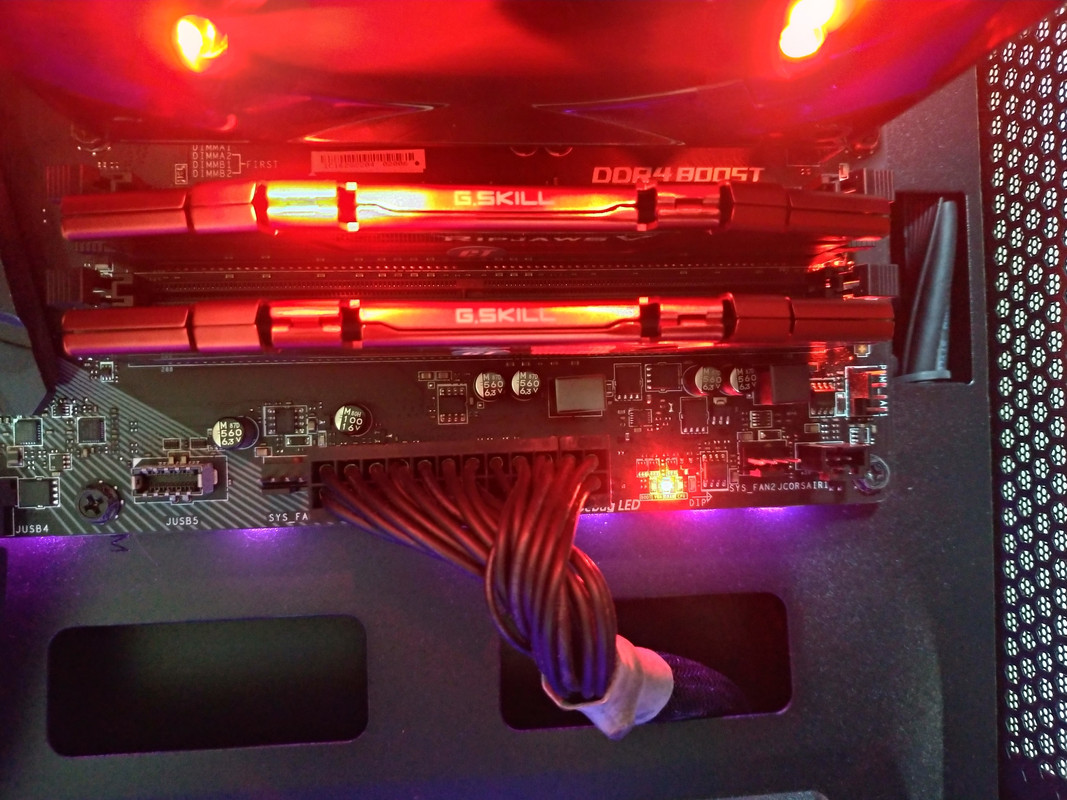

Yes I reseated the RAM sticks, I cleaned the contacts of both RAM sticks and use contact cleaner/cotton buds to clean the contacts, brushed the memory slot.
Put back both the RAM sticks and now only the DRAM Led stay light up, still no post.

P-20240624-214301-v-HDR-On-HP-2.jpg

Has reset the BIOS, removed batt and used the 2 pins with screwdriver method on MB.

Tested working RAM sticks from another PC, still show DRAM Red Led light.

Tested the faulty PC RAM sticks on another pc, they are working fine.

So is not the RAM sticks problem.

Guess could be the 2 problems you mentioned.

Now dont know to get new cpu+MB or get a new system?
Based on all the information given so far, i would assume that your motherboard is faulty.
I might be wrong but don't think a new pc replacement are require.
 

Koenig168

Arch-Supremacy Member
Joined
Nov 4, 2007
Messages
10,030
Reaction score
1,741
...

Now dont know to get new cpu+MB or get a new system?

I would suggest CPU + MB + DDR5.

However, Ryzen 5000 + AM4 MB are very cheap at the moment so it is worth considering as an interim measure since Intel Arrow Lake and Ryzen 9000 will be launching soon.
 

tigerwoods

Arch-Supremacy Member
Joined
Oct 7, 2005
Messages
11,359
Reaction score
2,602
I would suggest CPU + MB + DDR5.

However, Ryzen 5000 + AM4 MB are very cheap at the moment so it is worth considering as an interim measure since Intel Arrow Lake and Ryzen 9000 will be launching soon.
or should i get CPU + MB and use back my ddr4 ram?

thinking of geting these ASROCK B550M WIFI SE + RYZEN 5600
 
Last edited:

Phen8210

High Supremacy Member
Joined
Jul 29, 2011
Messages
29,028
Reaction score
8,284
Yes I reseated the RAM sticks, I cleaned the contacts of both RAM sticks and use contact cleaner/cotton buds to clean the contacts, brushed the memory slot.
Put back both the RAM sticks and now only the DRAM Led stay light up, still no post.

P-20240624-214301-v-HDR-On-HP-2.jpg

did it perform memory training
 

xonix

Arch-Supremacy Member
Joined
Mar 24, 2001
Messages
17,587
Reaction score
1,689
or should i get CPU + MB and use back my ddr4 ram?
you can go check out the various pricing and decide which is the best option for you

1) replace with same socket board or cpu depending which is defective ( most cost effective )
2) replace with intel latest gen cpu with ddr4 motherboard
3) replace with AMD latest gen with ddr5
 
Last edited:

peterchan75

Supremacy Member
Joined
Apr 26, 2003
Messages
6,751
Reaction score
533
From your video, it didn't pass the CPU check. Take out the motherboard + RAM + CPU + GPU and bring them to Performance PC Pte Ltd or Nigel at SLS. They can swap RAM, GPU and CPU with their working PSU. If the cpu is bad, you can get a used CPU for about $120. I got mine i5 9400 from Carousell for $110.
 

tigerwoods

Arch-Supremacy Member
Joined
Oct 7, 2005
Messages
11,359
Reaction score
2,602
From your video, it didn't pass the CPU check. Take out the motherboard + RAM + CPU + GPU and bring them to Performance PC Pte Ltd or Nigel at SLS. They can swap RAM, GPU and CPU with their working PSU. If the cpu is bad, you can get a used CPU for about $120. I got mine i5 9400 from Carousell for $110.

Now only DRAM Led is light up.
Tested RAM on another pc, they are working fine.

P-20240624-214301-v-HDR-On-HP-2.jpg
 
Important Forum Advisory Note
This forum is moderated by volunteer moderators who will react only to members' feedback on posts. Moderators are not employees or representatives of HWZ Forums. Forum members and moderators are responsible for their own posts. Please refer to our Community Guidelines and Standards and Terms and Conditions for more information.
Top