HTPC Recommendation

Tortoise79

Supremacy Member
Joined
Oct 14, 2007
Messages
7,307
Reaction score
309
Hello All,

I am looking for a HTPC (DIY or off the shelf) however I am new to this so would need some advise here.

1. Small form factor since there isn't much room for a typical desktop tower beside my TV.

2. Playing mainly videos and music, have a full fledged pc (gaming, torrent in my room). Would likely transfer most of the drama, shows from my room pc to the HTPC (thr LAN) and play on the big screen TV.

3. Can those off the shelf HTPC read .str cos some movie don't have subtitle and need to separately download the .str and put them in the same folder?

4. Also some movies come with multi language sub. I can select them through a normal pc player with k-lite codec. Able to do so with HTPC?

5. Any recommendation build would be a good start.

Thanks
:o
 

Phyber

Master Member
Joined
Apr 13, 2004
Messages
4,185
Reaction score
0
Hello All,

I am looking for a HTPC (DIY or off the shelf) however I am new to this so would need some advise here.

1. Small form factor since there isn't much room for a typical desktop tower beside my TV.

Aftershock has 2 mini-pcs. (Nano and Nano-S) www.aftershockpc.com
NANO.jpg

1_NANO-S.jpg


I'm planning to get the Nano myself. And as I don't own them, I can't tell you first-hand on it's real-world performance.

I have however so far bought 2 laptops from them before already and quality is solid and I am personally really happy about their customer service.

Back to the Mini-PCs, the Nano from the specs is not too shabby. The onboard gfx Intel Iris Graphics 520 is capable of running GTA5 according to this video (altho this is for a Surface 4 Pro)
*Edited. Earlier posted wrong info lol.


2. Playing mainly videos and music, have a full fledged pc (gaming, torrent in my room). Would likely transfer most of the drama, shows from my room pc to the HTPC (thr LAN) and play on the big screen TV.

Your idea is almost the same as mine, altho I dun use the HTPC to torrent. I will use it for playing lower spec Steam games, emulators from retro consoles and even look into a way to add maybe a TV tuner to watch tv maybe? This tv part i still researching.

For me, i'm currently using External HDDs to store the media, each HDD for a category. Eg: 1 for movies, 1 for tv shows etc. Only games and emulations will be installed on the HTPC itself. (My nano will be equiped with M.2 + 1TB HDD.
I was researching to convert from Ext HDDs to using NAS storage instead, but from what I see for me, its disadvantages seems to outweigh its advantages.

Why put M.2? is because it boots up really fast. And as a HTPC, its not nice for it to slowly boot to Windows while u are itching to watch a movie right? XD


3. Can those off the shelf HTPC read .str cos some movie don't have subtitle and need to separately download the .str and put them in the same folder?


For subtitles, I normally go to https://subscene.com/ most of the movies i use srt for subtitles. subtitles file just name it exactly same as the movie file name and put in same folder.

In addition, you may want to check out softwares such as Plex and Kodi. These are GUI frontends, that once configured, has a nice menu that can let you select your movie together with preview pics etc. Completely optional, but look very satki when properly set up, instead of just using VLC or Windows Media Player to play them.

https://kodi.tv/
https://www.plex.tv/

The one i'm familiar with is Kodi. I like that you can even install a free add-on app to your smartphone or tablet, and via WIFI, you can use your tablet to scroll the menu real-time and pick your movie. It looks and feels really amazing. And of course, they are free of charge. (Plex i think may need to pay for more advanced functions.)

This is how Kodi looks like in action: (Actual look is at 4:16)


4. Also some movies come with multi language sub. I can select them through a normal pc player with k-lite codec. Able to do so with HTPC?
For codecs, i highly recommend download this all-in-codec. Once you got this, any codec also can run very well.
http://www.cccp-project.net/


5. Any recommendation build would be a good start.

Thanks
:o

My answers in green.
 
Last edited:

Koenig168

Arch-Supremacy Member
Joined
Nov 4, 2007
Messages
10,071
Reaction score
1,766
HTPC is just a SFF PC. Whatever you can do on a full-size PC, you can do on a HTPC. The hardware requirements are minimal.
 

Phyber

Master Member
Joined
Apr 13, 2004
Messages
4,185
Reaction score
0
HTPC is just a SFF PC. Whatever you can do on a full-size PC, you can do on a HTPC. The hardware requirements are minimal.

While hardware requirements are minimal, there are some things one may look into that are specifically advantageous for the HTPC.

1) HTPC must boot up to OS fast. No point make a SFF PC, and need to wait minutes to boot to Windows just to watch a movie. Therefore, at least for me, SSD or M.2 is a minimum requirement.

2) Mini-PCs really win in small form factor. Of course the cheap way is to just plunk a basic PC case, but for homeowners with a specific taste for their decor, spending money for a mini-pc thats small sized isn't that crazy an idea.

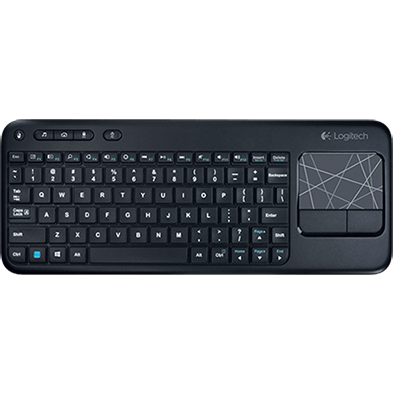
3) Then we come to controls. Sure, a keyboard and mouse would suffice in a computer desk environment, but in the living room, having a keyboard and mouse looks abit strange. A more elegant solution is to use a keyboard-mouse combo, and even better, something mini sized, thats no bigger then a TV remote control.

Something like this won't look out of place in a Living Room, and has full functions of keyboard/mouse.
1.0x0.jpg


If more adventurous, can even make use of Tablet, and emulate keyboard/mouse, and it as a virtual control. This works even best if used in conjunction with Kodi's tablet control.

Just my 2 cents.
 
Last edited:

Phyber

Master Member
Joined
Apr 13, 2004
Messages
4,185
Reaction score
0
ok Lets compare the specs:

6th generation Intel Core i5-6260U (Same processor)

Intel Iris graphics 540 (This wins, mine is 520)


Up to 7.1 surround audio via HDMI and Mini DisplayPort (Same as mine)

Internal support for M.2 SSD card (22x42 or 22x80)
Internal SATA3 support for 2.5.HDD/SSD(up to 9.5mm thickness)

This means there is No M.2 or any HDD.
(Mine is 120GB Samsung EVO 850 M.2 SSD + 1TB 7200RPM HGST HDD)


Intel Wireless-AC 8260 M.2 soldered-down, wireless antennas (IEEE 802.11ac, Bluetooth 4.1, Intel Wireless Display 6.0) = (Same as Mine)

19V, 65W wall-mount AC-DC power adapter (Er...this one no need to count lah)
Multi-country plugs(US, UK, EU, AU) (Er...this one no need to count lah)

No Windows. (Mine has Windows 10 Home 64 Bit)
No Warranty. (Mine is 2 Years Parts Warranty (1st Year ONSITE)
No RAM. (Mine has 8GB DDR4 2133mhz (1x8)

-----------------------------------

With a little adjustment, i try to mod my specs to be as close to it, removing those that it doesn't have as best as Aftershock menu can let me

Specs are:
NANO (I5-6260U Processor, Intel IRIS 520 Graphics, dual monitor support)
8GB DDR4 2133mhz (1x8)
1TB 7200RPM HGST HDD
Intel 8260 WIFI+BT
No Operating System
2 Years Parts Warranty (1st Year ONSITE)

.....this brings the price to: S$873.00

Amazon Price is:
USD$379.00 + $26.53 Import Fees Deposit = USD$405.53
Convert to SGD is is about S$551.09

Therefore, difference is
Aftershock S$873.00 - Amazon S$551.09 = S$321.91

In this case, we can say that i'm paying extra $321.91 for customer service + 2 years local warranty, whereas I have no warranty for the Amazon one.

Is 2 years warranty worth $321.91?
I think is pretty subjective.
HTPCs are very small, and probably prone to heat issues. Having warranty is better then no warranty tbh. If Amazon component spoil within 2 years is literally lan lan suck thumb. If discrete component like HDD or RAM spoil, still can replace. But i highly doubt can find anyone to replace mobo if spoil.

Another thing some may find very superficial is customer service which altho small, personally I put important emphasis on. As a customer, i want to feel happy. I want the vendor to treat me nice, and engage me like he want my business. No, i don't want to be treat like a King, but at least engage me with sincerity. You'd be surprise how many IT vendors in SG don't do this.

Yet another reason is why not just support fellow singaporeans right?
While I may frequent EDMW, i dun believe in "Sinkie pwn Sinkie" lolz!!
Where possible, I try to support our local retail lor.
 
Last edited:

Fatfool

High Supremacy Member
Joined
Nov 13, 2002
Messages
32,309
Reaction score
107
Zotac Zboxes of course. Just ask Dr_Disciple.

you can even get passively cooled ones since your demands aren't high
 

MoneyFace =p

High Supremacy Member
Joined
Dec 17, 2010
Messages
35,380
Reaction score
402
3) Then we come to controls. Sure, a keyboard and mouse would suffice in a computer desk environment, but in the living room, having a keyboard and mouse looks abit strange. A more elegant solution is to use a keyboard-mouse combo, and even better, something mini sized, thats no bigger then a TV remote control.

Something like this won't look out of place in a Living Room, and has full functions of keyboard/mouse.
1.0x0.jpg


If more adventurous, can even make use of Tablet, and emulate keyboard/mouse, and it as a virtual control. This works even best if used in conjunction with Kodi's tablet control.

Just my 2 cents.
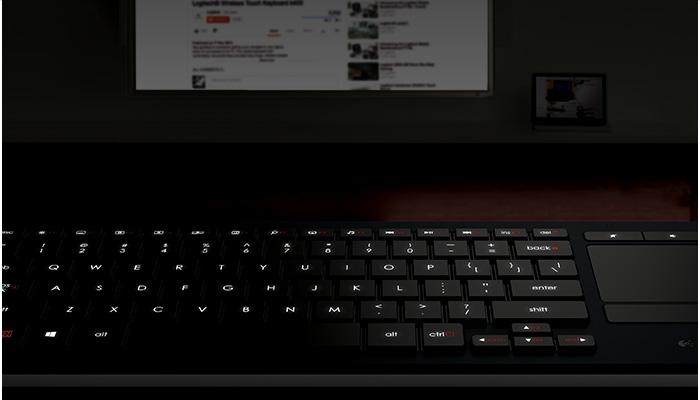
Many HTPC users like myself use integrated wireless keyboard + touchpad solution like this:
illuminated-living-room-keyboard.jpg


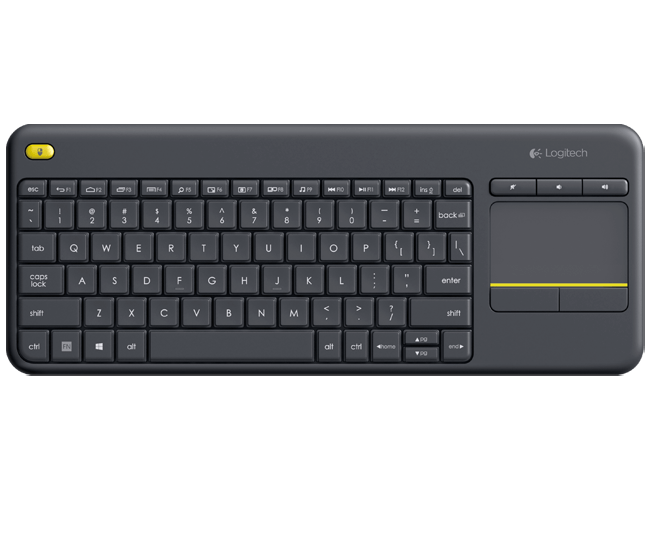
More people will use the non-LED cheaper alternative like this:
wireless-touch-keyboard-k400-plus.png


For the aforementioned solution is good for mobility but there's already iOS and Android apps on smartphones for that.
 

MoneyFace =p

High Supremacy Member
Joined
Dec 17, 2010
Messages
35,380
Reaction score
402
ok Lets compare the specs:

6th generation Intel Core i5-6260U (Same processor)

Intel Iris graphics 540 (This wins, mine is 520)


Up to 7.1 surround audio via HDMI and Mini DisplayPort (Same as mine)

Internal support for M.2 SSD card (22x42 or 22x80)
Internal SATA3 support for 2.5.HDD/SSD(up to 9.5mm thickness)

This means there is No M.2 or any HDD.
(Mine is 120GB Samsung EVO 850 M.2 SSD + 1TB 7200RPM HGST HDD)


Intel Wireless-AC 8260 M.2 soldered-down, wireless antennas (IEEE 802.11ac, Bluetooth 4.1, Intel Wireless Display 6.0) = (Same as Mine)

19V, 65W wall-mount AC-DC power adapter (Er...this one no need to count lah)
Multi-country plugs(US, UK, EU, AU) (Er...this one no need to count lah)

No Windows. (Mine has Windows 10 Home 64 Bit)
No Warranty. (Mine is 2 Years Parts Warranty (1st Year ONSITE)
No RAM. (Mine has 8GB DDR4 2133mhz (1x8)

-----------------------------------

With a little adjustment, i try to mod my specs to be as close to it, removing those that it doesn't have as best as Aftershock menu can let me

Specs are:
NANO (I5-6260U Processor, Intel IRIS 520 Graphics, dual monitor support)
8GB DDR4 2133mhz (1x8)
1TB 7200RPM HGST HDD
Intel 8260 WIFI+BT
No Operating System
2 Years Parts Warranty (1st Year ONSITE)

.....this brings the price to: S$873.00

Amazon Price is:
USD$379.00 + $26.53 Import Fees Deposit = USD$405.53
Convert to SGD is is about S$551.09

Therefore, difference is
Aftershock S$873.00 - Amazon S$551.09 = S$321.91

In this case, we can say that i'm paying extra $321.91 for customer service + 2 years local warranty, whereas I have no warranty for the Amazon one.

Is 2 years warranty worth $321.91?
I think is pretty subjective.
HTPCs are very small, and probably prone to heat issues. Having warranty is better then no warranty tbh. If Amazon component spoil within 2 years is literally lan lan suck thumb. If discrete component like HDD or RAM spoil, still can replace. But i highly doubt can find anyone to replace mobo if spoil.

Another thing some may find very superficial is customer service which altho small, personally I put important emphasis on. As a customer, i want to feel happy. I want the vendor to treat me nice, and engage me like he want my business. No, i don't want to be treat like a King, but at least engage me with sincerity. You'd be surprise how many IT vendors in SG don't do this.

Yet another reason is why not just support fellow singaporeans right?
While I may frequent EDMW, i dun believe in "Sinkie pwn Sinkie" lolz!!
Where possible, I try to support our local retail lor.

So expensive for GPU performance TS wouldn't require...

I'm curious why Entry Level PC never come in promote his Cubi. :D

I will go for these instead:

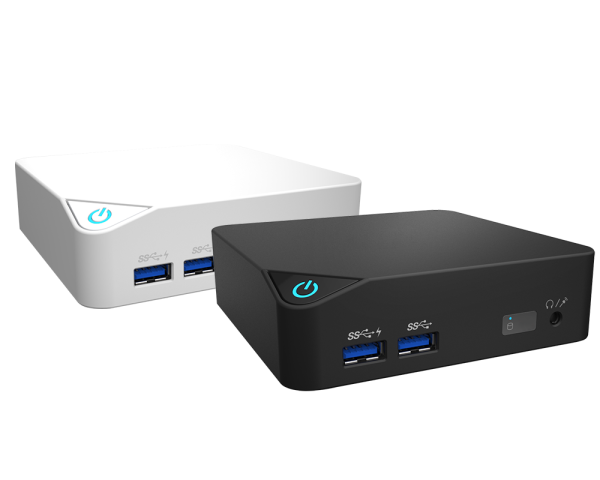
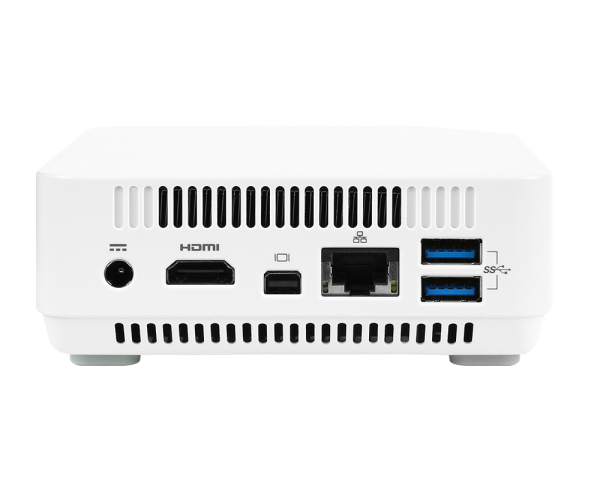
NUC+RAM: MSI Cubi-002 BUS + Crucial DDR3L 8GB Dual Channel Kit SO-DIMM @ $240 (Amazon US)
Just 0.5 litres small! Palm small!
Can be SGD$30 cheaper if you wait for NUC to reach USD$129!

SSD: Transcend MSA370 128GB @ $70* (Lazada SG)
HDD: HGST Travelstar 7K1000 1TB [7200 rpm] @ $75^ (Lazada SG)
OS: Microsoft Windows 8 Professional 64-bit Product Key [OEM] @ $30 (Reddit)
Upgrade for free to Windows 10 via free Windows 8.1 update.

Total: $415

All Lazada prices inclusive of delivery charge, waiver for all App purchases.
*Price after Lazada App SAFRAPERK $15 off min $80 promo code (for new customers)
Use this before any other code to prevent nullification
^Price after Lazada App NP15 $15 off min $30 promo code

Amazon US prices after estimated local bank conversion rate at SGD1.40 and inclusive of shipping charges (if any).

MSI Cubi-BUS002 comes with:
CPU: Intel Pentium 3805U (Broadwell-U)
GPU: Intel HD Graphics (Broadwell)
WIFI+BT: Intel Dual Band Wireless-AC 3160 Plus Bluetooth

600.png

600.png
 
Last edited:

Tortoise79

Supremacy Member
Joined
Oct 14, 2007
Messages
7,307
Reaction score
309
I pm Dr_Disciple already but no reply from him yet. Actually come to think of it, self DIY cost maybe more expensive and somemore so big! I think Cubi and Zotac seems like a good option just that Cubi need to purchase separate HDD and Ram.

My requirement quite simple one, only watch video nia except that maybe some video might be HD or 4k so the processor must be able to run without lagging. Price wise preferably below $500 ba.
:o
 

ahbao

Senior Member
Joined
Jan 1, 2000
Messages
823
Reaction score
8
if you can find an un-used old laptop around, maybe can consider using that. I am still using a 10-years old thinkpad t60 as htpc, set it auto sleep, wake it up with mouse when needed.

it can't play 1080p video initially, but solve that by adding a Broadcom Crystal HD PCI Express Mini Card
 

muddle

Supremacy Member
Joined
Apr 26, 2000
Messages
6,988
Reaction score
0
Been using this for the past six years


Recently reconfigured for kodi. Previously using mediaportal and wmc.
 

yusoffb01

Arch-Supremacy Member
Joined
Jun 17, 2008
Messages
16,837
Reaction score
1,781
You have a main PC u torrent and have shows for. You only need something to playback via lan.

You can do also achieve that with android + kodi+set your main computer hard disk as a network drive+wireless kB/mouse
wireless-touch-keyboard-k400r-glamour-lg.png

You can buy those $50 boxes if u just plan to play 8bit h264 videos. (For software playback try buying one with amlogic S905 chipset)
sF5lR1R.jpg

If you have android phone you can try and see if it works for your needs, if yes then can buy. If you have a spare unused Samsung galaxy s3/note 3 or later you just need to buy mhl to HDMI cable (for $8) and use that instead of buying android box
ke57XGxh.jpg


If you want windows, then buy a ready made wintel box for less than $180. You get Intel z8300, 32gb emmc, windows 10 and 2gb ram. Z8300 is able to play 1080p x265 videos smoothly
Sl5IKOzh.jpg


Intel Z8300 is also capable of smooth playback of 4k videos
Qh4W2mxh.jpg

And power consumption when playing video is less than 2w!
jQPUnVV.png

Assuming current electricity rate of $0.17/kWh, If you switch this on 24 hours, 365 days a year, you only pay $3/year in electricity

Of course if you have more money to burn, then follow the above suggestions and spend more than necessary... Like getting SSD to make switching on faster

If network drive is too troublesome to setup then just buy
sandisk-ultra-dual-usb-drive-30.jpg
 
Last edited:

watzup_ken

High Supremacy Member
Joined
Nov 21, 2003
Messages
25,669
Reaction score
2,123
From my experience, I think getting an NUC is the way to go for a HTPC. I have been using my Intel NUC with an i3 5010U, and I think it runs everything smoothly. Skylake U processors should support 4K60 decode so, it should cover almost every aspect of a HTPC.

Only problem is that it can be quite costly because you will need to get ram, hard drive and OS. Gaming performance is also so so, depending on what kind of games you play. I tend to play indie or old titles, so works well enough on the HTPC. Also, I feel gaming on HTPC hooked to a TV in the living room is quite tough, unless you limit yourself to games that work well with game controllers. I find it very challenging to use a keyboard and mouse in the living room, especially when you are using those wireless keyboards.
 

Fatfool

High Supremacy Member
Joined
Nov 13, 2002
Messages
32,309
Reaction score
107
From my experience, I think getting an NUC is the way to go for a HTPC. I have been using my Intel NUC with an i3 5010U, and I think it runs everything smoothly. Skylake U processors should support 4K60 decode so, it should cover almost every aspect of a HTPC.

Only problem is that it can be quite costly because you will need to get ram, hard drive and OS. Gaming performance is also so so, depending on what kind of games you play. I tend to play indie or old titles, so works well enough on the HTPC. Also, I feel gaming on HTPC hooked to a TV in the living room is quite tough, unless you limit yourself to games that work well with game controllers. I find it very challenging to use a keyboard and mouse in the living room, especially when you are using those wireless keyboards.
Does not work for 4k 60fps VP9 (ie youtube)

That requires a i5-6500 at least.
 

Ferolare

High Supremacy Member
Joined
Feb 26, 2007
Messages
48,329
Reaction score
144
VP9 you'd want Skylake GPU instead

But then that GPU wont do HEVC Main10

Most ideal scenario: Wait for Kaby Lake
 
Important Forum Advisory Note
This forum is moderated by volunteer moderators who will react only to members' feedback on posts. Moderators are not employees or representatives of HWZ Forums. Forum members and moderators are responsible for their own posts. Please refer to our Community Guidelines and Standards and Terms and Conditions for more information.
Top