IBM ThinkPad Users' Group

Firestone

Senior Member
Joined
Jun 4, 2000
Messages
1,699
Reaction score
31
huh.. you need to reconfirm whether nvidia can support vms or not in multiple environment

coz from what i understand you need to purchase Quadro GPUs if you need to virtualise them. GeForce are Consumer GPUs and do not support virtualisation. Your old model is based on Quadro

Furthermore your budget is too low for 64GB ram, even with 2nd hand model


Hi firesong,

No, I do not need to run CAD/Architecture works on my laptop.

But I do need to setup 4 X virtual server 2016 servers each with 8GB of RAM, 4 X virtual Windows OS (each of WinXP, Win7, Win8, Win10) with 1 or 2GB of RAM, 4 X virtual Firewall/Switch/Router depending on what I need to show, it can reach a total of 50GB of RAM set aside for running these VMs.

I use to buy Workstation class laptops to run these VMs as they provide better CPU power (4cores/8threads like QM or HQ class cpu) and also can add much more RAMs (usually 4 X RAM slots) and can have much more choices of storage, but the big drawback is the weight of these workstation class laptops. A W540 weights about 3KG.

For a 3D virtual reality demo, we even have to get a ASUS ROG 15/17 or Alienware gaming class laptop because of needing high GPU bandwidth. Same these weight over 3KG too. Imagine carrying these around for a few days from place to place.

Luckily, we have stop 3D virtual reality development awhile back so now it's just needing a laptop that can have decent CPU and GPU performance with as much RAMs as possible.

Because these laptops are for "proof of concept", budget is low, therefore newer or better laptops are out of my reach. Also there is no economical value in buying newer or better besides weight. I work in a small SME, so budgeting is super restrictive.

In office, I build systems with Xeon with 256GB RAMs that has VMWare running to support a lot more VMs to develop and perform more tests.
 

Calvin.Lee

Senior Member
Joined
Dec 7, 2007
Messages
1,948
Reaction score
0
huh.. you need to reconfirm whether nvidia can support vms or not in multiple environment

coz from what i understand you need to purchase Quadro GPUs if you need to virtualise them. GeForce are Consumer GPUs and do not support virtualisation. Your old model is based on Quadro

Furthermore your budget is too low for 64GB ram, even with 2nd hand model

Can confirm now they don't need to virtualised GPU, we just need the processor power and RAM. Reason to get a laptop with discrete GPU is more for added gpu power to hook up 4 X display (with docking) if needed.

I have 4 X 16GB DDR4 laptop RAMs in stocks. I will be buying 64GB kits on a separate budget.

I also has some 1TB PCIE SSDs lying around from the last project.

I understand that i7, GT 1050ti, 8GB, 256GB PCIE SSD, FHD LCD I can pay around S$1000-1500, 32GB+1TB SSD got see selling for $1400-1500.

Very sorry that I didn't make it clear in the beginning.
 

Firestone

Senior Member
Joined
Jun 4, 2000
Messages
1,699
Reaction score
31


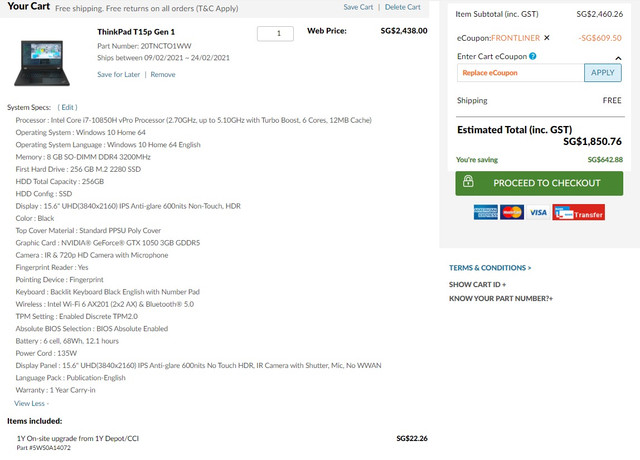
If you scrimp on the keyboard / IR cam / onsite warranty... price will drop to $1798.50

It's around your budget, and is brand new with 1 year warranty
However the bad side is it ships in more than 8 weeks

So you might want to check whether there is anyone selling 2nd hand x1 extreme or T15p for cheap

If you are buying 2nd hand, make sure you upgrade thunderbolt firmware


For this T15p,
it's
1. 2.07 kg vs X1 extreme 1.7kg
2. spec with i7-10850H with nvidia 1050 gfx
3. since ram and ssd are self-provided, i went with lowest spec

which is roughly your requirement


Can confirm now they don't need to virtualised GPU, we just need the processor power and RAM. Reason to get a laptop with discrete GPU is more for added gpu power to hook up 4 X display (with docking) if needed.

I have 4 X 16GB DDR4 laptop RAMs in stocks. I will be buying 64GB kits on a separate budget.

I also has some 1TB PCIE SSDs lying around from the last project.

I understand that i7, GT 1050ti, 8GB, 256GB PCIE SSD, FHD LCD I can pay around S$1000-1500, 32GB+1TB SSD got see selling for $1400-1500.

Very sorry that I didn't make it clear in the beginning.
 
Last edited:

Calvin.Lee

Senior Member
Joined
Dec 7, 2007
Messages
1,948
Reaction score
0


If you scrimp on the keyboard / IR cam / onsite warranty... price will drop to $1798.50

It's around your budget, and is brand new with 1 year warranty
However the bad side is it ships in more than 8 weeks

So you might want to check whether there is anyone selling 2nd hand x1 extreme or T15p for cheap

If you are buying 2nd hand, make sure you upgrade thunderbolt firmware


For this T15p,
it's
1. 2.07 kg vs X1 extreme 1.7kg
2. spec with i7-10850H with nvidia 1050 gfx
3. since ram and ssd are self-provided, i went with lowest spec

which is roughly your requirement

Thank you again.
It really great information and yeah, now I can decide on both models.

The T15p is within the requirements and of course will be brand new but I need to double check on the pricing to see if the boss approve of this.
 

zinedine

Member
Joined
Jun 9, 2016
Messages
207
Reaction score
0
I felt that laptop prices have dropped quite a bit of late, no?

Was thinking of getting the Flex 5 or Yoga 6...
 

razorlala

Banned
Joined
Jul 26, 2011
Messages
20,809
Reaction score
3,985
I felt that laptop prices have dropped quite a bit of late, no?

Was thinking of getting the Flex 5 or Yoga 6...

there were crazy demand early on in covid. whole world no supply esp for those work laptop models.

but question tho, why would anyone use these thinkpad laptops? buttons all in the wrong place
 
Last edited:

firesong

Supremacy Member
Deluxe Member
Joined
Jan 17, 2001
Messages
8,811
Reaction score
4,828
I felt that laptop prices have dropped quite a bit of late, no?

Was thinking of getting the Flex 5 or Yoga 6...

Are you asking about consumer-class Ideapads in a Thinkpad UG thread? They're a different product line from enterprise-class Thinkpads.

there were crazy demand early on in covid. whole world no supply esp for those work laptop models.

but question tho, why would anyone use these thinkpad laptops? buttons all in the wrong place
Only Fn and Ctrl iirc. Other than the X1 Carbon Gen 2, I think the other layouts were pretty standard.

To answer that, reliability. The QC on Thinkpads is much higher than their other line ups of laptops.

It's the reason why these are business laptops, and the other ones are "home consumer" laptops. Business laptops are built to run for hours on end, and to last without breaking down (cos it costs business when there's downtime). They also generally fit into company tech refresh cycles, which are typically 3-5 years for most cases. Enterprises buy these laptops by the hundreds, so if a batch of laptops is bad (eg, the recent Dell Latitude 7300/7400 that gave IT a lot of headaches in recent years and some companies returned them all and obtained refunds), companies will actually move their contracts elsewhere and buy competitor products. This alone makes the need for reliability and longevity very important in this class, since it's also costly to send engineers onsite to repair machines. In this space, there are three main players: IBM/Lenovo Thinkpad, Dell Latitude, and HP Elite. This class of laptops also comes with typically 3y warranty onsite, expandable up to 5 years.

Home laptops are built differently, and they don't really care if they lose one customer. And warranty coverage for consumer laptops don't run up to 5y. There are also videos of repair personnel showing bad design decisions on consumer laptops that demonstrate how such laptops are designed to fail over 1-3y, so that consumers will have to go out and buy new replacements and make more money.

If you think on the warranty alone, the differences in warranty coverage styles and the implications says a lot.

There are still people who can use the Thinkpad X220/230 today, but consumer laptops that old, with the same kind of heavy usage, would've probably died out years ago.
 

firesong

Supremacy Member
Deluxe Member
Joined
Jan 17, 2001
Messages
8,811
Reaction score
4,828
Here's a video of a Lenovo Ideapad repair job, showing the technician doing component level repair of a startup chip replacement. He talks through the intentional circuit board design error (intentionally done) that will guarantee the failure of the machine over time.


If you do check repair statistics, you'll see why some logic boards suddenly throw up errors and die after 2y of usage, or if the laptops are used heavily they might die within the first year in some heavy use cases.
 

razorlala

Banned
Joined
Jul 26, 2011
Messages
20,809
Reaction score
3,985
Are you asking about consumer-class Ideapads in a Thinkpad UG thread? They're a different product line from enterprise-class Thinkpads.


Only Fn and Ctrl iirc. Other than the X1 Carbon Gen 2, I think the other layouts were pretty standard.

To answer that, reliability. The QC on Thinkpads is much higher than their other line ups of laptops.

It's the reason why these are business laptops, and the other ones are "home consumer" laptops. Business laptops are built to run for hours on end, and to last without breaking down (cos it costs business when there's downtime). They also generally fit into company tech refresh cycles, which are typically 3-5 years for most cases. Enterprises buy these laptops by the hundreds, so if a batch of laptops is bad (eg, the recent Dell Latitude 7300/7400 that gave IT a lot of headaches in recent years and some companies returned them all and obtained refunds), companies will actually move their contracts elsewhere and buy competitor products. This alone makes the need for reliability and longevity very important in this class, since it's also costly to send engineers onsite to repair machines. In this space, there are three main players: IBM/Lenovo Thinkpad, Dell Latitude, and HP Elite. This class of laptops also comes with typically 3y warranty onsite, expandable up to 5 years.

Home laptops are built differently, and they don't really care if they lose one customer. And warranty coverage for consumer laptops don't run up to 5y. There are also videos of repair personnel showing bad design decisions on consumer laptops that demonstrate how such laptops are designed to fail over 1-3y, so that consumers will have to go out and buy new replacements and make more money.

If you think on the warranty alone, the differences in warranty coverage styles and the implications says a lot.

There are still people who can use the Thinkpad X220/230 today, but consumer laptops that old, with the same kind of heavy usage, would've probably died out years ago.

Correct me if i am wrong, dont lenovo/ibm take the lead in tragic design?

Fn ctrl wrong place, many other buttons also arranged differently, and most recently, the ***** power buttton is a normal button above backspace.

Ppl wanna press backspace will accidentally press the power button
 

firesong

Supremacy Member
Deluxe Member
Joined
Jan 17, 2001
Messages
8,811
Reaction score
4,828
Correct me if i am wrong, dont lenovo/ibm take the lead in tragic design?

Fn ctrl wrong place, many other buttons also arranged differently, and most recently, the ***** power buttton is a normal button above backspace.

Ppl wanna press backspace will accidentally press the power button
Not in Thinkpads. And this is a Thinkpad user group, not an Ideapad user group. Did you mix up your product classes, or did you just errantly lump everything under one brand without understanding market segmentation?

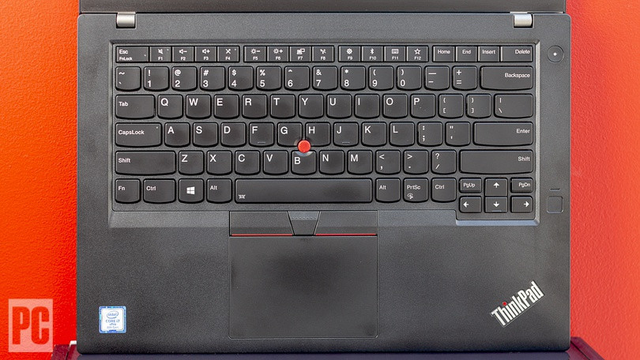
As for power button location, I have a very recent laptop in the T14s, a 2020 model and I don't think I'll accidentally touch the power button any time soon. It's not anywhere near the Del button. nor is it easy to depress accidentally since it's concave. I'm not quite sure how one can accidentally hit the power key while reaching for backspace in this layout. I believe this layout is the same for 2019's T49x series.

Lenovo-Thinkpad-T14s-keyboard-touchpad-.jpg


Keyboard layouts are region specific, so I'm referring to the standard US layout here, not the UK layout which some parallel import in.

Also, to go further back to 2016 models, even the T460/470/480 layout does not have the power button too near backspace to be easily confused as what you claim here.


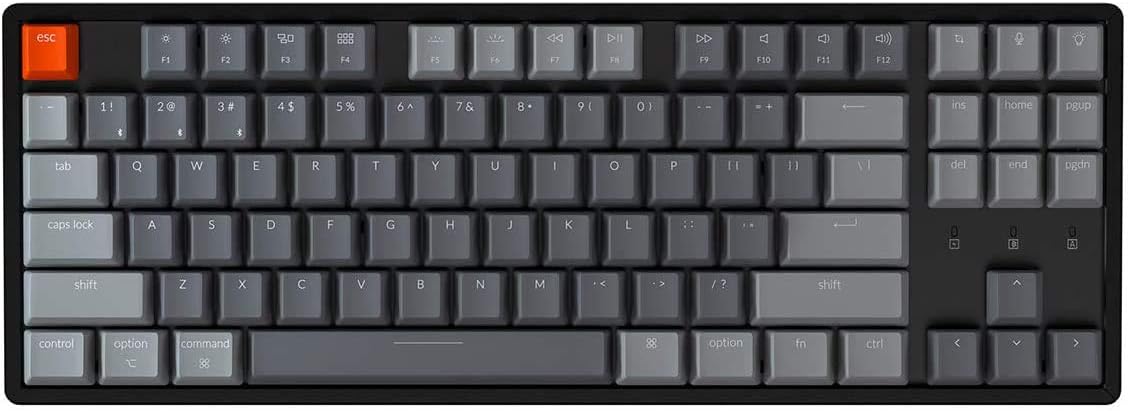
As for key layout, other than Fn and Ctrl on the lower left, the rest of the key layout generally matches my Keychron keyboard too. I'm really not sure if you're referring to mainstream Thinkpads here?
51MxMjKvF2L._AC_SL1132_.jpg
 
Last edited:

razorlala

Banned
Joined
Jul 26, 2011
Messages
20,809
Reaction score
3,985
Not in Thinkpads. And this is a Thinkpad user group, not an Ideapad user group. Did you mix up your product classes, or did you just errantly lump everything under one brand without understanding market segmentation?

As for power button location, I have a very recent laptop in the T14s, a 2020 model and I don't think I'll accidentally touch the power button any time soon. It's not anywhere near the Del button. nor is it easy to depress accidentally since it's concave. I'm not quite sure how one can accidentally hit the power key while reaching for backspace in this layout. I believe this layout is the same for 2019's T49x series.

Lenovo-Thinkpad-T14s-keyboard-touchpad-.jpg


Keyboard layouts are region specific, so I'm referring to the standard US layout here, not the UK layout which some parallel import in.

Also, to go further back to 2016 models, even the T460/470/480 layout does not have the power button too near backspace to be easily confused as what you claim here.


As for key layout, other than Fn and Ctrl on the lower left, the rest of the key layout generally matches my Keychron keyboard too. I'm really not sure if you're referring to mainstream Thinkpads here?
51MxMjKvF2L._AC_SL1132_.jpg

hmm.. i remember what model is it that has the power button directly above the backspace button.. my colleague have something like that and company group policy dont allow you to disable what the button does lolol.


currently im using X260. seem to have a common problem where if you apply pressure to somewhere on the bottom left undeaneath, it will crash the unit with a hypnotising screen. then have to force restart.

anyhow, the thinkpads seem sturdy but the fn and ctrl placement really rustles my jimmies. i fn lock and pry out the fn key lol. then a black marker to block the led underneath it
 

firesong

Supremacy Member
Deluxe Member
Joined
Jan 17, 2001
Messages
8,811
Reaction score
4,828
hmm.. i remember what model is it that has the power button directly above the backspace button.. my colleague have something like that and company group policy dont allow you to disable what the button does lolol.


currently im using X260. seem to have a common problem where if you apply pressure to somewhere on the bottom left undeaneath, it will crash the unit with a hypnotising screen. then have to force restart.

anyhow, the thinkpads seem sturdy but the fn and ctrl placement really rustles my jimmies. i fn lock and pry out the fn key lol. then a black marker to block the led underneath it
Interesting you chose to backpedal and change the accusation.

Could you name the Thinkpad model please, rather than leave it vague with a "my colleague has"? Particularly since you said it was "most recently", suggesting a fairly new model of the Thinkpad. I believe I'm not the only one that's curious over this allegation. I've checked online and even the X/L/E series keyboard layouts from 2016 (ie, x60/x70/x80/x90/and newer models) onwards is the same as the T that I've shown above. If anything, I'm sure you can always ask your colleague what the model number is.

Also, button placement can be swapped, either in the BIOS or using Lenovo Vantage. It's been this way for users who cannot get used to the layout. Beyond that, I'm still curious about which Thinkpad has the power button directly above the Backspace in a way that leads to accidentally depressing it often. I know this to be the case for many consumer laptops that I've seen, particularly in Asus and Acer machines, along with some Ideapads (which I generally avoid anyway due to QC and design issues. Ideapads are NOT Thinkpads).

As to the 2016 model, the X260 issue, it appears that a Lenovo service with a motherboard change could have addressed the issue. See this reddit thread for some info, which notes that some don't experience it, and that it went away with the change for users. I note that being a 2016 model, it is five years old this year and hardly qualifies as "recently", so it might not be under warranty unless your company purchased the full 5 years on it.
 
Last edited:

kazuki666

Arch-Supremacy Member
Joined
Jul 16, 2004
Messages
14,827
Reaction score
221
Ask you all. I am thinking to get those thinkpad laptop which corporate office often issue to employees. I find them quite hardy, good battery life and portable. But I notice these models are usually not listed on Lenovo website.
Where would you all recommend to buy them? I don't mind online or physical shop, as long reliable.

Thanks everyone

Sent from Xiaomi POCOPHONE F1 using GAGT
 

kazuki666

Arch-Supremacy Member
Joined
Jul 16, 2004
Messages
14,827
Reaction score
221
Those that you are see in the office are commonly known as T-series. More likely T440, T450, T460 and T470.


Current gen is T490. You can find that on the Lenovo website.
Thanks. Found it on lenovo official shopee and lazada too. Woah, not cheap $1700+. Because thinking to get a laptop for part-time studies, which I believe will have project work and presentation, and my personal laptop Lenovo s410 is crappy using for watching video at home nia.

I saw reseller selling T460 around $600 range with proclaimed warranty. Are these usually legit?

Sent from Xiaomi POCOPHONE F1 using GAGT
 

kazuki666

Arch-Supremacy Member
Joined
Jul 16, 2004
Messages
14,827
Reaction score
221
Those units are refurbed units. They do not have warranty from Lenovo anymore. A shot in the dark as to the condition but T-series laptops are truly very hardy and highly serviceable with a bit of research and know how. :o
I used to use X240 couple years ago at work. Damn it's a monster impossible to spoil. That's when I started to have good impression of the thinkpad.

If my budget is max up to $600, what would I be able to get? I am not sure exactly how intensive my studies demand will be, but it's part-time study only on weekends. And is not technical or IT course, so I suppose I won't need something very high spec. Just need one reliable laptop for writing reports and presentation.

Just curious. Where will be a good place to buy? I don't mind walk-in to physical shop or online also can, as long reliable not shady kind

Thanks again.

Sent from Xiaomi POCOPHONE F1 using GAGT
 

firesong

Supremacy Member
Deluxe Member
Joined
Jan 17, 2001
Messages
8,811
Reaction score
4,828
Thanks. Found it on lenovo official shopee and lazada too. Woah, not cheap $1700+. Because thinking to get a laptop for part-time studies, which I believe will have project work and presentation, and my personal laptop Lenovo s410 is crappy using for watching video at home nia.

I saw reseller selling T460 around $600 range with proclaimed warranty. Are these usually legit?

Sent from Xiaomi POCOPHONE F1 using GAGT

Thinkpads are available on Lenovo's official site.

I just bought my T14s from there in Dec.

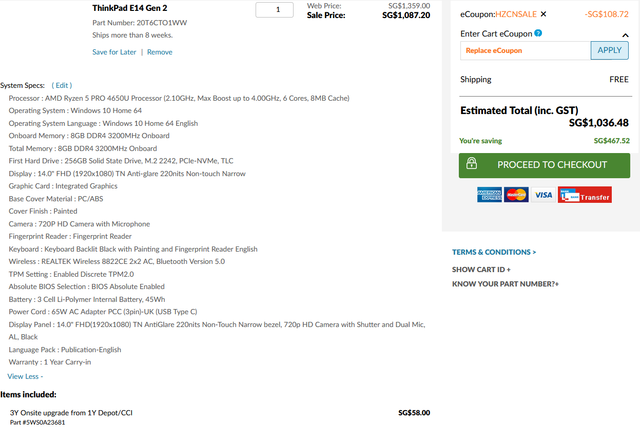
It might have been possible in Jan to get a Thinkpad E series for near your budget because HZCNSALE was 30% off. Let me look around quickly and see if I can do up something...

Edit: No big discounts now, unfortunately...


Best thing I could pull up with all discount codes and included the 3y onsite warranty cos it was only $58 more, and added the $10 FP reader option. Not really near your budget so I suppose you'll have to try Carousell and hope to get a decent unit.
 
Last edited:

kazuki666

Arch-Supremacy Member
Joined
Jul 16, 2004
Messages
14,827
Reaction score
221
Thanks for the detailed information.

My last office laptop was X240. Currently am using T480. I have to admit, both are very good laptops. Just curious, how does Lenovo differentiate what is X and T?

I saw a few T460 in shopee and Lazada. I wonder if it can be negotiable to install MS Words and Excel too...
I probably just need something with decent battery life so that I won't need to carry around the charger. And it doesnt lag crazy when doing schoolwork, and actually I don't think will need something lightweight.

I see T460 and X270 about the same price range. Anyone has experience using both models?
 

firesong

Supremacy Member
Deluxe Member
Joined
Jan 17, 2001
Messages
8,811
Reaction score
4,828
The T###s series are lighter versions of the T### series, with the weight class closer to the X and better materials to bring that weight down.

The X series are also 12" (older)/13" models, whereas the T series are usually 14/15" series, depending on the first digit (up to T490/495 before they changed their numbering strategy again to the current X13/T14/T14s/T15).

Personally, I'll go with a T470s. A few months back, I saw a couple on Carousell for about $500-ish. They disappeared pretty quickly though.
 
Important Forum Advisory Note
This forum is moderated by volunteer moderators who will react only to members' feedback on posts. Moderators are not employees or representatives of HWZ Forums. Forum members and moderators are responsible for their own posts. Please refer to our Community Guidelines and Standards and Terms and Conditions for more information.
Top