IBM ThinkPad Users' Group

Azrielsc

Senior Member
Joined
Feb 4, 2004
Messages
1,786
Reaction score
19
Dao, I think I may have found the solution. I was on graphics drivers 2321 when you brought up the issue. When I used System Update to find new drivers, there were no new graphics drivers. However, when I went to check the Lenovo website, there is a new driver, 2538. Downloaded it and the issues I faced about the "extend" and "projector only" modes are gone!

Try it!
 

skweam

Supremacy Member
Joined
Mar 31, 2005
Messages
5,635
Reaction score
0
hey guys, just got my x220 today. bought from pondchen, delivered from us. just drained the battery, now i want to charge it up. is it advisable to use the brick that comes with it? its a 2 pin plug. currently i cant find a socket adapter for it =/
 

dao

Senior Member
Joined
Jun 5, 2000
Messages
1,303
Reaction score
91
Dao, I think I may have found the solution. I was on graphics drivers 2321 when you brought up the issue. When I used System Update to find new drivers, there were no new graphics drivers. However, when I went to check the Lenovo website, there is a new driver, 2538. Downloaded it and the issues I faced about the "extend" and "projector only" modes are gone!

Try it!

Thanks Azrielsc. It indeed solve my problem. What I found out is, my HDD is having 2538 driver while my SSD was having 2321 driver. Should have done the comparison as part of the troubleshooting.

However, not sure why System Update able to update my HDD OS to the latest 2538 while the SDD OS not able to do so.
 

Azrielsc

Senior Member
Joined
Feb 4, 2004
Messages
1,786
Reaction score
19
hey guys, just got my x220 today. bought from pondchen, delivered from us. just drained the battery, now i want to charge it up. is it advisable to use the brick that comes with it? its a 2 pin plug. currently i cant find a socket adapter for it =/

No worries. Just get a socket adapter and plug it in. The power brick is rated at 110V - 240V so it can be used globally.

Thanks Azrielsc. It indeed solve my problem. What I found out is, my HDD is having 2538 driver while my SSD was having 2321 driver. Should have done the comparison as part of the troubleshooting.

However, not sure why System Update able to update my HDD OS to the latest 2538 while the SDD OS not able to do so.

Gave me a fright too! :) Was puzzled because I had the latest 2538 drivers on my HDD as well and didn't notice this issue when I had it plugged in to my TV. Only when you mentioned it, then I began to test the X220 with my SSD and it had the 2321 drivers. I couldn't test my HDD because I had already reformatted it and am using it as data storage, whereas my mSATA SSD is the OS drive.

System Update seems to be a bit wonky because it doesn't detect some newer drivers. I have to go into the Lenovo website to look through the drivers and compare them with the ones I have in the X220, it can be real tiring!

Cheers!
 
Last edited:

kazekai

Member
Joined
May 19, 2007
Messages
282
Reaction score
9
hey guys, check with those who own x220. Is it normal for the hours remaining shown in the battery gauge to keep fluctuating from 4hrs to 5hrs to 7hrs to 8 hrs and sometimes back to 6hrs again when the laptop is just idling?
 

skweam

Supremacy Member
Joined
Mar 31, 2005
Messages
5,635
Reaction score
0
@ Azrielsc: thanks boss, just got an adapter for it, working well :D

@ kazekai: experiencing the same thing too with mine

my x220 specs are

i7 2640m
4gb rams
win 7 x64 home premium
320gb 5.4krpm hdd
if im not wrong its a premium screen(how to check? it has webcam tho)

laptop looks and works great. this is my first ever laptop and after much researching, i felt this would be a good buy. was deciding this and an alienware, haha. world of difference.

i want to upgrade the rams to 8gb and get an ssd to install windows ultimate. anybody did the same? will there be any problems?
 

MBoI1986

Supremacy Member
Joined
Dec 22, 2004
Messages
7,321
Reaction score
25
For X220 specs, I can see VGA and Display Port. Just wondering is there DVI or HDMI to connect to monitor? Sorry, pls correct me if i said wrongly
 

Azrielsc

Senior Member
Joined
Feb 4, 2004
Messages
1,786
Reaction score
19
hey guys, check with those who own x220. Is it normal for the hours remaining shown in the battery gauge to keep fluctuating from 4hrs to 5hrs to 7hrs to 8 hrs and sometimes back to 6hrs again when the laptop is just idling?

Yup, it does that because it calculates the power drain at that particular moment. So if you have a power-heavy application on, the hours remaining will be low but once when you turn off that application, the hours remaining will increase, due to the lower power consumption.

@ Azrielsc: thanks boss, just got an adapter for it, working well :D

@ kazekai: experiencing the same thing too with mine

my x220 specs are

i7 2640m
4gb rams
win 7 x64 home premium
320gb 5.4krpm hdd
if im not wrong its a premium screen(how to check? it has webcam tho)

laptop looks and works great. this is my first ever laptop and after much researching, i felt this would be a good buy. was deciding this and an alienware, haha. world of difference.

i want to upgrade the rams to 8gb and get an ssd to install windows ultimate. anybody did the same? will there be any problems?

The difference between a TN & IPS screen can be shown here: Display: TN vs. IPS at Lenovo Thinkpad X220 - YouTube

Thinkpads are really easy to upgrade. Just throw in another 4GB of RAM! As for the SSD, please check if the SSD is 7mm in height because normal SSD/HDD are usually 9.5mm in height. Some X220 users remove the cover of their SSD so that they can fit the HDD slot.

Do note that in order to change the HDD/SSD, you only need to remove 1 screw and the HDD can be easily removed by pulling the black tab.

How simple is that! :)
 

Azrielsc

Senior Member
Joined
Feb 4, 2004
Messages
1,786
Reaction score
19
For X220 specs, I can see VGA and Display Port. Just wondering is there DVI or HDMI to connect to monitor? Sorry, pls correct me if i said wrongly

There is no DVI or HDMI ports on the X220, only VGA & Displayport (DP).

I connect my X220 to my monitor via DP > HDMI > DVI. And from DP > HDMI for my Samsung TV.
 

kazekai

Member
Joined
May 19, 2007
Messages
282
Reaction score
9
Yup, it does that because it calculates the power drain at that particular moment. So if you have a power-heavy application on, the hours remaining will be low but once when you turn off that application, the hours remaining will increase, due to the lower power consumption.

Thanks bro! but i'm not using any power-heavy application. i'm just surfing net using chrome and chatting on msn. Skype is on sign in but i'm not using that and the battery guage has been fluctuating :S
 

Azrielsc

Senior Member
Joined
Feb 4, 2004
Messages
1,786
Reaction score
19
Thanks bro! but i'm not using any power-heavy application. i'm just surfing net using chrome and chatting on msn. Skype is on sign in but i'm not using that and the battery guage has been fluctuating :S

There could be some processes in the background that causes the fluctuating battery gauge. Don't worry about it, it is normal. If I am just reading a page on wiki for a while, the gauge will show about 6-7hrs, but once when I switch tabs or chat on MSN, it goes down to 4-5hrs.

Not really bothered with it. :)
 

skweam

Supremacy Member
Joined
Mar 31, 2005
Messages
5,635
Reaction score
0
Yup, it does that because it calculates the power drain at that particular moment. So if you have a power-heavy application on, the hours remaining will be low but once when you turn off that application, the hours remaining will increase, due to the lower power consumption.


The difference between a TN & IPS screen can be shown here: Display: TN vs. IPS at Lenovo Thinkpad X220 - YouTube

Thinkpads are really easy to upgrade. Just throw in another 4GB of RAM! As for the SSD, please check if the SSD is 7mm in height because normal SSD/HDD are usually 9.5mm in height. Some X220 users remove the cover of their SSD so that they can fit the HDD slot.

Do note that in order to change the HDD/SSD, you only need to remove 1 screw and the HDD can be easily removed by pulling the black tab.

How simple is that! :)
thanks again! mine is an ips. thanks for the tips on the ssd, will research on 7mm drives
 

kazekai

Member
Joined
May 19, 2007
Messages
282
Reaction score
9
There could be some processes in the background that causes the fluctuating battery gauge. Don't worry about it, it is normal. If I am just reading a page on wiki for a while, the gauge will show about 6-7hrs, but once when I switch tabs or chat on MSN, it goes down to 4-5hrs.

Not really bothered with it. :)

haha, ok, thanks again bro! :)
 

MBoI1986

Supremacy Member
Joined
Dec 22, 2004
Messages
7,321
Reaction score
25
There is no DVI or HDMI ports on the X220, only VGA & Displayport (DP).

I connect my X220 to my monitor via DP > HDMI > DVI. And from DP > HDMI for my Samsung TV.

if i get the docking station, then connect to a 42" inch Monitor, will it be able to display full screen?
 

Azrielsc

Senior Member
Joined
Feb 4, 2004
Messages
1,786
Reaction score
19
if i get the docking station, then connect to a 42" inch Monitor, will it be able to display full screen?

Why shouldn't it? :)

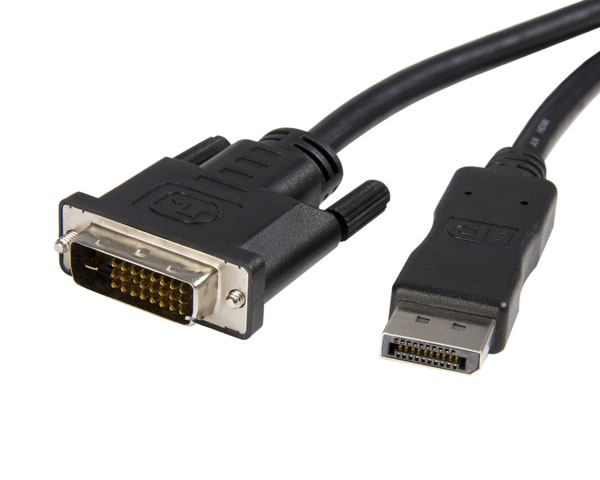
If your 42" monitor accepts DVI, then u can get this:

DISPLAY-PORT-DisplayPort-to-DVI-Cable-StarTech.jpg


If it is not commonly found here in Singapore, you can get this:

dvi-cable.jpg


And then get a HDMI > DP converter. I took this route as I bought the DVI > HDMI cable from Harvey Norman long before I bought the X220. It was actually for my wife's Lenovo U260. So I went online and bought the HDMI > DP converter when I bought my X220.

I find that the 2nd option is better because I can use the combination on both U260 & X220.

For my TV that accepts HDMI, I just use the HDMI > DP converter. :)

Cheers.
 

Solidus_GZ

Master Member
Joined
Nov 8, 2008
Messages
4,074
Reaction score
618
anyone brought a thinkpad in recent sitex show? on the brochure it offer an onsite warranty, but however my x220 still reflect an limited warranty. anyone encounter this issue? i called the dealer who sold this to me about this issue, but they still havent get back to me on this.
 

purpleberry

Supremacy Member
Joined
Nov 23, 2008
Messages
5,966
Reaction score
170
Tried ordering from Lenovo US but it doesn't acknowledge freight forwarding addresses like Vpost. Also tried Amazon Checkout but it didn't work. Any tips to bypass this?
 

MBoI1986

Supremacy Member
Joined
Dec 22, 2004
Messages
7,321
Reaction score
25
Why shouldn't it? :)

If your 42" monitor accepts DVI, then u can get this:

If it is not commonly found here in Singapore, you can get this:


And then get a HDMI > DP converter. I took this route as I bought the DVI > HDMI cable from Harvey Norman long before I bought the X220. It was actually for my wife's Lenovo U260. So I went online and bought the HDMI > DP converter when I bought my X220.

I find that the 2nd option is better because I can use the combination on both U260 & X220.

For my TV that accepts HDMI, I just use the HDMI > DP converter. :)

Cheers.

Ok thanks for the info
 

Azrielsc

Senior Member
Joined
Feb 4, 2004
Messages
1,786
Reaction score
19
anyone brought a thinkpad in recent sitex show? on the brochure it offer an onsite warranty, but however my x220 still reflect an limited warranty. anyone encounter this issue? i called the dealer who sold this to me about this issue, but they still havent get back to me on this.

You mean it shows "3-year limited warranty which includes a Thinkplus warranty upgrade. Blah blah blah... includes parts & labour and includes on-site repair service"?

If it is, I have "used" this warranty where the Lenovo technician came down and replaced parts for me, at no cost.
 
Important Forum Advisory Note
This forum is moderated by volunteer moderators who will react only to members' feedback on posts. Moderators are not employees or representatives of HWZ Forums. Forum members and moderators are responsible for their own posts. Please refer to our Community Guidelines and Standards and Terms and Conditions for more information.
Top