iCloud drive storage question

leongws

Master Member
Joined
May 31, 2003
Messages
3,032
Reaction score
676
Hi, was thinking of upgrading the 5GB free iCloud storage to 200GB( can share with family) but got some question before I pull the trigger.

Assume that I were to upgrade to 200GB, and I have a 128GB iPhone and icloud photo library is turned on, will I face the following issue?

1) message that says iPhone storage capacity is low due to many apps, photos and video even though I backup to with iCloud drive.
2) if I delete photo in iPhone to recover some space, it's backup in icloud also will be deleted?

If 2) is true, then why people go for icloud storage capacity that is higher than iPhone capacity when in actual fact the one having restrictions are on the iphone. Defeat the purpose of icloud photo library backup as delete on phone equals to delete in icloud.

Can someone alighten me how does the backup works?
 

the-alchemist

Master Member
Joined
Jun 16, 2007
Messages
3,807
Reaction score
10
So summary is to always go for icloud storage that is lower than Iphone storage?

nope.

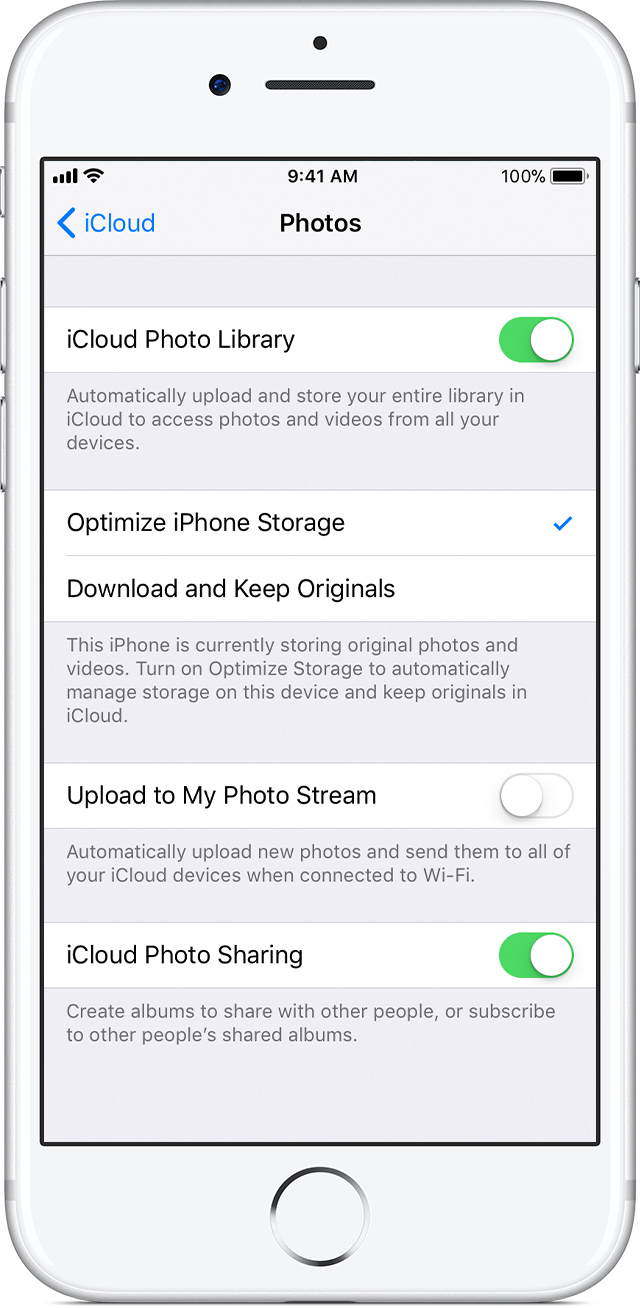
if your phone storage is approaching full, the phone will optimize your storage by saving only a low quality file on your phone and the original full sized photo on icloud. if you need it, the phone will download the high quality file.
 

THFC78

Honorary Member
Joined
Mar 21, 2011
Messages
103,620
Reaction score
8,737
Hi, was thinking of upgrading the 5GB free iCloud storage to 200GB( can share with family) but got some question before I pull the trigger.

2) if I delete photo in iPhone to recover some space, it's backup in icloud also will be deleted?

If 2) is true, then why people go for icloud storage capacity that is higher than iPhone capacity when in actual fact the one having restrictions are on the iphone. Defeat the purpose of icloud photo library backup as delete on phone equals to delete in icloud.

Can someone alighten me how does the backup works?

Yes it's true, if your phone's photo is sync to iCloud Photo Library. Whatever photo or video that you deleted from your phone will be remove from your icloud photo library.

If you want to store photo or video on your icloud and still being able to get rid of it on your phone, there is a way.

You have to use the Photos app on your mac desktop/notebook. Set the photos app on your desktop/notebook to sync with icloud photo library and disable the icloud photo library sync on your phone.

So if you got photo/video that you want to save on icloud photo library, you just have to manually upload them into Photos app on your desktop/notebook. From there, the Photos app will auto sync from your machine into icloud photo library.

After that you can just delete those photos/videos from your phone and still have it inside icloud photo library since now icloud photo library is sync to your machine instead of your phone
 

davi502

Master Member
Joined
Nov 20, 2005
Messages
4,597
Reaction score
52
So if you got photo/video that you want to save on icloud photo library, you just have to manually upload them into Photos app on your desktop/notebook. From there, the Photos app will auto sync from your machine into icloud photo library.

After that you can just delete those photos/videos from your phone and still have it inside icloud photo library since now icloud photo library is sync to your machine instead of your phone

Manually upload meaning have to manually import them into your pc or Mac via windows photo gallery or photos app?
 

THFC78

Honorary Member
Joined
Mar 21, 2011
Messages
103,620
Reaction score
8,737
Not sure if your window photo gallery can sync to icloud photo library since i very long time never use window liao.

But yes for mac. You have to manually import them onto your photos app on mac and get it to sync with icloud.
 

szeli

Arch-Supremacy Member
Joined
Mar 24, 2003
Messages
21,458
Reaction score
3,154
nope.

if your phone storage is approaching full, the phone will optimize your storage by saving only a low quality file on your phone and the original full sized photo on icloud. if you need it, the phone will download the high quality file.

e optimize storage option shud help

iphone7-ios11-settings-apple-id-icloud-photos-icloud-photo-library-optimize.jpg
 

sansanjikikut

Master Member
Joined
Sep 26, 2015
Messages
2,907
Reaction score
120
Is each Recently Deleted album on a device suppose to sync to your icloud photo library as well?
 

leongws

Master Member
Joined
May 31, 2003
Messages
3,032
Reaction score
676
ok have sub the 200GB icloud storage upgrade. Have successfully backup the device but my photos/videos on the phone does not seem to be able to upload successfully even though i enabled icloud photo library. It shows uploading 1xxx items with a pause button beside it.

The number of items to be uploaded does not change after 2 hrs. Have tried pressing pause and resume but still same. I am connected through wifi and the phone is charging. Any settings i missed out?
 

szeli

Arch-Supremacy Member
Joined
Mar 24, 2003
Messages
21,458
Reaction score
3,154
ok have sub the 200GB icloud storage upgrade. Have successfully backup the device but my photos/videos on the phone does not seem to be able to upload successfully even though i enabled icloud photo library. It shows uploading 1xxx items with a pause button beside it.

The number of items to be uploaded does not change after 2 hrs. Have tried pressing pause and resume but still same. I am connected through wifi and the phone is charging. Any settings i missed out?

do u have enough free space on yr device?
 

PetPet

Moderator
Moderator
Joined
May 24, 2004
Messages
95,222
Reaction score
319
ok have sub the 200GB icloud storage upgrade. Have successfully backup the device but my photos/videos on the phone does not seem to be able to upload successfully even though i enabled icloud photo library. It shows uploading 1xxx items with a pause button beside it.

The number of items to be uploaded does not change after 2 hrs. Have tried pressing pause and resume but still same. I am connected through wifi and the phone is charging. Any settings i missed out?

Just wait.
Plug in and leave the phone alone overnight.
 

leongws

Master Member
Joined
May 31, 2003
Messages
3,032
Reaction score
676
do u have enough free space on yr device?

256GB capacity with 161GB space left... Notice now the number of items to be uploaded is decreasing and icloud got photos/videos liao. Thanks for the help
 

i-Movies

Senior Member
Joined
Jan 29, 2009
Messages
1,613
Reaction score
43
ok have sub the 200GB icloud storage upgrade. Have successfully backup the device but my photos/videos on the phone does not seem to be able to upload successfully even though i enabled icloud photo library. It shows uploading 1xxx items with a pause button beside it.

The number of items to be uploaded does not change after 2 hrs. Have tried pressing pause and resume but still same. I am connected through wifi and the phone is charging. Any settings i missed out?

the very first time icloud photo library upload takes time, very slow, plug phone into power and leave it for whole night.
 

leongws

Master Member
Joined
May 31, 2003
Messages
3,032
Reaction score
676
Just wait.
Plug in and leave the phone alone overnight.

the very first time icloud photo library upload takes time, very slow, plug phone into power and leave it for whole night.

Guess will have to do so. I have plug in since i created this thread and other than the one time upload which i noticed, it has since stop uploading again.
 

chengsun

High Supremacy Member
Joined
Oct 5, 2004
Messages
38,501
Reaction score
12
sorry to hijack this thread. just want to ask a question about the format of icloud backup and restoration.

I have been using itunes to do iphone back to my computer. last year when I was setting up ip7 for my wife, as usual I restored the then latest backup of her old ip6 to her brand new ip7, from telco. I did not upgrade her ios 10 ios10 before the backup, it ws still on ios9. So, after the restoration, the ios of the new ip7 was actually "downgraded" to ios9, and I was prompted to upgrade the firmware immediately.

I just want to know, will samething happens if I use icloud backup? I myself feel that the answer is no, since it seems that it is not a image backup like the itunes local backup. instead the backup is based on the settings and apps that we want to backup.

but I want to confirm this. coz I am considering subscribing a 200GB plan to share with my wife as well.
 

PetPet

Moderator
Moderator
Joined
May 24, 2004
Messages
95,222
Reaction score
319
If your iCloud backup was done on an device running iOS 10.
You'll require an device with iOS 10 or higher to restore.

Hope this clarifies.
 

ckh98258

Senior Member
Joined
Feb 23, 2002
Messages
820
Reaction score
0
If your iCloud backup was done on an device running iOS 10.
You'll require an device with iOS 10 or higher to restore.

Hope this clarifies.

For me my iPhone 8 plus on iOS 11 still able to run a full restored from my iCloud backup from a device running iOS 10.
 
Important Forum Advisory Note
This forum is moderated by volunteer moderators who will react only to members' feedback on posts. Moderators are not employees or representatives of HWZ Forums. Forum members and moderators are responsible for their own posts. Please refer to our Community Guidelines and Standards and Terms and Conditions for more information.
Top