Intel Lunar Lake: RIP

stanlawj

Supremacy Member
Joined
Jul 11, 2021
Messages
7,937
Reaction score
4,275
10% battery drain after 12 hours.
Hibernate for long standy, no instant wake if hibernate.

Intel x86 CPU architecture is at fault. The CPU core is fabbed by TSMC at 3nm, same place as Apple Silicon SoC (on 3nm process) and Qualcomm Snapdragon X SoC (on 4nm process). Removing the fab process as the common factor, then the differentiating factor is simply the Lunar Lake x86 SoC design.


Power-performance curve testing shows Intel generally lowered the performance envelop to achieve low power and then packed in humongous batteries to make the battery life competitive with ARM laptops.
 
Last edited:

stanlawj

Supremacy Member
Joined
Jul 11, 2021
Messages
7,937
Reaction score
4,275
Basically, for 2024, the best scenario for x86 CPU is: high performance laptop (Arrow-Lake HX or Ryzen HX) with discrete GPU (Nvidia or AMD).
 

stanlawj

Supremacy Member
Joined
Jul 11, 2021
Messages
7,937
Reaction score
4,275
Review on Intel Lunar Lake by someone who had used Qualcomm's Snapdragon X laptop:


I didn't buy it for gaming, but I tested Fortnite, and it played well. I also experimented with XeSS, which provided a good experience. But I'm not really a gamer, I play light games like Vampire Survivors, AoEIIHD, Mini Motorways, etc.

Overall performance is okay, but not as snappy as Snapdragon-powered laptops. The multicore performance, in my opinion, is almost ridiculously low. Compared to an iPad M4, X Elite / X Plus, or M3 MacBook, it feels like it's lacking some power. This is hard to describe, and I'm used to high-end devices (my workstation has a 7950x, I have an M3 MBP from work, I've had a P14s with an 8840hs, etc), so maybe I'm just too demanding. However, my overall feeling is that it can easily become sluggish.

It's also quite loud, which is my biggest disappointment. I thought it'd be silent for web browsing and such. While typing this with only Obsidian and Edge open, the fan is spinning. The CPU temperature is around 45-50°C, drawing about 5W. I'm on "Best Performance" mode since the laptop is plugged in, but for less than 5W of CPU power, the fan activity seems excessive. Perhaps the chassis isn't great at dissipating heat. It's annoying, especially when any ARM device would be completely silent under these conditions.

The laptop wakes up almost instantly from sleep, but not quite as fast as ARM devices. Battery life seems better than typical Intel laptops, likely due to Intel's architecture optimization and fewer cores (and low performance). However, based on my brief testing, I don't think it'll match the battery life of X Elite / X Plus devices (SP11, Slim 7x, PZ13). The battery drained about 4% in 10.5 hours, which seems high compared to my PZ13, which only drained 1% in the same period.

My conclusion: If you need to use an x86-only app that doesn't emulate well, play games that don't run on ARM, want good battery life without needing much power, or don't believe in ARM's future in the PC world, this might work for you. The device is great. Lunar Lake is... a mixed experience. Otherwise, I'd recommend sticking with ARM. I think x86 in thin and light devices may be approaching its end.
 

stanlawj

Supremacy Member
Joined
Jul 11, 2021
Messages
7,937
Reaction score
4,275
so ARM is still better battery wise compared to lunar lake?
For normal productivity (office & coding) tasks. Software compatibility is the only moat left for Intel in the thin and light laptop space.

Here's what Intel Lunar Lake is up against:


Recently, I switched from my Intel-based XPS 13 to a 15” Surface Laptop with Snapdragon Elite X, 1 TB SSD, and 32 GB RAM. I mainly use it for .NET development with Visual Studio, and the experience is incredible.

The battery life is on par with a Mac, absolutely nothing like the 3-4 hours at most you get with an Intel like the XPS. More than 8 hours using Teams, VS, multiple PowerShell instances, Azure Data Studio, and several Docker containers, like SQL Server.

And the performance is amazing; applications run smoothly, even compiling a solution of around 120 projects while streaming Twitch. The difference in the processor is evident, there’s no throttling, and it maintains 3 GHz sustained when needed, something impossible to see in an Intel laptop and far from what the XPS achieves with its overheating issues.

Most applications are available on ARM. Drivers that don’t have an alternative in X64, like printers (I use an HP Photosmart that’s at least 10 years old), are mostly ported, and I haven’t had any issues. And those few apps that install on X64, you don’t notice any performance issues with the new emulation layer.

I couldn’t be happier with the purchase. Without a doubt, ARM on Windows is the future and probably the present.

--------
I have a different Snapdragon laptop, so the experience might be a bit different, but at least on mine, sleep mode is no problem for the battery. A full night of sleep only drops it by 1, maybe 2 percent.
--------
 
Last edited:

stanlawj

Supremacy Member
Joined
Jul 11, 2021
Messages
7,937
Reaction score
4,275
Lenovo Yoga Slim 7i - Aura Edition (Lunar Lake)
According to Just Josh, this is better than the Slim 7X Arm edition.

 
Last edited:

hkchew03

Master Member
Joined
Aug 20, 2010
Messages
2,531
Reaction score
521
TBH, i wouldn't even consider ARM laptop, at least not this generation. Its either Intel or AMD.
 

watzup_ken

High Supremacy Member
Joined
Nov 21, 2003
Messages
25,672
Reaction score
2,123
All these new CPUs be it from ARM, AMD or Intel, cost a lot. I happen to pop by Harvey Norman yesterday and they had a segment for "AI PCs". Walked over to take a peep, and gosh, those ARM and AMD Ryzen AI laptops with just integrated GPUs are priced at cool "sale" price starting at over SGD 2K. And those ARM based ones only have 16GB of RAM, which I think is bordering insufficient because of Windows.
 

stanlawj

Supremacy Member
Joined
Jul 11, 2021
Messages
7,937
Reaction score
4,275
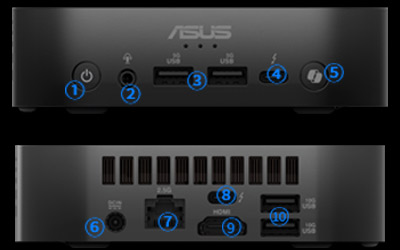
Asus NUC 14 Pro AI with Lunar Lake will probably be the best power-efficient SFF/mini PCs ever for Windows, rivaling AMD mini PCs since both CPUs are now made by TSMC using similar fab process. Intel CPU has the upper-hand with Quick Sync video encode/decode acceleration.

https://www.asus.com/displays-desktops/nucs/nuc-mini-pcs/asus-nuc-14-pro-ai/


grid-spec.jpg

  • 1 Power button
  • 2 Audio Jack
  • 3 USB 3.2 Gen 1
  • 4 Thunderbolt 4
  • 5 Copilot Key
  • 6 DC-in
  • 7 2.5G Ethernet
  • 8 Thunderbolt 4
  • 9 HDMI
  • 10 USB 3.2 Gen 2
 
Last edited:

watzup_ken

High Supremacy Member
Joined
Nov 21, 2003
Messages
25,672
Reaction score
2,123
Asus NUC 14 Pro AI with Lunar Lake will probably be the best power-efficient SFF/mini PCs ever for Windows, rivaling AMD mini PCs since both CPUs are now made by TSMC using similar fab process. Intel CPU has the upper-hand with Quick Sync video encode/decode acceleration.

https://www.asus.com/displays-desktops/nucs/nuc-mini-pcs/asus-nuc-14-pro-ai/


grid-spec.jpg

  • 1 Power button
  • 2 Audio Jack
  • 3 USB 3.2 Gen 1
  • 4 Thunderbolt 4
  • 5 Copilot Key
  • 6 DC-in
  • 7 2.5G Ethernet
  • 8 Thunderbolt 4
  • 9 HDMI
  • 10 USB 3.2 Gen 2
The low power draw on the Lunar Lake is great. But I think if there is less power constraints like a NUC, it pretty much negates the power efficiency requirement. It is good to have, but not a must have outside of laptops. Ultimately, it all boils down to the price I feel.

1 point to clarify though, Intel's Lunar Lake is based on TSMC's 3nm. AMD's Strix Point are still on 4nm/ 5nm. So AMD has a node disadvantage, but gained a cost advantage over Intel.
 

stanlawj

Supremacy Member
Joined
Jul 11, 2021
Messages
7,937
Reaction score
4,275
The low power draw on the Lunar Lake is great. But I think if there is less power constraints like a NUC, it pretty much negates the power efficiency requirement. It is good to have, but not a must have outside of laptops. Ultimately, it all boils down to the price I feel.

1 point to clarify though, Intel's Lunar Lake is based on TSMC's 3nm. AMD's Strix Point are still on 4nm/ 5nm. So AMD has a node disadvantage, but gained a cost advantage over Intel.
Power efficiency is important for saving electric bill. This Lunar Lake NUC can run 24/7 sipping electric power.
 

watzup_ken

High Supremacy Member
Joined
Nov 21, 2003
Messages
25,672
Reaction score
2,123
Power efficiency is important for saving electric bill. This Lunar Lake NUC can run 24/7 sipping electric power.
I acknowledge that power efficiency is good to have, but it also depends on your use case. I don't think everyone will be running their mini PC 24/7. For me, I may recommend a Lunar Lake based laptop because I want maximum battery life and good performance, but not hard and fast when it comes to a mini PC that is always plugged in to the mains. But that is just me. ;)
 

stanlawj

Supremacy Member
Joined
Jul 11, 2021
Messages
7,937
Reaction score
4,275
Lunar Lake mini PCs can run Home Assistant, CCTV recording & monitoring system, jukebox, NAS, firewall, home-based VPN server etc. Why not 24/7? This is the best use case for Intel Lunar Lake SoC.

Certainly better than overpriced Mac Mini. Also miles better than AMD MiniPCs that are extremely buggy/BSOD due to the AMD not providing sufficient support.
I acknowledge that power efficiency is good to have, but it also depends on your use case. I don't think everyone will be running their mini PC 24/7. For me, I may recommend a Lunar Lake based laptop because I want maximum battery life and good performance, but not hard and fast when it comes to a mini PC that is always plugged in to the mains. But that is just me. ;)
 

stanlawj

Supremacy Member
Joined
Jul 11, 2021
Messages
7,937
Reaction score
4,275
I dunno what to say, sleep/standby still not tested.


Still need more other Lunar Lake laptops from manufacturers with 4k 120Hz display to show us what this platform is capable of for productivity tasks.
 
Last edited:

stanlawj

Supremacy Member
Joined
Jul 11, 2021
Messages
7,937
Reaction score
4,275

HP OmniBook Ultra Flip 14" 2-in-1 (Intel Core Ultra 256V)​


Better than Zenbook S14.
Sleep/Standby still not tested.
  • Windows 11 Home
  • Up to Intec CoreTM Ultra 9 288V (up to 5.1 GHz with Intel Turbo Boost Technology) processor
  • 14" (35.6 cm) diagonal 16:10 3K OLED touchscreen with 48-120Hz variable refresh rate display
  • As light as 1.349kg16
  • Up to 326B LPDDR5x-8533 MHz
 
Last edited:

watzup_ken

High Supremacy Member
Joined
Nov 21, 2003
Messages
25,672
Reaction score
2,123
Lunar Lake mini PCs can run Home Assistant, CCTV recording & monitoring system, jukebox, NAS, firewall, home-based VPN server etc. Why not 24/7? This is the best use case for Intel Lunar Lake SoC.

Certainly better than overpriced Mac Mini. Also miles better than AMD MiniPCs that are extremely buggy/BSOD due to the AMD not providing sufficient support.
I think to clarify, my initial statement was that not everyone will use their mini PC 24/7. I did not say people won't run it for 24/7. All these use cases you mentioned are valid and possible. But most consumer class PCs are not designed to work 24/7 to begin with. You can certainly make it run 24/7, but you will just wear it down faster depending on how heavy the workload is. Also, if the load is not heavy in some of those cases you mentioned, why waste money using a Lunar Lake SOC when a N100 class SOC does the same thing at a fraction of the cost?

As to your point in buggy AMD Mini PCs, perhaps you have had bad experiences. But for me, I have tried 3 different AMD mini PCs over the last 5 years or more. I don't find it buggy nor did I get any BSOD so far.
 

stanlawj

Supremacy Member
Joined
Jul 11, 2021
Messages
7,937
Reaction score
4,275
Samsung Galaxy Book 5 Pro 360 (16" !!!) with pen and touch!!

Zero wobbles or wiggling of the pen strokes in diagonal!


  • Intel® Core™ Ultra 7 Series 2 Processor 256V
  • Galaxy AI :Included
  • Microsoft Copilot :Copilot AI assistance Copilot+ PC*
  • Display :16" 3K Dynamic AMOLED 2X, Anti-reflective display
  • Ports :1 x HDMI 2.1a
    2 x Thunderbolt™ 4
    1 x USB3.2
    1 x MicroSD
    1 x Headphone/Mic Combo
  • Memory & Storage12 :16GB RAM + 1TB SSD
  • Fingerprint reader
  • 76 Whr battery
  • 1.45kg
  • Est SGD$2600
Essentially a CPU upgrade of SG Book 4 Pro 360 (Meteor Lake edition). 16GB RAM limitation is still an issue.
Detailed review of the previous Core Ultra (Meteor Lake edition) by Notebookcheck.
 
Last edited:
Important Forum Advisory Note
This forum is moderated by volunteer moderators who will react only to members' feedback on posts. Moderators are not employees or representatives of HWZ. Forum members and moderators are responsible for their own posts.

Please refer to our Community Guidelines and Standards, Terms of Service and Member T&Cs for more information.
Top