Is it really over for Intel®?

Intel is ...

  • dead man walking, soon to be buried

    Votes: 58 50.9%
  • will bounce back, buyed Intc at $10 sure huat!

    Votes: 56 49.1%

  • Total voters
    114

Encrypted11

Supremacy Member
Joined
Jun 9, 2012
Messages
5,937
Reaction score
271
I just realised you're on MGBD or MHBD CKD? 3Gb M-die is universally known to clock possibly 400MHz++++ faster than their AGBD/AHBD counterparts.

If Apex Z790 AGBD = 8400MT/s, there are occassional OCN screenshots on MGBD/MHBD at 8600+ tight (Assuming ODTs and slopes no issue, or follow their manual numbers). CKD should net possibly 600MHz more. As tibcsi said up to 9000MT/s MGBD/MHBD in his corner case tuning due to temp scaling and training algorithms without a CKD, teamgroup 8800MT/s might not be close to a good bin, or a dud.

Edit: owikh84 is in msia in a similar climate with good tunes, probably gunning down his numbers are very realistic.

Benching low temp scaling is ideal, but real world profile for daily still has to go through PMIC temp target + VST VT3 or gsat.

But before assessing the possibility of going on the slippery slope of buying more hardware, usually the last 400MHz possible from a very well oiled tune like tibcsi/veii's screenshots will involve ODT / slope adjustments.

PMIC Temp
Possibly AC + custom loop 35-45C target
Air / AIO 50-65C depending case ambient, ITX or ATX board (more copper to soak heat)

ODT / Slope adjustments available even in Phantom Gaming (non-flagship)
But the silicon lottery reader for DRAM doesn't seem to generate a meaningful DIMM comparison like the ASUS or MSI Memory Force 2 equivalent.
hYY6VjL.png

UCM3ZEp.png
 

Phen8210

High Supremacy Member
Joined
Jul 29, 2011
Messages
29,028
Reaction score
8,285
This video mentioned from 25:00 time onwards, higher memory soc will result weaker pcie including GPU & m.2 on North bridge.

What he meant is that on AM5, the CPUs doing FCLK at 2200 MHz with a 1:1 UCLK:MCLK ratio at 6400 MT/s has pretty much reached the threshold as it's usually achieved near the recommended VSOC limits.

Hence, going beyond that threshold would require most CPUs to use a much higher vSOC that could result in PCIe bus and I/O instability.

Basically, increasing VSOC won't cause issues as long as you are within the recommended limits.
 

fkchon

Senior Member
Joined
Oct 9, 2022
Messages
933
Reaction score
466
I just realised you're on MGBD or MHBD CKD? 3Gb M-die is universally known to clock possibly 400MHz++++ faster than their AGBD/AHBD counterparts.

If Apex Z790 AGBD = 8400MT/s, there are occassional OCN screenshots on MGBD/MHBD at 8600+ tight (Assuming ODTs and slopes no issue, or follow their manual numbers). CKD should net possibly 600MHz more. As tibcsi said up to 9000MT/s MGBD/MHBD in his corner case tuning due to temp scaling and training algorithms without a CKD, teamgroup 8800MT/s might not be close to a good bin, or a dud.

Edit: owikh84 is in msia in a similar climate with good tunes, probably gunning down his numbers are very realistic.

Benching low temp scaling is ideal, but real world profile for daily still has to go through PMIC temp target + VST VT3 or gsat.

But before assessing the possibility of going on the slippery slope of buying more hardware, usually the last 400MHz possible from a very well oiled tune like tibcsi/veii's screenshots will involve ODT / slope adjustments.

PMIC Temp
Possibly AC + custom loop 35-45C target
Air / AIO 50-65C depending case ambient, ITX or ATX board (more copper to soak heat)

ODT / Slope adjustments available even in Phantom Gaming (non-flagship)
But the silicon lottery reader for DRAM doesn't seem to generate a meaningful DIMM comparison like the ASUS or MSI Memory Force 2 equivalent.
hYY6VjL.png

UCM3ZEp.png
Good to know, I'll take a look at the ODT/Slope adjustments later on.
I only have one pair of DDR5 CUDIMM at hand, how would I know if I'm limited by the memory controller or the DIMM themself?

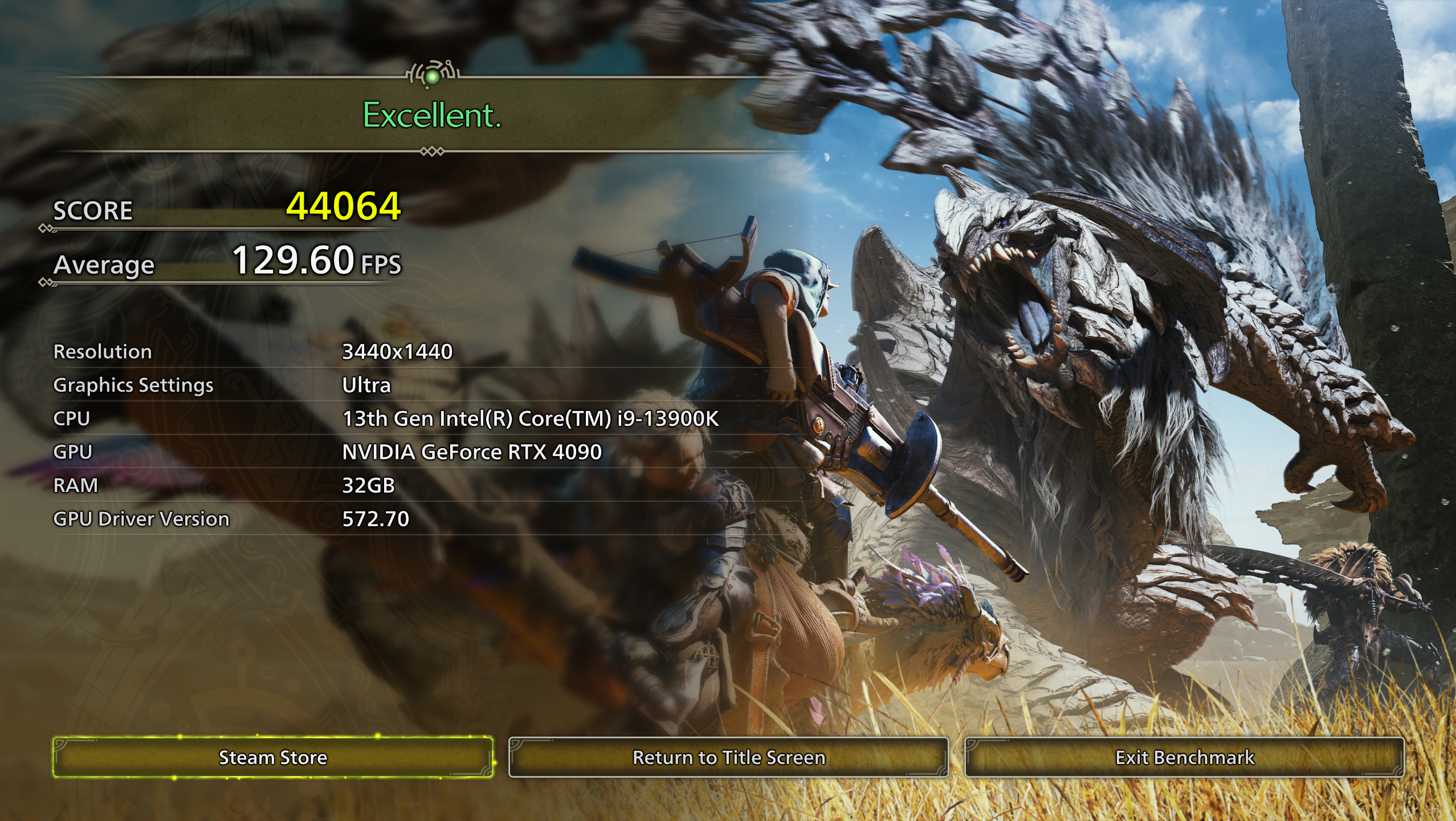
Anyway, reduced D2D back to 32X as it was having some stability issues at 34x. 4K Ultra fps went 94.64 -> 96.38.
h0P08pc.jpeg
 

fkchon

Senior Member
Joined
Oct 9, 2022
Messages
933
Reaction score
466
qStJ9hu.jpeg
29ReMiA.jpeg


Not sure why it won't let me print screenshot. But mine does seem quite a bit lower than yours (if higher is better).

CPU quality etc went to N/A because I did DLVA undervolting.
 

Encrypted11

Supremacy Member
Joined
Jun 9, 2012
Messages
5,937
Reaction score
271
Anecdotally in monolithic die good CPU = Good IMC, good cut of the wafer. But in chiplets..... :s13: hard to say. But Intel's binning should filter out lower quality IMCs to 245K and 265K. But there isn't concrete info how the average 285K clocks, with varying quality CUDIMMs vs others using non CKD for savings.
Hard to make a decision if you'd ask me.

Reflashing bios should restore screeenshot saving functionality. Most likely bios corruption after all the mem tuning. Save profile to usb externally, flashback and reload profile.

Edit: So it was very easy to train Klevv Black AGBD 8466 C36. But to pass GSAT VDD may take likely 1.65V-1.70V at PMIC 60C with pretty correct timings, with no fan blowing or waterblocks attached.

8066C34 took 60mV less than MSI Z690I Unify, GSAT 60C PMIC

82 quality potato 265k
 
Last edited:

fkchon

Senior Member
Joined
Oct 9, 2022
Messages
933
Reaction score
466
do you happen to know the max safe daily voltages for Z890 platform?

Right now I'm using the Stable voltages, bios won't let me increase VDD2 above 1.5V unless I go into the OC voltage profile.
 

Encrypted11

Supremacy Member
Joined
Jun 9, 2012
Messages
5,937
Reaction score
271
No idea, won't be fully in ARL. Only helping out with starters for a friend on mem oc.

Reviewers have gone to the dumps without Anand Lal Shimpi, Raja@Asus formerly Anandtech and Ian Cutress. Now edgeup is marking bs only.

Long ago there were useful asus edgeup articles by Raja or on Asus forums, sometimes by Shamino, now its all sensationalism (esp and YouTube) whatever gets attention without understanding what's going on. Good forumer posts like veii are among the few options these days, but sometimes comments are cryptic or they do expect you to comb and see their post history and avoid repeating questions previously answered, ctrl f keywords.
 

fkchon

Senior Member
Joined
Oct 9, 2022
Messages
933
Reaction score
466
I see. I went in ASUS forums and this was the most information I found. It's a bit outdated and doesn't tell me much about the voltage values, I think its pretty similar to the SkatterBencher articles on power rails on this platform.

I guess I will just dig through the OCN forums and find it that way. I feel theres lots more potential in this platform it just takes effort to unlock the power.
 

matique

Senior Member
Joined
Sep 25, 2017
Messages
797
Reaction score
786
IWUVPd3.jpeg


I'm just playing around with the bios settings with limited time I have, these settings are done in a minute Asrock Tuning Stage 2, DDR5 8800 Tight timing.

The CPU is insanely good, I just need to get to around 60-62ns and I will be very happy. I do seem to have a weird invisible wall at 9000MTs where its not very stable no matter what voltage I give it, the DIMMs were running cool during benches.

The 4K Score I have shows 94.64fps vs 87.07. I'm not sure whether because now I unlock full 4096 power limit vs default 250? or if its because Arrow Lake just likes Windows 10 that much more than Windows 11.

Hmm my 13900k / 4090 isn't that much better. I'm on a very old bloated 22H2 windows 11 OS. I don't think CPU draw is that high at 4K to make a difference, maybe it's the OS.

1440p-ultra-preset.png
 

fkchon

Senior Member
Joined
Oct 9, 2022
Messages
933
Reaction score
466
HG7NB3R.png

Grok is very impressive. I'm not too familar with tuning signal timing, impedance and electrical stability. I pretty much just gave it a picture I took on my phone with the memory RTL/MCO and its able to identify its Asrock Intel bios, then guide me through every step giving me more insight on what each option meant.

Check out the chat conversation with Grok
https://x.com/i/grok/share/V17ovwgCiNrFJ4ZTGYGrNrJLq

It certainly is much easier than googling (search engine just isn't how it was 10+ years ago).
 
Last edited:

fkchon

Senior Member
Joined
Oct 9, 2022
Messages
933
Reaction score
466
268W total pulled from CPU to do 44792 points in Cinebench R23. What a chip.

VI378wB.png


I'm sure I can go much higher than that, I think I could go 51x-52x E-cores at ease and use all core OC instead of boosting OC (currently it limits me to 5.5GHz on P cores as you can see IA: Max Turbo Limit: Yes).
 

matique

Senior Member
Joined
Sep 25, 2017
Messages
797
Reaction score
786
268W total pulled from CPU to do 44792 points in Cinebench R23. What a chip.

VI378wB.png


I'm sure I can go much higher than that, I think I could go 51x-52x E-cores at ease and use all core OC instead of boosting OC (currently it limits me to 5.5GHz on P cores as you can see IA: Max Turbo Limit: Yes).

Nice job, i think in MT the new intel chips are great. Sadly doesn't translate in games.

Here's my 13900K at 6ghz all core + 4.7ghz ecores, and 6.2ghz ST boost. 424w vs your 268w haha. They made good gains.
6ghz_r23_1.png

6ghz_r23_ST.png
 

fkchon

Senior Member
Joined
Oct 9, 2022
Messages
933
Reaction score
466
Did some tuning for on GPU side and wanted to see total power draw while running gaming benchmarks.

q7Nr1rB.png


These are the same settings as Quasar here, pretty much drag the quick preset to ultra and just turn off Upscaling and Ray tracing.
2MNYFUM.png

rTWHOGc.png

Not bad at all. (Fun fact, I had NZXT H7 Flow and then Thermaltake The Tower 600 which was too small and I shattered one of the glass, now I'm on Corsair 7000D, it's the first time I've seen this OLED screen on the PSU)
 

fkchon

Senior Member
Joined
Oct 9, 2022
Messages
933
Reaction score
466
Ok I'm having some issues cooling these ram with the new case. The old one was rotated layout where the cooling to both ram were equal. This new case with the standard layout is having issues cooling the stick of ram thats closer to CPU and all the heat from the GPU is being dumped into it.

I already have a cheap jonsbo memory fan (2x 40mm?) pointing towards the ram but I think due to the QA issues it doesn't have a snug fit onto the motherboard stand offs so I'm using some velcro to tape onto the AIO tubes.

The airflow in Corsair 7000D is definitely higher than on my previous Thermaltake The Tower 600, but the airflow isn't directed towards the ram so that is an issue.

I'm thinking this might be the perfect excuse for me to get a MO-RA 600..... it's a long term investment that will last generations of CPUs and multiple builds....right? someone please talk me out of this idea.

Edit: I'm tired, can someone check if this is all I need? I'm going to need a memory watercooling block separately and won't be watercooling this generation GPU.

VM3oLxY.png
 
Last edited:

kimsix

Arch-Supremacy Member
Joined
Jan 6, 2009
Messages
20,354
Reaction score
10,222
@matique is only one here with mora power.
Guess is fomo, dont buy now, never know how tariffs will affect when you feel the itch! Around S$3K isnt bad for longevity, seeing iphones, 5090s and other toys already there!

But cooling just the cpu is wasteful, at least get ram under water than regrats later for such a project
 

fkchon

Senior Member
Joined
Oct 9, 2022
Messages
933
Reaction score
466
@matique is only one here with mora power.
Guess is fomo, dont buy now, never know how tariffs will affect when you feel the itch! Around S$3K isnt bad for longevity, seeing iphones, 5090s and other toys already there!

But cooling just the cpu is wasteful, at least get ram under water than regrats later for such a project
ya mainly for ram, cpu quite coolith the 420mm AIO
 

matique

Senior Member
Joined
Sep 25, 2017
Messages
797
Reaction score
786
Ok I'm having some issues cooling these ram with the new case. The old one was rotated layout where the cooling to both ram were equal. This new case with the standard layout is having issues cooling the stick of ram thats closer to CPU and all the heat from the GPU is being dumped into it.

I already have a cheap jonsbo memory fan (2x 40mm?) pointing towards the ram but I think due to the QA issues it doesn't have a snug fit onto the motherboard stand offs so I'm using some velcro to tape onto the AIO tubes.

The airflow in Corsair 7000D is definitely higher than on my previous Thermaltake The Tower 600, but the airflow isn't directed towards the ram so that is an issue.

I'm thinking this might be the perfect excuse for me to get a MO-RA 600..... it's a long term investment that will last generations of CPUs and multiple builds....right? someone please talk me out of this idea.

Edit: I'm tired, can someone check if this is all I need? I'm going to need a memory watercooling block separately and won't be watercooling this generation GPU.

VM3oLxY.png
You're missing either feet or wall mount, whichever you decide to use. You'd also need a long main cable to power your passive module to your PSU, as well as a USB C-C (if connecting or rear mobo connector). Otherwise I think you're set.

Whether or not the mora is worth your money, I would say if it's just to cool your CPU then I would say it isn't. But yeah, the mora definitely can be used in every rig update you use, problem is that you would have to watercool each time. Not sure if that is worthwhile to you. You can save costs in the long run by just running the mora 600 though, and not having any internal rads. Can build some super small ITX builds that way lol.

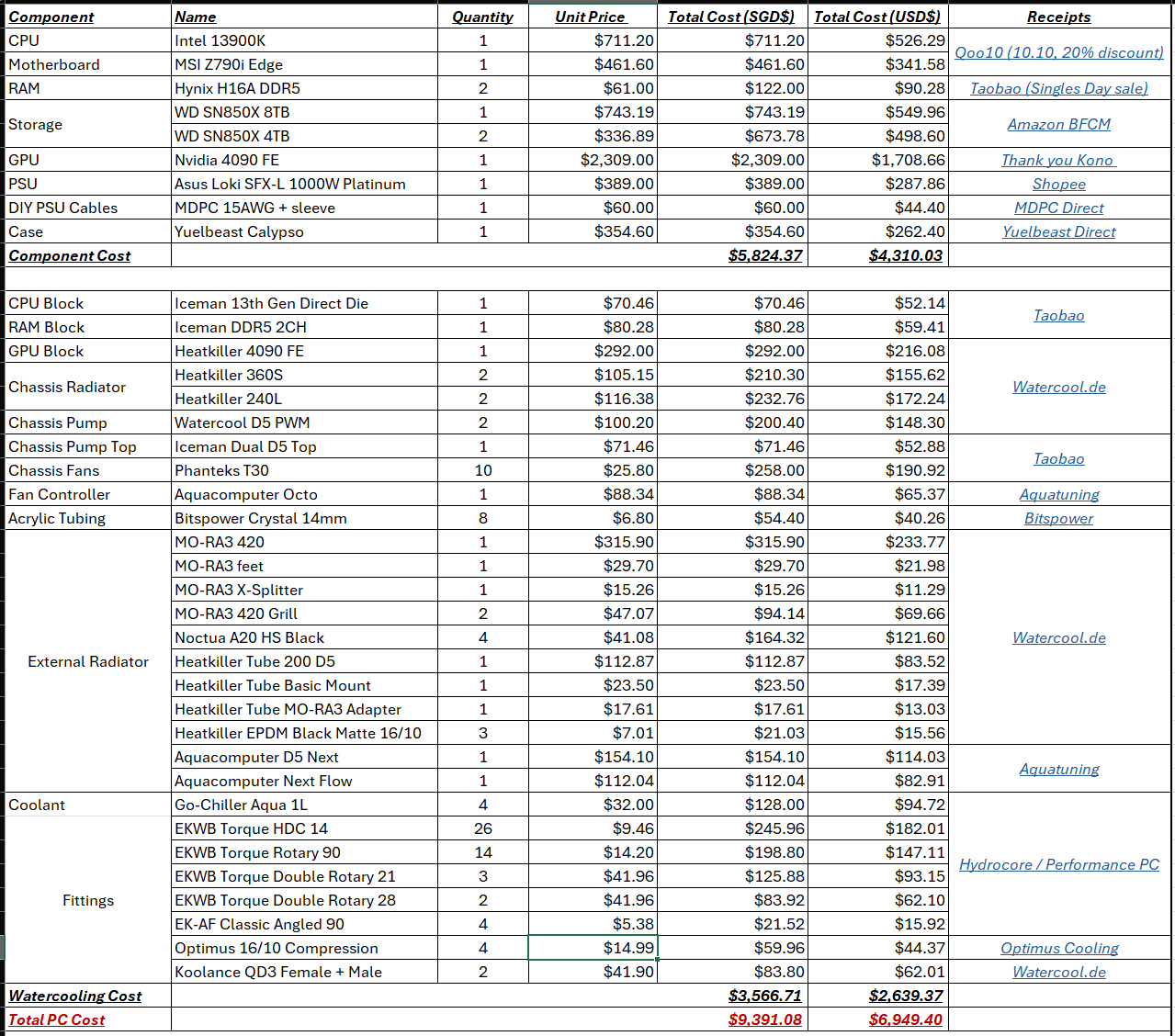
For me personally since 4700k / 980ti days I have been watercooling each rig of mine; and the costs do add up eventually. Here's the cost breakdown of my current rig. Note that some entries do not account for GST/shipping.

image.png
 

fkchon

Senior Member
Joined
Oct 9, 2022
Messages
933
Reaction score
466
What is this USB-C-C cable you speak of? I would like to have the mora running independent of my PC but thats the Active controller which isn't available yet, so I need the passive one that connects to motherboard headers.

Are the tube fittings the correct ones, last time I did watercooling was Intel Core i9 7900X and had a friend select the tubing/fitting for me.

I did see Alphacool offer 5080 waterblock for Zotac cards but it seems it voids the warranty and I'm definitely not keeping the card when next gen releases.
 
Important Forum Advisory Note
This forum is moderated by volunteer moderators who will react only to members' feedback on posts. Moderators are not employees or representatives of HWZ Forums. Forum members and moderators are responsible for their own posts. Please refer to our Community Guidelines and Standards and Terms and Conditions for more information.
Top