Let's DELL

Status
Not open for further replies.

jarred1223

Arch-Supremacy Member
Joined
Jun 16, 2007
Messages
18,631
Reaction score
2
But this Graphics Amplifier is already the most universal and effective box to bring desktop class gaming performance. Loser can't be chooser. And such solution is also definitely cheaper than having a gaming laptop + gaming desktop which will bill you another $1500, complete with monitor, peripherals. With the Alienware laptop + Graphics Amplifier, you also maximises utility of all the parts you pay for. Whereas with a gaming laptop and a separate desktop solution, you pay more for a whole lot of PC parts and peripherals duplicates that you can only concentrate on one set of system at a time, reducing utility by half. So at the end of the day, you still benefit more with the Alienware solution, both in utility and money...

never thought I'd see the day someone defending a gaming laptop so much over a DIY desktop :s22:

if I want a gaming laptop and a gaming desktop, I rather just get DIY desktop + Aftershock laptop.

only those who have limited space, can't have a gaming desktop then they will get a gaming laptop. especially Alienware 17 which is often called a desktop replacement. at most buy a cheap 24" monitor to connect while at home so don't have to suffer gaming on 17".
 
Last edited:

xtramadness

High Supremacy Member
Joined
Mar 4, 2009
Messages
41,675
Reaction score
15
Yes only gaming requires such a powerful GPU in the Inspirion 15 7000.
Can consider those laptops with Integrated Intel® HD Graphics 5500 if using for other purposes.

Nothing is TOO powerful! :)

Wah the Alienware 15 is much more expensive than the Inspirion 15 7000. Is it also slim and stylish like the Inspirion 15 7000 ?

Of Course la... The Dell Alienware is a premium brand. If Alienware 15 is not as good/expensive... then not really premium eh
 

xtramadness

High Supremacy Member
Joined
Mar 4, 2009
Messages
41,675
Reaction score
15
Dell Alienware M18 R3 has an 18 inch screen? Wow never seen a laptop with such a large screen before. It must be really heavy, since the M17 is already above 3kg.

Actually... we got 2KG, 3KG, 4KG bla bla... What is your threshold of weight for a laptop?

Dell Alienware M18 R3 if more than 3KG I am not surprised.
 

xtramadness

High Supremacy Member
Joined
Mar 4, 2009
Messages
41,675
Reaction score
15
Wow the Alienware 17 R3 must be very expensive.
It seems better to get a desktop for gaming. Doesn't Dell have a desktop for gaming?

So what is the price of Dell Alienware 17 R3 ?

Not always... Laptop easier to bring to friend's place than desktop still :)
 

koreanlover

Arch-Supremacy Member
Joined
Aug 6, 2004
Messages
17,141
Reaction score
4,084
With the Alienware Graphics Amplifier proven its capability, i feel that it is best paired with a rather lower end, smaller sized Alienware 13 (not R2). Alienware 13 (not R2) is not only small and thin enough (slightly over 1 inch), it is also sufficiently light at just slightly over 2kg, for a gaming grade 13.3" notebook, to be the most portable Alienware notebooks around. Alienware 13 + GTX 980 Ti will also be much cheaper than Alienware 17 R3 + GTX 980 Ti.

More importantly, it is also the only series to comes with lowest end GTX 960M graphics card in the entire Alienware lineup. It may sound ironic to go for lower end graphics instead of higher one but it certainly is most logical to use it with the Graphics Amplifier to see the greatest graphics performance boost over the lowest end internal discrete graphics card inside the notebook, reaping best gains. On the other hand, pairing highest-end Alienware 17 R3 with GTX 980M with the amplifier will not see any much performance boost since GTX 980M is already very powerful. Let say, you add a desktop discrete GTX 980, boost will be just a small step.

Hence, Alienware 13, together with the Graphics Amplifier, will bring out the best meaning and benefits for having a laptop that you can bring around easily and also fully maximises the main purpose of this Graphics Amplifier: To provide you the maximum graphics performance upgrade from laptop's internal discrete graphics to the best desktop class level gaming performance you can have. And lastly, it is also the cheapest solution you should consider to get the best of both worlds. Downside is probability absence of 4K screen variety on these 13 inch models. :vijayadmin:

Yes Alienware 13 is good for pairing with the Graphics Amplifier.
Alienware 13 is light enough to carry it around for other tasks, and you can connect it to the Graphics Amplifier when you need to do some serious gaming. However, the screen is only 13", not shiok enough for gaming.
 

xtramadness

High Supremacy Member
Joined
Mar 4, 2009
Messages
41,675
Reaction score
15
Gaming laptops in Singapore are limited to alienware, msi, gigabyte, Razer and Aftershock.

Among them, I feel safest with Dell because of the excellent pro support. And that is important because gaming laptop generate lots of heat and power going through the circuit. You can feel confidence Dell will come down and replace any spoilt parts the next day instead of having to deal with service center in some ulu parts of Singapore and there is good chance parts are not available and takes weeks of waiting.

Alienware 17 are right up there with the rest. The quality of the enclosure is very solid if you go down and touch the real thing. Alienware also has toned down the over aggressive gaming design for a more subtle look.

I would definitely put alienware 15 and 17 as a desktop gaming replacement if I am looking out for one!

Dont have Asus meh? Get the Dell Alienware 15 or 17 or M18 R3 if you like to crash over at friend's place or school to play games.
 

xtramadness

High Supremacy Member
Joined
Mar 4, 2009
Messages
41,675
Reaction score
15
If I am not wrong I got read review of the graphics amplifier and works up to pcie 8x because it connects through intel thunderbolt and there is limited bandwidth.

I think it is a great idea but the execution is not as stellar. First the price is too high for a psu, 120mm fan, limited gpu size compatible, and the casing is just hollow plastic. Ideally it is made for connecting to their 13" laptop, but the small laptop uses Intel -U low power dual core CPU, so pairing with 980 or 980ti gets bottleneck.

I hope alienware make future version as ones for more mainstream audience. The price needs to come down. As again the idea is smart and shows the alienware team focus on new gaming ideas. The success depends on how they approach future revision. With laptops grow in popularity, this is a useful add-on. And further down the road, they can make one compatible with Windows tablet!

The intel thunderbolt that the Alienware M18 R3 or Alienware 17 connects to... What is the bandwidth? fibre cable connection?
 

xtramadness

High Supremacy Member
Joined
Mar 4, 2009
Messages
41,675
Reaction score
15
Dell Alienware 17 R3 is definitely a gaming laptop. there is also Alienware Graphics Amplifier and Creative Sound Core3D-EX. i would say this is one of the best laptop for gaming. you can even insert a desktop graphic card say GTX Titan X.

Alienware M18 R3 or Alienware 17 uses, is that Creative from Singapore
 

koreanlover

Arch-Supremacy Member
Joined
Aug 6, 2004
Messages
17,141
Reaction score
4,084
Bear in mind that though this external Alienware Graphics Amplifier is a plug-and-play solution but it doesn't work exactly like Nvidia Optimus/AMD Dynamic Switchable Graphics such that you can toggle between internal discrete and external graphics both ways while laptop is operating.

If you got to leave the place with your Alienware notebook, you need to shut down the entire laptop first and then to plug out the amplifier cable (or vice versa also possible) and then turn it on to switch it back to internal discrete graphics. Laptop will automatic goes into shutdown once you plug out the amplifier cable while the laptop is still turned on. In this mode, sleep function will also be disabled, leaving only shutdown option available.

This can potentially cause data loss issue to many as people may accidentally forgot to save their work on the notebook right before plugging out the amplifier cable, thinking that it is a 2-way plug-and-play dock as it seem to be one since you can plug in to operate while laptop is already on.

It should be ok for users who having been using the Alienware notebook together with the Graphics Amplifier for some time, as they should be used to it.
However, it would be better if Dell can introduce the switchable feature in future versions.
 

what88

Supremacy Member
Joined
Aug 11, 2007
Messages
6,557
Reaction score
17
Dell Alienware is a portable high performance gaming laptop without sacrifice the dimension .

However, the weight of Alienware 15 R2 is 3.2KG is much more heavier than Dell Inspiron 15 7000, not as easy as just slot into backpack.

But again Dell Alienware does not have Intel Realsense Camera or 4K UHD touchscreen, a disappointment when other Dell laptops having better specs at cheaper pricing.


Link: http://www.dell.com/sg/p/alienware-15-r2/pd?ref=PD_OC

wvgy3AI.jpg


This Alienware 15" or 17" is more for gaming purpose and meant to be used as desktop replacement. Look at its weight, portability will be a issue and definitely not a machine you would want to lug around.
 

what88

Supremacy Member
Joined
Aug 11, 2007
Messages
6,557
Reaction score
17
With the Alienware Graphics Amplifier proven its capability, i feel that it is best paired with a rather lower end, smaller sized Alienware 13 (not R2). Alienware 13 (not R2) is not only small and thin enough (slightly over 1 inch), it is also sufficiently light at just slightly over 2kg, for a gaming grade 13.3" notebook, to be the most portable Alienware notebooks around. Alienware 13 + GTX 980 Ti will also be much cheaper than Alienware 17 R3 + GTX 980 Ti.

More importantly, it is also the only series to comes with lowest end GTX 960M graphics card in the entire Alienware lineup. It may sound ironic to go for lower end graphics instead of higher one but it certainly is most logical to use it with the Graphics Amplifier to see the greatest graphics performance boost over the lowest end internal discrete graphics card inside the notebook, reaping best gains. On the other hand, pairing highest-end Alienware 17 R3 with GTX 980M with the amplifier will not see any much performance boost since GTX 980M is already very powerful. Let say, you add a desktop discrete GTX 980, boost will be just a small step.

Hence, Alienware 13, together with the Graphics Amplifier, will bring out the best meaning and benefits for having a laptop that you can bring around easily and also fully maximises the main purpose of this Graphics Amplifier: To provide you the maximum graphics performance upgrade from laptop's internal discrete graphics to the best desktop class level gaming performance you can have. And lastly, it is also the cheapest solution you should consider to get the best of both worlds. Downside is probability absence of 4K screen variety on these 13 inch models. :vijayadmin:


13" screen seem likes too small for gaming, bigger screen tend to give better gaming experience, the bigger the merrier. Ideally Alienware 17 R3 will be a good choice,.
 

kimsix

Arch-Supremacy Member
Joined
Jan 6, 2009
Messages
19,946
Reaction score
9,922
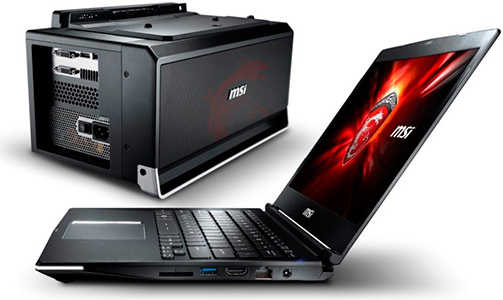
Not sure if you are referring to MSI GS30 notebook with its separate GamingDock external graphics box:

msi_notebook_external_gpu.jpg


MSI's solution is a whole lot more troublesome and restrictive, as you can only use it with their sole GS30 notebook model and when you want to use the external graphics, you also die die have to connect it to an external display, which kind of defeats the purpose since it will effectively render the notebook to a barebone system. Unless you don't mind typing on the notebook keyboard while viewing another screen... :s22:

Nope not really. But i remember details wrongly for Dell Alienware graphics amplifier since the last time i read up about it. So it use 4x pcie 3.0 and a 92mm fan and the connector is not thunderbolt based. It is better than MSI on flexibility you are right. The experience behind Alienware team showing their design advantage over MSI.
 

koreanlover

Arch-Supremacy Member
Joined
Aug 6, 2004
Messages
17,141
Reaction score
4,084
I would go for laptop as Alienware R3 laptop seems nice. Alienware R3 laptop is i7 has 17.3 inch UHD IGZO IPS Anti-Glare 400-nits display screen and best of all GTX 980M.
Also it comes with Creative Sound Core3D-EX Audio with Creative Soundblaster Pro Studio Software. There is Alienware Graphics Amplifier which is very suitable for gaming as it pushes the frame rates up.
The performance is much better than Dell Inspiron 15 7000 gaming laptop and perfect for gaming.

Think whether gaming is better on desktop or laptop depends on whether you want to bring out your laptop to play games with your friends or do you mainly play games at home.

If you play mainly at home, you can get the Alienware desktops (X51 and Area-51)

The Area-51 Alienware desktops delivers performance which is unmatched by an Alienware laptop with Graphics Amplifier.
You can customised up to Triple Nvidia Geforce GTX 980 Ti running in SLI (Triple Geforce GTX Titan X is supposed to be supported, not sure why it is not in the list).
And of course, you can use a much bigger monitor than the ones on the Alienware laptops.

SnR1x3S.png


Area51
 

koreanlover

Arch-Supremacy Member
Joined
Aug 6, 2004
Messages
17,141
Reaction score
4,084
I suppose it also comes with discrete graphics card in removable MXM module? Can't see from this pic...

Best would be to downgrade the card to lowest MXM card possible and get the separate Graphics Amplifier for lowest heat/noise output from the laptop while getting the best performance from external graphics with more cooling.

Yes it seems the Dell Alienware 17 comes with a MXM slot for upgrading GPU, but would it void the warranty if you DIY the upgrade?
Or must you let Dell do the upgrade for you?
 

kimsix

Arch-Supremacy Member
Joined
Jan 6, 2009
Messages
19,946
Reaction score
9,922
Might as well get a desktop then, since the Alienware 17 R3 is too heavy to be carried around constantly.

Yes the Alienware 17 R3 is very heavy by laptop standards but it is still portable. You have the freedom to play on your bed, on your desk, connect to your large screen TV, bring it along when visiting relatives. You can game anywhere with the GTX980M, it has enough power to play all console games port till next PS5 come out!

I think that is what the new video is trying to show. A desktop has all the power and value, but it gets stuck in place. In fairness, one can build a very powerful mitx desktop now but the casing is still not as portable and a closed Alienware 17 R3.
 

koreanlover

Arch-Supremacy Member
Joined
Aug 6, 2004
Messages
17,141
Reaction score
4,084
Gaming laptops in Singapore are limited to alienware, msi, gigabyte, Razer and Aftershock.

Among them, I feel safest with Dell because of the excellent pro support. And that is important because gaming laptop generate lots of heat and power going through the circuit. You can feel confidence Dell will come down and replace any spoilt parts the next day instead of having to deal with service center in some ulu parts of Singapore and there is good chance parts are not available and takes weeks of waiting.

Alienware 17 are right up there with the rest. The quality of the enclosure is very solid if you go down and touch the real thing. Alienware also has toned down the over aggressive gaming design for a more subtle look.

I would definitely put alienware 15 and 17 as a desktop gaming replacement if I am looking out for one!

Dell Alienware 15 and 17 laptops provide good gaming performance and has excellent Pro support, but their price is expensive for most people like me. :(
 

kimsix

Arch-Supremacy Member
Joined
Jan 6, 2009
Messages
19,946
Reaction score
9,922
I think the following is my preferred build of Alienware gaming laptop.
I will get the 15", upgrade to GTX980M and max out the pro-support to 4 years.
For pro-support on Alienware, the 4th year is cheaper than Dell other laptops. I see it as a sign Dell has confidence in the Alienware design to last the distance.

Module Description Show Details
Base Alienware 15
Operating System Windows 10 Home 64bit English
Memory 16GB Dual Channel DDR4 2133MHz (8GBx2)
Keyboard English Keyboard
Video Card NVIDIA® GeForce® GTX 980M with 4GB GDDR5
Wireless Driver/Label Killer N1535 Wireless Driver
Hard Drive 256GB PCIe SSD (Boot) + 1TB 7200RPM SATA 6Gb/s (Storage)
Wireless Killer 1535 802.11ac 2x2 WiFi and Bluetooth 4.1
Power Options Power Cord (UK)
Documentation/Disks Document for MUI (English,Simplified Chinese,Japanese,Traditional Chinese,Korean)
Bundle W510814SGW10 - Alienware 15 R2
Dell Services: Hardware Support 4Yr ProSupport: Next Business Day Onsite Service
Systems Management Intel Driver
Placemat Welcome Letter - English
Dell Services: Remarks Dell's Terms and Conditions apply
Dell Services: Remarks Laptop Batteries Carry 1 Year Warranty Only From Invoice Date
Dell Services: Remarks Great Technical Tips & Information available 24x7 at http://support.ap.dell.com
Primary Battery 8 Cell 92W Hour Battery
Processor 6th Generation Intel® Core™ i7-6700HQ (Quad-Core, 6MB Cache, up to 3.5GHz w/ Turbo Boost)
Dell Services: Tech Sheet Included NONE
Packaging Shipping Material
FGA Module No FGA
Additional Settings Dropbox software
Label None
Dell Services: Item Included Technical Support
Retail Information None
Retail Tech Sheets None
Processor Label Intel® Core™ i7 Label
LCD 15.6 inch FHD (1920 x 1080) IPS Anti-Glare 220-nits Display
Freights FGA NB-OS-BTO Freight Charges(Singapore)
Microsoft Application Software Microsoft® Office trial
Additional Software Additional Software
Security Software McAfee Live Safe 12 month Subscription
AC Adapter Alienware 240W AC Adapter
Microsoft Operating System Media OS Media Kit Not Included
 

kimsix

Arch-Supremacy Member
Joined
Jan 6, 2009
Messages
19,946
Reaction score
9,922
I see Dell Alienware laptops are powered by Killer network solutions. Fret not if it is not an Intel we are used to see.

Killer actually do make good their network hardware and software suite

I read 2 reviews where the reviewers are happy with Killer performance and software QoS for gaming. I think the naming give the impression it is all gamey flash and not real in performance. But the tests showed otherwise positively.
http://www.pcper.com/reviews/Networking/Killer-Wireless-AC-1535-Review-MU-MIMO-Era-Begins

http://techreport.com/review/29144/revisiting-the-killer-nic-eight-years-on/4
 
Status
Not open for further replies.
Important Forum Advisory Note
This forum is moderated by volunteer moderators who will react only to members' feedback on posts. Moderators are not employees or representatives of HWZ Forums. Forum members and moderators are responsible for their own posts. Please refer to our Community Guidelines and Standards and Terms and Conditions for more information.
Top