Let's DELL

Status
Not open for further replies.

kimsix

Arch-Supremacy Member
Joined
Jan 6, 2009
Messages
19,950
Reaction score
9,925
This is a very good and detailed review of Alienware 15

Mentioned
very good UHD screen with 99% argb coverage and very good 1100:1 contrast!
Very good cooling and silent fans!
Super stiff screen hinge.
Very good keyboard travel, more like your desktop keyboard than a usual laptop keys.
Prices of Alienware are closer to ROG, MSI, Razer laptops than ever before now.
All in, you pay for what you get in high quality build and durability.


kimsix

Arch-Supremacy Member
Joined
Jan 6, 2009
Messages
19,950
Reaction score
9,925
I just played with the realsense app kagura which is installed in the Dell 24 7000 insprion. It is some musical apps which you can play various types of instruments, controlling with your finger as you wave without touching the screen. There is one sample which have 8 bit instruments. I find the apps extremely snappy in registering my fingers. The video capture me and the frames per second is also very fast.

Only thing is the apps is not highlighted at all! After I launched and play it, and left, the litle girl besides me immediately went to try her turn and it looks she was captived by it. Young children are used to touch screen, but motion sensing is something new for them
 

Ohayo!

Great Supremacy Member
Joined
Mar 10, 2011
Messages
55,368
Reaction score
3,761
All of them we can do ourselves, but seriously software?? I hate bloatware. Maybe they should put unique things inside like fibre optics... Like I suggested for the Dell Alienware 17 R3 earlier... Dunno why today keep thinking of fibre... :s22:


Doesnt come free but the darn trial comes with it :mad:

:s13:

Microsoft and Google very kind to student. Both give free cloud storage which nobody uses :s22: (Onedrive 1tb, Google for Education)
 

MoneyFace =p

High Supremacy Member
Joined
Dec 17, 2010
Messages
35,374
Reaction score
401
Users can't change the parts in the laptop so the Graphics Amplifier is made for this purpose.

Users can change the parts inside. Just that it is gonna be super tedious and pointless when the graphics upgrade options are so limited compared to having a desktop discrete graphics. Hence, Alienware Graphics Amplifier is here to save them for this very purpose! :s12:
 

Ohayo!

Great Supremacy Member
Joined
Mar 10, 2011
Messages
55,368
Reaction score
3,761
It should not void warranty i believe if you do discreetly and do not flash with unsupported bios. I also think Alienware will have built in limiter and restricters to prevent users to overvolt and kill the hardware.

Talking about overclocking, it should be something for the likes of gaming grade hardware like Alienware laptops.

The 970M graphics is a good overclocker according to feedback on the interwebs, where it can reach as good as a 980M after you play overclocks. With Alienware superior cooling system, i like to see how much it can overclock.

Just enable Turbo Boost (if it has not already been enabled by default) in the BIOS would probably be the safest. It will run when you set your PC power options to "High Performance". I wouldn't recommend newbies who don't have any knowledge and experience to use Intel XTU to overclock their hardware in the Alienware laptop.

Intel XTU is quite complicated and has a lot of options and may confuse newbies. Better to stick to the overclocking tools which many manufacturer provides like those 1-click tool. Can gain a bit of extra performance also good.
 

Ohayo!

Great Supremacy Member
Joined
Mar 10, 2011
Messages
55,368
Reaction score
3,761
y Alienware laptop notch insai ?

because Alienware uses GTX980M

These laptops are using GTX980 which provide desktop gaming performance.

Alienware has the separate Alienware graphics amplifier which you can add your own GTX 980 graphic card to enjoy powerful graphic performance at home.
 

MoneyFace =p

High Supremacy Member
Joined
Dec 17, 2010
Messages
35,374
Reaction score
401
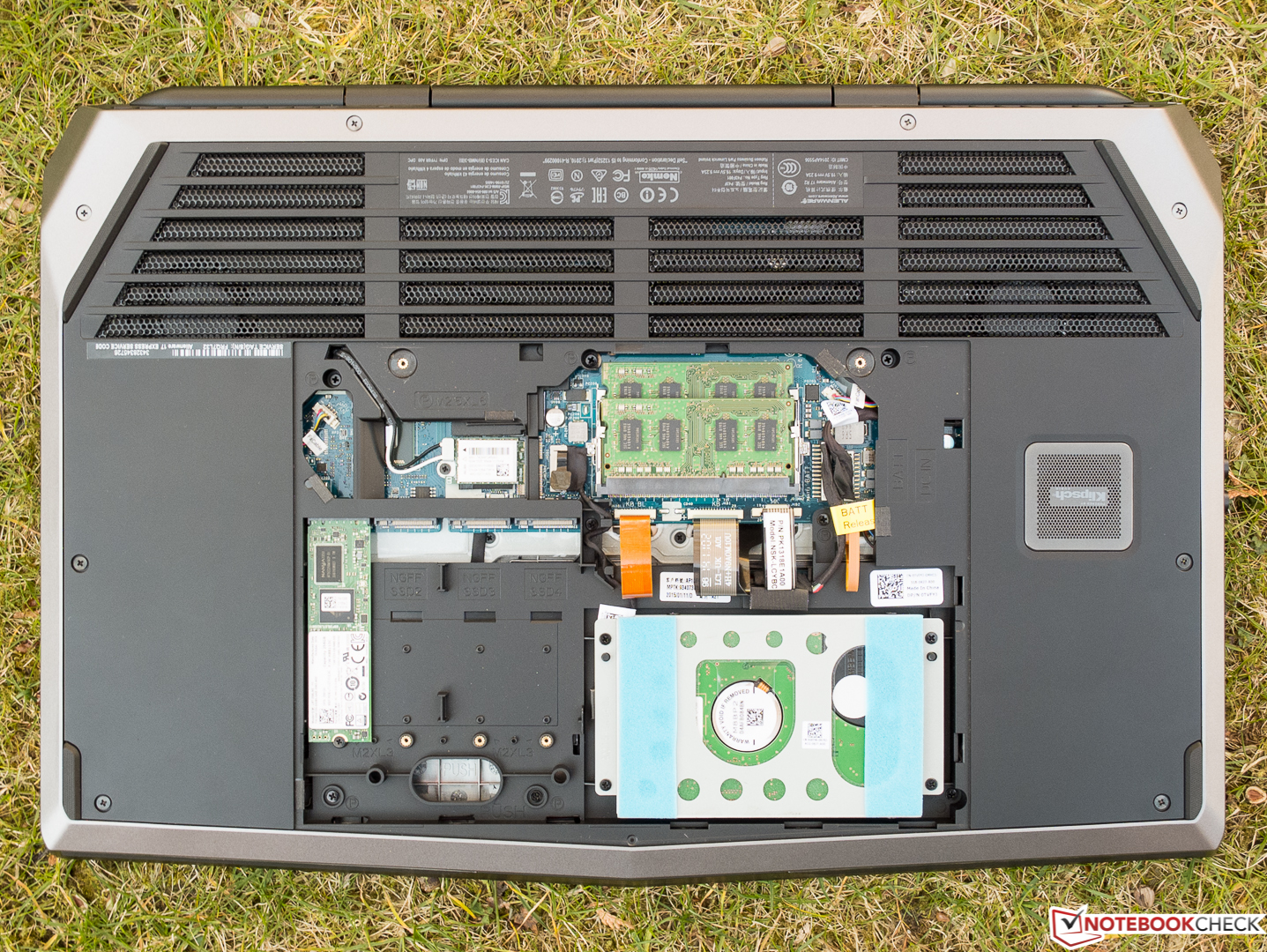
Alienware_17_R2_19_von_22.jpg


A picture of the exposed 4 m2 expansion bays, the easily accessible back panel where you upgrade the ram and 2.5" harddisk. You can safely do without voiding the warranty. Alienware 17 R3 can be self diy to be as powerful storage as desktop PC

Having 2 M.2 slots is already very well sufficient for everyone. I feel that they could have further optimise the internal layout better to pack slightly bigger battery to improve the meagre battery life or for heatsink to cool system better on the 2 x M.2 worth of space as it seemed more like a slab of wasted space there. Who seriously will uses that many M.2 SSDs there?
 

Ohayo!

Great Supremacy Member
Joined
Mar 10, 2011
Messages
55,368
Reaction score
3,761
I like to see Alienware do a take on slim gaming laptop at 15.6". They are gaining popularity and the other brands have this line of laptops, but the limiting factor of the small casing limits heat dissipation and causes throttling, those with slim laptops have GPU/CPU running 80-90 degrees.

I believe the problem can be solved with more investment in this category. It can be a rebirth of liquid cooling in a laptop because of higher efficiency of water, smaller heatsinks are used.

Dell already have the XPS15 and Precision 15 5000 of slim powerful workstation class, a tweak here and there with cooling and a slightly thicker bottom can work.

The specs of such a laptop should be gaming grade , so a quad core i5 6300HQ configured down to 35W, 2x8GB of DDR4 ram as it is more efficient than DDR3 and GTX 970M, 256-1000GB of m2 SSD, and must include the graphics amplifier connector.

True. If only its lighter and can still bring high graphics performance would be the best. Liquid cooling is a good option but it will surely be very expensive to implement.
 

MoneyFace =p

High Supremacy Member
Joined
Dec 17, 2010
Messages
35,374
Reaction score
401
i would prefer Alienware to come out with a laptop with very good cooling system becos the heat generated from the graphics card as well as processor would be alot. long term use would degrade the lifespan of the laptop. also if they can reduce the weight would be even better.

It is always a trilemma to choose between better cooling system, better performance, or smaller/lighter weight and size, either 2. All 3 can only be possible achieved if Intel/AMD/Nvidia release an super imba energy efficient CPU and GPU microarchitecture chip and when laptop makers found their secret sauce to best cooling/size ratio. Without the former delivering such progress, it will always be a distant dream for such ideal laptop. :(
 

Ohayo!

Great Supremacy Member
Joined
Mar 10, 2011
Messages
55,368
Reaction score
3,761
Every PC manufacturer will have some sort of 'Gaming' system, be it desktop or laptop. However the components they include in their 'Gaming' system are usually terrible or not bang for buck.

Before Dell aquire Alienware, Dell themselves also offer poor 'Gaming' systems.. much like Acer/HP/Lenovo/etc.

Just google <brand name> gaming desktop and take a look at their specs and the amount of money it cost. As long as the consumers learn how to DIY their own PC, these branded desktop systems will never get the gamers $$$.

Gaming PCs are very expensive. If everyone learn how to DIY to build their own PCs then they have nothing to earn. Of course gaming graphic performance laptops like the Alienware 15 are not possible to DIY so thats why they are able to charge a premium for it.
 

kimsix

Arch-Supremacy Member
Joined
Jan 6, 2009
Messages
19,950
Reaction score
9,925
Having 2 M.2 slots is already very well sufficient for everyone. I feel that they could have further optimise the internal layout better to pack slightly bigger battery to improve the meagre battery life or for heatsink to cool system better on the 2 x M.2 worth of space as it seemed more like a slab of wasted space there. Who seriously will uses that many M.2 SSDs there?

My guess a bigger battery adds more weight and do we have some w/hr safety or production limits? In the earlier review video, the alienware 15 with haswell is quite good battery life for gaming grade laptop. With gen 6 cpu, ddr4 and pch, I figure we can get another 30mins more with the same battery?
 

Ohayo!

Great Supremacy Member
Joined
Mar 10, 2011
Messages
55,368
Reaction score
3,761
Yes i also prefer a good cooling for gaming grade laptops.

Alienware cooling design is very good and one secret is to have higher rubber feets to prop up the laptop to allow air flow
DbAb.jpg


Thermal image of Alienware with gaming grade parts against a lower powered macbook pro and alienware is cooler!
EbAb.png

:eek:

Didnt know Macbook run so hot. I thought its very cool all the time leh.
 

MoneyFace =p

High Supremacy Member
Joined
Dec 17, 2010
Messages
35,374
Reaction score
401
True. If only its lighter and can still bring high graphics performance would be the best. Liquid cooling is a good option but it will surely be very expensive to implement.

I certainly won't want liquid cooling to implement inside the laptop chassis due to risk of water leaking and its domino effect of impacting nearby components in such a closely packed environment. And once the pump motor inside fails, the laptop will render useless since the cooling system no longer operates to cool the system.

It will be a big headache for users to run back and forth RMA service and a nightmare to them once it is out of warranty. Having a hybrid traditional air cooling + external water cooling kit as innovated by ASUS is a very great solution that mitigate the problem. hough the kit is a very bulky unit. Hopefully they can slim it down much more with future revisions.
 

MoneyFace =p

High Supremacy Member
Joined
Dec 17, 2010
Messages
35,374
Reaction score
401
:eek:

Didnt know Macbook run so hot. I thought its very cool all the time leh.
And so the moment of truth unveiled... The fact that they select aluminium as their main choice of chassis material did fool buyers into believing about their 'better' heat dissipation as opposed to competing PC laptops. I nearly had been fooled too as i once had that idea to get a MBP, due to its material use and the quality assurance Apple promises with many of their other product lines. However, as I went to some Apple booth to play around one unit of MBP, i noticed it is rather heavy and also observe the very hot base around that very same infrared scanned area. Hence, i eventually puts off the idea and went with an Acer laptop (this Acer laptop came free with my home M1 broadband)... So that infrared image double confirms my view about MBPs....
 

MoneyFace =p

High Supremacy Member
Joined
Dec 17, 2010
Messages
35,374
Reaction score
401
I just played with the realsense app kagura which is installed in the Dell 24 7000 insprion. It is some musical apps which you can play various types of instruments, controlling with your finger as you wave without touching the screen. There is one sample which have 8 bit instruments. I find the apps extremely snappy in registering my fingers. The video capture me and the frames per second is also very fast.

Only thing is the apps is not highlighted at all! After I launched and play it, and left, the litle girl besides me immediately went to try her turn and it looks she was captived by it. Young children are used to touch screen, but motion sensing is something new for them
2000s: Buttons era
2010s: Touchscreen era
2020s: Touch air era :s13:
 
Status
Not open for further replies.
Important Forum Advisory Note
This forum is moderated by volunteer moderators who will react only to members' feedback on posts. Moderators are not employees or representatives of HWZ Forums. Forum members and moderators are responsible for their own posts. Please refer to our Community Guidelines and Standards and Terms and Conditions for more information.
Top